Points Path works beyond Google Flights: Here's where else you can use it


When Points Path launched its Google Flights browser extension in early 2024, it displayed award rates alongside cash prices for flights sold by select airlines. The original Points Path Google Flights browser extension also showed travelers which transferable points to use to book supported airlines, and recommended when to use rewards versus when to book a paid rate.
Points Path still offers those Google Flights features and has since added more rewards currencies, paid Pro and Alerts tiers and support for special cardholder pricing on select Delta and United award flights. But in April, Points Path expanded beyond Google Flights with two opt-in browser extension features available to free and paid users. Here's what you should know about these new features, including how to set them up.
Calculate Points Boosts on the Chase Travel portal
In 2025, Chase introduced Points Boost to the Chase Travel℠ portal. You'll often only get 1 cent per point when redeeming points through the Chase Travel portal, but Points Boost lets you get up to 2 cents per point (and sometimes even more) when booking select flights and hotels.
It's easy to tell which options in Chase Travel are eligible for Points Boost. But it's less straightforward to determine the redemption rate you'll get. After all, while cardholders of the Chase Sapphire Reserve® (see rates and fees) and Chase Sapphire Reserve for Business℠ (see rates and fees) can get up to 2 cents per point and cardholders of the Chase Sapphire Preferred® Card (see rates and fees) and Ink Business Preferred® Credit Card (see rates and fees) can get up to 1.5 cents per point, not all Points Boost options give you the maximum redemption rate of 1.5 or 2 cents per point.
That's where a new Points Path feature comes in. Once you opt-in, Points Path will show you the value of every Points Boost option for flights and hotels in the Chase Travel portal.
To opt in, open the Points Path account page in the browser where you have Points Path installed and log in to your account. Click the "Additional permissions" tab on the left-hand side of the page and find the option to "Enhance your Chase travel experience."
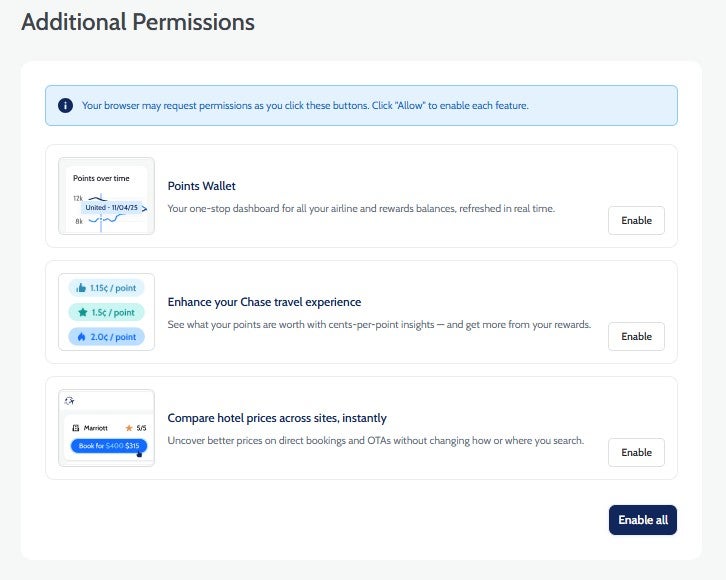
Click the "Enable" button next to it and follow the Chrome or Safari prompts to agree to the new permissions. Note that you will be giving Points Path the ability to "read and change your data on all chase.com sites" by accepting the new permissions in Chrome. If you're uncomfortable granting this level of access, you may decide not to enable the feature.
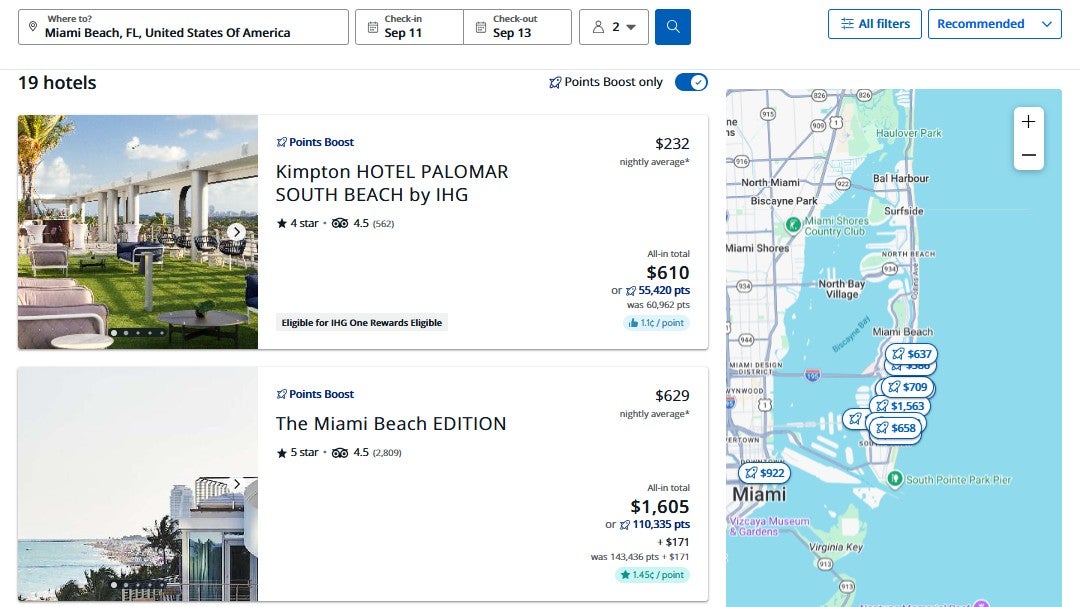
You'll only need to enable the feature and accept the permissions once per device. Once you enable it, you can head over to the Chase Travel portal and search for travel as normal. You'll see the cents-per-point added next to each Points Boost option. For example, here's what it looks like for hotels when I searched on my Chase Sapphire Preferred account.
And here's what it looks like for flights on the same account.

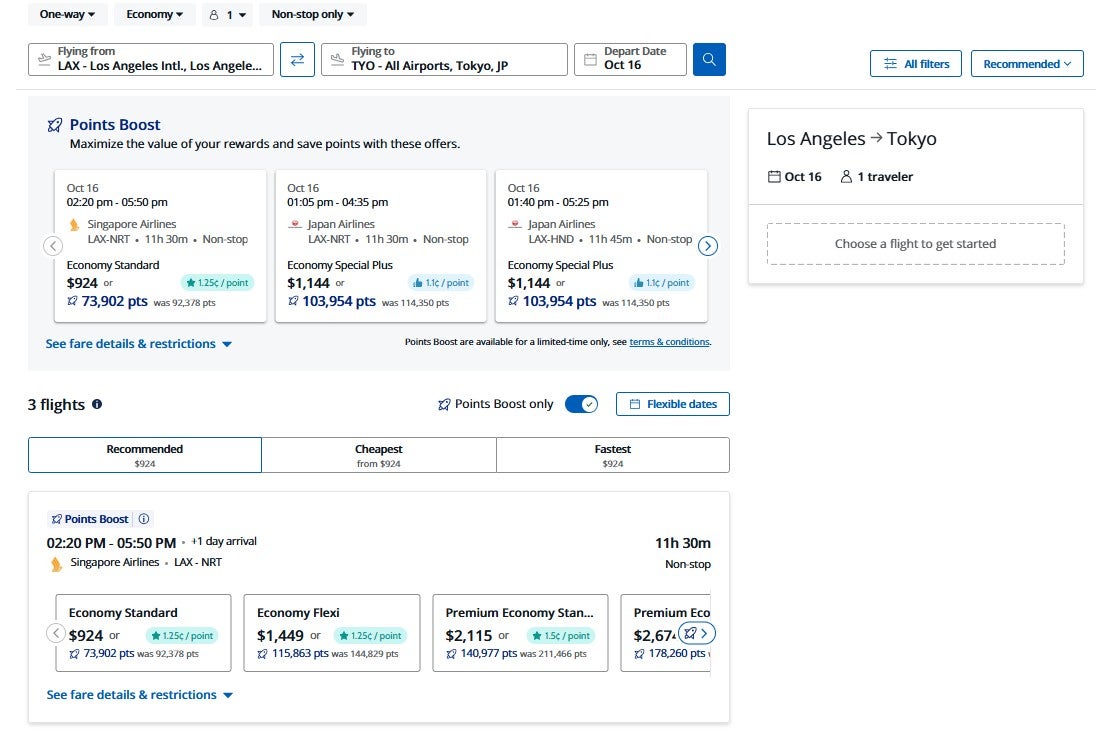
Especially since the redemption rates you can get with Points Boost vary, this is a useful tool if you're considering redeeming Chase Ultimate Rewards points through Chase Travel.
Related: 10 best ways to redeem 150,000 Chase Ultimate Rewards points
Compare hotel prices across multiple sites
Even if you know which hotel you want to book, finding the best price can be difficult. Luckily, another new Points Path feature makes it easier to compare hotel prices across multiple sites.
This feature is available on select hotel booking sites, including Expedia. You'll need to opt in on the Points Path account page (it's just as simple as for the Chase Points Boost feature described above), then head over to Expedia (or your favorite booking site if Points Path supports it). Once there, you'll see the feature adds an overlay that compares results.
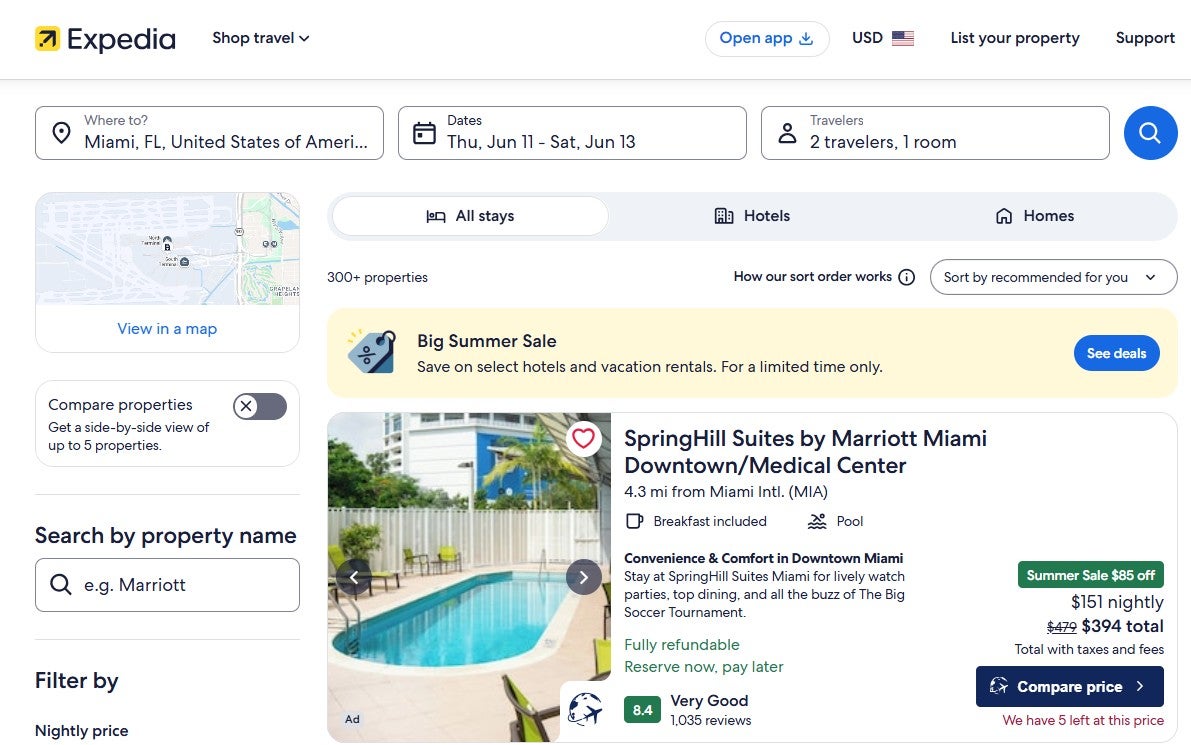
Points Path will add an overlay for each property with the lowest alternative booking option it found. So far, I've seen Points Path add links to the book directly (the ones with the "Compare price" button) through Super.com and Directo.com.
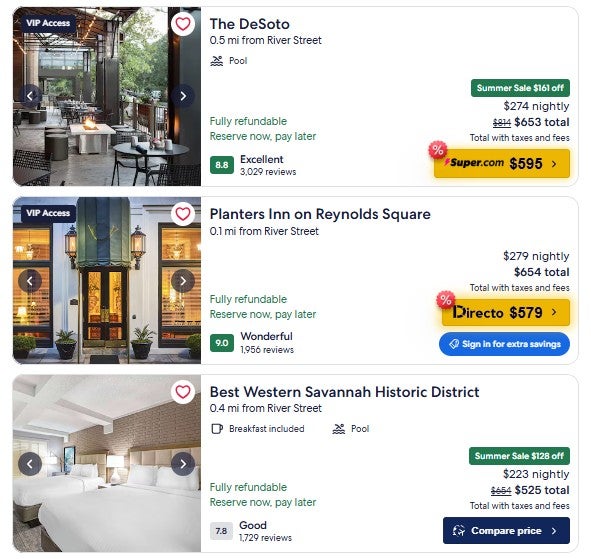
Click the overlay button on a specific result, and you'll head to the site on which you can book the less expensive rate. Of course, a lower third-party rate usually won't be the best option if you're trying to earn hotel points or use elite benefits.
Related: 10 truly special luxury hotels and resorts you can book with points
Bottom line
Points Path is best known for its Google Flights features. But now Points Path also has Chase Travel and hotel price-comparison features that may be helpful.
The Chase Travel feature is especially useful if you're considering redeeming Ultimate Rewards points through Points Boost, since the exact redemption rate varies by booking. Meanwhile, the hotel price comparison feature can help you quickly spot lower rates elsewhere, though you'll still want to consider whether booking directly is better for earning rewards and using elite benefits.
Since both features are available to all Points Path users, including those on the free Standard plan, they're worth enabling if you're comfortable granting the required browser permissions. If you decide to become a Pro member, know that first-time paid subscribers can save 15% off the first year of an annual Points Path Pro membership by visiting pointspath.com/pricing, selecting the annual Pro plan and entering TPG15 as the promotional code on the checkout page.