The Points Guy believes that credit cards can transform lives, helping you leverage everyday spending for cash back or travel experiences that might otherwise be out of reach. That's why we publish a variety of editorial content and card comparisons: to help you find a great card to turn your goals into reality.
Our site may earn compensation when a customer clicks on a link, when an application is approved, or when an account is opened with our partners, and this may impact how or where these products appear. While we don't cover all available credit cards, our editorial team creates and maintains all of the analysis of these cards, and our content is not influenced nor subject to review by any credit card company, bank or partner prior to (or after) publication. Please view our advertising policy and product review methodology for more information.
Advertiser disclosure
The Points Guy believes that credit cards can transform lives, helping you leverage everyday spending for cash back or travel experiences that might otherwise be out of reach. That's why we publish a variety of editorial content and card comparisons: to help you find a great card to turn your goals into reality.
Our site may earn compensation when a customer clicks on a link, when an application is approved, or when an account is opened with our partners, and this may impact how or where these products appear. While we don't cover all available credit cards, our editorial team creates and maintains all of the analysis of these cards, and our content is not influenced nor subject to review by any credit card company, bank or partner prior to (or after) publication. Please view our advertising policy and product review methodology for more information.
Guides
Your guide to the Points Path extension for Google Flights, Chase Travel and more
Katie Genter is a digital nomad who has traveled full time since June 2017. She writes and edits stories about points and miles, and loyalty programs, often letting her personal experiences color these stories.
June 24, 2026 • 9 min read
The cards we feature here are from partners who compensate us when you are approved through our site, and this may impact how or where these products appear. We don't cover all available credit cards, but our analysis, reviews, and opinions are entirely from our editorial team. Terms apply to the offers listed on this page. Please view our advertising policy and product review methodology for more information.
Editorial note: This is a recurring post, regularly updated with new information.
Editorial disclaimer: Opinions expressed here are the author's alone, not those of any bank, credit card issuer, airline or hotel chain, and have not been reviewed, approved or otherwise endorsed by any of these entities.
Comments
By commenting, you agree to our Community Guidelines to help create a positive space for conversation. The responses below are not provided or commissioned by the bank advertiser, our partners, or The Points Guy (“TPG”). They have not been reviewed, approved, or otherwise endorsed by any of these parties. All responses are submitted by individual contributors, and neither the bank advertiser, our partners, nor TPG are responsible for ensuring that all posts and/or questions are answered.
Related stories
TPG featured card
Quick summary
Points Path is a browser extension that displays airline award rates alongside cash fares on Google Flights.
The extension now works on additional websites, allowing users to compare hotel prices across multiple agencies and calculate redemption value for Points Boost bookings.
Users can install Points Path on major browsers and access both free and paid membership tiers.
What to consider
Points Path works best when Google Flights is set to English (United States) and U.S. dollars.
Paid tiers allow tracking of award price drops and access to more loyalty programs and advanced features.
Always verify award pricing, taxes and fees, and transfer requirements with the loyalty program before transferring points.
What you'll miss from the article
Step-by-step instructions for installing and using Points Path, plus detailed feature breakdowns for each supported travel platform.
Generated by AI with support from our editorial team.
In 2024, Points Path launched a Google Flights web browser extension that displays award rates alongside cash fares for flights sold by select airlines. This extension has been extremely useful, especially for travelers just getting started with points and miles.
Recently, Points Path launched two new features: one that calculates Points Boosts on the Chase Travel portal and another that compares hotel prices across multiple sites. So, let's take a closer look at the Points Path extension, including what it is, how to install it and how it can help you.
What is Points Path?
Points Path is a web browser extension that works on Google Flights, Chase Travel, and select online travel agencies.
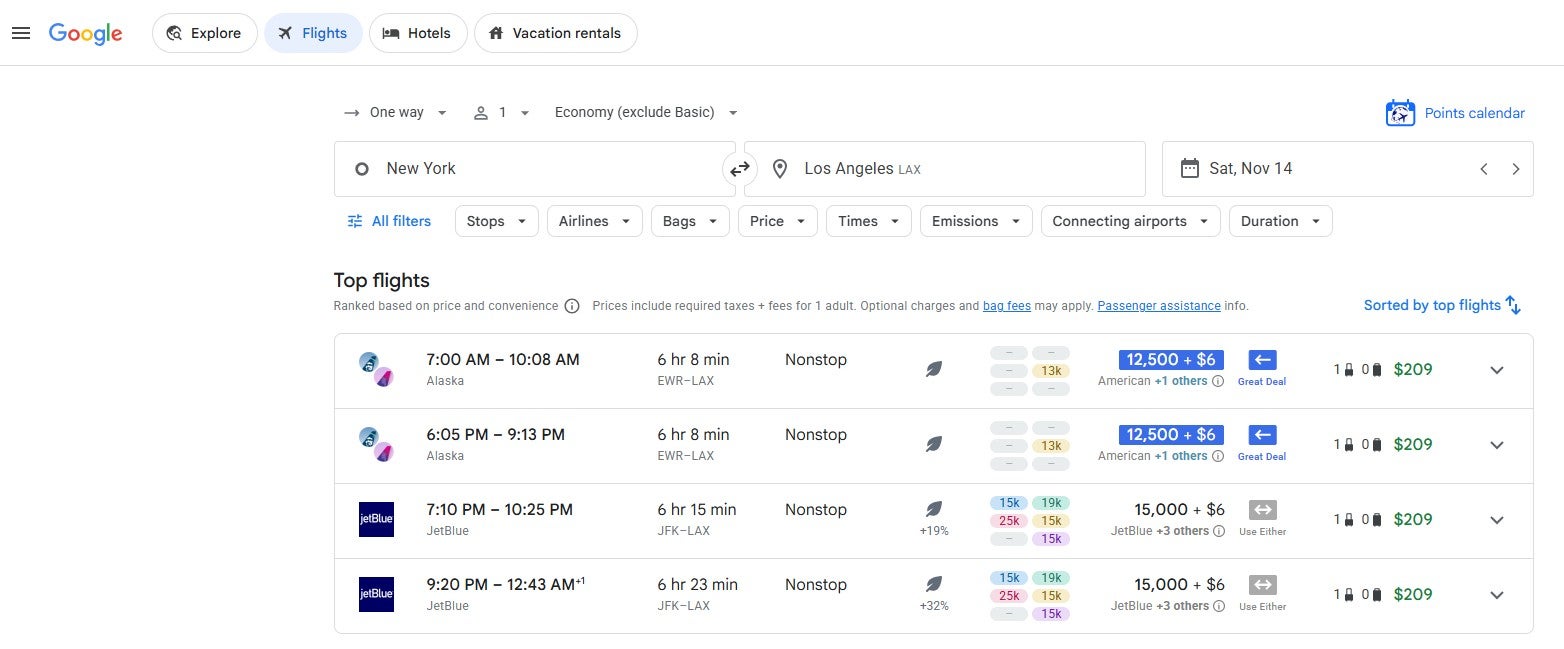
On Google Flights, the Points Path extension shows award rates alongside cash prices and indicates whether it's better to redeem rewards or book at a paid rate for each itinerary. Once you select an itinerary, you can book a paid rate as you typically would with Google Flights or redeem an award directly with the airline loyalty program.
GOOGLE FLIGHTS AND POINTS PATH
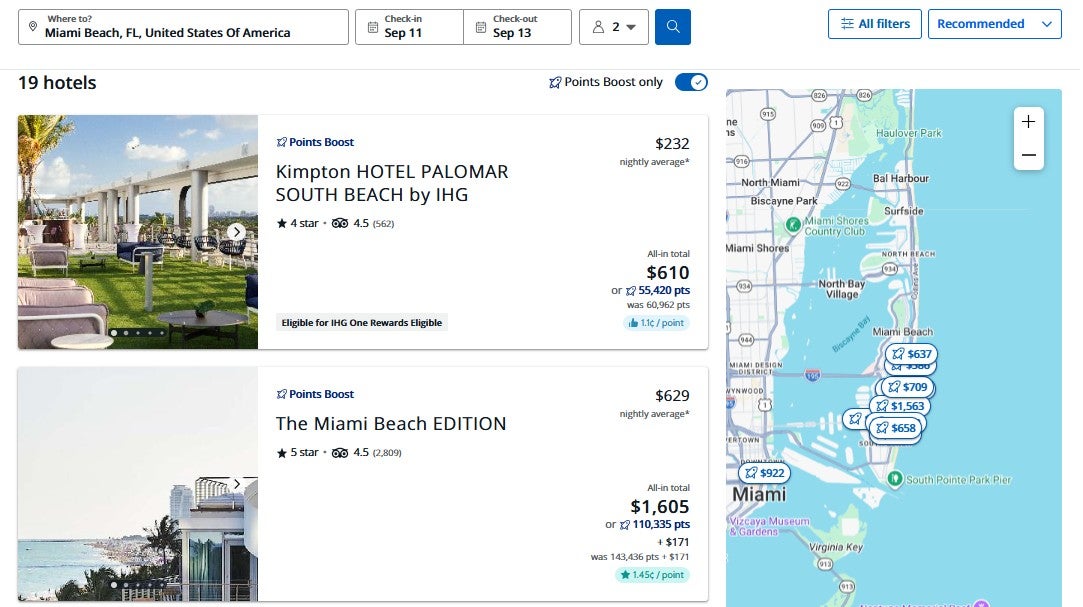
Meanwhile, within the Chase Travel portal, the Points Path extension shows Points Boost redemption rates for flights and hotels. This is particularly important, as redemption rates through Points Boost can vary, with some offering significantly better value than others.
CHASE AND POINTS PATH
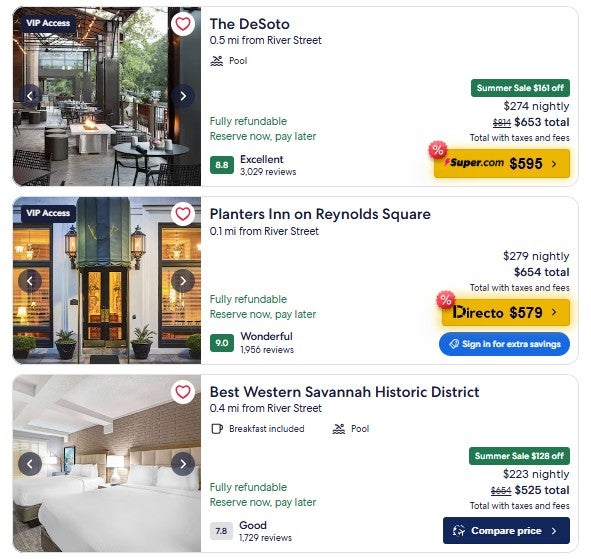
And on select online travel agencies, such as Expedia, the Points Path extension shows when you can book a specific property at a lower rate.
EXPEDIA AND POINTS PATH
How to install the Points Path extension
To install the Points Path extension, you must be a Google Chrome, Apple Safari, Microsoft Edge, Brave or Opera browser user. To get started with Points Path, head to its website and click the blue "Download the free extension" button near the top of the page.
Doing so will take you to the installation page for your browser, which, for me, was the Points Path Chrome Web Store page. I clicked the "Add to Chrome" button on this page to install the Points Path Chrome extension. The installation only took a few seconds, after which I could begin using the Points Path extension.
How much does Points Path cost?
Points Path offers a free standard version and several paid membership tiers. All tiers offer access to the full Chase Points Boost and hotel comparison features; the differences lie in the Google Flights extension. However, some paid tiers also provide new members with longer free trials for Dollar Flight Club Premium+ and HotelSlash.
The standard version of Points Path lets you see award pricing in Google Flights for select domestic airline programs, shows which transfer partners let you access flights booked through these programs and shows recommendations on whether to book using cash or rewards. Specifically, standard Points Path members can see award options in the following programs:
Alaska Atmos Rewards
American AAdvantage
Delta SkyMiles
JetBlue TrueBlue
United MileagePlus
MEDIAPHOTOS/GETTY IMAGES
Points Path also offers two elevated paid membership tiers: Alerts for $34.99 per year and Pro for $79.99 per year (or $7.99 per month). The Alerts tier lets you track one-way award price drops (or, if there are none, availability) for up to 10 itineraries.
Meanwhile, the Pro tier lets you set up to 30 award price alerts at once, see seven-day points calendars, account for United and Delta cardholder award discounts and set your own points valuations. Pro members can also see award options through many additional loyalty programs, including those offered by:
Aer Lingus
Air Canada
Air France-KLM
Avianca
Emirates
Etihad
Qantas
Qatar
TAP Air Portugal
Virgin Atlantic
Virgin Australia
TPG readers can get 15% off the first year of an annual Points Path Pro membership when using TPG15 as the promotional code at checkout. However, this discount is only valid for first-time paid subscribers.
Occasionally, Points Path allows its members to subscribe to a higher tier, called Founders Club. Founders Club members can track up to 50 flights at a time, enjoy access to special online meetups and get early access to new features.
How to use the Points Path extension for Google Flights
Once you've installed the Points Path extension, head to Google Flights. You'll need to use the basic Google Flights page at flights.google.com, select "English (United States)" as your language and choose U.S. dollars as your currency for Points Path to work properly. If needed, you can change your language and currency to meet these requirements at the bottom of the Google Flights website.
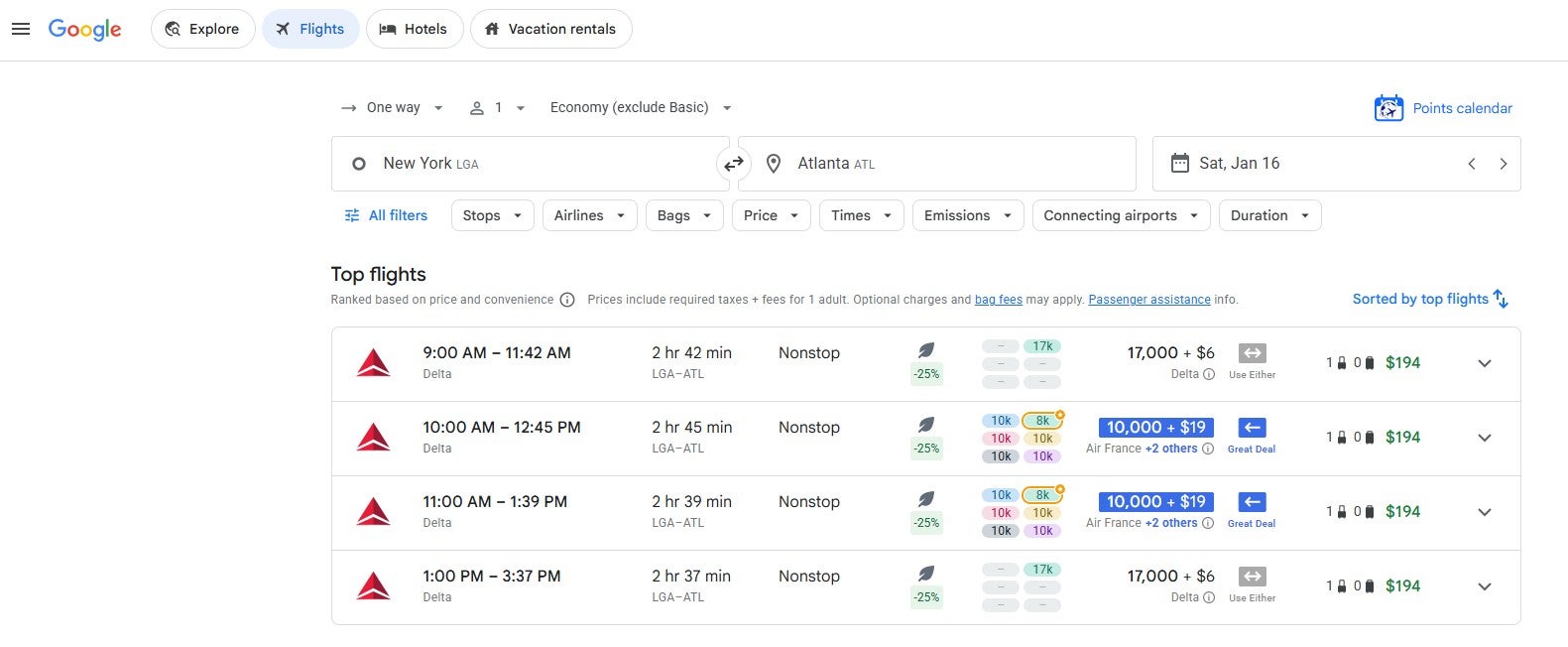
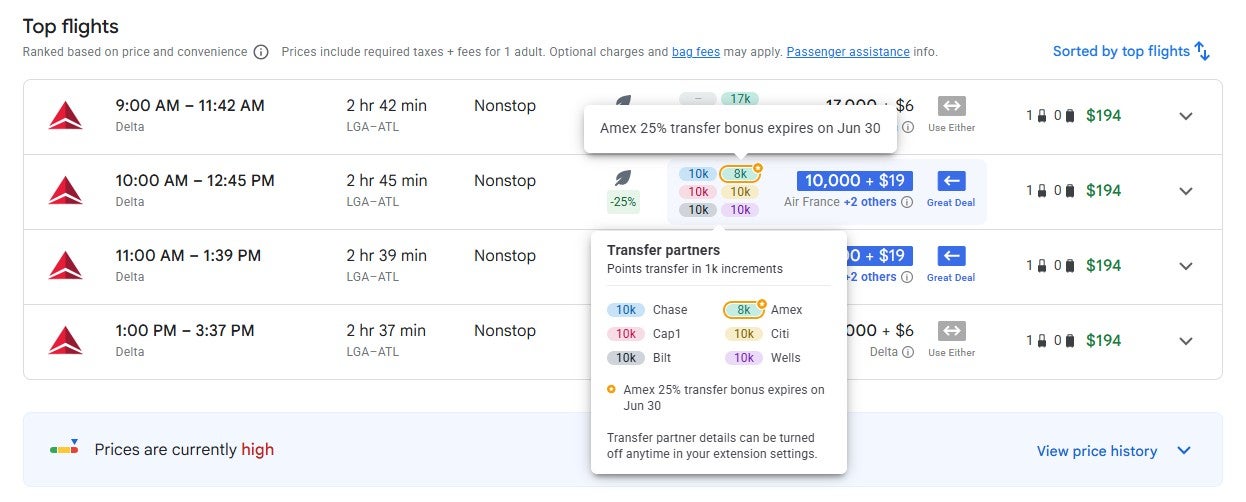
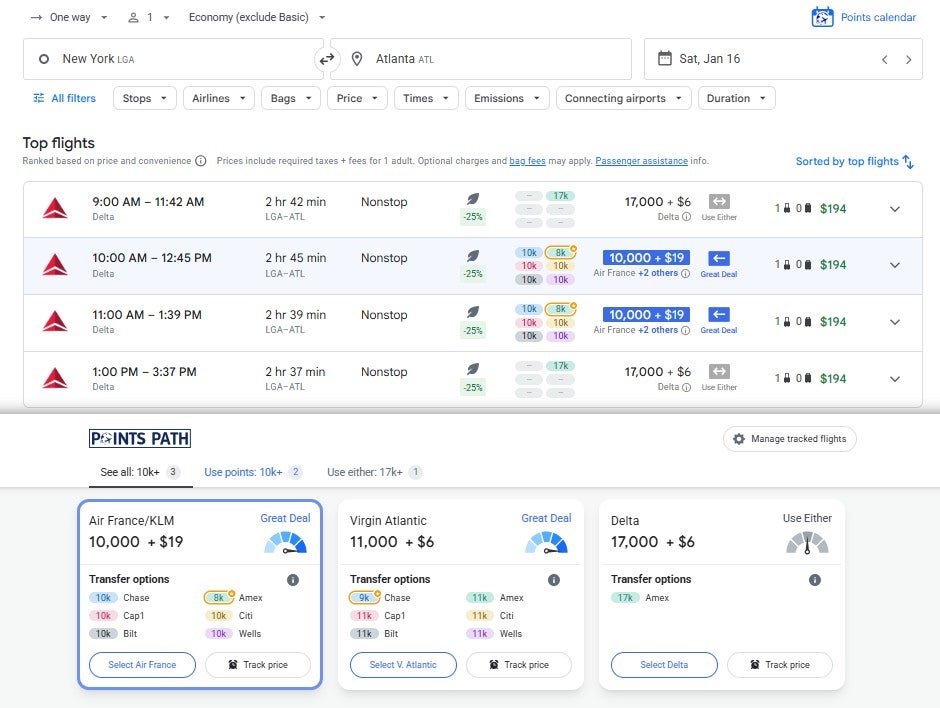
Then, search as you typically would in Google Flights. When you do so, you should see an extra column in the results that shows the lowest award rate Points Path found across its supported programs and a recommendation on whether to book a paid or award rate for each itinerary.
GOOGLE FLIGHTS AND POINTS PATH
If you hover over the block of six award prices for a particular itinerary, you can see which transfer partners can be used to book this itinerary. Note that you'll even see active transfer bonuses accounted for in these rates.
GOOGLE FLIGHTS AND POINTS PATH
If you click a specific itinerary, you'll see award rates for the loyalty programs Points Path supports, and the transfer points you can transfer to each program. Alerts, Pro and Founders Club members can also click "Track price" to set an alert if the award price drops.
GOOGLE FLIGHTS AND POINTS PATH
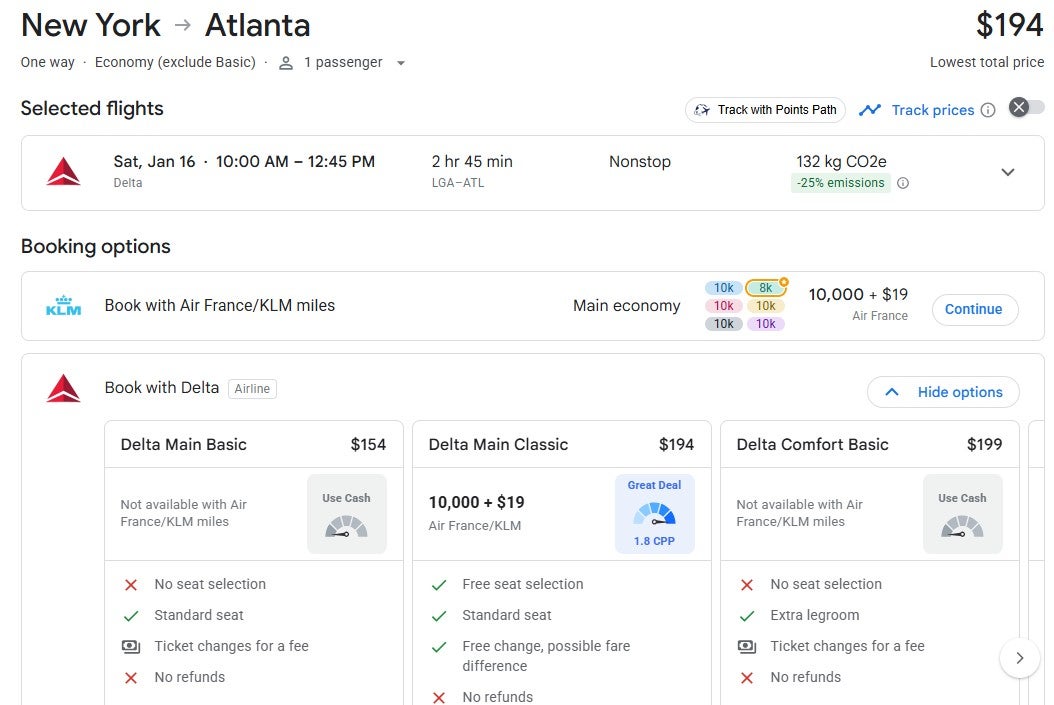
If you select a program, such as Air France-KLM Flying Blue, you'll end up on a page that shows the award rate and comparable paid rates. If you click "Continue" next to the award option, your browser will open the loyalty program's website in a new tab, where you can book your award.
GOOGLE FLIGHTS AND POINTS PATH
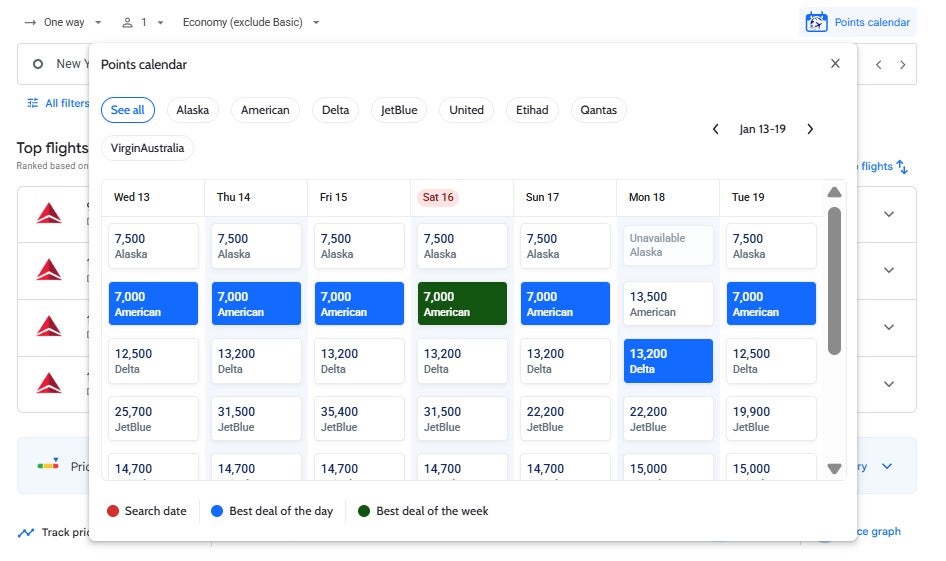
Back on the initial Google Flights results page, Pro and Founders Club members can also click "Points Calendar" above the results to load a seven-day calendar of award options bookable through American, Alaska, Delta, JetBlue, United, Qantas, Virgin Australia and Etihad.
GOOGLE FLIGHTS AND POINTS PATH
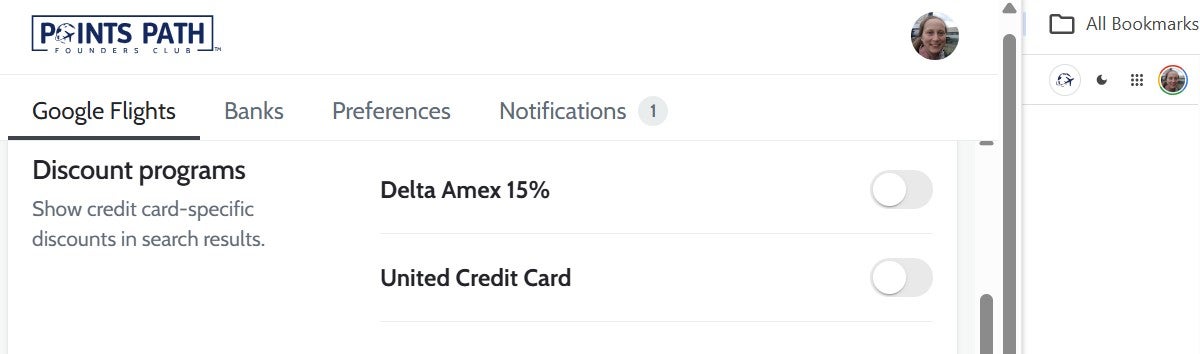
Pro and Founders Club members who have a Delta or United cobranded credit card that unlocks award flight discounts can also toggle on these savings by selecting the Points Path logo in the top-right corner of Google Flights and clicking "Discount programs."
GOOGLE FLIGHTS AND POINTS PATH
Of course, keep in mind that you should always verify award pricing with the airline program you plan to book through before transferring points.
How to use the Points Path extension for Chase Travel
You can opt-in to a Points Path extension for Chase Travel that calculates the cents per point redemption rate for Points Boost flights and hotels. To opt-in, head to your Points Path account page, click "Additional Permissions" in the left-hand menu bar, click "Enable" next to "Enhance your Chase travel experience," and grant the necessary permissions.
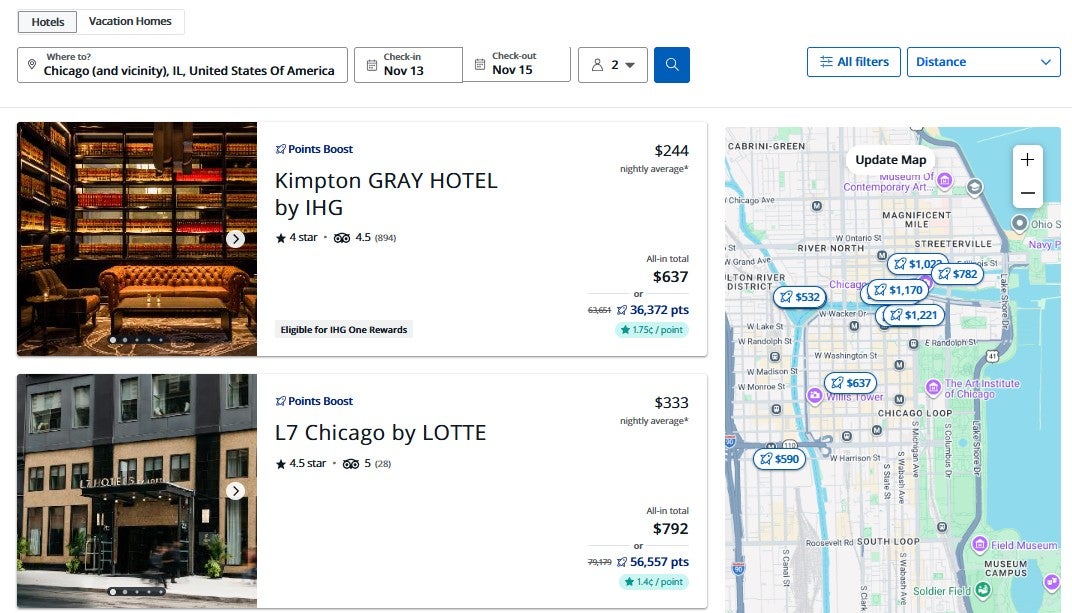
Then, head to the Chase Travel portal. On hotel searches, you'll see a small overlay with the redemption rate on each hotel result eligible for Points Boost.
CHASE AND POINTS PATH
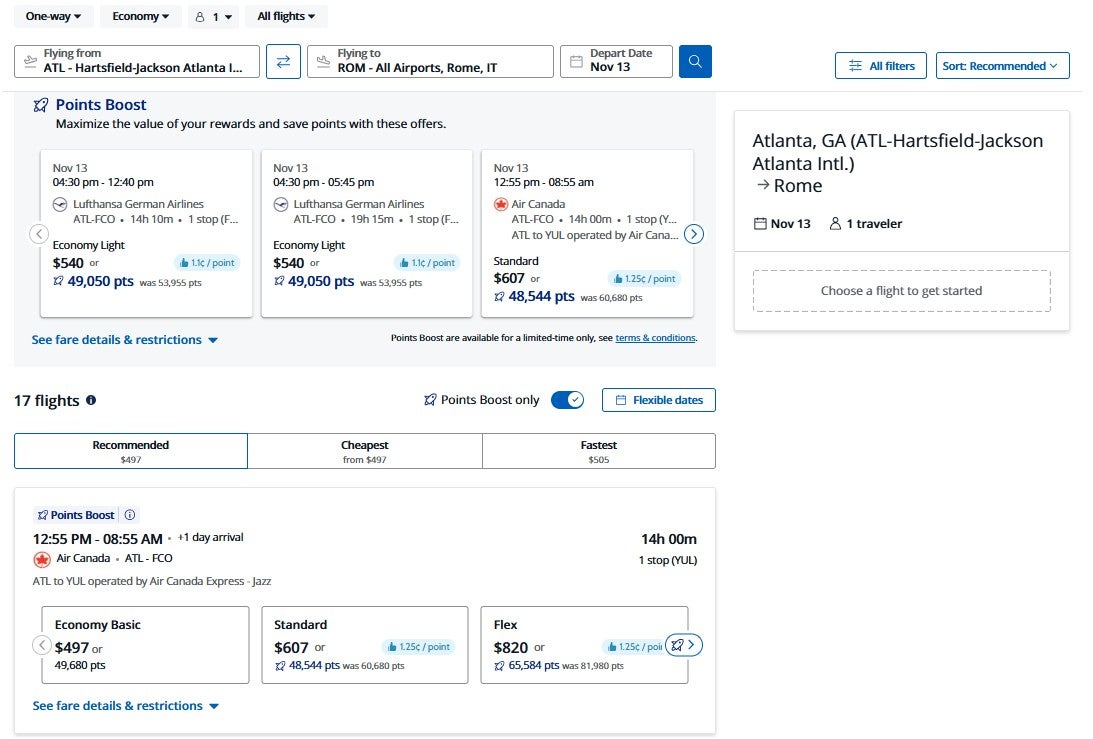
On flight searches, you'll see a similar small overlay with the redemption rate on each flight eligible for Points Boost.
CHASE AND POINTS PATH
Especially since Points Boost doesn't provide a consistently high redemption rate, these overlays can help you determine when you're getting enough value to justify redeeming Chase points for a booking.
Finally, Points Path says its extension also works on "100+ online travel agencies and their international sites" to help you find lower rates for the same properties. So, while I've only noticed the extension showing lower prices in Expedia searches since I installed it a few weeks ago, you may see it working on other online travel agencies as well.
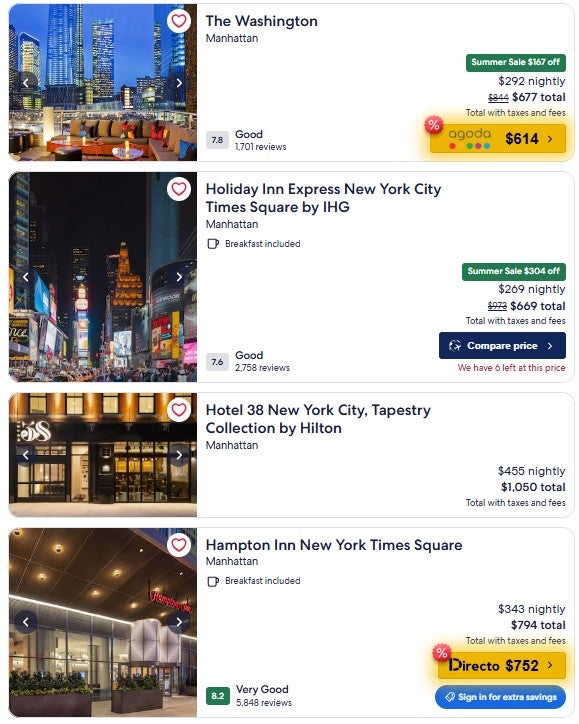
For example, when I search for a hotel on Expedia, Points Path adds boxes showing lower rates it has found through other sites. If Points Path doesn't add a box for a result, it means it couldn't find a lower rate.
EXPEDIA AND POINTS PATH
Similarly to the Points Path extension for Chase Points Boost, you must opt in to the "Compare hotel prices across sites, instantly" option in your Points Path account and grant the required browser permissions.
Points Path is a useful browser extension for travelers who want help deciding when to use points and miles and when to pay cash. Its Google Flights integration can save time by showing award rates alongside cash fares, while its Chase Travel and hotel comparison tools can help you spot better-value redemptions and lower hotel prices. Just be sure to verify award availability, taxes and fees, and transfer requirements directly with the loyalty program before moving any rewards.
Comments
By commenting, you agree to our Community Guidelines to help create a positive space for conversation. The responses below are not provided or commissioned by the bank advertiser, our partners, or The Points Guy (“TPG”). They have not been reviewed, approved, or otherwise endorsed by any of these parties. All responses are submitted by individual contributors, and neither the bank advertiser, our partners, nor TPG are responsible for ensuring that all posts and/or questions are answered.
at American Express's secure site. Terms & restrictions apply. See rates & fees.
Rewards rate
Rewards rate
Rate
Category
4X
Earn 4X Membership Rewards® points per dollar spent on purchases at restaurants worldwide, on up to $50,000 in purchases per calendar year, then 1X points for the rest of the year.
4X
Earn 4X Membership Rewards® points per dollar spent at US supermarkets, on up to $25,000 in purchases per calendar year, then 1X points for the rest of the year.
5X
Earn 5X Membership Rewards® points on prepaid hotel stays booked through AmexTravel.com or the Amex Travel App™.
3X
Earn 3X Membership Rewards® points on flights booked through AmexTravel.com, the Amex Travel App™, or purchased directly from airlines.
2X
Earn 2X Membership Rewards® points on prepaid car rentals booked through AmexTravel.com or the Amex Travel App™ and cruises booked and paid through AmexTravel.com.
1X
Earn 1X Membership Rewards® point per dollar spent on all other eligible purchases.
Intro offer
As High As 100,000 points. Find Out Your Offer.
Annual fee
$325
Regular APR
See Pay Over Time APR
Recommended credit
Excellent to Good
Pros + cons
Pros
Valuable dining and food-related credits
Flexible rewards with airline and hotel transfer partners
Multiple travel and purchase protections
No foreign transaction fees
Access to Amex Offers for additional savings (enrollment required)
Cons
Not as useful for those living outside the U.S.
Some may have trouble using Uber and other dining credits
More details
You may be eligible for as high as 100,000 Membership Rewards® Points after you spend $8,000 in eligible purchases on your new Card in your first 6 months of Card Membership. Welcome offers vary and you may not be eligible for an offer. Apply to know if you’re approved and find out your exact welcome offer amount – all with no credit score impact. If you’re approved and choose to accept the Card, your score may be impacted.
Earn 4X Membership Rewards® points per dollar spent on purchases at restaurants worldwide, on up to $50,000 in purchases per calendar year, then 1X points for the rest of the year.
Earn 4X Membership Rewards® points per dollar spent at US supermarkets, on up to $25,000 in purchases per calendar year, then 1X points for the rest of the year.
Earn 5X Membership Rewards® points on prepaid hotel stays booked through AmexTravel.com or the Amex Travel App™.
Earn 3X Membership Rewards® points on flights booked through AmexTravel.com, the Amex Travel App™, or purchased directly from airlines.
Earn 2X Membership Rewards® points on prepaid car rentals booked through AmexTravel.com or the Amex Travel App™ and cruises booked and paid through AmexTravel.com.
Earn 1X Membership Rewards® point per dollar spent on all other eligible purchases.
Pay It® lets you tap in the American Express® App to quickly pay for small purchase amounts throughout the month and still earn rewards the way you usually do. Plan It® gives you the option to split up big purchases into equal monthly payments with a fixed fee. You’ll know upfront exactly how much you’ll pay.
$120 Dining Credit: Earn up to a total of $10 in statement credits monthly when you pay with the Gold Card at Grubhub (including Seamless), Buffalo Wild Wings, Five Guys, The Cheesecake Factory, and Wonder. This can be an annual savings of up to $120. Enrollment required.
$100 Resy Credit: Get up to $100 in statement credits each calendar year at over 10,000 qualifying U.S. Resy restaurants after you pay for eligible purchases with the American Express® Gold Card. That’s up to $50 in statement credits semi-annually. Enrollment required.
$84 Dunkin' Credit: Earn up to $7 in monthly statement credits after you pay with the American Express® Gold Card at U.S. Dunkin’ locations. Enrollment required.
$120 Uber Cash on Gold: Enjoy up to $120 in Uber Cash annually with your Gold Card. Just add your Card to your Uber account and you'll get $10 in Uber Cash each month to use on orders and rides in the U.S. when you select an Amex Card for your transaction.
Enjoy complimentary Hertz Five Star® Status benefits like skipping the counter at select locations, adding an additional driver at no additional cost*, and vehicle upgrades**. Benefit enrollment and Hertz Gold+ registration are required. *Additional drivers must meet standard rental qualifications and must be a spouse or domestic partner to qualify as complimentary. Other additional drivers subject to fees. **Benefits are subject to availability and vary by location. Additional Hertz program Terms and Conditions including age restrictions apply.
Book two nights or more with The Hotel Collection through AmexTravel.com or the Amex Travel App™ and receive a $100* credit towards eligible charges at over 1,400 upscale hotels worldwide. *Eligible charges vary by property.
Book your travel through the Amex Travel App™ with added peace of mind – backed by American Express® service and support. Only for American Express® Card Members.
Whenever you need us, we're here. Our Member Services team will ensure you are taken care of. From lost Card replacement to statement questions, we are available to help 24/7.
No Foreign Transaction Fees.
Annual Fee is $325.
Terms Apply.
Pros
Valuable dining and food-related credits
Flexible rewards with airline and hotel transfer partners
Multiple travel and purchase protections
No foreign transaction fees
Access to Amex Offers for additional savings (enrollment required)
Cons
Not as useful for those living outside the U.S.
Some may have trouble using Uber and other dining credits
You may be eligible for as high as 100,000 Membership Rewards® Points after you spend $8,000 in eligible purchases on your new Card in your first 6 months of Card Membership. Welcome offers vary and you may not be eligible for an offer. Apply to know if you’re approved and find out your exact welcome offer amount – all with no credit score impact. If you’re approved and choose to accept the Card, your score may be impacted.
Earn 4X Membership Rewards® points per dollar spent on purchases at restaurants worldwide, on up to $50,000 in purchases per calendar year, then 1X points for the rest of the year.
Earn 4X Membership Rewards® points per dollar spent at US supermarkets, on up to $25,000 in purchases per calendar year, then 1X points for the rest of the year.
Earn 5X Membership Rewards® points on prepaid hotel stays booked through AmexTravel.com or the Amex Travel App™.
Earn 3X Membership Rewards® points on flights booked through AmexTravel.com, the Amex Travel App™, or purchased directly from airlines.
Earn 2X Membership Rewards® points on prepaid car rentals booked through AmexTravel.com or the Amex Travel App™ and cruises booked and paid through AmexTravel.com.
Earn 1X Membership Rewards® point per dollar spent on all other eligible purchases.
Pay It® lets you tap in the American Express® App to quickly pay for small purchase amounts throughout the month and still earn rewards the way you usually do. Plan It® gives you the option to split up big purchases into equal monthly payments with a fixed fee. You’ll know upfront exactly how much you’ll pay.
$120 Dining Credit: Earn up to a total of $10 in statement credits monthly when you pay with the Gold Card at Grubhub (including Seamless), Buffalo Wild Wings, Five Guys, The Cheesecake Factory, and Wonder. This can be an annual savings of up to $120. Enrollment required.
$100 Resy Credit: Get up to $100 in statement credits each calendar year at over 10,000 qualifying U.S. Resy restaurants after you pay for eligible purchases with the American Express® Gold Card. That’s up to $50 in statement credits semi-annually. Enrollment required.
$84 Dunkin' Credit: Earn up to $7 in monthly statement credits after you pay with the American Express® Gold Card at U.S. Dunkin’ locations. Enrollment required.
$120 Uber Cash on Gold: Enjoy up to $120 in Uber Cash annually with your Gold Card. Just add your Card to your Uber account and you'll get $10 in Uber Cash each month to use on orders and rides in the U.S. when you select an Amex Card for your transaction.
Enjoy complimentary Hertz Five Star® Status benefits like skipping the counter at select locations, adding an additional driver at no additional cost*, and vehicle upgrades**. Benefit enrollment and Hertz Gold+ registration are required. *Additional drivers must meet standard rental qualifications and must be a spouse or domestic partner to qualify as complimentary. Other additional drivers subject to fees. **Benefits are subject to availability and vary by location. Additional Hertz program Terms and Conditions including age restrictions apply.
Book two nights or more with The Hotel Collection through AmexTravel.com or the Amex Travel App™ and receive a $100* credit towards eligible charges at over 1,400 upscale hotels worldwide. *Eligible charges vary by property.
Book your travel through the Amex Travel App™ with added peace of mind – backed by American Express® service and support. Only for American Express® Card Members.
Whenever you need us, we're here. Our Member Services team will ensure you are taken care of. From lost Card replacement to statement questions, we are available to help 24/7.
at American Express's secure site. Terms & restrictions apply. See rates & fees.
Rewards rate
Rewards rate
Rate
Category
4X
Earn 4X Membership Rewards® points per dollar spent on purchases at restaurants worldwide, on up to $50,000 in purchases per calendar year, then 1X points for the rest of the year.
4X
Earn 4X Membership Rewards® points per dollar spent at US supermarkets, on up to $25,000 in purchases per calendar year, then 1X points for the rest of the year.
5X
Earn 5X Membership Rewards® points on prepaid hotel stays booked through AmexTravel.com or the Amex Travel App™.
3X
Earn 3X Membership Rewards® points on flights booked through AmexTravel.com, the Amex Travel App™, or purchased directly from airlines.
2X
Earn 2X Membership Rewards® points on prepaid car rentals booked through AmexTravel.com or the Amex Travel App™ and cruises booked and paid through AmexTravel.com.
1X
Earn 1X Membership Rewards® point per dollar spent on all other eligible purchases.
Intro offer
As High As 100,000 points. Find Out Your Offer.
Annual fee
$325
Regular APR
See Pay Over Time APR
Recommended credit
Excellent to Good
Pros + cons
Pros
Valuable dining and food-related credits
Flexible rewards with airline and hotel transfer partners
Multiple travel and purchase protections
No foreign transaction fees
Access to Amex Offers for additional savings (enrollment required)
Cons
Not as useful for those living outside the U.S.
Some may have trouble using Uber and other dining credits
More details
You may be eligible for as high as 100,000 Membership Rewards® Points after you spend $8,000 in eligible purchases on your new Card in your first 6 months of Card Membership. Welcome offers vary and you may not be eligible for an offer. Apply to know if you’re approved and find out your exact welcome offer amount – all with no credit score impact. If you’re approved and choose to accept the Card, your score may be impacted.
Earn 4X Membership Rewards® points per dollar spent on purchases at restaurants worldwide, on up to $50,000 in purchases per calendar year, then 1X points for the rest of the year.
Earn 4X Membership Rewards® points per dollar spent at US supermarkets, on up to $25,000 in purchases per calendar year, then 1X points for the rest of the year.
Earn 5X Membership Rewards® points on prepaid hotel stays booked through AmexTravel.com or the Amex Travel App™.
Earn 3X Membership Rewards® points on flights booked through AmexTravel.com, the Amex Travel App™, or purchased directly from airlines.
Earn 2X Membership Rewards® points on prepaid car rentals booked through AmexTravel.com or the Amex Travel App™ and cruises booked and paid through AmexTravel.com.
Earn 1X Membership Rewards® point per dollar spent on all other eligible purchases.
Pay It® lets you tap in the American Express® App to quickly pay for small purchase amounts throughout the month and still earn rewards the way you usually do. Plan It® gives you the option to split up big purchases into equal monthly payments with a fixed fee. You’ll know upfront exactly how much you’ll pay.
$120 Dining Credit: Earn up to a total of $10 in statement credits monthly when you pay with the Gold Card at Grubhub (including Seamless), Buffalo Wild Wings, Five Guys, The Cheesecake Factory, and Wonder. This can be an annual savings of up to $120. Enrollment required.
$100 Resy Credit: Get up to $100 in statement credits each calendar year at over 10,000 qualifying U.S. Resy restaurants after you pay for eligible purchases with the American Express® Gold Card. That’s up to $50 in statement credits semi-annually. Enrollment required.
$84 Dunkin' Credit: Earn up to $7 in monthly statement credits after you pay with the American Express® Gold Card at U.S. Dunkin’ locations. Enrollment required.
$120 Uber Cash on Gold: Enjoy up to $120 in Uber Cash annually with your Gold Card. Just add your Card to your Uber account and you'll get $10 in Uber Cash each month to use on orders and rides in the U.S. when you select an Amex Card for your transaction.
Enjoy complimentary Hertz Five Star® Status benefits like skipping the counter at select locations, adding an additional driver at no additional cost*, and vehicle upgrades**. Benefit enrollment and Hertz Gold+ registration are required. *Additional drivers must meet standard rental qualifications and must be a spouse or domestic partner to qualify as complimentary. Other additional drivers subject to fees. **Benefits are subject to availability and vary by location. Additional Hertz program Terms and Conditions including age restrictions apply.
Book two nights or more with The Hotel Collection through AmexTravel.com or the Amex Travel App™ and receive a $100* credit towards eligible charges at over 1,400 upscale hotels worldwide. *Eligible charges vary by property.
Book your travel through the Amex Travel App™ with added peace of mind – backed by American Express® service and support. Only for American Express® Card Members.
Whenever you need us, we're here. Our Member Services team will ensure you are taken care of. From lost Card replacement to statement questions, we are available to help 24/7.
No Foreign Transaction Fees.
Annual Fee is $325.
Terms Apply.
Pros
Valuable dining and food-related credits
Flexible rewards with airline and hotel transfer partners
Multiple travel and purchase protections
No foreign transaction fees
Access to Amex Offers for additional savings (enrollment required)
Cons
Not as useful for those living outside the U.S.
Some may have trouble using Uber and other dining credits
You may be eligible for as high as 100,000 Membership Rewards® Points after you spend $8,000 in eligible purchases on your new Card in your first 6 months of Card Membership. Welcome offers vary and you may not be eligible for an offer. Apply to know if you’re approved and find out your exact welcome offer amount – all with no credit score impact. If you’re approved and choose to accept the Card, your score may be impacted.
Earn 4X Membership Rewards® points per dollar spent on purchases at restaurants worldwide, on up to $50,000 in purchases per calendar year, then 1X points for the rest of the year.
Earn 4X Membership Rewards® points per dollar spent at US supermarkets, on up to $25,000 in purchases per calendar year, then 1X points for the rest of the year.
Earn 5X Membership Rewards® points on prepaid hotel stays booked through AmexTravel.com or the Amex Travel App™.
Earn 3X Membership Rewards® points on flights booked through AmexTravel.com, the Amex Travel App™, or purchased directly from airlines.
Earn 2X Membership Rewards® points on prepaid car rentals booked through AmexTravel.com or the Amex Travel App™ and cruises booked and paid through AmexTravel.com.
Earn 1X Membership Rewards® point per dollar spent on all other eligible purchases.
Pay It® lets you tap in the American Express® App to quickly pay for small purchase amounts throughout the month and still earn rewards the way you usually do. Plan It® gives you the option to split up big purchases into equal monthly payments with a fixed fee. You’ll know upfront exactly how much you’ll pay.
$120 Dining Credit: Earn up to a total of $10 in statement credits monthly when you pay with the Gold Card at Grubhub (including Seamless), Buffalo Wild Wings, Five Guys, The Cheesecake Factory, and Wonder. This can be an annual savings of up to $120. Enrollment required.
$100 Resy Credit: Get up to $100 in statement credits each calendar year at over 10,000 qualifying U.S. Resy restaurants after you pay for eligible purchases with the American Express® Gold Card. That’s up to $50 in statement credits semi-annually. Enrollment required.
$84 Dunkin' Credit: Earn up to $7 in monthly statement credits after you pay with the American Express® Gold Card at U.S. Dunkin’ locations. Enrollment required.
$120 Uber Cash on Gold: Enjoy up to $120 in Uber Cash annually with your Gold Card. Just add your Card to your Uber account and you'll get $10 in Uber Cash each month to use on orders and rides in the U.S. when you select an Amex Card for your transaction.
Enjoy complimentary Hertz Five Star® Status benefits like skipping the counter at select locations, adding an additional driver at no additional cost*, and vehicle upgrades**. Benefit enrollment and Hertz Gold+ registration are required. *Additional drivers must meet standard rental qualifications and must be a spouse or domestic partner to qualify as complimentary. Other additional drivers subject to fees. **Benefits are subject to availability and vary by location. Additional Hertz program Terms and Conditions including age restrictions apply.
Book two nights or more with The Hotel Collection through AmexTravel.com or the Amex Travel App™ and receive a $100* credit towards eligible charges at over 1,400 upscale hotels worldwide. *Eligible charges vary by property.
Book your travel through the Amex Travel App™ with added peace of mind – backed by American Express® service and support. Only for American Express® Card Members.
Whenever you need us, we're here. Our Member Services team will ensure you are taken care of. From lost Card replacement to statement questions, we are available to help 24/7.
No Foreign Transaction Fees.
Annual Fee is $325.
Terms Apply.
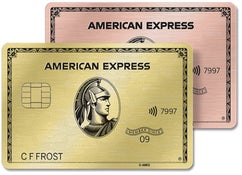
American Express® Gold Card
TPG editor's rating4
TPG editor's rating4
at American Express's secure site. Terms & restrictions apply. See rates & fees.
Rewards rate
Rewards rate
Rate
Category
4X
Earn 4X Membership Rewards® points per dollar spent on purchases at restaurants worldwide, on up to $50,000 in purchases per calendar year, then 1X points for the rest of the year.
4X
Earn 4X Membership Rewards® points per dollar spent at US supermarkets, on up to $25,000 in purchases per calendar year, then 1X points for the rest of the year.
5X
Earn 5X Membership Rewards® points on prepaid hotel stays booked through AmexTravel.com or the Amex Travel App™.
3X
Earn 3X Membership Rewards® points on flights booked through AmexTravel.com, the Amex Travel App™, or purchased directly from airlines.
2X
Earn 2X Membership Rewards® points on prepaid car rentals booked through AmexTravel.com or the Amex Travel App™ and cruises booked and paid through AmexTravel.com.
1X
Earn 1X Membership Rewards® point per dollar spent on all other eligible purchases.
Intro offer
As High As 100,000 points. Find Out Your Offer.
Annual fee
$325
Regular APR
See Pay Over Time APR
Recommended credit
Excellent to Good
Pros + cons
Pros
Valuable dining and food-related credits
Flexible rewards with airline and hotel transfer partners
Multiple travel and purchase protections
No foreign transaction fees
Access to Amex Offers for additional savings (enrollment required)
Cons
Not as useful for those living outside the U.S.
Some may have trouble using Uber and other dining credits
More details
You may be eligible for as high as 100,000 Membership Rewards® Points after you spend $8,000 in eligible purchases on your new Card in your first 6 months of Card Membership. Welcome offers vary and you may not be eligible for an offer. Apply to know if you’re approved and find out your exact welcome offer amount – all with no credit score impact. If you’re approved and choose to accept the Card, your score may be impacted.
Earn 4X Membership Rewards® points per dollar spent on purchases at restaurants worldwide, on up to $50,000 in purchases per calendar year, then 1X points for the rest of the year.
Earn 4X Membership Rewards® points per dollar spent at US supermarkets, on up to $25,000 in purchases per calendar year, then 1X points for the rest of the year.
Earn 5X Membership Rewards® points on prepaid hotel stays booked through AmexTravel.com or the Amex Travel App™.
Earn 3X Membership Rewards® points on flights booked through AmexTravel.com, the Amex Travel App™, or purchased directly from airlines.
Earn 2X Membership Rewards® points on prepaid car rentals booked through AmexTravel.com or the Amex Travel App™ and cruises booked and paid through AmexTravel.com.
Earn 1X Membership Rewards® point per dollar spent on all other eligible purchases.
Pay It® lets you tap in the American Express® App to quickly pay for small purchase amounts throughout the month and still earn rewards the way you usually do. Plan It® gives you the option to split up big purchases into equal monthly payments with a fixed fee. You’ll know upfront exactly how much you’ll pay.
$120 Dining Credit: Earn up to a total of $10 in statement credits monthly when you pay with the Gold Card at Grubhub (including Seamless), Buffalo Wild Wings, Five Guys, The Cheesecake Factory, and Wonder. This can be an annual savings of up to $120. Enrollment required.
$100 Resy Credit: Get up to $100 in statement credits each calendar year at over 10,000 qualifying U.S. Resy restaurants after you pay for eligible purchases with the American Express® Gold Card. That’s up to $50 in statement credits semi-annually. Enrollment required.
$84 Dunkin' Credit: Earn up to $7 in monthly statement credits after you pay with the American Express® Gold Card at U.S. Dunkin’ locations. Enrollment required.
$120 Uber Cash on Gold: Enjoy up to $120 in Uber Cash annually with your Gold Card. Just add your Card to your Uber account and you'll get $10 in Uber Cash each month to use on orders and rides in the U.S. when you select an Amex Card for your transaction.
Enjoy complimentary Hertz Five Star® Status benefits like skipping the counter at select locations, adding an additional driver at no additional cost*, and vehicle upgrades**. Benefit enrollment and Hertz Gold+ registration are required. *Additional drivers must meet standard rental qualifications and must be a spouse or domestic partner to qualify as complimentary. Other additional drivers subject to fees. **Benefits are subject to availability and vary by location. Additional Hertz program Terms and Conditions including age restrictions apply.
Book two nights or more with The Hotel Collection through AmexTravel.com or the Amex Travel App™ and receive a $100* credit towards eligible charges at over 1,400 upscale hotels worldwide. *Eligible charges vary by property.
Book your travel through the Amex Travel App™ with added peace of mind – backed by American Express® service and support. Only for American Express® Card Members.
Whenever you need us, we're here. Our Member Services team will ensure you are taken care of. From lost Card replacement to statement questions, we are available to help 24/7.
No Foreign Transaction Fees.
Annual Fee is $325.
Terms Apply.
Pros
Valuable dining and food-related credits
Flexible rewards with airline and hotel transfer partners
Multiple travel and purchase protections
No foreign transaction fees
Access to Amex Offers for additional savings (enrollment required)
Cons
Not as useful for those living outside the U.S.
Some may have trouble using Uber and other dining credits
You may be eligible for as high as 100,000 Membership Rewards® Points after you spend $8,000 in eligible purchases on your new Card in your first 6 months of Card Membership. Welcome offers vary and you may not be eligible for an offer. Apply to know if you’re approved and find out your exact welcome offer amount – all with no credit score impact. If you’re approved and choose to accept the Card, your score may be impacted.
Earn 4X Membership Rewards® points per dollar spent on purchases at restaurants worldwide, on up to $50,000 in purchases per calendar year, then 1X points for the rest of the year.
Earn 4X Membership Rewards® points per dollar spent at US supermarkets, on up to $25,000 in purchases per calendar year, then 1X points for the rest of the year.
Earn 5X Membership Rewards® points on prepaid hotel stays booked through AmexTravel.com or the Amex Travel App™.
Earn 3X Membership Rewards® points on flights booked through AmexTravel.com, the Amex Travel App™, or purchased directly from airlines.
Earn 2X Membership Rewards® points on prepaid car rentals booked through AmexTravel.com or the Amex Travel App™ and cruises booked and paid through AmexTravel.com.
Earn 1X Membership Rewards® point per dollar spent on all other eligible purchases.
Pay It® lets you tap in the American Express® App to quickly pay for small purchase amounts throughout the month and still earn rewards the way you usually do. Plan It® gives you the option to split up big purchases into equal monthly payments with a fixed fee. You’ll know upfront exactly how much you’ll pay.
$120 Dining Credit: Earn up to a total of $10 in statement credits monthly when you pay with the Gold Card at Grubhub (including Seamless), Buffalo Wild Wings, Five Guys, The Cheesecake Factory, and Wonder. This can be an annual savings of up to $120. Enrollment required.
$100 Resy Credit: Get up to $100 in statement credits each calendar year at over 10,000 qualifying U.S. Resy restaurants after you pay for eligible purchases with the American Express® Gold Card. That’s up to $50 in statement credits semi-annually. Enrollment required.
$84 Dunkin' Credit: Earn up to $7 in monthly statement credits after you pay with the American Express® Gold Card at U.S. Dunkin’ locations. Enrollment required.
$120 Uber Cash on Gold: Enjoy up to $120 in Uber Cash annually with your Gold Card. Just add your Card to your Uber account and you'll get $10 in Uber Cash each month to use on orders and rides in the U.S. when you select an Amex Card for your transaction.
Enjoy complimentary Hertz Five Star® Status benefits like skipping the counter at select locations, adding an additional driver at no additional cost*, and vehicle upgrades**. Benefit enrollment and Hertz Gold+ registration are required. *Additional drivers must meet standard rental qualifications and must be a spouse or domestic partner to qualify as complimentary. Other additional drivers subject to fees. **Benefits are subject to availability and vary by location. Additional Hertz program Terms and Conditions including age restrictions apply.
Book two nights or more with The Hotel Collection through AmexTravel.com or the Amex Travel App™ and receive a $100* credit towards eligible charges at over 1,400 upscale hotels worldwide. *Eligible charges vary by property.
Book your travel through the Amex Travel App™ with added peace of mind – backed by American Express® service and support. Only for American Express® Card Members.
Whenever you need us, we're here. Our Member Services team will ensure you are taken care of. From lost Card replacement to statement questions, we are available to help 24/7.
at American Express's secure site. Terms & restrictions apply. See rates & fees.
Rewards rate
Rewards rate
Rate
Category
4X
Earn 4X Membership Rewards® points per dollar spent on purchases at restaurants worldwide, on up to $50,000 in purchases per calendar year, then 1X points for the rest of the year.
4X
Earn 4X Membership Rewards® points per dollar spent at US supermarkets, on up to $25,000 in purchases per calendar year, then 1X points for the rest of the year.
5X
Earn 5X Membership Rewards® points on prepaid hotel stays booked through AmexTravel.com or the Amex Travel App™.
3X
Earn 3X Membership Rewards® points on flights booked through AmexTravel.com, the Amex Travel App™, or purchased directly from airlines.
2X
Earn 2X Membership Rewards® points on prepaid car rentals booked through AmexTravel.com or the Amex Travel App™ and cruises booked and paid through AmexTravel.com.
1X
Earn 1X Membership Rewards® point per dollar spent on all other eligible purchases.
Intro offer
As High As 100,000 points. Find Out Your Offer.
Annual fee
$325
Regular APR
See Pay Over Time APR
Recommended credit
Excellent to Good
Pros + cons
Pros
Valuable dining and food-related credits
Flexible rewards with airline and hotel transfer partners
Multiple travel and purchase protections
No foreign transaction fees
Access to Amex Offers for additional savings (enrollment required)
Cons
Not as useful for those living outside the U.S.
Some may have trouble using Uber and other dining credits
More details
You may be eligible for as high as 100,000 Membership Rewards® Points after you spend $8,000 in eligible purchases on your new Card in your first 6 months of Card Membership. Welcome offers vary and you may not be eligible for an offer. Apply to know if you’re approved and find out your exact welcome offer amount – all with no credit score impact. If you’re approved and choose to accept the Card, your score may be impacted.
Earn 4X Membership Rewards® points per dollar spent on purchases at restaurants worldwide, on up to $50,000 in purchases per calendar year, then 1X points for the rest of the year.
Earn 4X Membership Rewards® points per dollar spent at US supermarkets, on up to $25,000 in purchases per calendar year, then 1X points for the rest of the year.
Earn 5X Membership Rewards® points on prepaid hotel stays booked through AmexTravel.com or the Amex Travel App™.
Earn 3X Membership Rewards® points on flights booked through AmexTravel.com, the Amex Travel App™, or purchased directly from airlines.
Earn 2X Membership Rewards® points on prepaid car rentals booked through AmexTravel.com or the Amex Travel App™ and cruises booked and paid through AmexTravel.com.
Earn 1X Membership Rewards® point per dollar spent on all other eligible purchases.
Pay It® lets you tap in the American Express® App to quickly pay for small purchase amounts throughout the month and still earn rewards the way you usually do. Plan It® gives you the option to split up big purchases into equal monthly payments with a fixed fee. You’ll know upfront exactly how much you’ll pay.
$120 Dining Credit: Earn up to a total of $10 in statement credits monthly when you pay with the Gold Card at Grubhub (including Seamless), Buffalo Wild Wings, Five Guys, The Cheesecake Factory, and Wonder. This can be an annual savings of up to $120. Enrollment required.
$100 Resy Credit: Get up to $100 in statement credits each calendar year at over 10,000 qualifying U.S. Resy restaurants after you pay for eligible purchases with the American Express® Gold Card. That’s up to $50 in statement credits semi-annually. Enrollment required.
$84 Dunkin' Credit: Earn up to $7 in monthly statement credits after you pay with the American Express® Gold Card at U.S. Dunkin’ locations. Enrollment required.
$120 Uber Cash on Gold: Enjoy up to $120 in Uber Cash annually with your Gold Card. Just add your Card to your Uber account and you'll get $10 in Uber Cash each month to use on orders and rides in the U.S. when you select an Amex Card for your transaction.
Enjoy complimentary Hertz Five Star® Status benefits like skipping the counter at select locations, adding an additional driver at no additional cost*, and vehicle upgrades**. Benefit enrollment and Hertz Gold+ registration are required. *Additional drivers must meet standard rental qualifications and must be a spouse or domestic partner to qualify as complimentary. Other additional drivers subject to fees. **Benefits are subject to availability and vary by location. Additional Hertz program Terms and Conditions including age restrictions apply.
Book two nights or more with The Hotel Collection through AmexTravel.com or the Amex Travel App™ and receive a $100* credit towards eligible charges at over 1,400 upscale hotels worldwide. *Eligible charges vary by property.
Book your travel through the Amex Travel App™ with added peace of mind – backed by American Express® service and support. Only for American Express® Card Members.
Whenever you need us, we're here. Our Member Services team will ensure you are taken care of. From lost Card replacement to statement questions, we are available to help 24/7.
No Foreign Transaction Fees.
Annual Fee is $325.
Terms Apply.
Pros
Valuable dining and food-related credits
Flexible rewards with airline and hotel transfer partners
Multiple travel and purchase protections
No foreign transaction fees
Access to Amex Offers for additional savings (enrollment required)
Cons
Not as useful for those living outside the U.S.
Some may have trouble using Uber and other dining credits
You may be eligible for as high as 100,000 Membership Rewards® Points after you spend $8,000 in eligible purchases on your new Card in your first 6 months of Card Membership. Welcome offers vary and you may not be eligible for an offer. Apply to know if you’re approved and find out your exact welcome offer amount – all with no credit score impact. If you’re approved and choose to accept the Card, your score may be impacted.
Earn 4X Membership Rewards® points per dollar spent on purchases at restaurants worldwide, on up to $50,000 in purchases per calendar year, then 1X points for the rest of the year.
Earn 4X Membership Rewards® points per dollar spent at US supermarkets, on up to $25,000 in purchases per calendar year, then 1X points for the rest of the year.
Earn 5X Membership Rewards® points on prepaid hotel stays booked through AmexTravel.com or the Amex Travel App™.
Earn 3X Membership Rewards® points on flights booked through AmexTravel.com, the Amex Travel App™, or purchased directly from airlines.
Earn 2X Membership Rewards® points on prepaid car rentals booked through AmexTravel.com or the Amex Travel App™ and cruises booked and paid through AmexTravel.com.
Earn 1X Membership Rewards® point per dollar spent on all other eligible purchases.
Pay It® lets you tap in the American Express® App to quickly pay for small purchase amounts throughout the month and still earn rewards the way you usually do. Plan It® gives you the option to split up big purchases into equal monthly payments with a fixed fee. You’ll know upfront exactly how much you’ll pay.
$120 Dining Credit: Earn up to a total of $10 in statement credits monthly when you pay with the Gold Card at Grubhub (including Seamless), Buffalo Wild Wings, Five Guys, The Cheesecake Factory, and Wonder. This can be an annual savings of up to $120. Enrollment required.
$100 Resy Credit: Get up to $100 in statement credits each calendar year at over 10,000 qualifying U.S. Resy restaurants after you pay for eligible purchases with the American Express® Gold Card. That’s up to $50 in statement credits semi-annually. Enrollment required.
$84 Dunkin' Credit: Earn up to $7 in monthly statement credits after you pay with the American Express® Gold Card at U.S. Dunkin’ locations. Enrollment required.
$120 Uber Cash on Gold: Enjoy up to $120 in Uber Cash annually with your Gold Card. Just add your Card to your Uber account and you'll get $10 in Uber Cash each month to use on orders and rides in the U.S. when you select an Amex Card for your transaction.
Enjoy complimentary Hertz Five Star® Status benefits like skipping the counter at select locations, adding an additional driver at no additional cost*, and vehicle upgrades**. Benefit enrollment and Hertz Gold+ registration are required. *Additional drivers must meet standard rental qualifications and must be a spouse or domestic partner to qualify as complimentary. Other additional drivers subject to fees. **Benefits are subject to availability and vary by location. Additional Hertz program Terms and Conditions including age restrictions apply.
Book two nights or more with The Hotel Collection through AmexTravel.com or the Amex Travel App™ and receive a $100* credit towards eligible charges at over 1,400 upscale hotels worldwide. *Eligible charges vary by property.
Book your travel through the Amex Travel App™ with added peace of mind – backed by American Express® service and support. Only for American Express® Card Members.
Whenever you need us, we're here. Our Member Services team will ensure you are taken care of. From lost Card replacement to statement questions, we are available to help 24/7.