How to ride Disney’s newest attractions with the virtual queue system


Editor's note: This post has been updated with the latest information.
Once upon a time in a land far, far away called Orlando, you could wake up one morning and decide on a whim that you wanted to spend the day at Walt Disney World. There were no theme park or dining reservations to secure, no upcharges to skip the line and no mobile apps to master.
I hate to break it to you, but this isn't a fairy tale.
This is the real world, and here and now, you practically need a Ph.D. in Disney if you want to make the most of your time at The Most Magical Place on Earth.
I am neither a professor nor a fairy godmother, but I can teach you how to master Disney's virtual queue system and help you improve your chances of securing a spot on Disney's most popular attractions.
Here's TPG's complete guide to Disney's virtual queue system.
What is Disney World's virtual queue system?
A few months after reports of 11-hour lines to ride Universal's new Hagrid-themed roller coaster, Disney opened the much-anticipated Star Wars: Rise of the Resistance attraction in Hollywood Studios' Star Wars: Galaxy's Edge with virtual queuing in December 2019. Rather than standing in an hours-long line for this groundbreaking new attraction, guests could attempt to join a virtual queue via the My Disney Experience app.
With potentially tens of thousands of guests vying for a spot in the virtual queue each day, it became a lottery of sorts.
When the virtual queue opened each morning, boarding groups were gone within seconds. Those who secured a spot were given a boarding group number that would grant them access to the ride during a specific one-hour window of time.

Now that it's been open for nearly three years, Rise of the Resistance no longer utilizes a virtual queue system, but Disney has continued to use virtual queues for a period of time when new attractions open.
Unlike Disney Lightning Lane skip-the-line access, using Disney's virtual queue system does not incur an additional fee.
Securing a boarding group using Disney's virtual queue system
Guests typically have two opportunities to join a virtual queue. Currently, there are no Disney World rides that use a virtual queue, but here is a primer in case they reinstate this service in the future.
The first virtual queue opportunity begins at 7 a.m., and you can request to join the queue while you drink your morning coffee in your hotel room (or grab for your phone in the dark with only one eye half open). Technically, you can join from anywhere if you have a valid admission (and theme park reservation for certain ticket types, like annual passes).
The second opportunity is at 1:00 p.m., and you must be inside the park where the attraction is located to join.
Still with me? Good. Here's how to find the virtual queue in the My Disney Experience app.
From the home page of the app, click the "hamburger menu" (the three stacked lines) in the bottom right corner. Click the menu item called "Virtual Queues" and then select "Join Virtual Queue."
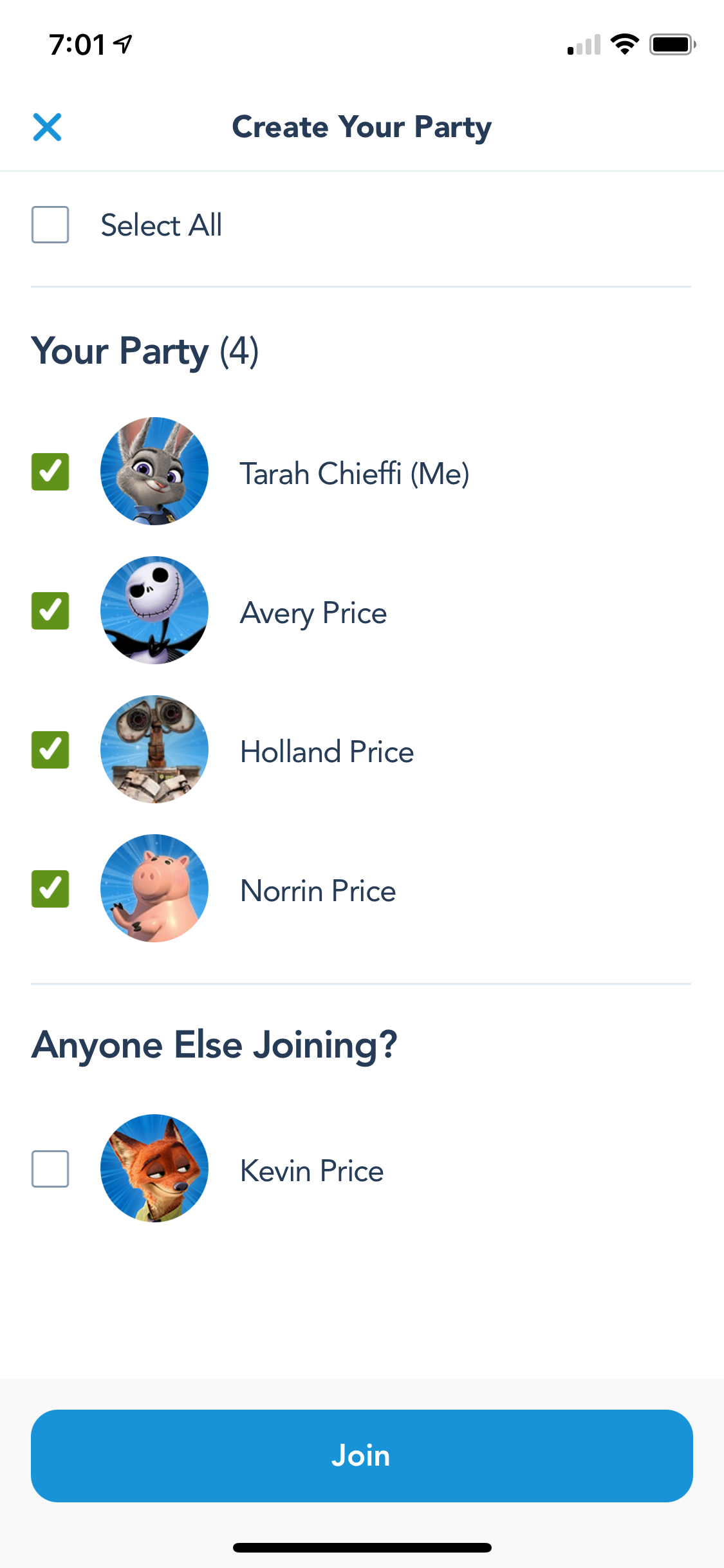
Start this step about 10 minutes before the queue officially opens and click "Confirm Your Party" and ensure everyone in your travel party is listed correctly.
When there are about 10 seconds left before the virtual queue opens (we recommend using the World Clock or Time.gov if you want to be extra precise), begin to refresh the "Join Virtual Queue" screen until the "Join" button appears at 7 a.m. on the dot.
Related: Magic at every budget: These are the best hotels at Walt Disney World
From there, just follow the on-screen instructions and fingers crossed, you'll see a screen with your boarding group number and estimated return time. Success!
You should receive a push notification with a return window when your boarding group is called. Head to the attraction during your designated window and a cast member will scan you into the attraction.
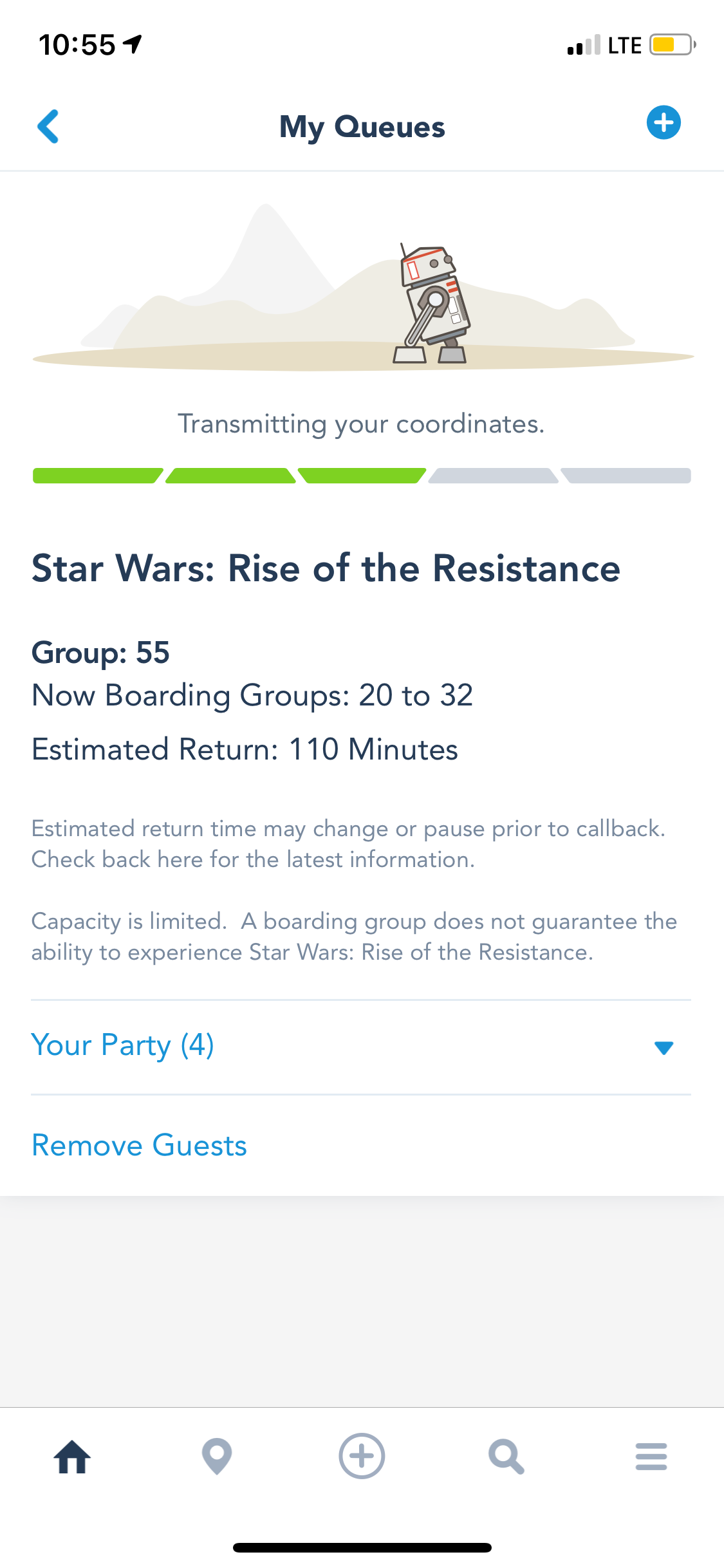
You should still expect a small wait — typically around 10 to 15 minutes, but possibly up to 30. It still beats standing in the Florida sun for two to three hours in a standby queue.
Attractions that use virtual queue

Currently, there are no rides at Disney World utilizing a virtual queue. Disney has taken to only using virtual queues for new ride openings and then phasing them out in favor of standby queues and Lightning Lane once the excitement dies down.
Related: Why Epcot is now Disney World's must-do park
Virtual queue tips and tricks
- Give thought to whether you want to use your phone's cell service or available Wi-Fi — sometimes, cell service can actually be better. In this case, fractions of a second can matter, so it's worth thinking through.
- If there are multiple tech-savvy travelers in your group, it may not hurt to have more than one person try for the virtual queues.
- Guests can only join the virtual queue for a given experience once per day, with the exception of guests who are eligible for extended evening theme park hours.
- Disneyland's virtual queue system operates slightly differently than Disney World's. You can view full details on the Disneyland website.
- Joining the virtual queue does not guarantee that you will get on the ride. If the attraction goes down or there are other difficulties, there is a possibility your boarding group will never be called.
- Make sure you have the latest version of the My Disney Experience app on your phone before your visit. Sign in to the app and double-check that your entire travel party is linked in your Friends & Family list and has tickets and theme park reservations in place. If something doesn't look right, rectify it at least the day before your visit so you don't hit any snags.
What to do if you don't get a boarding group
Don't freak out just yet. If you are unable to secure a boarding group, you do have other options.
First, if you feel that you didn't get a virtual queue spot because of an error with the app or some other type of technical difficulty, take screenshots and speak to a cast member at one of the guest experience team kiosks once you get to the park.
You may also have the option to purchase Lightning Lane Multi Pass or Lightning Lane Single Pass access.

Bottom line
These tips should help you make the most of your trip and imbue you with the superpower to get on your favorite Disney attractions using the virtual queue system. I wish you all the luck in the galaxy — and a good Wi-Fi signal.
TPG featured card

at American Express's secure site
Terms & restrictions apply. See rates & fees.
| 4X | Earn 4X Membership Rewards® points per dollar spent on purchases at restaurants worldwide, on up to $50,000 in purchases per calendar year, then 1X points for the rest of the year. |
| 4X | Earn 4X Membership Rewards® points per dollar spent at US supermarkets, on up to $25,000 in purchases per calendar year, then 1X points for the rest of the year. |
| 5X | Earn 5X Membership Rewards® points on prepaid hotel stays booked through AmexTravel.com or the Amex Travel App™. |
| 3X | Earn 3X Membership Rewards® points on flights booked through AmexTravel.com, the Amex Travel App™, or purchased directly from airlines. |
| 2X | Earn 2X Membership Rewards® points on prepaid car rentals booked through AmexTravel.com or the Amex Travel App™ and cruises booked and paid through AmexTravel.com. |
| 1X | Earn 1X Membership Rewards® point per dollar spent on all other eligible purchases. |
Pros
- Valuable dining and food-related credits
- Flexible rewards with airline and hotel transfer partners
- Multiple travel and purchase protections
- No foreign transaction fees
- Access to Amex Offers for additional savings (enrollment required)
Cons
- Not as useful for those living outside the U.S.
- Some may have trouble using Uber and other dining credits
- You may be eligible for as high as 100,000 Membership Rewards® Points after you spend $8,000 in eligible purchases on your new Card in your first 6 months of Card Membership. Welcome offers vary and you may not be eligible for an offer. Apply to know if you’re approved and find out your exact welcome offer amount – all with no credit score impact. If you’re approved and choose to accept the Card, your score may be impacted.
- Earn 4X Membership Rewards® points per dollar spent on purchases at restaurants worldwide, on up to $50,000 in purchases per calendar year, then 1X points for the rest of the year.
- Earn 4X Membership Rewards® points per dollar spent at US supermarkets, on up to $25,000 in purchases per calendar year, then 1X points for the rest of the year.
- Earn 5X Membership Rewards® points on prepaid hotel stays booked through AmexTravel.com or the Amex Travel App™.
- Earn 3X Membership Rewards® points on flights booked through AmexTravel.com, the Amex Travel App™, or purchased directly from airlines.
- Earn 2X Membership Rewards® points on prepaid car rentals booked through AmexTravel.com or the Amex Travel App™ and cruises booked and paid through AmexTravel.com.
- Earn 1X Membership Rewards® point per dollar spent on all other eligible purchases.
- Pay It® lets you tap in the American Express® App to quickly pay for small purchase amounts throughout the month and still earn rewards the way you usually do. Plan It® gives you the option to split up big purchases into equal monthly payments with a fixed fee. You’ll know upfront exactly how much you’ll pay.
- $120 Dining Credit: Earn up to a total of $10 in statement credits monthly when you pay with the Gold Card at Grubhub (including Seamless), Buffalo Wild Wings, Five Guys, The Cheesecake Factory, and Wonder. This can be an annual savings of up to $120. Enrollment required.
- $100 Resy Credit: Get up to $100 in statement credits each calendar year at over 10,000 qualifying U.S. Resy restaurants after you pay for eligible purchases with the American Express® Gold Card. That’s up to $50 in statement credits semi-annually. Enrollment required.
- $84 Dunkin' Credit: Earn up to $7 in monthly statement credits after you pay with the American Express® Gold Card at U.S. Dunkin’ locations. Enrollment required.
- $120 Uber Cash on Gold: Enjoy up to $120 in Uber Cash annually with your Gold Card. Just add your Card to your Uber account and you'll get $10 in Uber Cash each month to use on orders and rides in the U.S. when you select an Amex Card for your transaction.
- Enjoy complimentary Hertz Five Star® Status benefits like skipping the counter at select locations, adding an additional driver at no additional cost*, and vehicle upgrades**. Benefit enrollment and Hertz Gold+ registration are required. *Additional drivers must meet standard rental qualifications and must be a spouse or domestic partner to qualify as complimentary. Other additional drivers subject to fees. **Benefits are subject to availability and vary by location. Additional Hertz program Terms and Conditions including age restrictions apply.
- Book two nights or more with The Hotel Collection through AmexTravel.com or the Amex Travel App™ and receive a $100* credit towards eligible charges at over 1,400 upscale hotels worldwide. *Eligible charges vary by property.
- Book your travel through the Amex Travel App™ with added peace of mind – backed by American Express® service and support. Only for American Express® Card Members.
- Whenever you need us, we're here. Our Member Services team will ensure you are taken care of. From lost Card replacement to statement questions, we are available to help 24/7.
- No Foreign Transaction Fees.
- Annual Fee is $325.
- Terms Apply.