First look at the revamped Google Pay app with a new look, rewards and much more

Step out of the way, Venmo. Google has just completely overhauled its mobile payments app, introducing a new look and a slew of new features.
The new Google Pay app shifts from being just an ordinary contactless payment method toward an all-in-one money app, with a focus on managing personal finances. It offers more intuitive peer-to-peer payments, engaging financial insights and integrates retailer rewards. Starting in 2021, users will also be able to open fully online "Plex" bank accounts through the app.
New to The Points Guy? Want to learn more about credit card points and miles? Sign up for our daily newsletter.
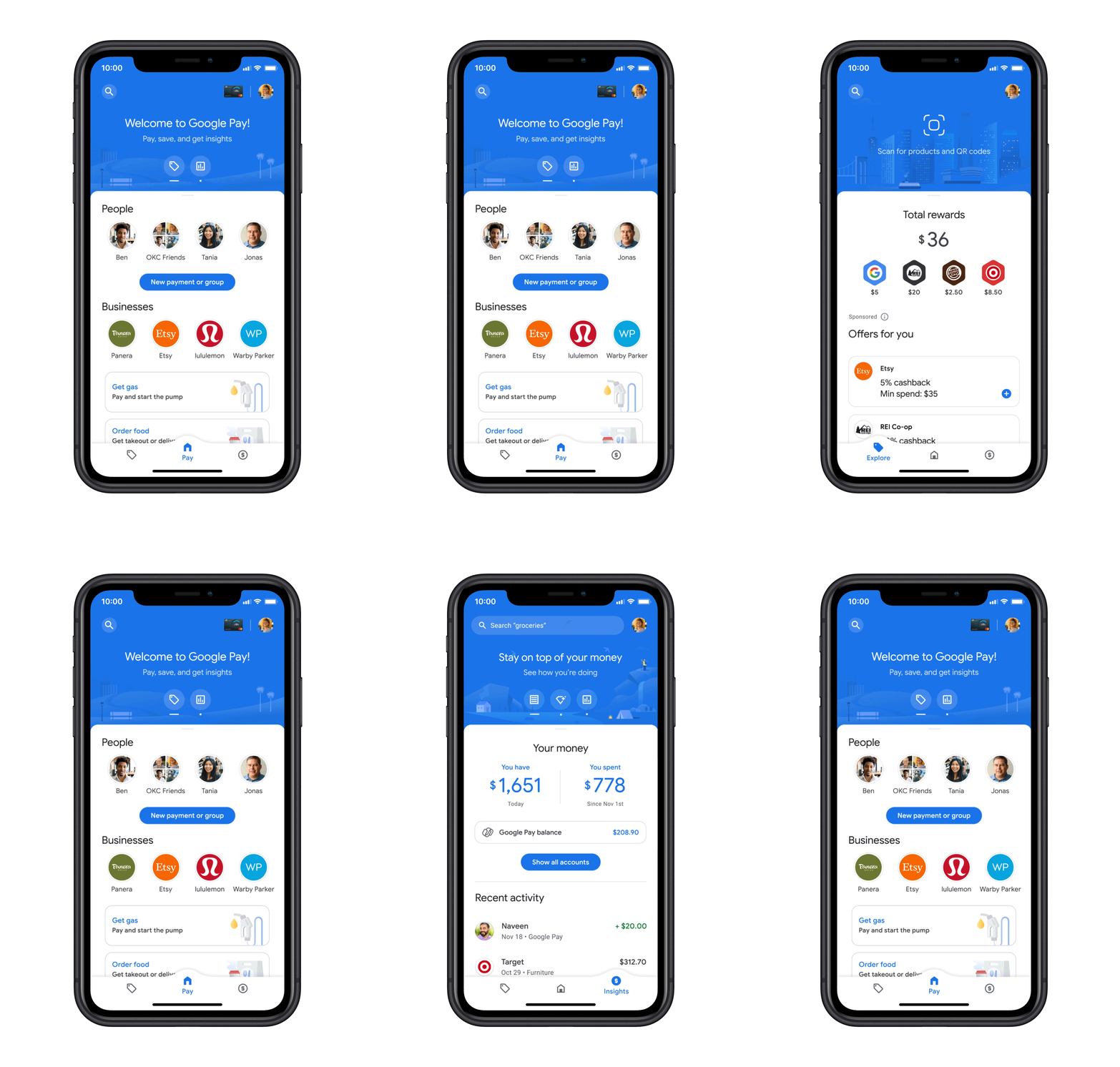
Let's take a closer look at the app's three key tabs: Pay, Explore and Insights.
Pay
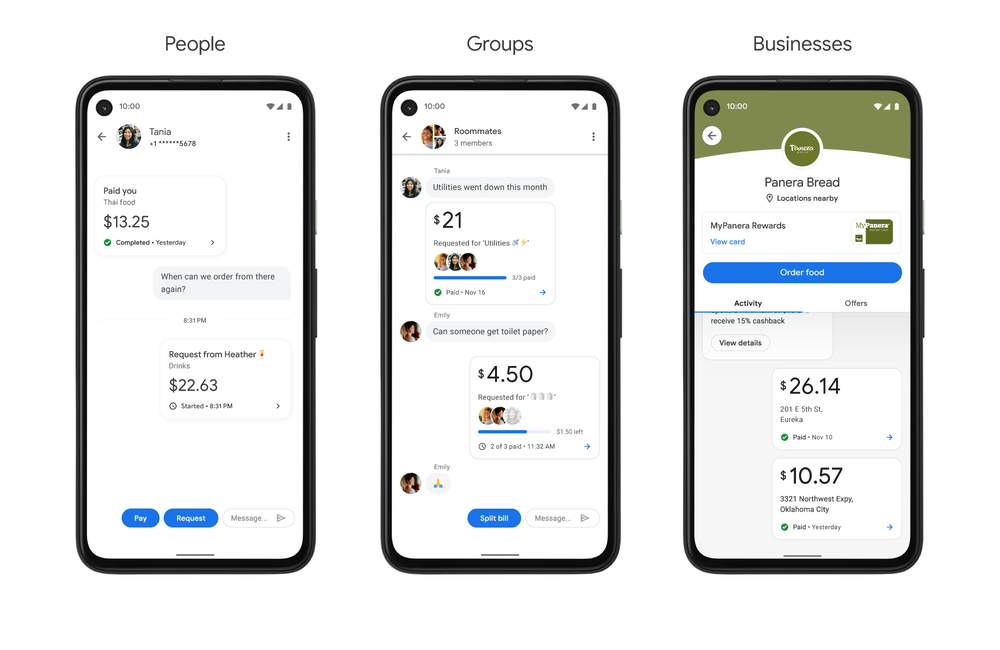
This is the center and primary tab on the app. Exactly as it sounds, it's where you manage your payments — both peer-to-peer and tap-to-pay at retailers. In addition to being able to send money to friends and make contactless payments, you can now use the app to split expenses with groups and place orders with businesses. More specifically, Google says that you can now order food at more than 100,000 restaurants, buy gas at more than 30,000 gas stations (i.e. Shell, ExxonMobil, and 76) and pay for parking in over 400 cities -- all from within the app. This means you'll need one less food delivery app on your phone and can reduce your contact with high-touch surfaces at gas stations and parking lots, which is very COVID-19-friendly.
Payments have a chat-like view so you can easily track when payments were made or see if you have any pending payments. If you have store loyalty cards stored in your account, they should automatically show up in your "conversation" with the corresponding business if Google Pay is available to associate them. You'll also be able to see special offers from businesses here, but we'll get more into that later on.
Related: COVID-19 is moving us closer to a contactless (and cashless) future
Explore
The Explore tab is essentially a deals page. At first glance, it looks similar to programs such as Amex Offers and Chase Offers.
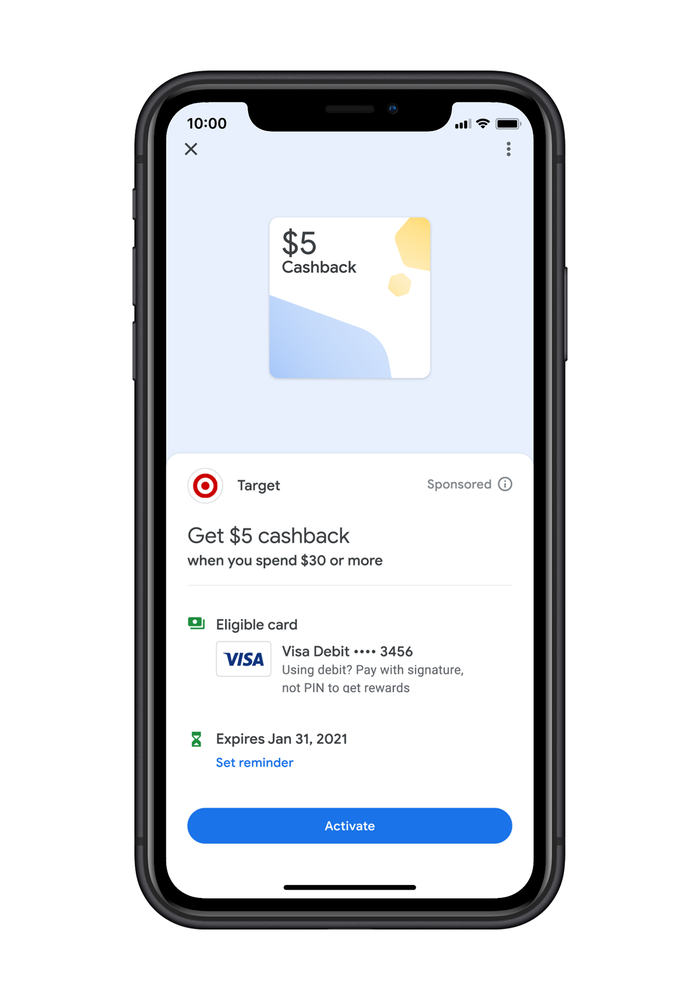
On this tab, you're able to browse through various deals and link them to your account. As Google describes it, it allows you to save money and redeem offers without the hassle of clipping coupons or copying and pasting promo codes.

After activating an offer on the app, it will automatically apply when you pay in-store or online with any linked card. Similar to online shopping portals, any cash back you earn goes into your Google Pay account. It's not an instant rebate and you'll need to transfer it out if you want to deposit it into your bank account.
For now, you can expect offers from major brands including Burger King, Etsy, REI Co-op, Sweetgreen, Target and Warby Parker. If you give Google permission to monitor your transactions, you'll be able to get offers customized for you. It's important to note that Google Pay does not use your transaction history to personalize your experience within the app by default. Additionally, Google Pay says that it will never sell your data to third parties or share your transaction history with the rest of Google for targeting ads.
Related: The best rewards credit cards
In addition to the offers, the Explore tab is home to a QR and barcode scanner. This allows you to quickly compare prices of items with other stores when shopping. This is especially useful for stores like Target and Best Buy that offer price match guarantees.
Insights
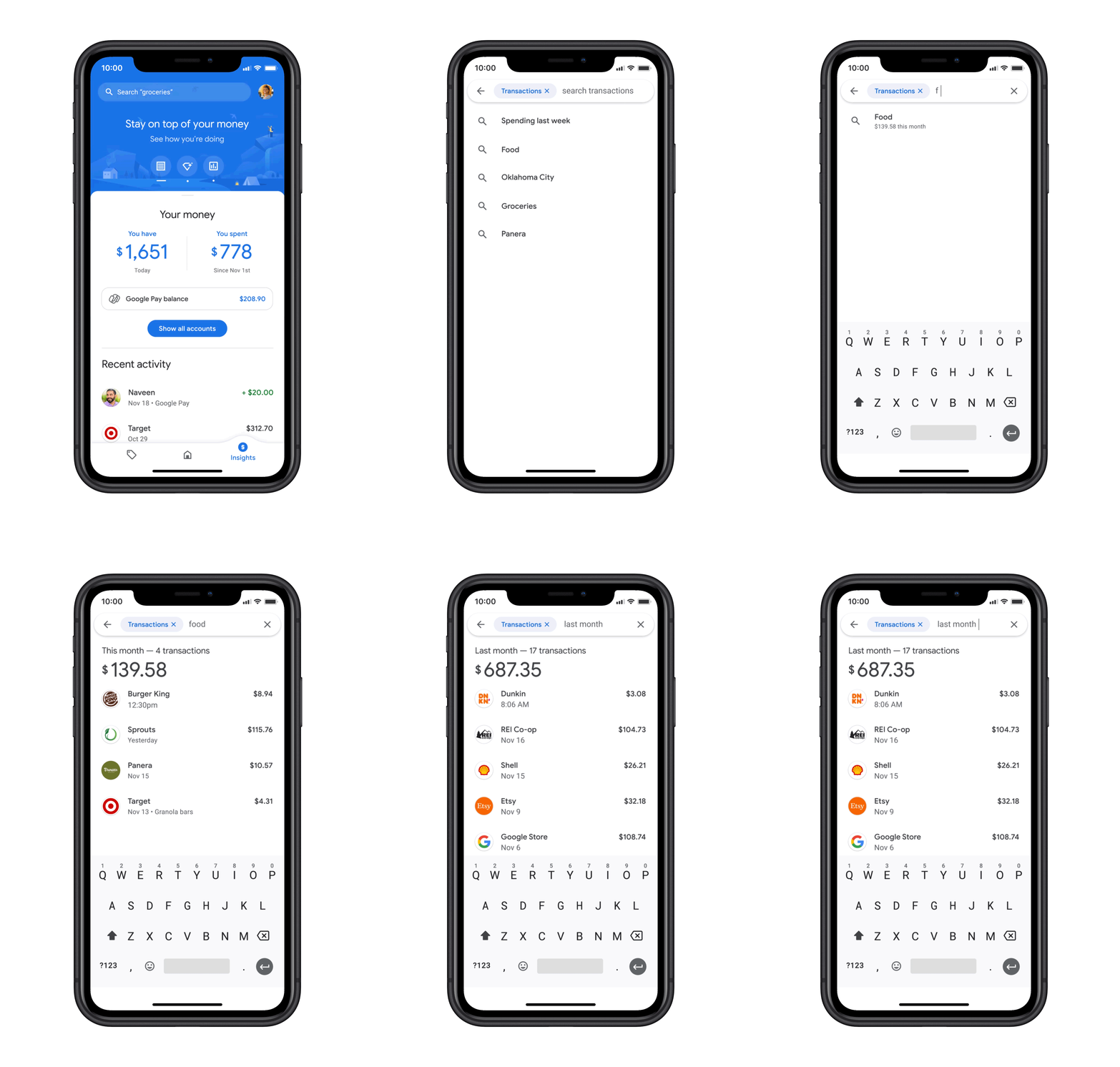
The final tab on the app is Insights. Here you can see an overview of your spending with any banking or credit accounts you connected to the app.
You'll get spending summaries and can see your trends over time. For instance, on Mondays, you'll get a summary of how much you spent on the weekend. Google Pay's algorithms automatically categorize your transactions so you can search for keywords like "food" or "flights" and find all relevant transactions. Heck, according to Google, you can even search for more specific terms, such as "Mexican restaurants," or search by location. While most credit cards and bank accounts allow you to sort transactions, they don't allow you to search with this level of detail.
For more accurate results, you can also link your Gmail and Google Photos accounts. If you opt in, Google Pay will automatically scan for receipts and link them to the corresponding transaction. Once again, Google says that it doesn't share your transaction history with any third party and doesn't use it for targeting ads.
Related: The best apps for money management
Bottom line
Assuming you opt into all of the features, Google Pay offers all the tools you need from a money management app. It makes transactions simpler potentially and more rewarding. The biggest thing missing from the app is the integration of bank accounts, but that's coming next year. Google Plex accounts, which will be offered by banks like Citi and the Stanford Federal Credit Union, will be free to open and promise no monthly fees or overdraft charges. The app also doesn't let you track credit card points or miles, but you'll be able to use the new TPG app for that when it launches next year. Unlike Apple and its Apple Card, Google doesn't have plans to release its own credit card for the time being.
Screenshots courtesy of Google.
TPG featured card

at American Express's secure site
Terms & restrictions apply. See rates & fees.
| 4X | Earn 4X Membership Rewards® points per dollar spent on purchases at restaurants worldwide, on up to $50,000 in purchases per calendar year, then 1X points for the rest of the year. |
| 4X | Earn 4X Membership Rewards® points per dollar spent at US supermarkets, on up to $25,000 in purchases per calendar year, then 1X points for the rest of the year. |
| 5X | Earn 5X Membership Rewards® points on prepaid hotel stays booked through AmexTravel.com or the Amex Travel App™. |
| 3X | Earn 3X Membership Rewards® points on flights booked through AmexTravel.com, the Amex Travel App™, or purchased directly from airlines. |
| 2X | Earn 2X Membership Rewards® points on prepaid car rentals booked through AmexTravel.com or the Amex Travel App™ and cruises booked and paid through AmexTravel.com. |
| 1X | Earn 1X Membership Rewards® point per dollar spent on all other eligible purchases. |
Pros
- Valuable dining and food-related credits
- Flexible rewards with airline and hotel transfer partners
- Multiple travel and purchase protections
- No foreign transaction fees
- Access to Amex Offers for additional savings (enrollment required)
Cons
- Not as useful for those living outside the U.S.
- Some may have trouble using Uber and other dining credits
- You may be eligible for as high as 100,000 Membership Rewards® Points after you spend $8,000 in eligible purchases on your new Card in your first 6 months of Card Membership. Welcome offers vary and you may not be eligible for an offer. Apply to know if you’re approved and find out your exact welcome offer amount – all with no credit score impact. If you’re approved and choose to accept the Card, your score may be impacted.
- Earn 4X Membership Rewards® points per dollar spent on purchases at restaurants worldwide, on up to $50,000 in purchases per calendar year, then 1X points for the rest of the year.
- Earn 4X Membership Rewards® points per dollar spent at US supermarkets, on up to $25,000 in purchases per calendar year, then 1X points for the rest of the year.
- Earn 5X Membership Rewards® points on prepaid hotel stays booked through AmexTravel.com or the Amex Travel App™.
- Earn 3X Membership Rewards® points on flights booked through AmexTravel.com, the Amex Travel App™, or purchased directly from airlines.
- Earn 2X Membership Rewards® points on prepaid car rentals booked through AmexTravel.com or the Amex Travel App™ and cruises booked and paid through AmexTravel.com.
- Earn 1X Membership Rewards® point per dollar spent on all other eligible purchases.
- Pay It® lets you tap in the American Express® App to quickly pay for small purchase amounts throughout the month and still earn rewards the way you usually do. Plan It® gives you the option to split up big purchases into equal monthly payments with a fixed fee. You’ll know upfront exactly how much you’ll pay.
- $120 Dining Credit: Earn up to a total of $10 in statement credits monthly when you pay with the Gold Card at Grubhub (including Seamless), Buffalo Wild Wings, Five Guys, The Cheesecake Factory, and Wonder. This can be an annual savings of up to $120. Enrollment required.
- $100 Resy Credit: Get up to $100 in statement credits each calendar year at over 10,000 qualifying U.S. Resy restaurants after you pay for eligible purchases with the American Express® Gold Card. That’s up to $50 in statement credits semi-annually. Enrollment required.
- $84 Dunkin' Credit: Earn up to $7 in monthly statement credits after you pay with the American Express® Gold Card at U.S. Dunkin’ locations. Enrollment required.
- $120 Uber Cash on Gold: Enjoy up to $120 in Uber Cash annually with your Gold Card. Just add your Card to your Uber account and you'll get $10 in Uber Cash each month to use on orders and rides in the U.S. when you select an Amex Card for your transaction.
- Enjoy complimentary Hertz Five Star® Status benefits like skipping the counter at select locations, adding an additional driver at no additional cost*, and vehicle upgrades**. Benefit enrollment and Hertz Gold+ registration are required. *Additional drivers must meet standard rental qualifications and must be a spouse or domestic partner to qualify as complimentary. Other additional drivers subject to fees. **Benefits are subject to availability and vary by location. Additional Hertz program Terms and Conditions including age restrictions apply.
- Book two nights or more with The Hotel Collection through AmexTravel.com or the Amex Travel App™ and receive a $100* credit towards eligible charges at over 1,400 upscale hotels worldwide. *Eligible charges vary by property.
- Book your travel through the Amex Travel App™ with added peace of mind – backed by American Express® service and support. Only for American Express® Card Members.
- Whenever you need us, we're here. Our Member Services team will ensure you are taken care of. From lost Card replacement to statement questions, we are available to help 24/7.
- No Foreign Transaction Fees.
- Annual Fee is $325.
- Terms Apply.