Cruise luggage tags: A printable PDF with a TPG twist


After you've checked in for your cruise, you won't want to forget your luggage tags — and I don't mean the hard plastic ones with your contact information that you attach to your suitcases in case your bags are lost.
Your cruise line will generally provide you with a PDF file of luggage tags to print as part of your electronic travel documents when you've completed your registration and provided your necessary details. However, if you're tired of the same old cruise line luggage tags, check out our special TPG version below, which you can use to supplement the ones your cruise line gives you.
Printable luggage tags for your next cruise
Click here or on the link below the photo to open a PDF file that you can print or download and save.
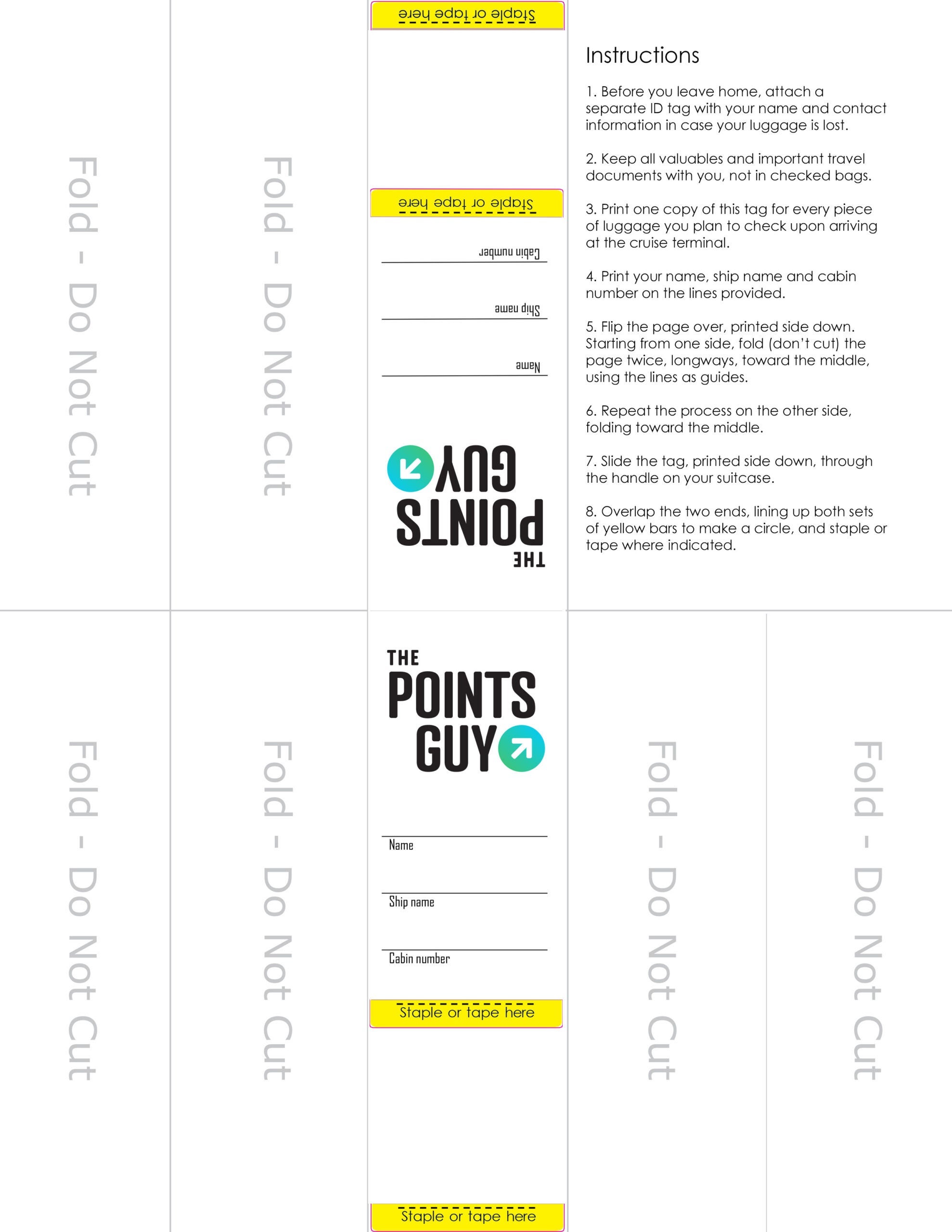
Click here to print or download the above cruise luggage tags.
How to print the cruise luggage tags
- Click the link above to open the PDF version of the luggage tag. (You must have Adobe Acrobat reader installed on your computer.)
- Click the printer icon near the top right corner of the screen.
- Select your printer; make any necessary adjustments to page orientation, size and color; and set the number of copies you'll need. (Print one copy per piece of luggage that you plan to leave with porters when you arrive at the terminal. You don't need them for items you plan to personally carry onto the ship with you.)
- Click the "print" button.
How to attach the cruise luggage tags
- Using a pen, print your name, the ship's name and your sailing date and cabin number on the lines provided.
- Flip the page over so the printed side is facing down.
- Starting at one end, fold the paper twice, longways, toward the middle, using the printed lines as guides.
- Repeat step three from the other end. (The goal is to have a long, skinny strip that displays only the portion of the tag with the TPG logo and lines for your information, with the rest of the page folded underneath to make it thicker.)
- Slide the tag face down through the handle on your suitcase.
- Overlap the two ends so the yellow bars line up, creating a ring, and staple or tape the tag in place.

Tip: If you're flying to your embarkation destination, wait until after your flight to attach the tags to your luggage so they don't detach during transit. Be sure to use them in addition to your cruise line's printable tags, not instead of them.
If you think you need a sturdier way to display your luggage tag information, I recommend these protective cruise luggage tag holders that are reusable and won't rip like paper does. You can also try laminating your folded luggage tags with packing tape to prevent tears before securing them to your bag.
Planning a cruise? Start with these stories:
- The 5 most desirable cabin locations on any cruise ship
- A beginners guide to picking a cruise line
- The 8 worst cabin locations on any cruise ship
- The ultimate guide to what to pack for a cruise
- A quick guide to the most popular cruise lines
- 21 tips and tricks that will make your cruise go smoothly
- Top ways cruisers waste money
- The ultimate guide to choosing a cruise ship cabin
TPG featured card

at American Express's secure site
Terms & restrictions apply. See rates & fees.
| 4X | Earn 4X Membership Rewards® points per dollar spent on purchases at restaurants worldwide, on up to $50,000 in purchases per calendar year, then 1X points for the rest of the year. |
| 4X | Earn 4X Membership Rewards® points per dollar spent at US supermarkets, on up to $25,000 in purchases per calendar year, then 1X points for the rest of the year. |
| 5X | Earn 5X Membership Rewards® points on prepaid hotel stays booked through AmexTravel.com or the Amex Travel App™. |
| 3X | Earn 3X Membership Rewards® points on flights booked through AmexTravel.com, the Amex Travel App™, or purchased directly from airlines. |
| 2X | Earn 2X Membership Rewards® points on prepaid car rentals booked through AmexTravel.com or the Amex Travel App™ and cruises booked and paid through AmexTravel.com. |
| 1X | Earn 1X Membership Rewards® point per dollar spent on all other eligible purchases. |
Pros
- Valuable dining and food-related credits
- Flexible rewards with airline and hotel transfer partners
- Multiple travel and purchase protections
- No foreign transaction fees
- Access to Amex Offers for additional savings (enrollment required)
Cons
- Not as useful for those living outside the U.S.
- Some may have trouble using Uber and other dining credits
- You may be eligible for as high as 100,000 Membership Rewards® Points after you spend $8,000 in eligible purchases on your new Card in your first 6 months of Card Membership. Welcome offers vary and you may not be eligible for an offer. Apply to know if you’re approved and find out your exact welcome offer amount – all with no credit score impact. If you’re approved and choose to accept the Card, your score may be impacted.
- Earn 4X Membership Rewards® points per dollar spent on purchases at restaurants worldwide, on up to $50,000 in purchases per calendar year, then 1X points for the rest of the year.
- Earn 4X Membership Rewards® points per dollar spent at US supermarkets, on up to $25,000 in purchases per calendar year, then 1X points for the rest of the year.
- Earn 5X Membership Rewards® points on prepaid hotel stays booked through AmexTravel.com or the Amex Travel App™.
- Earn 3X Membership Rewards® points on flights booked through AmexTravel.com, the Amex Travel App™, or purchased directly from airlines.
- Earn 2X Membership Rewards® points on prepaid car rentals booked through AmexTravel.com or the Amex Travel App™ and cruises booked and paid through AmexTravel.com.
- Earn 1X Membership Rewards® point per dollar spent on all other eligible purchases.
- Pay It® lets you tap in the American Express® App to quickly pay for small purchase amounts throughout the month and still earn rewards the way you usually do. Plan It® gives you the option to split up big purchases into equal monthly payments with a fixed fee. You’ll know upfront exactly how much you’ll pay.
- $120 Dining Credit: Earn up to a total of $10 in statement credits monthly when you pay with the Gold Card at Grubhub (including Seamless), Buffalo Wild Wings, Five Guys, The Cheesecake Factory, and Wonder. This can be an annual savings of up to $120. Enrollment required.
- $100 Resy Credit: Get up to $100 in statement credits each calendar year at over 10,000 qualifying U.S. Resy restaurants after you pay for eligible purchases with the American Express® Gold Card. That’s up to $50 in statement credits semi-annually. Enrollment required.
- $84 Dunkin' Credit: Earn up to $7 in monthly statement credits after you pay with the American Express® Gold Card at U.S. Dunkin’ locations. Enrollment required.
- $120 Uber Cash on Gold: Enjoy up to $120 in Uber Cash annually with your Gold Card. Just add your Card to your Uber account and you'll get $10 in Uber Cash each month to use on orders and rides in the U.S. when you select an Amex Card for your transaction.
- Enjoy complimentary Hertz Five Star® Status benefits like skipping the counter at select locations, adding an additional driver at no additional cost*, and vehicle upgrades**. Benefit enrollment and Hertz Gold+ registration are required. *Additional drivers must meet standard rental qualifications and must be a spouse or domestic partner to qualify as complimentary. Other additional drivers subject to fees. **Benefits are subject to availability and vary by location. Additional Hertz program Terms and Conditions including age restrictions apply.
- Book two nights or more with The Hotel Collection through AmexTravel.com or the Amex Travel App™ and receive a $100* credit towards eligible charges at over 1,400 upscale hotels worldwide. *Eligible charges vary by property.
- Book your travel through the Amex Travel App™ with added peace of mind – backed by American Express® service and support. Only for American Express® Card Members.
- Whenever you need us, we're here. Our Member Services team will ensure you are taken care of. From lost Card replacement to statement questions, we are available to help 24/7.
- No Foreign Transaction Fees.
- Annual Fee is $325.
- Terms Apply.