How to Stop Apps From Tracking You While Traveling


This week, a privacy bug in Apple's inbuilt FaceTime calling software was discovered. In a nutshell, it allowed users to hear (and in some cases see) another person they dialed without the other party even answering. Apple has since disabled group FaceTime calling on its side until a fix is issued, which should come later this week per an official statement.
While you'd be wise to turn FaceTime off completely until the bug is fixed, it's also worth pausing to check your privacy settings more broadly so you're aware of what's tracking you and when.
Manage Your Location Services
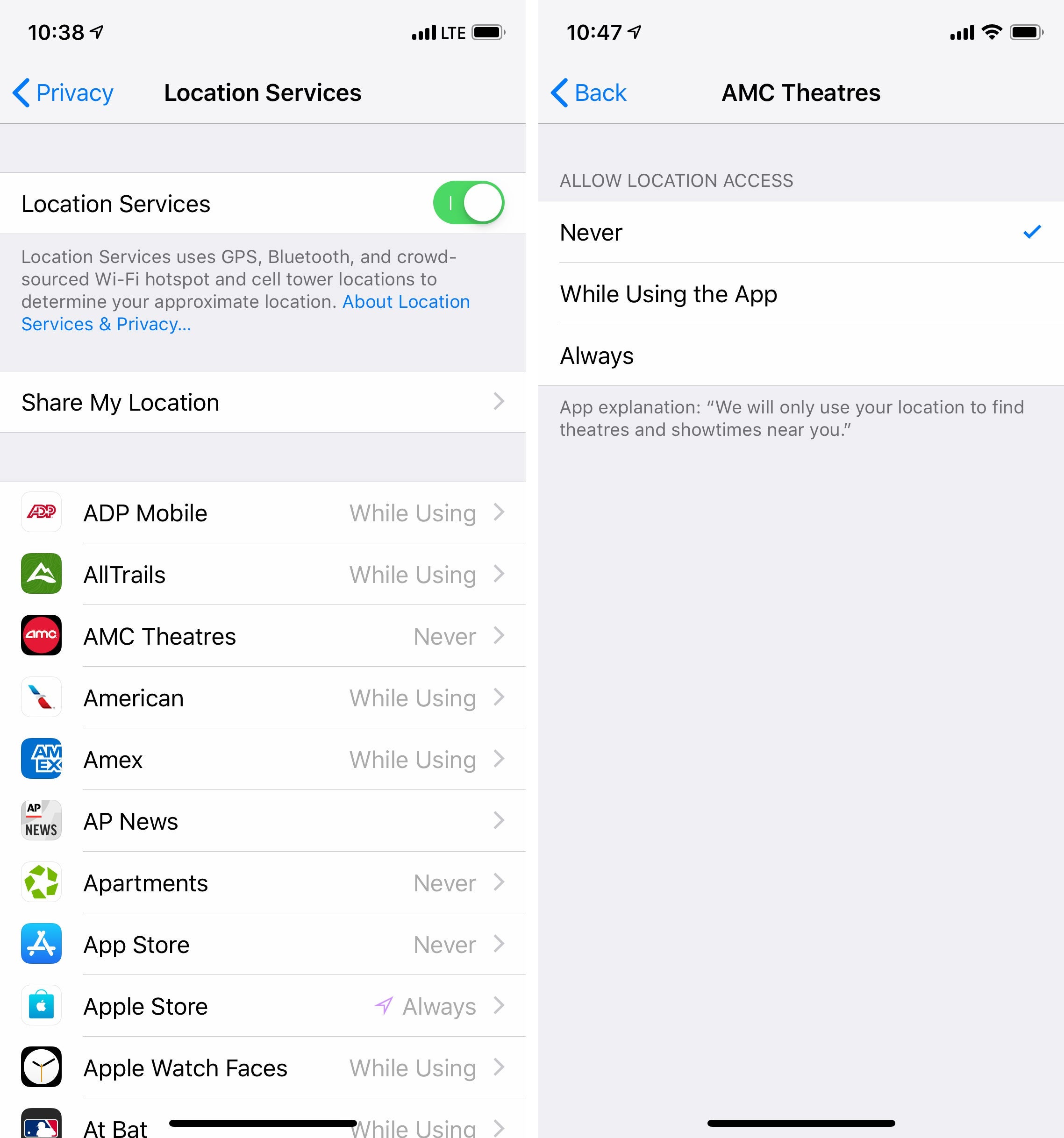
Unfortunately, most apps that you install on your smartphone or tablet will attempt to enable a sneaky setting by default. If you aren't careful, you can easily tap through a confirmation upon initial setup that gives the app permission to track your location at all times, even when you aren't actively using the app.
App developers love data. They love location data, usage data and personalization data. This data can be used for good — for example, Google Maps can use real-time traffic data to generate accurate forecasts of how bad future traffic will be — but it can also be used for ill. The trouble is that you, the end user, rarely have a bead on how a developer will use your data. Will they sell it to advertisers? Will they use it to target you with a product they're hawking? All of the above?

Granted, most travel related apps require that location services are enabled for them to be useful at all. While you should always consider how well you trust a certain company or developer, you can typically restrict apps from using your location data when you aren't actively using the app.
On Apple's iPhone and iPad products, you can check this by doing the following:
- Open Settings
- Pull down to find the search box, and input "Privacy"
- Within Privacy, tap into Location Services
- Comb through each app listed and select "While Using the App" for each app
- If the above option isn't available, toggle "Never" until you're using the app; you'll need to manually turn Location Services on and off for these apps each time you use the app.
If you have a phone or tablet running Google's Android operating system, Google has an entire guide devoted to managing location settings across the system as a whole as well as in individual apps.
Use the Web Instead of Apps
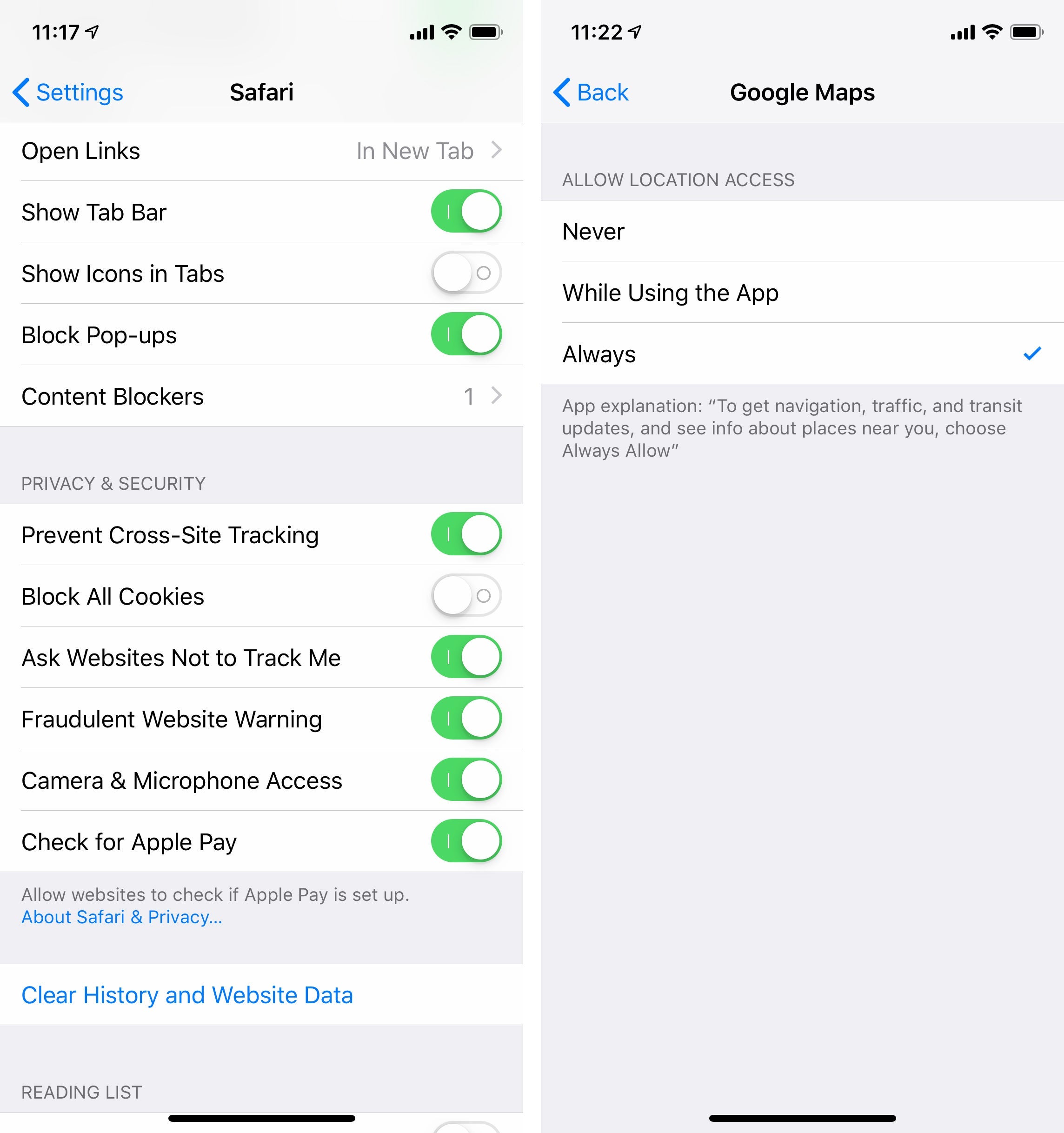
This is a more extreme option for those looking to truly purge their phone of avenues for tracking. Instead of downloading a dedicated app to check the weather, social media and even your credit cards, use a web browser like Apple Safari or Google Chrome.
This begins with deleting any app that has a suitable web-based replacement. Instead of downloading a weather app, for example, open a private browsing tab in your phone's browser and bookmark a weather website. You can then focus your efforts on ensuring that your browser disallows location tracking. Additionally, you can toggle your browser to block all cookies, request Do Not Track and prevent cross-site tracking within Settings.

For Apple users, you can take things a step further by downloading a content tracker compatible with the Safari web browser, such as Refine. In essence, the fewer apps you have on your phone, the fewer programs you'll need to be mindful of when it comes to tracking you.
Have any other tips for keeping tracking at bay on your smartphone and tablet? Let us know in comments below!
For more TPG news delivered each morning to your inbox, sign up for our daily newsletter here!
TPG featured card
at American Express's secure site
Terms & restrictions apply. See rates & fees.
| 4X | Earn 4X Membership Rewards® points per dollar spent on purchases at restaurants worldwide, on up to $50,000 in purchases per calendar year, then 1X points for the rest of the year. |
| 4X | Earn 4X Membership Rewards® points per dollar spent at US supermarkets, on up to $25,000 in purchases per calendar year, then 1X points for the rest of the year. |
| 5X | Earn 5X Membership Rewards® points on prepaid hotel stays booked through AmexTravel.com or the Amex Travel App™. |
| 3X | Earn 3X Membership Rewards® points on flights booked through AmexTravel.com, the Amex Travel App™, or purchased directly from airlines. |
| 2X | Earn 2X Membership Rewards® points on prepaid car rentals booked through AmexTravel.com or the Amex Travel App™ and cruises booked and paid through AmexTravel.com. |
| 1X | Earn 1X Membership Rewards® point per dollar spent on all other eligible purchases. |
Pros
- Valuable dining and food-related credits
- Flexible rewards with airline and hotel transfer partners
- Multiple travel and purchase protections
- No foreign transaction fees
- Access to Amex Offers for additional savings (enrollment required)
Cons
- Not as useful for those living outside the U.S.
- Some may have trouble using Uber and other dining credits
- You may be eligible for as high as 100,000 Membership Rewards® Points after you spend $8,000 in eligible purchases on your new Card in your first 6 months of Card Membership. Welcome offers vary and you may not be eligible for an offer. Apply to know if you’re approved and find out your exact welcome offer amount – all with no credit score impact. If you’re approved and choose to accept the Card, your score may be impacted.
- Earn 4X Membership Rewards® points per dollar spent on purchases at restaurants worldwide, on up to $50,000 in purchases per calendar year, then 1X points for the rest of the year.
- Earn 4X Membership Rewards® points per dollar spent at US supermarkets, on up to $25,000 in purchases per calendar year, then 1X points for the rest of the year.
- Earn 5X Membership Rewards® points on prepaid hotel stays booked through AmexTravel.com or the Amex Travel App™.
- Earn 3X Membership Rewards® points on flights booked through AmexTravel.com, the Amex Travel App™, or purchased directly from airlines.
- Earn 2X Membership Rewards® points on prepaid car rentals booked through AmexTravel.com or the Amex Travel App™ and cruises booked and paid through AmexTravel.com.
- Earn 1X Membership Rewards® point per dollar spent on all other eligible purchases.
- Pay It® lets you tap in the American Express® App to quickly pay for small purchase amounts throughout the month and still earn rewards the way you usually do. Plan It® gives you the option to split up big purchases into equal monthly payments with a fixed fee. You’ll know upfront exactly how much you’ll pay.
- $120 Dining Credit: Earn up to a total of $10 in statement credits monthly when you pay with the Gold Card at Grubhub (including Seamless), Buffalo Wild Wings, Five Guys, The Cheesecake Factory, and Wonder. This can be an annual savings of up to $120. Enrollment required.
- $100 Resy Credit: Get up to $100 in statement credits each calendar year at over 10,000 qualifying U.S. Resy restaurants after you pay for eligible purchases with the American Express® Gold Card. That’s up to $50 in statement credits semi-annually. Enrollment required.
- $84 Dunkin' Credit: Earn up to $7 in monthly statement credits after you pay with the American Express® Gold Card at U.S. Dunkin’ locations. Enrollment required.
- $120 Uber Cash on Gold: Enjoy up to $120 in Uber Cash annually with your Gold Card. Just add your Card to your Uber account and you'll get $10 in Uber Cash each month to use on orders and rides in the U.S. when you select an Amex Card for your transaction.
- Enjoy complimentary Hertz Five Star® Status benefits like skipping the counter at select locations, adding an additional driver at no additional cost*, and vehicle upgrades**. Benefit enrollment and Hertz Gold+ registration are required. *Additional drivers must meet standard rental qualifications and must be a spouse or domestic partner to qualify as complimentary. Other additional drivers subject to fees. **Benefits are subject to availability and vary by location. Additional Hertz program Terms and Conditions including age restrictions apply.
- Book two nights or more with The Hotel Collection through AmexTravel.com and receive a $100* credit towards eligible charges at over 1,300 upscale hotels worldwide.§ *Eligible charges vary by property.
- Book your travel through the Amex Travel App™ with added peace of mind – backed by American Express® service and support. Only for American Express® Card Members.
- Whenever you need us, we're here. Our Member Services team will ensure you are taken care of. From lost Card replacement to statement questions, we are available to help 24/7.
- No Foreign Transaction Fees.
- Annual Fee is $325.
- Terms Apply.