Save Money By Changing This Paypal Currency Setting


When you travel to another country it is common to be asked when paying with a credit card if you want to be charged in the local currency or in US dollars. While it may seem counter-intuitive at first, the correct answer is virtually always to be charged in local currency as otherwise you are very, very likely to lose out on a less than favorable exchange rate. Of course you also want to be sure to pay with a credit card that does not charge a foreign transaction fee so you aren't hit with a roughly 3% fee by your bank every time you use your card abroad to pay in local currency.
I knew that #traveltruth, but I had never dealt with this issue from my home when using Paypal online to pay for services from another country. I'm sure some of you have already experienced this phenomenon, but if you haven't yet, be aware that you have to be on guard when using Paypal to pay for services billed in a different currency or you may end up wasting money on unfavorable exchange rates because of a Paypal default setting.
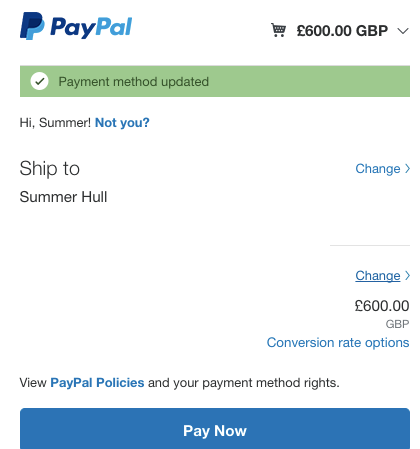
To give an example, I recently had a £600 bill to pay via PayPal and when I went to pay it I was surprised that it was displaying the price in USD.
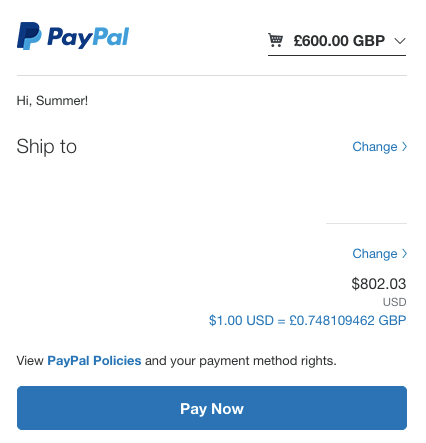
Not only that, but I was surprised that the converted total was as high as it was, as I figured that it would convert to less than $800 USD. Turns out that the default setting in PayPal seems to be convert the transaction to the currency of the credit card you have on file, at least for Visa and MasterCard cards.
You can change the setting to bill you in the currency listed in the seller's invoice by following several steps, but it isn't an intuitive process so I'll outline how I got it done.
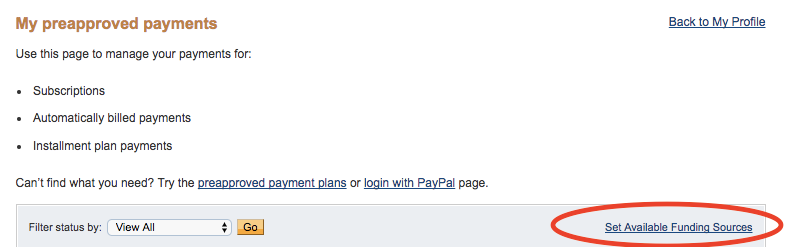
To change the conversion settings, log into your PayPal account and then click on "Payments" on the top bar. Next, select "Manage Pre-approved Payments". From that screen you can select a tiny "Set Available Funding Sources" link as shown below.
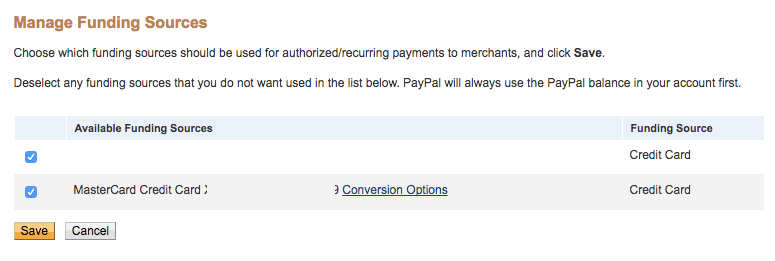
On the Manage Funding Sources screen you can click the hyperlink "Conversion Options" by the Visa and MasterCard cards to change their conversion settings.
You can then click off of the default setting on top and instead have Paypal bill your card in the currency listed on the seller's invoice as indicated by the second option.
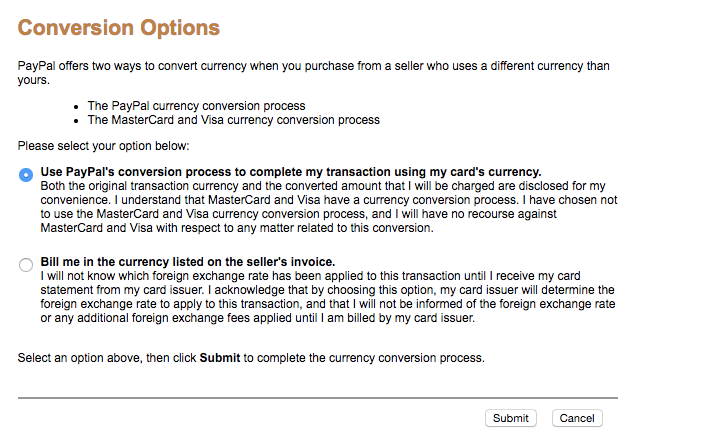
Once I changed this setting I then was able to view and pay the bill in pounds with that specific credit card.

Now let's talk again about why I wanted to do that in the first place. Paypal was converting £600 into $802.03, but when I instead paid in pounds and let my bank do the conversion for me I instead paid just $775.32.

That is roughly $27 saved by paying in 'local currency' and trusting my bank's conversion rate over the payment system at hand. Have you ever dealt with this issue? Do you have any other money saving tips when dealing with different currencies?
TPG featured card

at American Express's secure site
Terms & restrictions apply. See rates & fees.
| 4X | Earn 4X Membership Rewards® points per dollar spent on purchases at restaurants worldwide, on up to $50,000 in purchases per calendar year, then 1X points for the rest of the year. |
| 4X | Earn 4X Membership Rewards® points per dollar spent at US supermarkets, on up to $25,000 in purchases per calendar year, then 1X points for the rest of the year. |
| 5X | Earn 5X Membership Rewards® points on prepaid hotel stays booked through AmexTravel.com or the Amex Travel App™. |
| 3X | Earn 3X Membership Rewards® points on flights booked through AmexTravel.com, the Amex Travel App™, or purchased directly from airlines. |
| 2X | Earn 2X Membership Rewards® points on prepaid car rentals booked through AmexTravel.com or the Amex Travel App™ and cruises booked and paid through AmexTravel.com. |
| 1X | Earn 1X Membership Rewards® point per dollar spent on all other eligible purchases. |
Pros
- Valuable dining and food-related credits
- Flexible rewards with airline and hotel transfer partners
- Multiple travel and purchase protections
- No foreign transaction fees
- Access to Amex Offers for additional savings (enrollment required)
Cons
- Not as useful for those living outside the U.S.
- Some may have trouble using Uber and other dining credits
- You may be eligible for as high as 100,000 Membership Rewards® Points after you spend $8,000 in eligible purchases on your new Card in your first 6 months of Card Membership. Welcome offers vary and you may not be eligible for an offer. Apply to know if you’re approved and find out your exact welcome offer amount – all with no credit score impact. If you’re approved and choose to accept the Card, your score may be impacted.
- Earn 4X Membership Rewards® points per dollar spent on purchases at restaurants worldwide, on up to $50,000 in purchases per calendar year, then 1X points for the rest of the year.
- Earn 4X Membership Rewards® points per dollar spent at US supermarkets, on up to $25,000 in purchases per calendar year, then 1X points for the rest of the year.
- Earn 5X Membership Rewards® points on prepaid hotel stays booked through AmexTravel.com or the Amex Travel App™.
- Earn 3X Membership Rewards® points on flights booked through AmexTravel.com, the Amex Travel App™, or purchased directly from airlines.
- Earn 2X Membership Rewards® points on prepaid car rentals booked through AmexTravel.com or the Amex Travel App™ and cruises booked and paid through AmexTravel.com.
- Earn 1X Membership Rewards® point per dollar spent on all other eligible purchases.
- Pay It® lets you tap in the American Express® App to quickly pay for small purchase amounts throughout the month and still earn rewards the way you usually do. Plan It® gives you the option to split up big purchases into equal monthly payments with a fixed fee. You’ll know upfront exactly how much you’ll pay.
- $120 Dining Credit: Earn up to a total of $10 in statement credits monthly when you pay with the Gold Card at Grubhub (including Seamless), Buffalo Wild Wings, Five Guys, The Cheesecake Factory, and Wonder. This can be an annual savings of up to $120. Enrollment required.
- $100 Resy Credit: Get up to $100 in statement credits each calendar year at over 10,000 qualifying U.S. Resy restaurants after you pay for eligible purchases with the American Express® Gold Card. That’s up to $50 in statement credits semi-annually. Enrollment required.
- $84 Dunkin' Credit: Earn up to $7 in monthly statement credits after you pay with the American Express® Gold Card at U.S. Dunkin’ locations. Enrollment required.
- $120 Uber Cash on Gold: Enjoy up to $120 in Uber Cash annually with your Gold Card. Just add your Card to your Uber account and you'll get $10 in Uber Cash each month to use on orders and rides in the U.S. when you select an Amex Card for your transaction.
- Enjoy complimentary Hertz Five Star® Status benefits like skipping the counter at select locations, adding an additional driver at no additional cost*, and vehicle upgrades**. Benefit enrollment and Hertz Gold+ registration are required. *Additional drivers must meet standard rental qualifications and must be a spouse or domestic partner to qualify as complimentary. Other additional drivers subject to fees. **Benefits are subject to availability and vary by location. Additional Hertz program Terms and Conditions including age restrictions apply.
- Book two nights or more with The Hotel Collection through AmexTravel.com or the Amex Travel App™ and receive a $100* credit towards eligible charges at over 1,400 upscale hotels worldwide. *Eligible charges vary by property.
- Book your travel through the Amex Travel App™ with added peace of mind – backed by American Express® service and support. Only for American Express® Card Members.
- Whenever you need us, we're here. Our Member Services team will ensure you are taken care of. From lost Card replacement to statement questions, we are available to help 24/7.
- No Foreign Transaction Fees.
- Annual Fee is $325.
- Terms Apply.