Skip to content

How to set up autopay for all your credit cards

Aug. 05, 2024
4 min read
Happy man sitting and drinking coffee at cafe using his phone with credit card
The cards we feature here are from partners who compensate us when you are approved through our site, and this may impact how or where these products appear. We don’t cover all available credit cards, but our analysis, reviews, and opinions are entirely from our editorial team. Terms apply to the offers listed on this page. Please view our advertising policy and product review methodology for more information.

Editor's Note

This is a recurring post, regularly updated with new information and offers.  

It's probably happened at least once to everyone here: You log into your bank account to make a payment and realize that you've just missed your payment deadline. The result is the same whether you were off by one day or one week — late fees and penalties await those who fail to make timely payments.

You can avoid any potential late payment worries by setting up automatic payments. This service, offered by essentially every bank out there, allows you to set a recurring monthly payment on your credit cards, so you'll never have to worry about missing one again.

The process for setting up autopay is fairly simple to navigate. Here's how.

Log in to your bank account

To get started, you'll need to log in to your bank account. Since I have a Chase Sapphire Preferred® Card (see rates and fees), I'll use this account to illustrate how it's done.

You can also call in to set this up if you don't have an online account. However, creating a username and password makes accessing your information much easier.

Navigate to your account

Once you log into your account, you'll be at your account dashboard. On Chase's website, you'll see a list of your credit cards in the "Accounts" tab. Click on the individual card, and a pop-up will appear, giving you additional information, including the ability to set up automatic payments.

CHASE

The process is similar across most banks' sites. From your home page, navigate to a single credit card or click to the payments page to find the autopay option.

Set up your payment

From here, you can begin to set up your payments. If you don't already have a bank account linked for payments, you'll need to do that now. To do so, you'll need your bank account and routing numbers.

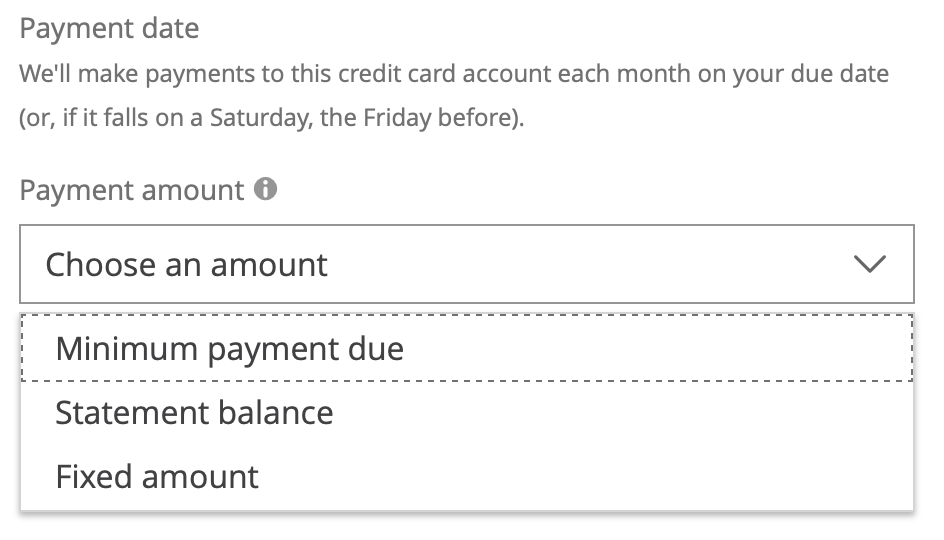
Once your accounts are linked, you can set up automatic payments. You'll have several options for how much you'd like to pay:
Daily Newsletter
Reward your inbox with the TPG Daily newsletter
Join over 700,000 readers for breaking news, in-depth guides and exclusive deals from TPG’s experts
CHASE

While we always advocate paying your balance in full, there may be some times when you're unable to do so. If that's the case for you, you can always pay less than your balance. The bank calculates your minimum payment monthly, which will vary according to how much you owe, while a fixed amount is a set dollar amount you pick yourself. Remember that penalties will still apply if your fixed amount is below your minimum payment.

While these two options aren't as good as paying your balance in full, if you're at least making the amount of your minimum payments, you won't suffer things like late fees or even lost reward points. Considering that many banks charge upward of $30 every time you make a late payment, these fees can rack up quickly.

Related story: 6 reasons the Chase Sapphire Preferred should be your next credit card

Review and double check

Once you've set up your automatic payments, you should be good to go. Many banks take at least one billing cycle to implement your choices, so if you've got a payment already due, you'll likely need to make one more manual payment. Check with your bank to be certain.

man on phone in front of computer
DAMIRCUDIC/GETTY IMAGES

Another thing to remember is that these payments will continue indefinitely; as long as you're charging transactions to your card and have autopay on, your bank account will be billed each month automatically. If the amount charged to your bank account is more than the money you've got available, you could face overdraft fees. This is especially true in times of hardship, such as an unexpected layoff.

Bottom line

Autopay is a fantastic feature banks offer that helps you avoid missing payments. Aside from incurring late fees, missed payments can negatively affect your credit score and even increase your APR. Avoid all these issues by setting up your account to make automatic payments — just don't forget you have it on!


Learn more: Best credit cards of August 2024


Featured image by ZORICA NASTASIC/GETTY IMAGES
Editorial disclaimer: Opinions expressed here are the author’s alone, not those of any bank, credit card issuer, airline or hotel chain, and have not been reviewed, approved or otherwise endorsed by any of these entities.

TPG featured card

Rewards rate
4XEarn 4X Membership Rewards® points per dollar spent on purchases at restaurants worldwide, on up to $50,000 in purchases per calendar year, then 1X points for the rest of the year.
4XEarn 4X Membership Rewards® points per dollar spent at US supermarkets, on up to $25,000 in purchases per calendar year, then 1X points for the rest of the year.
5XNew! Earn 5X Membership Rewards® points on prepaid hotel stays booked through AmexTravel.com or the Amex Travel App.
3XEarn 3X Membership Rewards® points on flights booked through AmexTravel.com, the Amex Travel App, or purchased directly from airlines.
2XEarn 2X Membership Rewards® points on prepaid car rentals booked through AmexTravel.com or the Amex Travel App and cruises booked and paid through AmexTravel.com.
1XEarn 1X Membership Rewards® point per dollar spent on all other eligible purchases.
Intro offer
Open Intro bonus
As High As 100,000 points. Find Out Your Offer.
Annual fee
$325
Regular APR
See Pay Over Time APR
Recommended credit
Open Credit score description
Excellent to Good

Pros

  • Valuable dining and food-related credits
  • Flexible rewards with airline and hotel transfer partners
  • Multiple travel and purchase protections
  • No foreign transaction fees
  • Access to Amex Offers for additional savings (enrollment required)

Cons

  • Not as useful for those living outside the U.S.
  • Some may have trouble using Uber and other dining credits
  • You may be eligible for as high as 100,000 Membership Rewards® Points after you spend $8,000 in eligible purchases on your new Card in your first 6 months of Card Membership. Welcome offers vary and you may not be eligible for an offer. Apply to know if you’re approved and find out your exact welcome offer amount – all with no credit score impact. If you’re approved and choose to accept the Card, your score may be impacted.
  • Earn 4X Membership Rewards® points per dollar spent on purchases at restaurants worldwide, on up to $50,000 in purchases per calendar year, then 1X points for the rest of the year.
  • Earn 4X Membership Rewards® points per dollar spent at US supermarkets, on up to $25,000 in purchases per calendar year, then 1X points for the rest of the year.
  • New! Earn 5X Membership Rewards® points on prepaid hotel stays booked through AmexTravel.com or the Amex Travel App.
  • Earn 3X Membership Rewards® points on flights booked through AmexTravel.com, the Amex Travel App, or purchased directly from airlines.
  • Earn 2X Membership Rewards® points on prepaid car rentals booked through AmexTravel.com or the Amex Travel App and cruises booked and paid through AmexTravel.com.
  • Earn 1X Membership Rewards® point per dollar spent on all other eligible purchases.
  • Pay It® lets you tap in the American Express® App to quickly pay for small purchase amounts throughout the month and still earn rewards the way you usually do. Plan It® gives you the option to split up big purchases into equal monthly payments with a fixed fee. You’ll know upfront exactly how much you’ll pay.
  • Updated! $120 Dining Credit: Earn up to a total of $10 in statement credits monthly when you pay with the Gold Card at Grubhub (including Seamless), Buffalo Wild Wings, Five Guys, The Cheesecake Factory, and Wonder. This can be an annual savings of up to $120. Enrollment required.
  • $100 Resy Credit: Get up to $100 in statement credits each calendar year at over 10,000 qualifying U.S. Resy restaurants after you pay for eligible purchases with the American Express® Gold Card. That’s up to $50 in statement credits semi-annually. Enrollment required.
  • $84 Dunkin' Credit: Earn up to $7 in monthly statement credits after you pay with the American Express® Gold Card at U.S. Dunkin’ locations. Enrollment required.
  • $120 Uber Cash on Gold: Enjoy up to $120 in Uber Cash annually with your Gold Card. Just add your Card to your Uber account and you'll get $10 in Uber Cash each month to use on orders and rides in the U.S. when you select an Amex Card for your transaction.
  • New! As an American Express® Gold Card Member, you can enjoy complimentary Hertz Five Star® Status. Enjoy benefits like skipping the counter at select locations, adding an additional driver at no additional cost*, and vehicle upgrades**. Benefit enrollment and Hertz Gold+ registration are required. *Additional drivers must meet standard rental qualifications and must be a spouse or domestic partner to qualify as complimentary. Other additional drivers subject to fees. **Benefits are subject to availability and vary by location. Additional Hertz program Terms and Conditions including age restrictions apply.
  • Take advantage of a $100 credit towards eligible charges* at over 1,300 upscale hotels worldwide when you book The Hotel Collection through AmexTravel.com or the Amex Travel App **. *Eligible charges vary by property. **The Hotel Collection requires a two-night minimum stay.
  • Book your travel through the Amex Travel App with added peace of mind – backed by American Express® service and support. Only for American Express® Card Members.
  • Whenever you need us, we're here. Our Member Services team will ensure you are taken care of. From lost Card replacement to statement questions, we are available to help 24/7.
  • No Foreign Transaction Fees.
  • Annual Fee is $325.
  • Terms Apply.