
Skip to content

Amazon Payments - Send and Receive Money with a Credit Card

July 28, 2014
6 min read
amazon logo black square
Amazon Payments - Send and Receive Money with a Credit Card
The cards we feature here are from partners who compensate us when you are approved through our site, and this may impact how or where these products appear. We don’t cover all available credit cards, but our analysis, reviews, and opinions are entirely from our editorial team. Terms apply to the offers listed on this page. Please view our advertising policy and product review methodology for more information.

Today TPG Contributor Jason Steele offers insights into using Amazon Payments, a program for sending and receiving payments online with the option of using a credit card.

Perhaps you've heard of Amazon Payments from Amazon.com, the retailing giant's web-based payments platform. Amazon recently issued a high profile announcement that it would offer a smartphone integrated with Amazon Payments to allow customers to to send and receive money and make purchases seamlessly, even though the service also remains available through a plain old web browser.

If you've heard of Amazon Payments through travel related sites, then you probably know that it's a great tool not just for sending and receiving money, but for using a credit card to pay for expenses that might otherwise not earn rewards. Despite its popularity among points and miles enthusiasts, I've found that most people I talk to about using Amazon Payments to earn credit card rewards are confused about the details. In this post I want to refresh readers' memories about how Amazon Payments works, and to answer some of the questions I hear asked most frequently about how the program works.

What is Amazon Payments?

Anyone who has ever bought or sold something using eBay is familiar with the concept of PayPal. People send money to others using PayPal all the time, and it usually charges a fee of about 3% for facilitating the transaction. The person sending money can fund their transaction using a bank account, credit card, or debit card.

A few years ago, Amazon decided to offer a similar service, but with a slight twist. With Amazon Payments, users can send and receive up to $1,000 each calendar month using a credit card without being charged any fees, creating the opportunity to earn credit card points for expenses that might otherwise be paid in cash or by check, like a house cleaner, piano lessons, loans between friends, etc. Money received can then be withdrawn to a linked bank account, again with no fees, so it won't cost the recipient either.

This can effectively help you put an extra $12,000 per year on your credit card for things you already pay for anyway, making it much easier to meet minimum spend requirements for new cards, or strive for high spending bonuses.
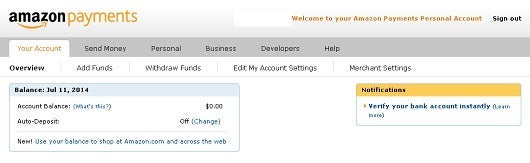
The Amazon Payments account home page.

How to start using Amazon Payments

First, you need to create an account at Amazon.com. If you already have an Amazon account with a login, use it to log into payments.amazon.com. Next, you'll need to verify your email address and begin the process of linking your bank account.

Daily Newsletter
Reward your inbox with the TPG Daily newsletter
Join over 700,000 readers for breaking news, in-depth guides and exclusive deals from TPG’s experts

To link your bank account, you'll need to submit your login information or verify your ownership of the account by receiving two small deposits and confirming the amounts. Finally, you can add one or more credit cards that you can use to fund transfers.

The next thing you'll need is the email address of the Amazon Payments account holder that you wish to send money to. The recipients name (as listed with Amazon.com) will show up in a verification screen, so you have a chance to double check that it's going to the right person. Amazon will ask what the payment is for, and you'll want to specify "Goods/Services," and not "Cash Advance," since the latter may result in you being charged a cash advance fee by your credit card company.

The whole process takes just a minute or two, and transactions go through quickly. Recipients can leave money in their Amazon Payments account (like Paypal), or withdraw it to a connected bank account (according to Amazon, in 5-7 business days, but it's often faster).
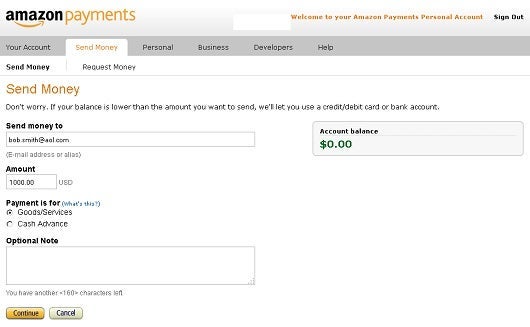
You can use your credit card to send up to $1,000 a month to other Amazon Payments users, with no fees.

FAQs

What happens if I try to send more than $1,000?
Amazon will only allow you to process $1,000 per month through a credit card with no fees. You can send amounts above $1,000, but you'll be charged for it.

Do I need to enter a description of the goods and services I'm paying for?
Some people like to enter something in that field, but I never have.

If I have an Amazon Payments account in my name, can I send money using my spouse's (or someone else's) credit card?
Yes, it doesn't seem to matter if the Amazon Payments account holder has the same name or address of the credit card holder used to fund the account.

If I have an Amazon Payments account in my name, can I transfer money to my spouse's (or someone else's) bank account?
Yes, it doesn't seem to matter if the Amazon Payments account holder has the same name or address of the bank account you withdraw funds to.

Why is Amazon Payments absorbing the merchant fees and allowing us to manufacture spending so easily?
It seems likely that Amazon has been working on its smartphone offering for years, and Amazon Payments was planned to be part of it. Perhaps they're using us to test the system, and its possible that the merchant fees incurred are just considered a reasonable cost to bear in order to gain traction in what is expected to be a very large market for person to person payments in the future.
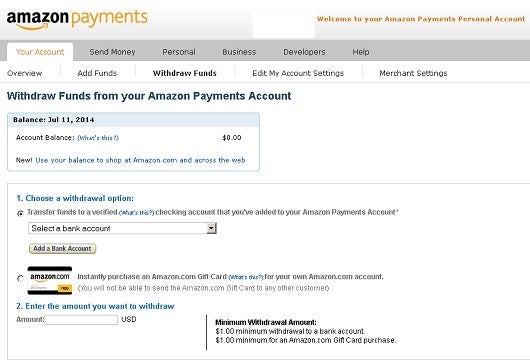
Once you receive money, you can withdraw it directly to a linked bank account.

Can I have multiple Amazon Payments accounts to circumvent the $1,000 monthly limit?
No, it's against the rules and may result in your account being shut down.

Can you use Amazon Payments if you're not a US citizen?
Yes as long as you have a United States Social Security number.

Will I get charged a cash advance fee by my credit card issuer?
I am not aware of any credit card that charges a cash advance fee for transactions with Amazon Payments when the payment is marked as "Goods/Services." If you want to be extra cautious, contact your credit card issuer and set your cash advance limit to zero. Then make a small payment to confirm you're not being charged a cash advance fee.

I understand that you can generate points or miles equivalent to $1,000 of spending each month. What else is Amazon Payments good for?
I've used Amazon Payments to cash out gift cards with small amounts remaining. Also, if you purchase gift cards from a place that offers additional bonuses, you can realize more points or miles from their purchase.


TPG featured card

Rewards rate
4XEarn 4X Membership Rewards® points per dollar spent on purchases at restaurants worldwide, on up to $50,000 in purchases per calendar year, then 1X points for the rest of the year.
4XEarn 4X Membership Rewards® points per dollar spent at US supermarkets, on up to $25,000 in purchases per calendar year, then 1X points for the rest of the year.
5XNew! Earn 5X Membership Rewards® points on prepaid hotel stays booked through AmexTravel.com or the Amex Travel App.
3XEarn 3X Membership Rewards® points on flights booked through AmexTravel.com, the Amex Travel App, or purchased directly from airlines.
2XEarn 2X Membership Rewards® points on prepaid car rentals booked through AmexTravel.com or the Amex Travel App and cruises booked and paid through AmexTravel.com.
1XEarn 1X Membership Rewards® point per dollar spent on all other eligible purchases.
Intro offer
Open Intro bonus
As High As 100,000 points. Find Out Your Offer.
Annual fee
$325
Regular APR
See Pay Over Time APR
Recommended credit
Open Credit score description
Excellent to Good

Pros

  • Valuable dining and food-related credits
  • Flexible rewards with airline and hotel transfer partners
  • Multiple travel and purchase protections
  • No foreign transaction fees
  • Access to Amex Offers for additional savings (enrollment required)

Cons

  • Not as useful for those living outside the U.S.
  • Some may have trouble using Uber and other dining credits
  • You may be eligible for as high as 100,000 Membership Rewards® Points after you spend $8,000 in eligible purchases on your new Card in your first 6 months of Card Membership. Welcome offers vary and you may not be eligible for an offer. Apply to know if you’re approved and find out your exact welcome offer amount – all with no credit score impact. If you’re approved and choose to accept the Card, your score may be impacted.
  • Earn 4X Membership Rewards® points per dollar spent on purchases at restaurants worldwide, on up to $50,000 in purchases per calendar year, then 1X points for the rest of the year.
  • Earn 4X Membership Rewards® points per dollar spent at US supermarkets, on up to $25,000 in purchases per calendar year, then 1X points for the rest of the year.
  • New! Earn 5X Membership Rewards® points on prepaid hotel stays booked through AmexTravel.com or the Amex Travel App.
  • Earn 3X Membership Rewards® points on flights booked through AmexTravel.com, the Amex Travel App, or purchased directly from airlines.
  • Earn 2X Membership Rewards® points on prepaid car rentals booked through AmexTravel.com or the Amex Travel App and cruises booked and paid through AmexTravel.com.
  • Earn 1X Membership Rewards® point per dollar spent on all other eligible purchases.
  • Pay It® lets you tap in the American Express® App to quickly pay for small purchase amounts throughout the month and still earn rewards the way you usually do. Plan It® gives you the option to split up big purchases into equal monthly payments with a fixed fee. You’ll know upfront exactly how much you’ll pay.
  • Updated! $120 Dining Credit: Earn up to a total of $10 in statement credits monthly when you pay with the Gold Card at Grubhub (including Seamless), Buffalo Wild Wings, Five Guys, The Cheesecake Factory, and Wonder. This can be an annual savings of up to $120. Enrollment required.
  • $100 Resy Credit: Get up to $100 in statement credits each calendar year at over 10,000 qualifying U.S. Resy restaurants after you pay for eligible purchases with the American Express® Gold Card. That’s up to $50 in statement credits semi-annually. Enrollment required.
  • $84 Dunkin' Credit: Earn up to $7 in monthly statement credits after you pay with the American Express® Gold Card at U.S. Dunkin’ locations. Enrollment required.
  • $120 Uber Cash on Gold: Enjoy up to $120 in Uber Cash annually with your Gold Card. Just add your Card to your Uber account and you'll get $10 in Uber Cash each month to use on orders and rides in the U.S. when you select an Amex Card for your transaction.
  • New! As an American Express® Gold Card Member, you can enjoy complimentary Hertz Five Star® Status. Enjoy benefits like skipping the counter at select locations, adding an additional driver at no additional cost*, and vehicle upgrades**. Benefit enrollment and Hertz Gold+ registration are required. *Additional drivers must meet standard rental qualifications and must be a spouse or domestic partner to qualify as complimentary. Other additional drivers subject to fees. **Benefits are subject to availability and vary by location. Additional Hertz program Terms and Conditions including age restrictions apply.
  • Take advantage of a $100 credit towards eligible charges* at over 1,300 upscale hotels worldwide when you book The Hotel Collection through AmexTravel.com or the Amex Travel App **. *Eligible charges vary by property. **The Hotel Collection requires a two-night minimum stay.
  • Book your travel through the Amex Travel App with added peace of mind – backed by American Express® service and support. Only for American Express® Card Members.
  • Whenever you need us, we're here. Our Member Services team will ensure you are taken care of. From lost Card replacement to statement questions, we are available to help 24/7.
  • No Foreign Transaction Fees.
  • Annual Fee is $325.
  • Terms Apply.