How to turn off this new Uber feature so you aren't overcharged


Even if you're well educated on foreign transaction fees and how to avoid them with a no-foreign-transaction-fee credit card when you travel abroad, a sneaky new Uber feature may thwart your fee-free international spending strategy.
Uber is rolling out Preferred Currency Pricing in select locations, including the U.S., Canada, the United Kingdom and the European Union, news that came to our attention after one member of the TPG team received an account update email from Uber.
Beginning Feb. 27, Uber will charge residents in these areas a 1.5% currency conversion fee if they choose to pay in their preferred currency instead of the local currency when they request a ride abroad.

The preferred currency setting is intended to help riders know how much they pay when they travel internationally by displaying prices in their home currency, rather than the local currency. This can also help alleviate conversion fees charged by some banks and credit card issuers, which can exceed the 1.5% rate charged by Uber.
Related: Tips to save on overseas ATM withdrawals
Of course, if you pay with a card that doesn't charge foreign transaction fees, you're essentially giving Uber an extra 1.5% when you request a ride outside of your home country.

When the feature rolls out, Uber will automatically assign your home currency as your preferred currency — but you can opt out to avoid this surcharge.
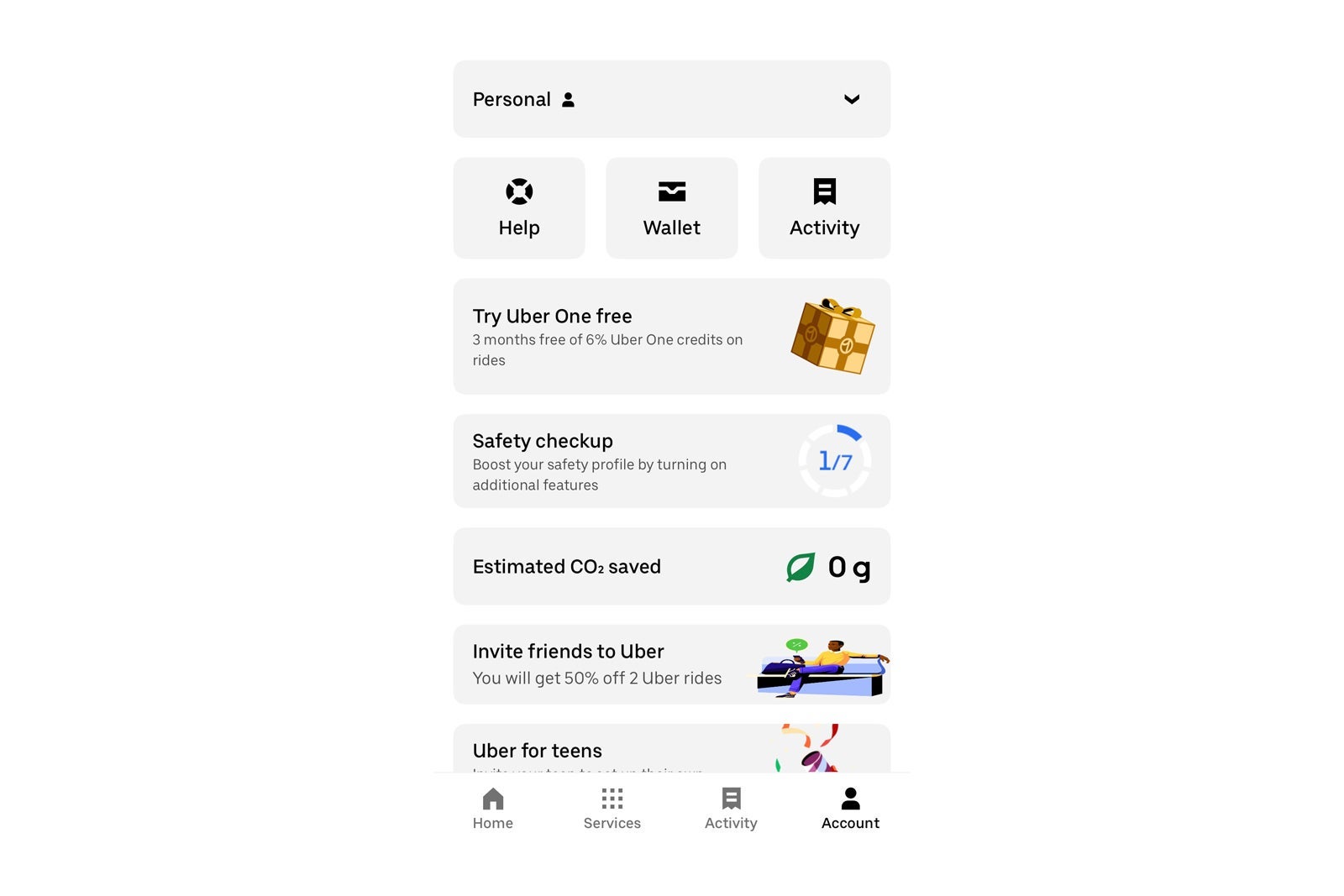
To opt out, open your Uber app and click "Account." From there, go to your "Wallet" and click on "Preferred Currency." It should default to your home currency — but you can change the setting to "No preferred currency" if you prefer to pay in the local currency when you travel. By making "No preferred currency" your default, you can avoid the 1.5% surcharge.
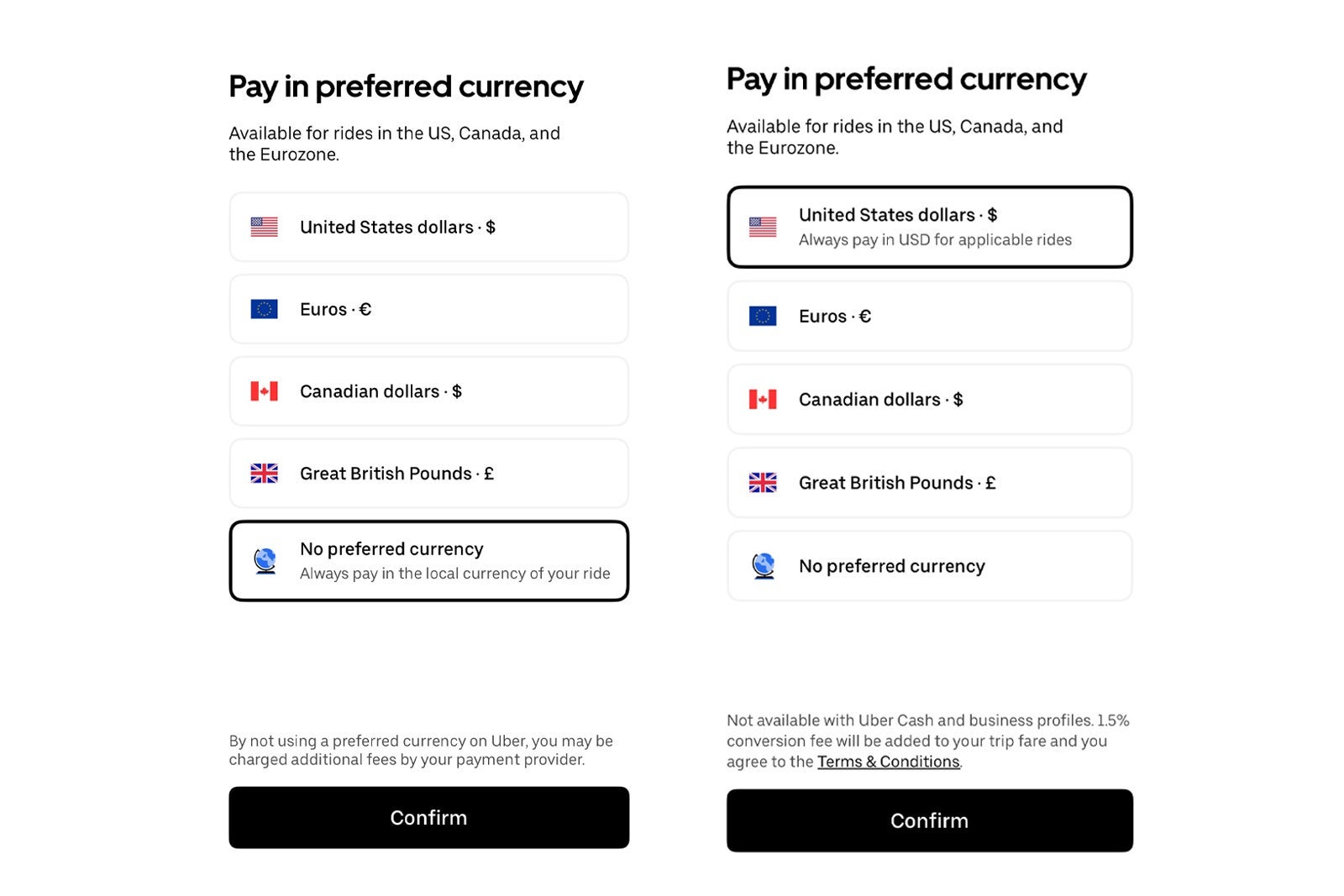
Even if you don't change this setting before you travel, you will also see the option to opt out of paying in your preferred currency at checkout when you book a ride abroad. It's best to change this setting before your next international trip, though, so you don't forget.
While you are at it, make sure the card(s) in your Uber wallet are ones that don't charge currency conversion fees and that you keep up to date on ways to maximize perks when riding with Uber.
- Get $75 in Uber credits when you sign up for Clear
- Amex Platinum and Gold cardmembers: Changes coming to your Uber Cash benefit
- Frequent Uber or Lyft user? These are the best credit cards for you
- Quick Points: Earn more points and miles with Uber, Lyft and Starbucks apps
- Marriott announces Uber partnership changes: The good, the bad and the totally worthless
TPG featured card
at American Express's secure site
Terms & restrictions apply. See rates & fees.
| 4X | Earn 4X Membership Rewards® points per dollar spent on purchases at restaurants worldwide, on up to $50,000 in purchases per calendar year, then 1X points for the rest of the year. |
| 4X | Earn 4X Membership Rewards® points per dollar spent at US supermarkets, on up to $25,000 in purchases per calendar year, then 1X points for the rest of the year. |
| 5X | Earn 5X Membership Rewards® points on prepaid hotel stays booked through AmexTravel.com or the Amex Travel App™. |
| 3X | Earn 3X Membership Rewards® points on flights booked through AmexTravel.com, the Amex Travel App™, or purchased directly from airlines. |
| 2X | Earn 2X Membership Rewards® points on prepaid car rentals booked through AmexTravel.com or the Amex Travel App™ and cruises booked and paid through AmexTravel.com. |
| 1X | Earn 1X Membership Rewards® point per dollar spent on all other eligible purchases. |
Pros
- Valuable dining and food-related credits
- Flexible rewards with airline and hotel transfer partners
- Multiple travel and purchase protections
- No foreign transaction fees
- Access to Amex Offers for additional savings (enrollment required)
Cons
- Not as useful for those living outside the U.S.
- Some may have trouble using Uber and other dining credits
- You may be eligible for as high as 100,000 Membership Rewards® Points after you spend $8,000 in eligible purchases on your new Card in your first 6 months of Card Membership. Welcome offers vary and you may not be eligible for an offer. Apply to know if you’re approved and find out your exact welcome offer amount – all with no credit score impact. If you’re approved and choose to accept the Card, your score may be impacted.
- Earn 4X Membership Rewards® points per dollar spent on purchases at restaurants worldwide, on up to $50,000 in purchases per calendar year, then 1X points for the rest of the year.
- Earn 4X Membership Rewards® points per dollar spent at US supermarkets, on up to $25,000 in purchases per calendar year, then 1X points for the rest of the year.
- Earn 5X Membership Rewards® points on prepaid hotel stays booked through AmexTravel.com or the Amex Travel App™.
- Earn 3X Membership Rewards® points on flights booked through AmexTravel.com, the Amex Travel App™, or purchased directly from airlines.
- Earn 2X Membership Rewards® points on prepaid car rentals booked through AmexTravel.com or the Amex Travel App™ and cruises booked and paid through AmexTravel.com.
- Earn 1X Membership Rewards® point per dollar spent on all other eligible purchases.
- Pay It® lets you tap in the American Express® App to quickly pay for small purchase amounts throughout the month and still earn rewards the way you usually do. Plan It® gives you the option to split up big purchases into equal monthly payments with a fixed fee. You’ll know upfront exactly how much you’ll pay.
- $120 Dining Credit: Earn up to a total of $10 in statement credits monthly when you pay with the Gold Card at Grubhub (including Seamless), Buffalo Wild Wings, Five Guys, The Cheesecake Factory, and Wonder. This can be an annual savings of up to $120. Enrollment required.
- $100 Resy Credit: Get up to $100 in statement credits each calendar year at over 10,000 qualifying U.S. Resy restaurants after you pay for eligible purchases with the American Express® Gold Card. That’s up to $50 in statement credits semi-annually. Enrollment required.
- $84 Dunkin' Credit: Earn up to $7 in monthly statement credits after you pay with the American Express® Gold Card at U.S. Dunkin’ locations. Enrollment required.
- $120 Uber Cash on Gold: Enjoy up to $120 in Uber Cash annually with your Gold Card. Just add your Card to your Uber account and you'll get $10 in Uber Cash each month to use on orders and rides in the U.S. when you select an Amex Card for your transaction.
- Enjoy complimentary Hertz Five Star® Status benefits like skipping the counter at select locations, adding an additional driver at no additional cost*, and vehicle upgrades**. Benefit enrollment and Hertz Gold+ registration are required. *Additional drivers must meet standard rental qualifications and must be a spouse or domestic partner to qualify as complimentary. Other additional drivers subject to fees. **Benefits are subject to availability and vary by location. Additional Hertz program Terms and Conditions including age restrictions apply.
- Book two nights or more with The Hotel Collection through AmexTravel.com or the Amex Travel App™ and receive a $100* credit towards eligible charges at over 1,400 upscale hotels worldwide. *Eligible charges vary by property.
- Book your travel through the Amex Travel App™ with added peace of mind – backed by American Express® service and support. Only for American Express® Card Members.
- Whenever you need us, we're here. Our Member Services team will ensure you are taken care of. From lost Card replacement to statement questions, we are available to help 24/7.
- No Foreign Transaction Fees.
- Annual Fee is $325.
- Terms Apply.