How to turn off this new Uber feature so you aren't overcharged


Even if you're well educated on foreign transaction fees and how to avoid them with a no-foreign-transaction-fee credit card when you travel abroad, a sneaky new Uber feature may thwart your fee-free international spending strategy.
Uber is rolling out Preferred Currency Pricing in select locations, including the U.S., Canada, the United Kingdom and the European Union, news that came to our attention after one member of the TPG team received an account update email from Uber.
Beginning Feb. 27, Uber will charge residents in these areas a 1.5% currency conversion fee if they choose to pay in their preferred currency instead of the local currency when they request a ride abroad.

The preferred currency setting is intended to help riders know how much they pay when they travel internationally by displaying prices in their home currency, rather than the local currency. This can also help alleviate conversion fees charged by some banks and credit card issuers, which can exceed the 1.5% rate charged by Uber.
Related: Tips to save on overseas ATM withdrawals
Of course, if you pay with a card that doesn't charge foreign transaction fees, you're essentially giving Uber an extra 1.5% when you request a ride outside of your home country.

When the feature rolls out, Uber will automatically assign your home currency as your preferred currency — but you can opt out to avoid this surcharge.
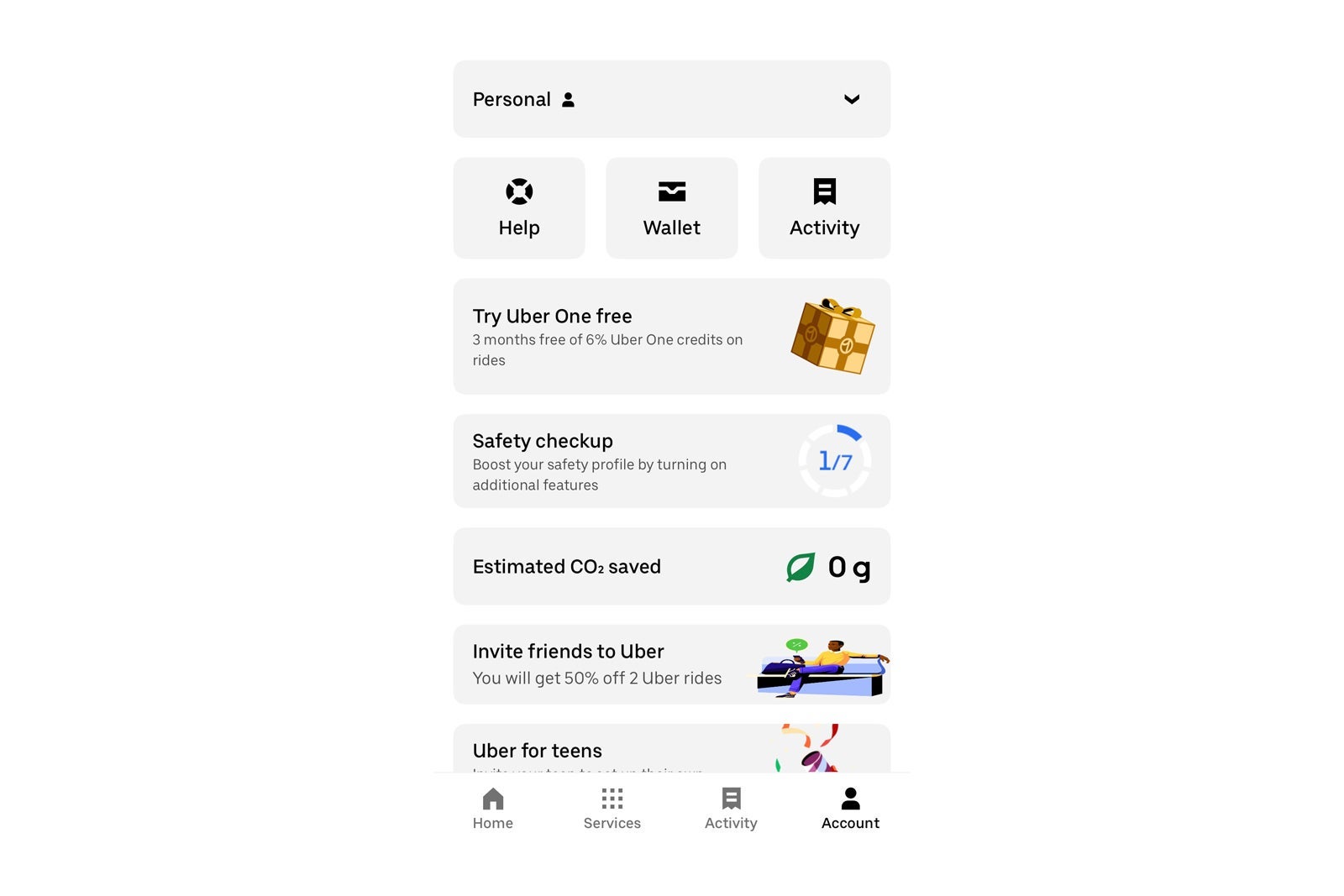
To opt out, open your Uber app and click "Account." From there, go to your "Wallet" and click on "Preferred Currency." It should default to your home currency — but you can change the setting to "No preferred currency" if you prefer to pay in the local currency when you travel. By making "No preferred currency" your default, you can avoid the 1.5% surcharge.
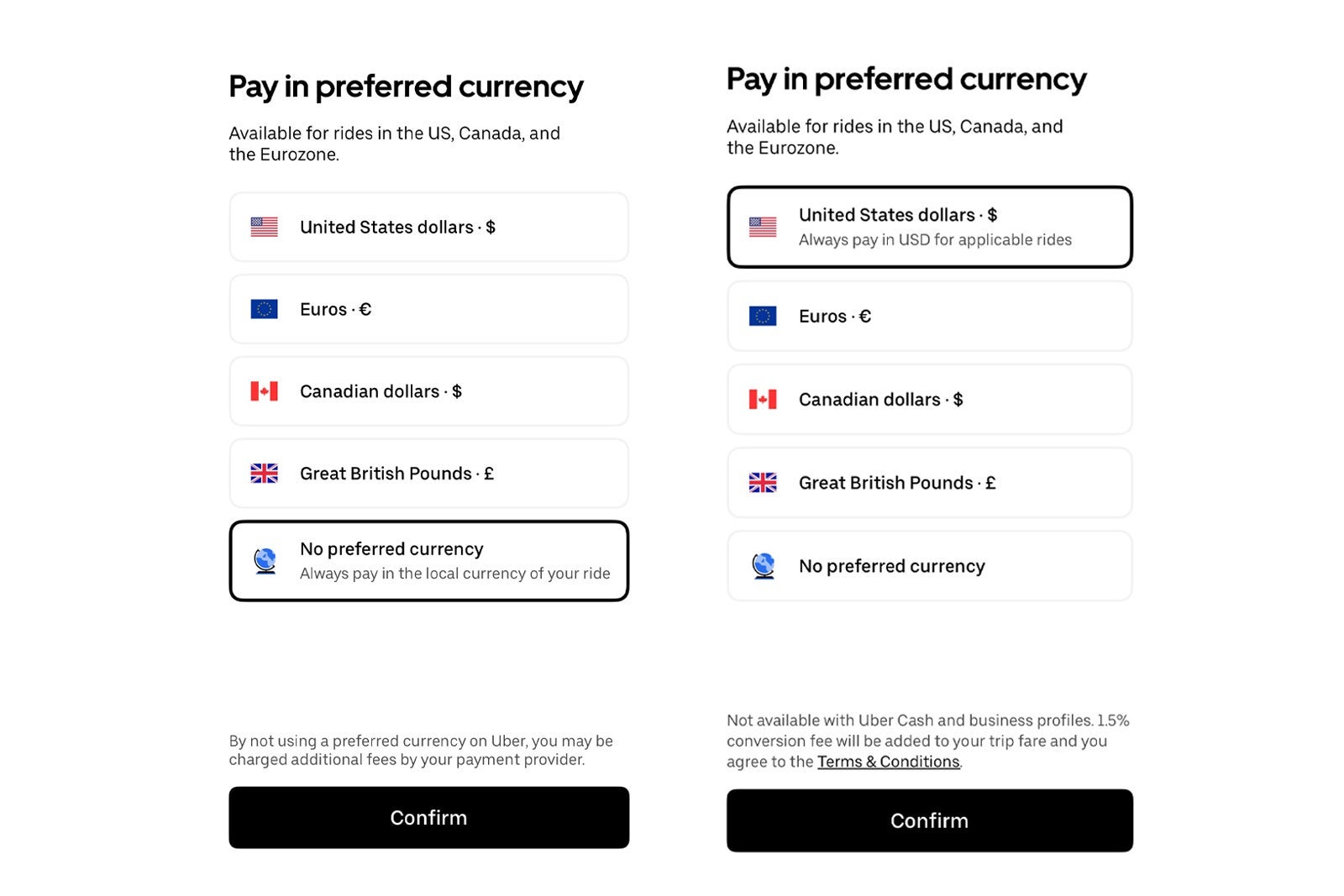
Even if you don't change this setting before you travel, you will also see the option to opt out of paying in your preferred currency at checkout when you book a ride abroad. It's best to change this setting before your next international trip, though, so you don't forget.
While you are at it, make sure the card(s) in your Uber wallet are ones that don't charge currency conversion fees and that you keep up to date on ways to maximize perks when riding with Uber.
- Get $75 in Uber credits when you sign up for Clear
- Amex Platinum and Gold cardmembers: Changes coming to your Uber Cash benefit
- Frequent Uber or Lyft user? These are the best credit cards for you
- Quick Points: Earn more points and miles with Uber, Lyft and Starbucks apps
- Marriott announces Uber partnership changes: The good, the bad and the totally worthless
TPG featured card

at Capital One's secure site
Terms & restrictions apply. See rates & fees.
| 5X miles | Earn 5X miles on hotels, vacation rentals and rental cars booked through Capital One Travel |
| 2X miles | Earn unlimited 2X miles on every purchase, every day |
Pros
- Stellar welcome offer of 75,000 miles after spending $4,000 on purchases in the first three months from account opening. Plus, a $250 Capital One Travel credit to use in your first cardholder year upon account opening.
- You'll earn 2 miles per dollar on every purchase, which means you won't have to worry about memorizing bonus categories
- Rewards are versatile and can be redeemed for a statement credit or transferred to Capital One’s transfer partners
Cons
- Highest bonus-earning categories only on travel booked via Capital One Travel
- LIMITED-TIME OFFER: Enjoy $250 to use on Capital One Travel in your first cardholder year, plus earn 75,000 bonus miles once you spend $4,000 on purchases within the first 3 months from account opening - that’s equal to $1,000 in travel
- Earn unlimited 2X miles on every purchase, every day
- Earn 5X miles on hotels, vacation rentals and rental cars booked through Capital One Travel
- Miles won't expire for the life of the account and there's no limit to how many you can earn
- Receive up to a $120 credit for Global Entry or TSA PreCheck®
- Use your miles to get reimbursed for any travel purchase—or redeem by booking a trip through Capital One Travel
- Enjoy a $50 experience credit and other premium benefits with every hotel and vacation rental booked from the Lifestyle Collection
- Transfer your miles to your choice of 15+ travel loyalty programs
- Top rated mobile app