Why kids who fly need their own email addresses


In an increasingly connected world, it's important that your kids have their own email addresses. This is especially the case if they fly. More often than not, in order to establish a frequent flyer account for your child, you need to use an email address that is distinct from your own. Each account needs an identifying email address and sharing one just won't cut it in these instances.
Even if you just travel once or twice a year as a family, there's no reason to let those frequent flyer miles go to waste. But, if your child doesn't have a frequent flyer account, it's a no-go. If you don't have an account, there's no way to earn miles. Kids may also need their own email addresses for establishing a relationship with Homeland Security's Trusted Traveler Programs (Global Entry, TSA PreCheck, Nexus or Sentri).
While you may not actually give your kids access to their own email address until they hit a certain age, you'll likely still need to create and manage one on their behalf -- even when they are just infants, toddlers or tweens. Here's some advice on how to do just that.

Use this Gmail tip to quickly setup email addresses for your kids
TPG editor-at-large Zach Honig shared some fantastic advice about using this simple Gmail trick to create a new email address. The beautiful part here is that the emails directed to this new address will actually be delivered to your Gmail inbox. And, this method is free. This is the perfect scenario for a parent that's setting up and managing email accounts for the sole purpose of managing their children's loyalty accounts.
Anyone with an existing Gmail address can use this technique. Say your email address is jake2656@gmail.com and your kids are Amy, Todd and Sara. You would use the following Gmail addresses when setting up their loyalty accounts:
- jake2656+amy@gmail.com
- jake2656+todd@gmail.com
- jake2656+sara@gmail.com
Whenever someone sends an email to any of the above addresses, it will appear in the jake2656@gmail.com inbox. This is awesome because you don't have to even bother setting up or registering any new email accounts. You're just sharing your inbox with your kids. This trick allows you a super easy way to get young ones signed up for loyalty programs with the added benefit of easy management on your part.
Or create a "real" Gmail email account
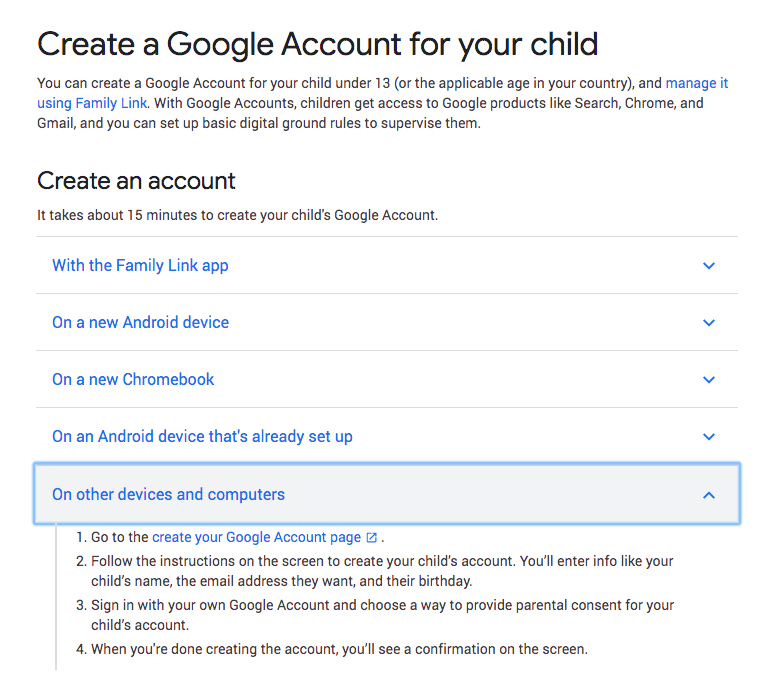
If you'd prefer, you can also create a real individual Gmail account for any of your kids who are under 13. Parents can manage these accounts with Google's Family Link parental control software. You can choose to keep these accounts to yourself or give your kids access. If you do, you can set up access to the specific Google products you'll allow them to access (like search, Chrome, Gmail, etc.).
Yahoo used to offer a similar service through Yahoo Family Account but it is not currently supporting the creation of new accounts.

Other email options for kids
If you want to create individual email addresses for your kids but don't want to use Gmail, there are other free and paid services that specifically cater to families. Take a look at offerings from:
- ZillaMail -- offers both a basic free service and a paid option ($1.95/month or $14.95 annually)
- KidsEmail -- free 30-day trial and then $4.95/month or $38.95 annually
- ZooBuh -- free 30-day trial and then $1/month
- Tocomail -- one-week free trial and then $2.99/month or $29.99 annually
Bottom line
Don't let an email address be the barrier to starting your kids' loyalty accounts. Setup an email address and then register your kids for their own frequent flyer accounts. You'll be glad you did when they earn enough miles for a free flight!
What solution do you use for managing email accounts for your family's loyalty accounts?
Looking for more family travel advice? Here are some resources:
TPG featured card

at American Express's secure site
Terms & restrictions apply. See rates & fees.
| 4X | Earn 4X Membership Rewards® points per dollar spent on purchases at restaurants worldwide, on up to $50,000 in purchases per calendar year, then 1X points for the rest of the year. |
| 4X | Earn 4X Membership Rewards® points per dollar spent at US supermarkets, on up to $25,000 in purchases per calendar year, then 1X points for the rest of the year. |
| 5X | Earn 5X Membership Rewards® points on prepaid hotel stays booked through AmexTravel.com or the Amex Travel App™. |
| 3X | Earn 3X Membership Rewards® points on flights booked through AmexTravel.com, the Amex Travel App™, or purchased directly from airlines. |
| 2X | Earn 2X Membership Rewards® points on prepaid car rentals booked through AmexTravel.com or the Amex Travel App™ and cruises booked and paid through AmexTravel.com. |
| 1X | Earn 1X Membership Rewards® point per dollar spent on all other eligible purchases. |
Pros
- Valuable dining and food-related credits
- Flexible rewards with airline and hotel transfer partners
- Multiple travel and purchase protections
- No foreign transaction fees
- Access to Amex Offers for additional savings (enrollment required)
Cons
- Not as useful for those living outside the U.S.
- Some may have trouble using Uber and other dining credits
- You may be eligible for as high as 100,000 Membership Rewards® Points after you spend $8,000 in eligible purchases on your new Card in your first 6 months of Card Membership. Welcome offers vary and you may not be eligible for an offer. Apply to know if you’re approved and find out your exact welcome offer amount – all with no credit score impact. If you’re approved and choose to accept the Card, your score may be impacted.
- Earn 4X Membership Rewards® points per dollar spent on purchases at restaurants worldwide, on up to $50,000 in purchases per calendar year, then 1X points for the rest of the year.
- Earn 4X Membership Rewards® points per dollar spent at US supermarkets, on up to $25,000 in purchases per calendar year, then 1X points for the rest of the year.
- Earn 5X Membership Rewards® points on prepaid hotel stays booked through AmexTravel.com or the Amex Travel App™.
- Earn 3X Membership Rewards® points on flights booked through AmexTravel.com, the Amex Travel App™, or purchased directly from airlines.
- Earn 2X Membership Rewards® points on prepaid car rentals booked through AmexTravel.com or the Amex Travel App™ and cruises booked and paid through AmexTravel.com.
- Earn 1X Membership Rewards® point per dollar spent on all other eligible purchases.
- Pay It® lets you tap in the American Express® App to quickly pay for small purchase amounts throughout the month and still earn rewards the way you usually do. Plan It® gives you the option to split up big purchases into equal monthly payments with a fixed fee. You’ll know upfront exactly how much you’ll pay.
- $120 Dining Credit: Earn up to a total of $10 in statement credits monthly when you pay with the Gold Card at Grubhub (including Seamless), Buffalo Wild Wings, Five Guys, The Cheesecake Factory, and Wonder. This can be an annual savings of up to $120. Enrollment required.
- $100 Resy Credit: Get up to $100 in statement credits each calendar year at over 10,000 qualifying U.S. Resy restaurants after you pay for eligible purchases with the American Express® Gold Card. That’s up to $50 in statement credits semi-annually. Enrollment required.
- $84 Dunkin' Credit: Earn up to $7 in monthly statement credits after you pay with the American Express® Gold Card at U.S. Dunkin’ locations. Enrollment required.
- $120 Uber Cash on Gold: Enjoy up to $120 in Uber Cash annually with your Gold Card. Just add your Card to your Uber account and you'll get $10 in Uber Cash each month to use on orders and rides in the U.S. when you select an Amex Card for your transaction.
- Enjoy complimentary Hertz Five Star® Status benefits like skipping the counter at select locations, adding an additional driver at no additional cost*, and vehicle upgrades**. Benefit enrollment and Hertz Gold+ registration are required. *Additional drivers must meet standard rental qualifications and must be a spouse or domestic partner to qualify as complimentary. Other additional drivers subject to fees. **Benefits are subject to availability and vary by location. Additional Hertz program Terms and Conditions including age restrictions apply.
- Book two nights or more with The Hotel Collection through AmexTravel.com or the Amex Travel App™ and receive a $100* credit towards eligible charges at over 1,400 upscale hotels worldwide. *Eligible charges vary by property.
- Book your travel through the Amex Travel App™ with added peace of mind – backed by American Express® service and support. Only for American Express® Card Members.
- Whenever you need us, we're here. Our Member Services team will ensure you are taken care of. From lost Card replacement to statement questions, we are available to help 24/7.
- No Foreign Transaction Fees.
- Annual Fee is $325.
- Terms Apply.