How not to 'waste' your Delta Regional and Global Upgrade Certificates


Among the perks of reaching Delta's two highest Medallion elite ranks – Platinum and Diamond — are upgrades. Specifically, Global and Regional Upgrade Certificates can be selected as Delta Choice Benefits when earning or requalifying for elite status.
For Platinum Medallion members, their Choice Benefit selections to nab are four Regional Upgrade Certificates (RUC). Diamonds, meanwhile, can snag either four Global Upgrade Certificates (GUC), two Global certificates and four Regional certificates or eight Regional certificates with one of their three Choice Benefits.
In this article, I'll give you a brief overview of what these certificates are, how to use them and how not to waste them on your future travels. These upgrades can be extremely valuable, so it's in your best interest to completely understand them before you start to redeem them.
How to use Delta Global and Regional Upgrade Certificates
Before we dive into how you should use your upgrades, let's take a quick look at the difference between Global Upgrade Certificates and Regional Upgrade Certificates.
Global Upgrade Certificates are the most flexible and valuable of the two types of certificates. You can use them on all Delta flights and also on select partner-operated flights. They can be applied to all paid, published Main Cabin and Delta Comfort+ fares, on Pay with Miles tickets, and on Companion Certificates. You cannot apply these upgrade certificates to basic economy tickets.
However, you can use Global Upgrade Certificates to upgrade flights operated by Air France, KLM, Virgin Atlantic, Virgin Australia, Korean Air and Aeromexico. That said, only certain fare classes are eligible and there may be restrictions on which routes are eligible. Check Delta's full terms and conditions for more info on those partners.
Regional Upgrades are, as you would probably guess, more restricted.
You can use these certificates to upgrade any Delta domestic flight and on flights to/from the U.S. and Bermuda, Canada, the Caribbean and Central America. As you'd expect, they're valid on all paid published Main Cabin and Delta Comfort+ fares, on Pay with Miles tickets, and on Companion Certificates. Like regional certificates, you cannot apply them to basic economy tickets.
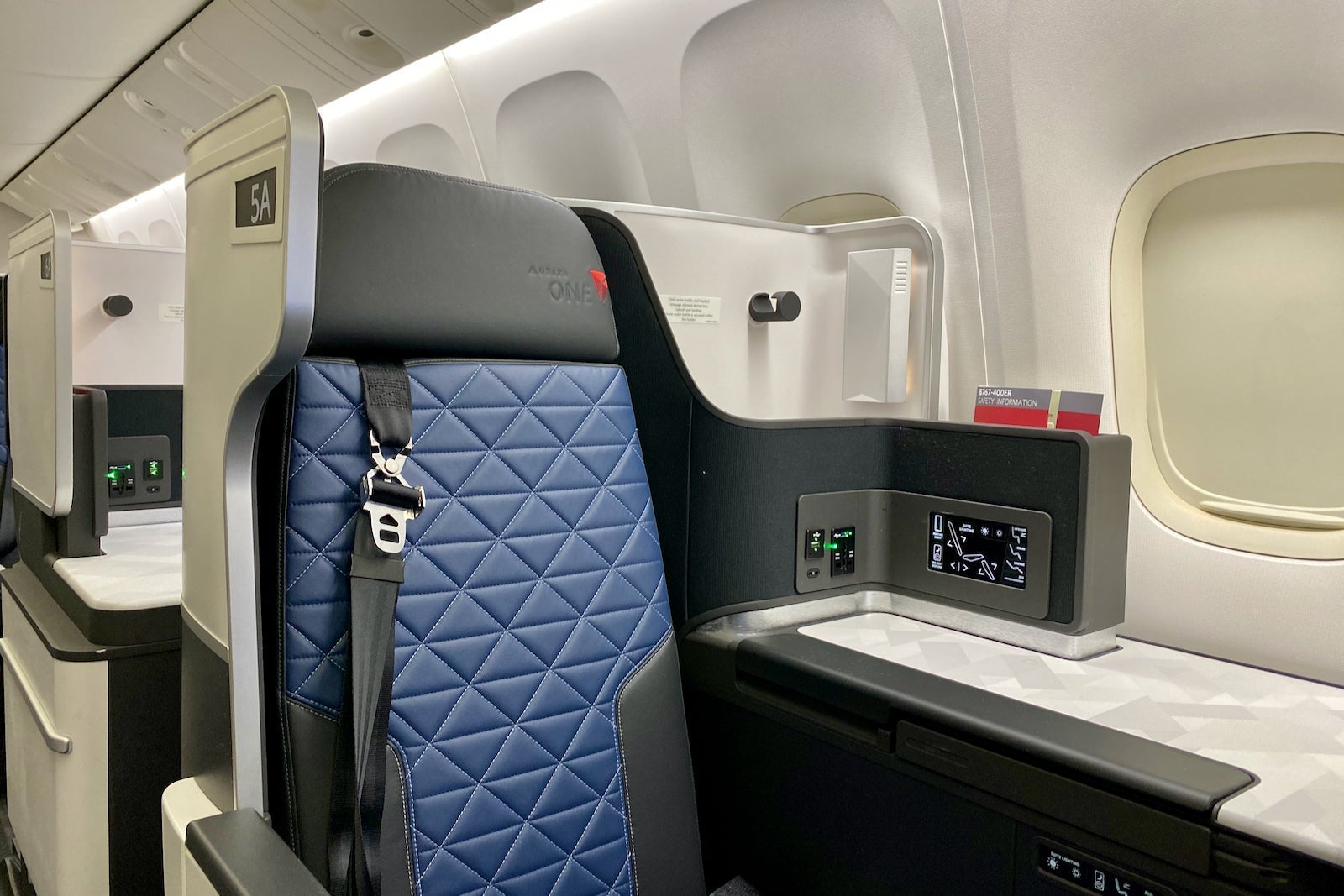
One of the best parts of Regional Upgrade Certificates is that you can use them to upgrade to Delta One on transcontinental flights. This is similar to international Delta One wherein you'll sit in a lie-flat seat and have an upgraded onboard meal.

Of course, not all Delta flights will have upgrade space available at the time of booking. You can view which flights have upgrade space available when searching for flights on the Delta website. If you have upgrade certificates in your account, you'll see upgrade availability underneath the flight info.
Related: These are the best Delta credit cards
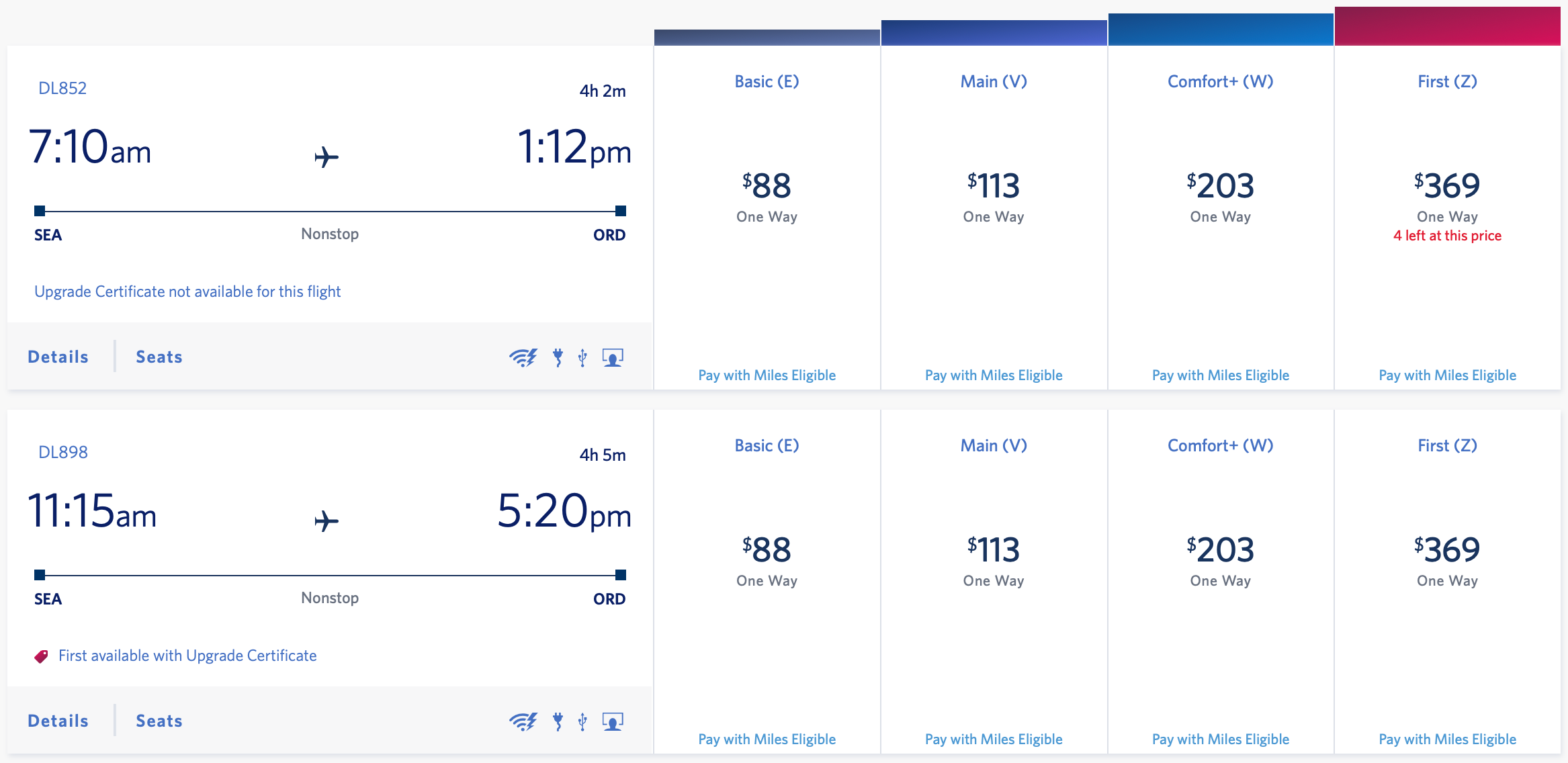
You can apply an upgrade certificate to a flight without upgrade space and be added to the upgrade waitlist. If your upgrade doesn't clear by the time your flight departs, the certificate will be returned to your account.
Unfortunately, Delta's Regional and Global Certificates still can't be applied online. Instead, you have to call Delta Reservations and request that a certificate be applied after you book your ticket.
Related: The ultimate guide to getting upgraded on Delta
How to not waste your Delta upgrades

Now that you know how these upgrades work, let's take a look at how to get the most value from them. Here are a few pointers you can use to ensure you're not 'wasting' your upgrade certificates.
Try and save certificates for long-haul flights
It's almost never worth burning your upgrade certificates on short-haul flights. If you're a Diamond Medallion member, you'll already have high upgrade priority on a flight from Newark (EWR) to Detroit (DTW) and may clear a complimentary upgrade anyway.
Plus, your Regional Upgrade certificates are worth significantly more on a transcontinental flight than on a short hop given you're spending more time in the sky. Likewise, your Global Upgrade certificate is worth more when flying long-haul from the U.S. than on a domestic U.S. hop.
Pick your upgrades wisely
This leads me to my next point: make sure to choose your upgrades wisely.
If you mostly travel domestically, it's in your best interest to pick either eight Regional upgrades or two Global and four Regional Upgrades as one of your Diamond Choice Benefits. Alternatively, those who fly international often may opt for four Global Upgrade Certificates.
This ensures that you're getting the most value from your Choice Benefits and have upgrades you can actually use. There's no point in having Global Upgrades in your account if you can't actually use them and would rather upgrade domestic flights instead.
The importance of upgrade priority
If you have a reservation involving multiple legs, make sure to tell the phone agent to place upgrade priority on the leg that matters most to you. If you don't clarify this, upgrades can clear on relatively unimportant and short legs, while you remain waitlisted on the long leg.
For example, say you're flying from Chicago-O'Hare (ORD) to Salt Lake City (SLC) to Honolulu (HNL). If you don't clarify that you'd like priority on the SLC to HNL leg, your upgrade may clear on the ORD to SLC leg. In turn, you'd spend three hours in domestic first class instead of a long-flight in lie-flat business class.
If you don't place priority on the hard-to-get leg, and the upgrade clears on any other leg, your upgrade certificate is considered used. Worse, there's no way to "undo" an upgrade clearing. Once it's burned, it's burned.
Flexibility pays
It's also worth mentioning just how important it is to be flexible with your plans. Obviously, it's best to try and confirm an upgrade at the time you book your flight. If you're looking to book a long-haul flight and want to make sure you're sitting in the front, try searching across multiple days to find a flight that has upgrade space open at the time of booking.
On popular routes like New York-JFK to Los Angeles (LAX), you may only need to be flexible with the time of your flight. Oftentimes the off-peak flight frequencies (think red-eyes) will have open upgrade space even if the daytime flight doesn't.
Again, if your upgrade doesn't clear at the time of booking, you will be added to the upgrade list where upgrades will clear at the airport if available. The upgrade will be returned to your Delta account if it doesn't clear and you can use it on a future flight.
Related: How to earn more MQD with Delta partner flights
Bottom line
There are multiple ways to avoid wasting the value of your upgrade certificates. In summary, make sure to choose your upgrades wisely and try to be flexible when applying upgrades to your flights. This will help you get the most value from your upgrades and help you spend more time at the front of the plane.
Additional reporting by Darren Murph
Feature photo by Zach Griff / The Points Guy
TPG featured card
at American Express's secure site
Terms & restrictions apply. See rates & fees.
| 4X | Earn 4X Membership Rewards® points per dollar spent on purchases at restaurants worldwide, on up to $50,000 in purchases per calendar year, then 1X points for the rest of the year. |
| 4X | Earn 4X Membership Rewards® points per dollar spent at US supermarkets, on up to $25,000 in purchases per calendar year, then 1X points for the rest of the year. |
| 5X | Earn 5X Membership Rewards® points on prepaid hotel stays booked through AmexTravel.com or the Amex Travel App™. |
| 3X | Earn 3X Membership Rewards® points on flights booked through AmexTravel.com, the Amex Travel App™, or purchased directly from airlines. |
| 2X | Earn 2X Membership Rewards® points on prepaid car rentals booked through AmexTravel.com or the Amex Travel App™ and cruises booked and paid through AmexTravel.com. |
| 1X | Earn 1X Membership Rewards® point per dollar spent on all other eligible purchases. |
Pros
- Valuable dining and food-related credits
- Flexible rewards with airline and hotel transfer partners
- Multiple travel and purchase protections
- No foreign transaction fees
- Access to Amex Offers for additional savings (enrollment required)
Cons
- Not as useful for those living outside the U.S.
- Some may have trouble using Uber and other dining credits
- You may be eligible for as high as 100,000 Membership Rewards® Points after you spend $8,000 in eligible purchases on your new Card in your first 6 months of Card Membership. Welcome offers vary and you may not be eligible for an offer. Apply to know if you’re approved and find out your exact welcome offer amount – all with no credit score impact. If you’re approved and choose to accept the Card, your score may be impacted.
- Earn 4X Membership Rewards® points per dollar spent on purchases at restaurants worldwide, on up to $50,000 in purchases per calendar year, then 1X points for the rest of the year.
- Earn 4X Membership Rewards® points per dollar spent at US supermarkets, on up to $25,000 in purchases per calendar year, then 1X points for the rest of the year.
- Earn 5X Membership Rewards® points on prepaid hotel stays booked through AmexTravel.com or the Amex Travel App™.
- Earn 3X Membership Rewards® points on flights booked through AmexTravel.com, the Amex Travel App™, or purchased directly from airlines.
- Earn 2X Membership Rewards® points on prepaid car rentals booked through AmexTravel.com or the Amex Travel App™ and cruises booked and paid through AmexTravel.com.
- Earn 1X Membership Rewards® point per dollar spent on all other eligible purchases.
- Pay It® lets you tap in the American Express® App to quickly pay for small purchase amounts throughout the month and still earn rewards the way you usually do. Plan It® gives you the option to split up big purchases into equal monthly payments with a fixed fee. You’ll know upfront exactly how much you’ll pay.
- $120 Dining Credit: Earn up to a total of $10 in statement credits monthly when you pay with the Gold Card at Grubhub (including Seamless), Buffalo Wild Wings, Five Guys, The Cheesecake Factory, and Wonder. This can be an annual savings of up to $120. Enrollment required.
- $100 Resy Credit: Get up to $100 in statement credits each calendar year at over 10,000 qualifying U.S. Resy restaurants after you pay for eligible purchases with the American Express® Gold Card. That’s up to $50 in statement credits semi-annually. Enrollment required.
- $84 Dunkin' Credit: Earn up to $7 in monthly statement credits after you pay with the American Express® Gold Card at U.S. Dunkin’ locations. Enrollment required.
- $120 Uber Cash on Gold: Enjoy up to $120 in Uber Cash annually with your Gold Card. Just add your Card to your Uber account and you'll get $10 in Uber Cash each month to use on orders and rides in the U.S. when you select an Amex Card for your transaction.
- Enjoy complimentary Hertz Five Star® Status benefits like skipping the counter at select locations, adding an additional driver at no additional cost*, and vehicle upgrades**. Benefit enrollment and Hertz Gold+ registration are required. *Additional drivers must meet standard rental qualifications and must be a spouse or domestic partner to qualify as complimentary. Other additional drivers subject to fees. **Benefits are subject to availability and vary by location. Additional Hertz program Terms and Conditions including age restrictions apply.
- Book two nights or more with The Hotel Collection through AmexTravel.com or the Amex Travel App™ and receive a $100* credit towards eligible charges at over 1,400 upscale hotels worldwide. *Eligible charges vary by property.
- Book your travel through the Amex Travel App™ with added peace of mind – backed by American Express® service and support. Only for American Express® Card Members.
- Whenever you need us, we're here. Our Member Services team will ensure you are taken care of. From lost Card replacement to statement questions, we are available to help 24/7.
- No Foreign Transaction Fees.
- Annual Fee is $325.
- Terms Apply.