Skip to content

How and why you should use a VPN internet connection while traveling


Aug. 17, 2022
5 min read
woman holding notebook app vpn creation Internet protocols protection network
The cards we feature here are from partners who compensate us when you are approved through our site, and this may impact how or where these products appear. We don’t cover all available credit cards, but our analysis, reviews, and opinions are entirely from our editorial team. Terms apply to the offers listed on this page. Please view our advertising policy and product review methodology for more information.

Travel is full of uncertainty, from canceled flights and changed itineraries to connectivity challenges as you cross borders and struggle to stay in touch with loved ones. To help reduce one area of risk, all travelers should consider installing and using a virtual private network application on their phones and computers.

Your personal and private data is at risk when you connect to networks, especially public ones like free airport Wi-Fi. Not to mention, you may be unable to access important applications and websites in certain foreign countries.

To help keep your communications secure and maintain access to certain internet features, it's useful to use a VPN. Here's everything to know about setting up and using a VPN to keep your information secure.

Why you should use a VPN while traveling

(Photo by 1shot Production/Getty Images)

VPN applications encrypt your data — such as passwords and financial information — when it's sent over a network. The VPN essentially hides your information while it's sent along a private virtual pipeline from your phone or computer to the computers at the VPN's data center.

Within the VPN's computer system, your identity and information are kept confidential and are not tracked. After arriving at the VPN's computer system, your message or internet query is resent to its end application (whether it be a bank website, Facebook or Netflix) as if the message was originating from your location of choice.

By using a VPN when traveling, you'll enjoy two key benefits:

  • You'll be able to hide your data from hackers who may be lurking on public Wi-Fi systems at airports, hotels and cafes.
  • You'll be able to access websites as if you are logging in at home, ensuring you can access apps like FaceTime, Twitter and Netflix without any hiccups.

Related: 5 ways to secure your data on a public Wi-Fi network

How to set up a VPN
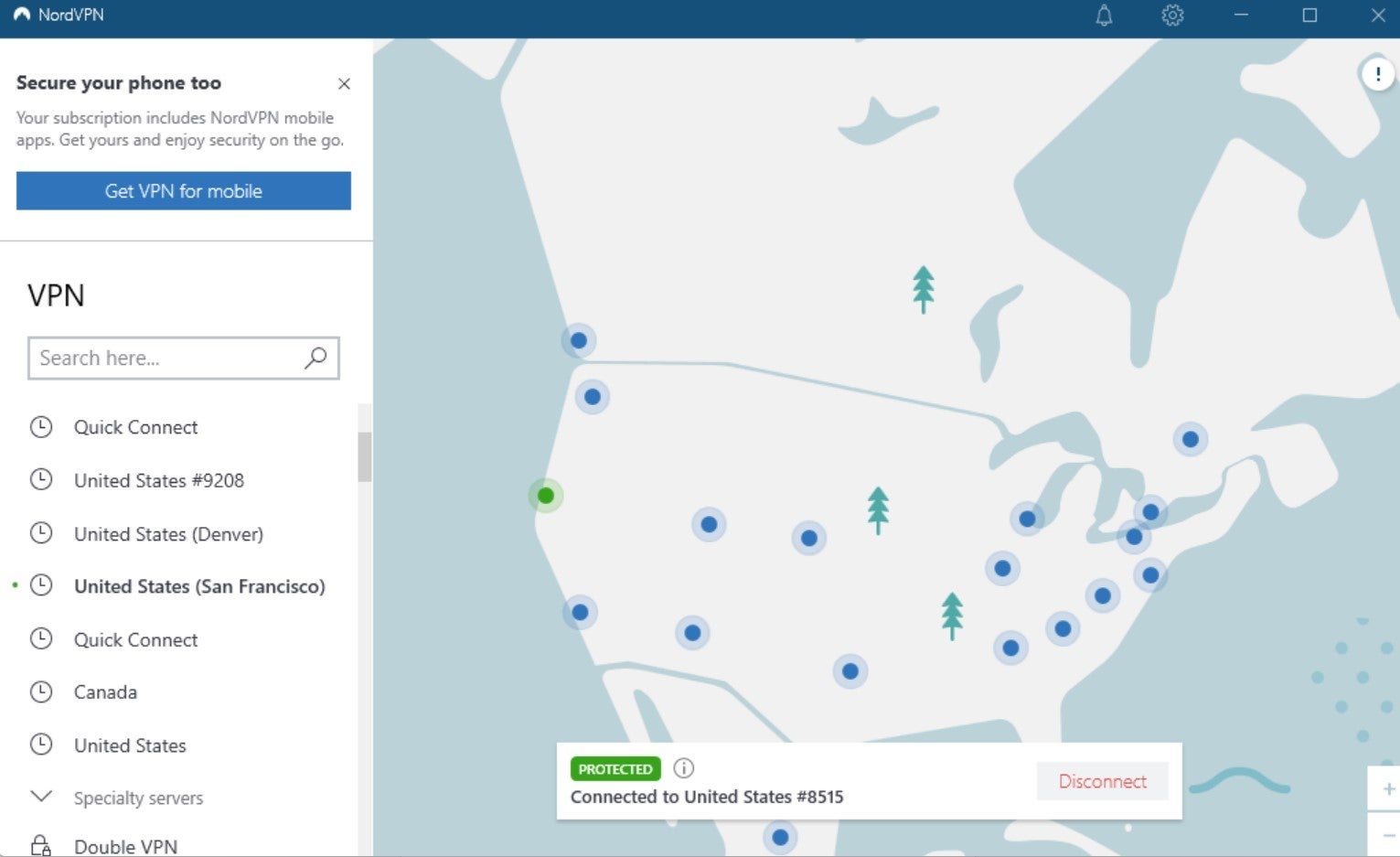
(Screenshot from NordVPN)

Setting up a VPN on your computer or phone is a fairly simple process. However, you'll want to make sure you set it up before you travel abroad, since some countries, such as China, have restrictions on accessing VPN websites.

Daily Newsletter
Reward your inbox with the TPG Daily newsletter
Join over 700,000 readers for breaking news, in-depth guides and exclusive deals from TPG’s experts

First, select from one of the dozens of VPN providers currently on the market. The technical specifications for each may be confusing, but generally, it is best to select one that is both widely implemented and tailored for regular consumer use.

Some of the more popular and well-vetted VPN apps rated by CNET (which, like TPG, is a Red Ventures-owned company) include:

  • ExpressVPN: CNET's top-rated option based on its combination of speed and security.
  • IPVanish: An option that gets good grades for ease of use by beginners.
  • NordVPN: I've personally been using this service for years. It tends to be speedy and effective in accessing websites while abroad as well as encrypting data transfers while at home, based on my experience.
  • Surfshark: One of the least expensive (yet reliable) services currently available.

After choosing a VPN provider, your next step is to sign up for a subscription. Typically, a VPN subscription costs about $5 to $10 a month. Depending on the service you choose, you may find discounts available for annual or two-year plans.

Once you purchase your VPN subscription, you'll then download the app from the app store on your phone or computer. Most programs are available for multiple operating systems, including iPhone and Android.

Then, all that's left to do after installing the app is to click the icon and sign in with your user ID and password. You can enable the app to start automatically every time your computer boots up or your phone connects to a network. It's a good practice to allow for auto-connection, as it's easy to forget to run your VPN.

How to use a VPN

Most VPNs offer a variety of settings ranging from simple features (such as choosing a location) to more complex setups involving traffic routing and specialty servers. For most users, it should be enough to change your connection location if access speed is slow or if websites are blocked.

The screenshot above from a NordVPN login page shows the various locations where a user can connect simply by clicking on one of the blue buttons on the map. Most VPN providers have a similarly large selection of places where you can connect. You can usually view them in either map or list format.

Once you select your connection location, the VPN should work seamlessly with most apps and websites, and you can access them from anywhere in the world. If you find websites performing slowly or not loading at all, try reconnecting to an alternate server or location.

Related: How technology is transforming business travel

Bottom line

For security and connectivity when traveling, it's a good practice to install and use a VPN application on your phone and computer. Not only are VPN services affordable, they also provide a simple and efficient way to encrypt your data and access the websites of your choice while traveling abroad.

Choose a VPN provider that is well established and reviewed, such as ExpressVPN, IPVanish, NordVPN or Surfshark. Then, simply install the app on your device and enable it to connect whenever you do.

Taking these simple steps will help you greatly reduce the risk of jeopardizing your personal information while using public internet networks.

Featured image by Getty Images/iStockphoto
Editorial disclaimer: Opinions expressed here are the author’s alone, not those of any bank, credit card issuer, airline or hotel chain, and have not been reviewed, approved or otherwise endorsed by any of these entities.

TPG featured card

Best for dining at restaurants
TPG Editor‘s Rating
4 / 5
Go to review
Apply for American Express® Gold Card
at American Express's secure site

Rewards

1 - 4X points

Intro offer

As High As 100,000 points. Find Out Your Offer.

Annual Fee

$325

Recommended Credit

Excellent to Good

Why We Chose It

There’s a lot to love about the Amex Gold. It’s a fan favorite thanks to its fantastic bonus-earning rates at restaurants worldwide and at U.S. supermarkets. If you’re hitting the skies soon, you’ll also earn bonus Membership Rewards points on travel. Paired with up to $120 in Uber Cash annually (for U.S. Uber rides or Uber Eats orders, card must be added to Uber app and you can redeem with any Amex card), up to $120 in annual dining statement credits to be used with eligible partners, an up to $84 Dunkin’ credit each year at U.S. Dunkin Donuts and an up to $100 Resy credit annually, there’s no reason that foodies shouldn’t add the Amex Gold to their wallet. These benefits alone are worth more than $400, which offsets the $325 annual fee on the Amex Gold card. Enrollment is required for select benefits. (Partner offer)

Pros

  • 4 points per dollar spent on dining at restaurants worldwide and U.S. supermarkets (on the first $50,000 in purchases per calendar year; then 1 point per dollar spent thereafter and $25,000 in purchases per calendar year; then 1 point per dollar spent thereafter, respectively)
  • 3 points per dollar spent on flights booked directly with the airline or with amextravel.com
  • Packed with credits foodies will enjoy
  • Solid welcome bonus

Cons

  • Not as useful for those living outside the U.S.
  • Some may have trouble using Uber and other dining credits
  • You may be eligible for as high as 100,000 Membership Rewards® Points after you spend $6,000 in eligible purchases on your new Card in your first 6 months of Card Membership. Welcome offers vary and you may not be eligible for an offer. Apply to know if you’re approved and find out your exact welcome offer amount – all with no credit score impact. If you’re approved and choose to accept the Card, your score may be impacted.
  • Earn 4X Membership Rewards® points per dollar spent on purchases at restaurants worldwide, on up to $50,000 in purchases per calendar year, then 1X points for the rest of the year.
  • Earn 4X Membership Rewards® points per dollar spent at US supermarkets, on up to $25,000 in purchases per calendar year, then 1X points for the rest of the year.
  • Earn 3X Membership Rewards® points per dollar spent on flights booked directly with airlines or on AmexTravel.com.
  • Earn 2X Membership Rewards® points per dollar spent on prepaid hotels and other eligible purchases booked on AmexTravel.com.
  • Earn 1X Membership Rewards® point per dollar spent on all other eligible purchases.
  • $120 Uber Cash on Gold: Add your Gold Card to your Uber account and get $10 in Uber Cash each month to use on orders and rides in the U.S. when you select an American Express Card for your transaction. That’s up to $120 Uber Cash annually. Plus, after using your Uber Cash, use your Card to earn 4X Membership Rewards® points for Uber Eats purchases made with restaurants or U.S. supermarkets. Point caps and terms apply.
  • $84 Dunkin' Credit: With the $84 Dunkin' Credit, you can earn up to $7 in monthly statement credits after you enroll and pay with the American Express® Gold Card at U.S. Dunkin' locations. Enrollment is required to receive this benefit.
  • $100 Resy Credit: Get up to $100 in statement credits each calendar year after you pay with the American Express® Gold Card to dine at U.S. Resy restaurants or make other eligible Resy purchases. That's up to $50 in statement credits semi-annually. Enrollment required.
  • $120 Dining Credit: Satisfy your cravings, sweet or savory, with the $120 Dining Credit. Earn up to $10 in statement credits monthly when you pay with the American Express® Gold Card at Grubhub, The Cheesecake Factory, Goldbelly, Wine.com, and Five Guys. Enrollment required.
  • Explore over 1,000 upscale hotels worldwide with The Hotel Collection and receive a $100 credit towards eligible charges* with every booking of two nights or more through AmexTravel.com. *Eligible charges vary by property.
  • No Foreign Transaction Fees.
  • Annual Fee is $325.
  • Terms Apply.
Apply for American Express® Gold Card
at American Express's secure site
Terms & restrictions apply. See rates & fees
Best for dining at restaurants
TPG Editor‘s Rating
4 / 5
Go to review

Rewards Rate

4XEarn 4X Membership Rewards® points per dollar spent on purchases at restaurants worldwide, on up to $50,000 in purchases per calendar year, then 1X points for the rest of the year.
4XEarn 4X Membership Rewards® points per dollar spent at US supermarkets, on up to $25,000 in purchases per calendar year, then 1X points for the rest of the year.
3XEarn 3X Membership Rewards® points per dollar spent on flights booked directly with airlines or on AmexTravel.com.
2XEarn 2X Membership Rewards® points per dollar spent on prepaid hotels and other eligible purchases booked on AmexTravel.com.
1XEarn 1X Membership Rewards® point per dollar spent on all other eligible purchases.
  • Intro Offer

    As High As 100,000 points. Find Out Your Offer.
  • Annual Fee

    $325
  • Recommended Credit

    Excellent to Good

Why We Chose It

There’s a lot to love about the Amex Gold. It’s a fan favorite thanks to its fantastic bonus-earning rates at restaurants worldwide and at U.S. supermarkets. If you’re hitting the skies soon, you’ll also earn bonus Membership Rewards points on travel. Paired with up to $120 in Uber Cash annually (for U.S. Uber rides or Uber Eats orders, card must be added to Uber app and you can redeem with any Amex card), up to $120 in annual dining statement credits to be used with eligible partners, an up to $84 Dunkin’ credit each year at U.S. Dunkin Donuts and an up to $100 Resy credit annually, there’s no reason that foodies shouldn’t add the Amex Gold to their wallet. These benefits alone are worth more than $400, which offsets the $325 annual fee on the Amex Gold card. Enrollment is required for select benefits. (Partner offer)

Pros

  • 4 points per dollar spent on dining at restaurants worldwide and U.S. supermarkets (on the first $50,000 in purchases per calendar year; then 1 point per dollar spent thereafter and $25,000 in purchases per calendar year; then 1 point per dollar spent thereafter, respectively)
  • 3 points per dollar spent on flights booked directly with the airline or with amextravel.com
  • Packed with credits foodies will enjoy
  • Solid welcome bonus

Cons

  • Not as useful for those living outside the U.S.
  • Some may have trouble using Uber and other dining credits
  • You may be eligible for as high as 100,000 Membership Rewards® Points after you spend $6,000 in eligible purchases on your new Card in your first 6 months of Card Membership. Welcome offers vary and you may not be eligible for an offer. Apply to know if you’re approved and find out your exact welcome offer amount – all with no credit score impact. If you’re approved and choose to accept the Card, your score may be impacted.
  • Earn 4X Membership Rewards® points per dollar spent on purchases at restaurants worldwide, on up to $50,000 in purchases per calendar year, then 1X points for the rest of the year.
  • Earn 4X Membership Rewards® points per dollar spent at US supermarkets, on up to $25,000 in purchases per calendar year, then 1X points for the rest of the year.
  • Earn 3X Membership Rewards® points per dollar spent on flights booked directly with airlines or on AmexTravel.com.
  • Earn 2X Membership Rewards® points per dollar spent on prepaid hotels and other eligible purchases booked on AmexTravel.com.
  • Earn 1X Membership Rewards® point per dollar spent on all other eligible purchases.
  • $120 Uber Cash on Gold: Add your Gold Card to your Uber account and get $10 in Uber Cash each month to use on orders and rides in the U.S. when you select an American Express Card for your transaction. That’s up to $120 Uber Cash annually. Plus, after using your Uber Cash, use your Card to earn 4X Membership Rewards® points for Uber Eats purchases made with restaurants or U.S. supermarkets. Point caps and terms apply.
  • $84 Dunkin' Credit: With the $84 Dunkin' Credit, you can earn up to $7 in monthly statement credits after you enroll and pay with the American Express® Gold Card at U.S. Dunkin' locations. Enrollment is required to receive this benefit.
  • $100 Resy Credit: Get up to $100 in statement credits each calendar year after you pay with the American Express® Gold Card to dine at U.S. Resy restaurants or make other eligible Resy purchases. That's up to $50 in statement credits semi-annually. Enrollment required.
  • $120 Dining Credit: Satisfy your cravings, sweet or savory, with the $120 Dining Credit. Earn up to $10 in statement credits monthly when you pay with the American Express® Gold Card at Grubhub, The Cheesecake Factory, Goldbelly, Wine.com, and Five Guys. Enrollment required.
  • Explore over 1,000 upscale hotels worldwide with The Hotel Collection and receive a $100 credit towards eligible charges* with every booking of two nights or more through AmexTravel.com. *Eligible charges vary by property.
  • No Foreign Transaction Fees.
  • Annual Fee is $325.
  • Terms Apply.
