Announcing the Latest Version of TPG To Go: TPG To Go 2.0

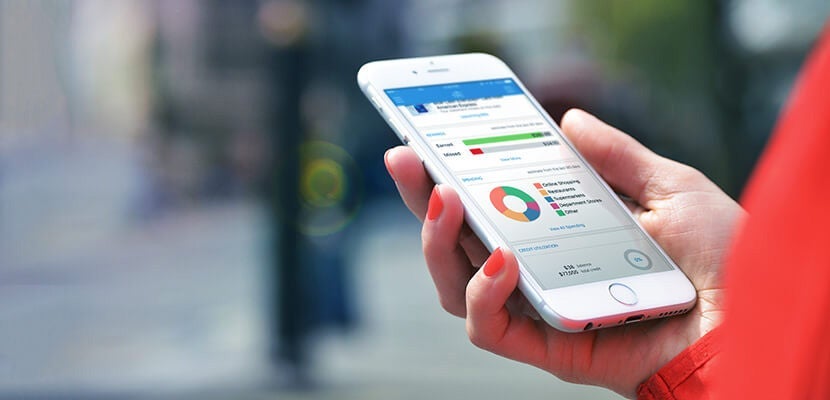
After much planning and testing, we released the first TPG app, TPG To Go, back in 2014. More than a year later and after receiving some great feedback from users, we're thrilled to announce the follow-up version of the app, TPG To Go 2.0!
Along with all the tools from the first version of the app, including favorites like Pay With This, TPG Tracker and TPG Now, version 2.0 will include new features that are more customizable, making it even easier to track how you spend and monitor all of your credit cards. As of yesterday, TPG To Go 2.0 is available as a free download in the Apple App Store for iPhone/iOS users, however, TPG To Go 2.0 for Android is still in development. Android users can log in with the new Google sign-in feature on TPG To Go 1.1, which was released yesterday, but the full features of TPG To Go 2.0 are still in the works.
We worked in much of your fantastic feedback when building TPG To Go 2.0. Below, you'll find an overview of the newest features on TPG To Go 2.0, as well as updates to existing services from TPG To Go. We hope you enjoy the new app as much as we do!
TPG To Go 2.0 new/updated features include:
Customizable Interface
When you open the new app for the first time, you'll immediately be able to tell things have changed. Upon signing up, you can establish a PIN that will serve as an extra layer of security, which you can choose to keep on or turn off. If it's kept on, any time your phone locks or you close out of the app, you'll have to reenter your PIN in order to access your information.
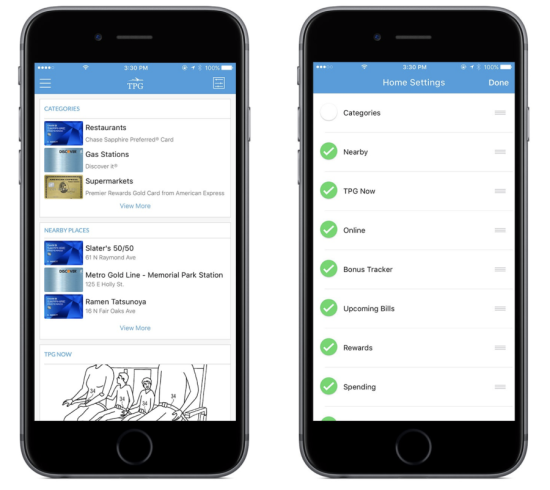
We've also improved the homescreen, making it more customizable. If your spending is most important to you, you can set that to be the first thing you see right when you open the app. And the same goes for all the other aspects — TPG Now, rewards, categories, what's nearby to your location, online offers, bonus tracker and upcoming bills, among others. By clicking on the menu icon in the top right corner of the interface, you'll see a list of all the features and can manually drag them into the order you want to see them appear whenever you open the app.
Pay with This!
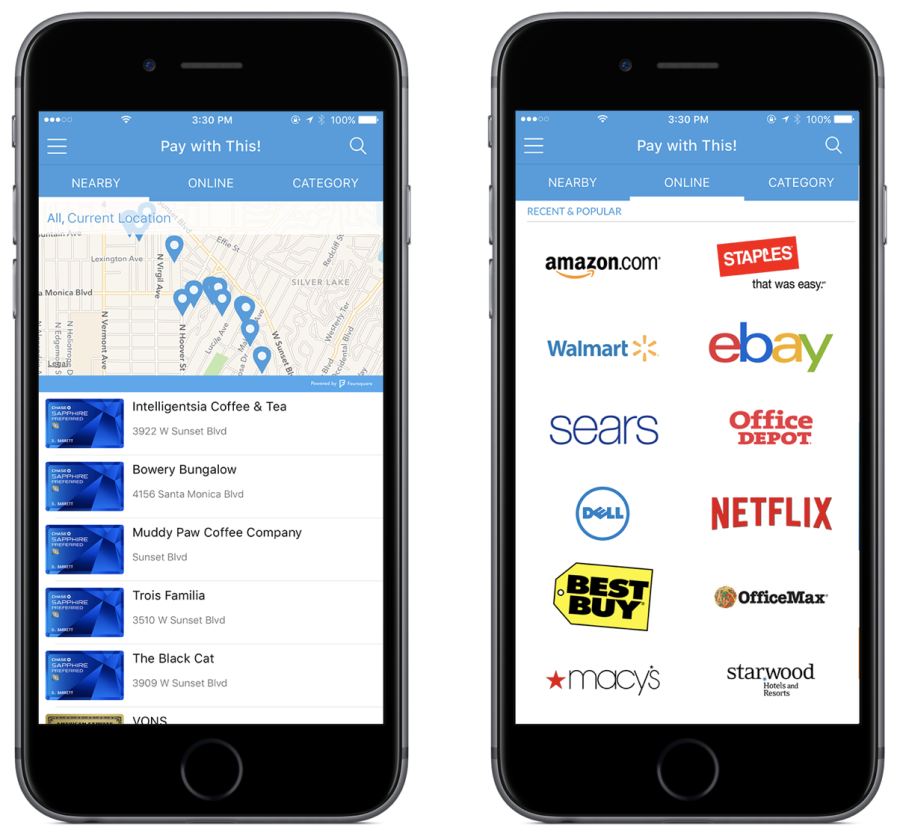
The Pay with This! feature is updated to be more interactive and useful when you're out and about. It's the same general concept as the original version, but we've updated the look and feel. Say you're looking for a place to go around the office for lunch — the Pay with This! feature will highlight which card you should use based on where you're going. The map, which is powered by Foursquare, and the location names listed below will feature easy-to-read graphic displays of whichever card is recommended for the location. In addition, there's also a force-touch option when looking at each location on later versions of the iPhone.

In addition to the standard functionality you're used to with Pay with This!, there are two new and exciting bonus features that have been added by popular demand. We were getting a lot of feedback from readers who were requesting online options, such as which cards to use at various online retailers. Worry no more, as TPG To Go 2.0 offers more than 1,800 online merchants. When you use the app for the first time, you'll be given a select offering of popular merchants, but as you use the tool, you'll be given new options that are more in line with your tastes. If you can't find a merchant on the app, email appsupport@thepointsguy.com and let us know — we'd like to hear from you and add your favorite stores to the list.
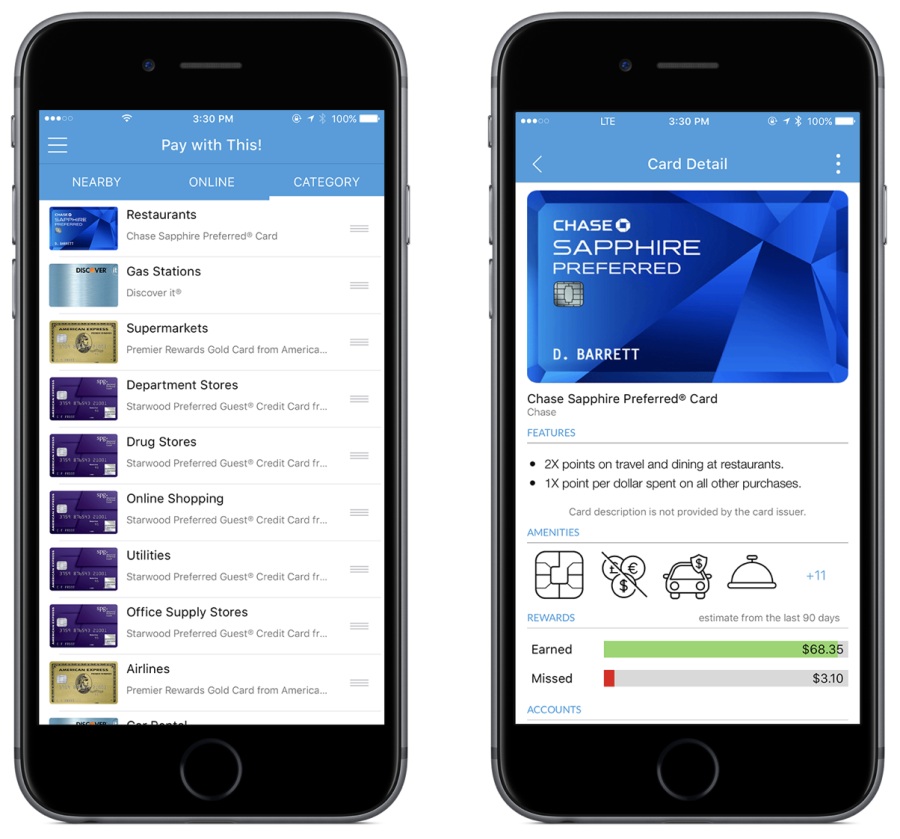
The other new part of Pay with This! is the category section, which will give you credit card recommendations based on category. You'll be able to check out which of your cards will get you the most return on everything from supermarkets to department stores, utilities and home improvement, among others. It gives you a great overview of which card to use and when. Although you can't change what's included here, you can customize the category tab by moving the selections around — if you're the most interested in airlines, move it to the top.
In each of the three subcategories of Pay with This! (nearby, online and category), you'll be able to click on a card to expand its features, as well as a rewards estimate and other amenities that come with being a cardholder. We're really excited about the expanded opportunities TPG To Go 2.0 gives users to interact with when choosing which cards to use.
TPG Now
This feature was available on the old version of the app and we're happy to announce that it's updated with a more user-friendly interface on version 2.0. In this tab, you'll be able to follow all the latest points and travel news from TPG. It's a direct pull from the blog and — new to version 2.0 — you can access and interact in the comment section of each post. We love to hear from you in the comments, and TPG To Go 2.0 makes interacting with us and other readers easier.
TPG Tracker
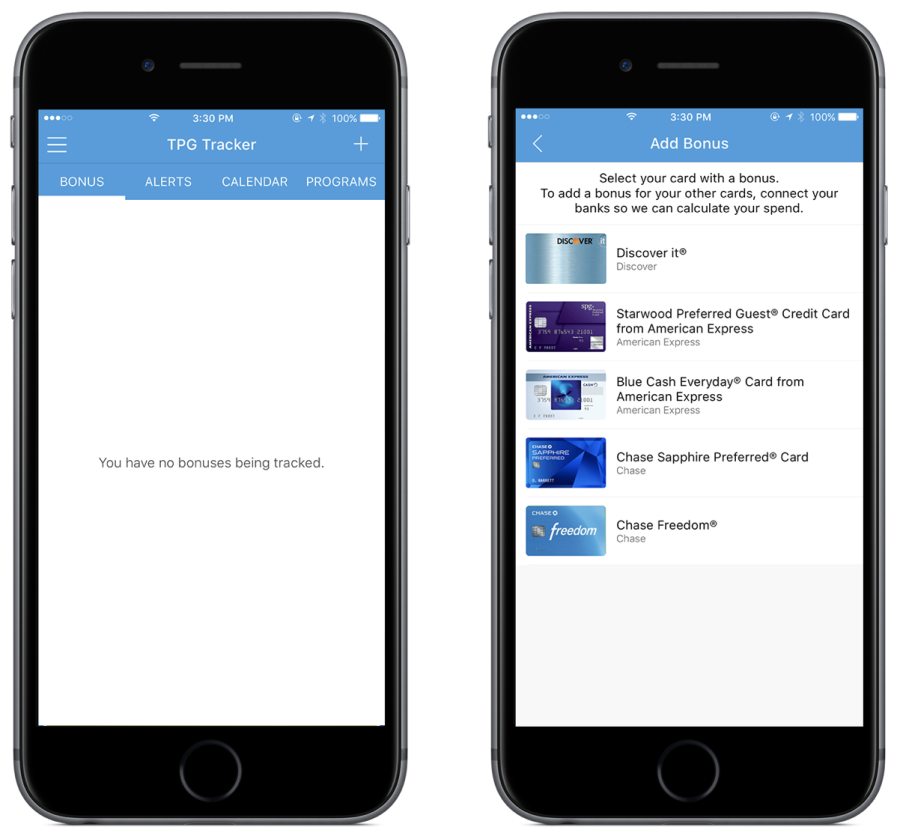
This category is also one of the most customizable options. Here, you can really stay on top of your programs of choice and credit card bonuses by selecting your favorite programs and brands. If you're a loyal Delta flyer, select the Delta SkyMiles option and get a notification sent straight to your phone when there's a post on TPG about Delta. This feature will really keep you up to speed with your favorite programs so you can best maximize all they have to offer.
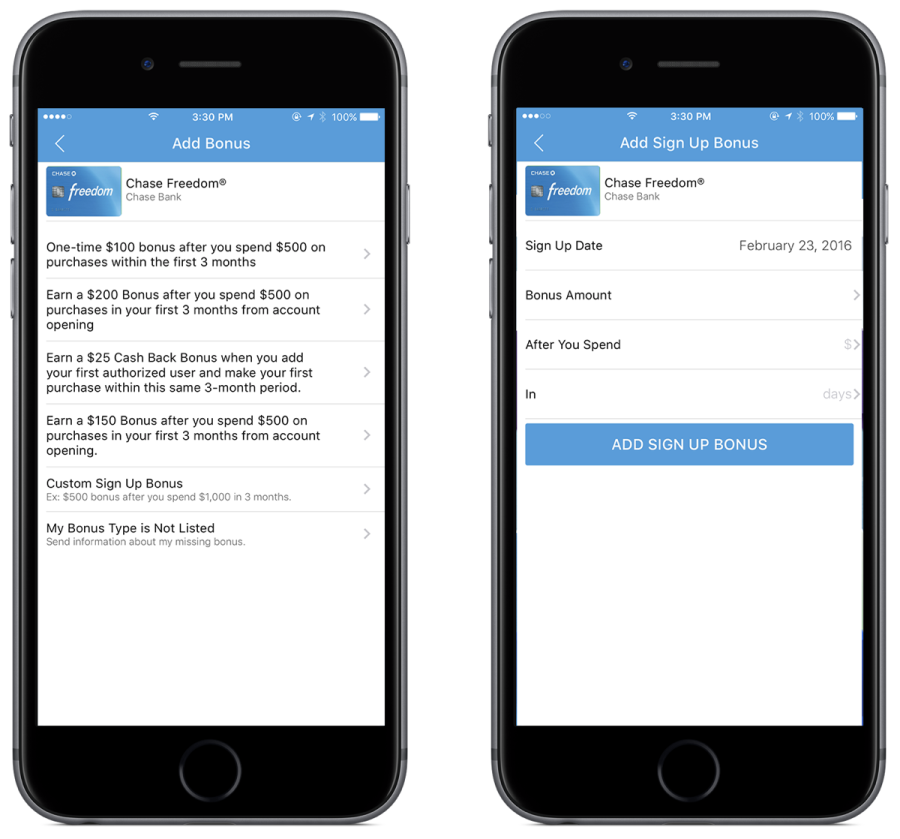
Here, you can also set up your credit card bonuses. By inputting your card details, you'll be able to stay on top of your spend to make sure you meet any sign-up bonuses. You'll be able to select bonuses and then follow your progress on the calendar feature. TPG Tracker makes it extremely easy to navigate all the cards in your wallet — especially your newer cards — to make sure you don't miss any important dates or deals.
My Wallet
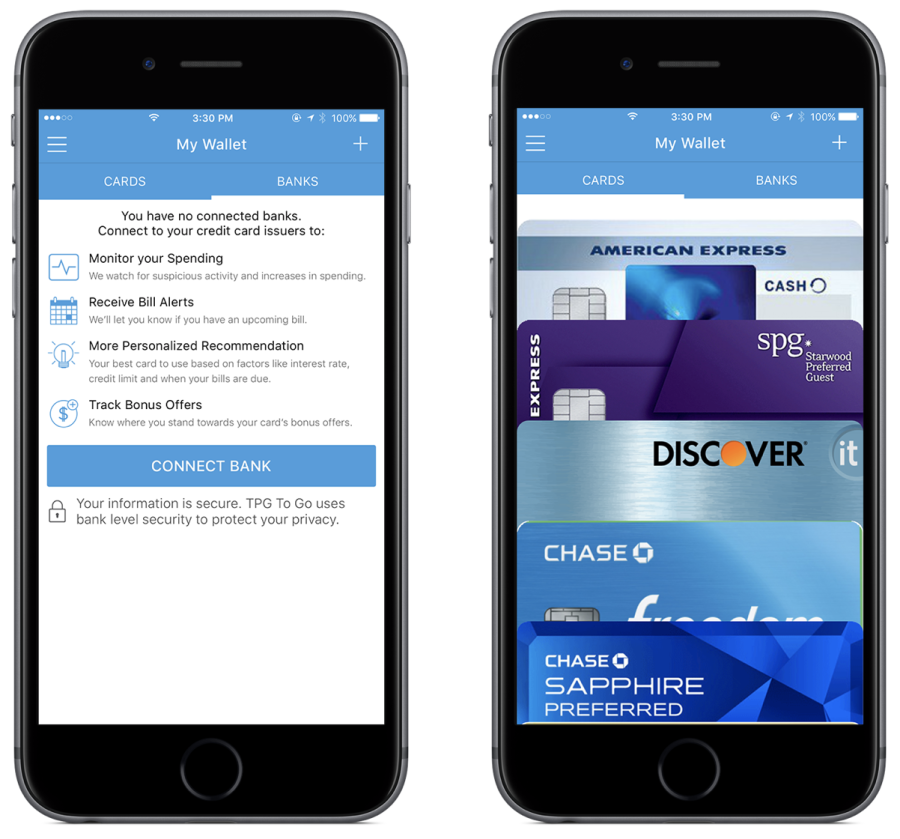
This is where all of your cards are stored. In this version, the graphics are much more aesthetically pleasing. The cards themselves in the wallet are easy to scroll through and select which you want to further expand, displaying complete card details.
TPGtv
As readers of TPG, you know about TPGtv — you can join TPG as he travels to different parts of the world, sharing with you how to maximize points and miles to get there. Well, on version 2.0 of TPG To Go, you'll be able to watch each video at your convenience. When you open the TPGtv tab, you'll be redirected to the TPG YouTube page where you can watch each TPGtv episode.
Spend Monitor
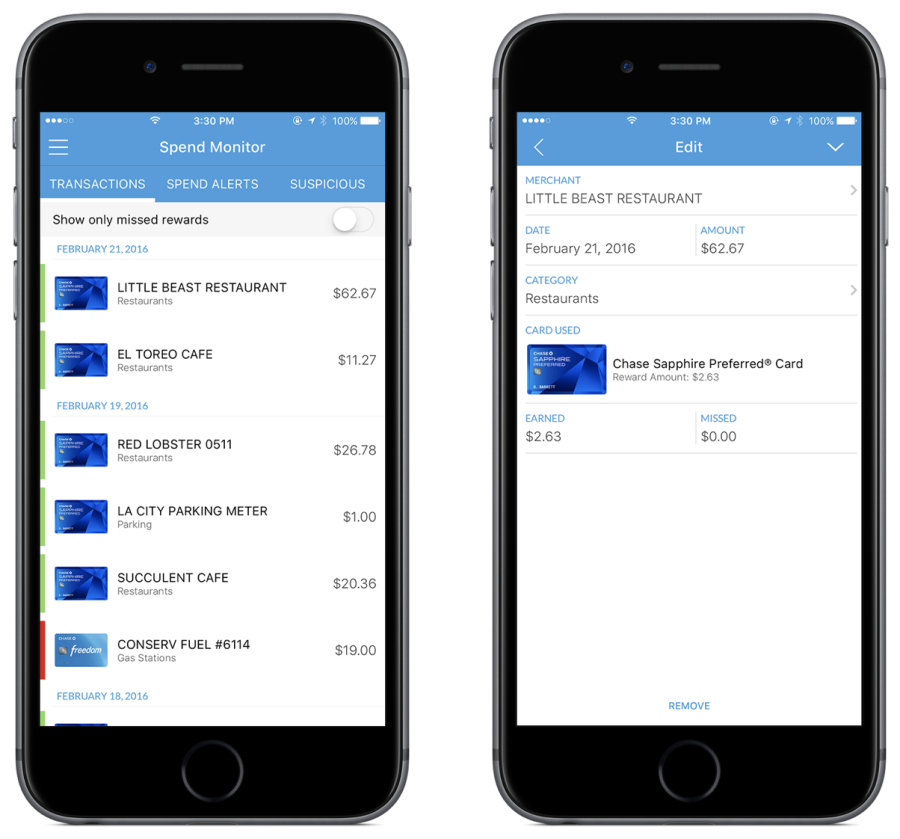
The Spend Monitor tool allows you to do just as it sounds — track your spending. Here, you'll be able to view all your transactions, as well as see which purchases you missed rewards on. You can filter your transactions to show all purchases or just those you missed. This is a great tool to help make sure you maximize all spending for future purchases. If you paid for gas with a card and missed rewards you would have been able to get with another card, the Spend Monitor will alert you of that so you never miss a reward again.
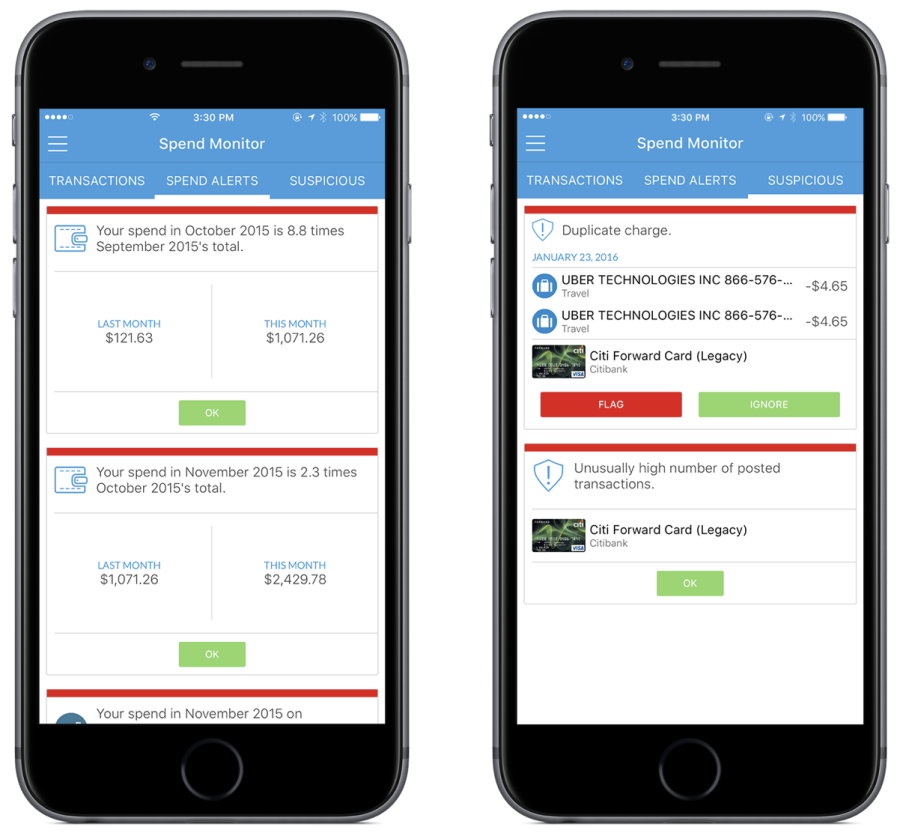
With the Spend Monitor, you'll also be able to compare your monthly spending and general spending habits. This tool makes it easy for you to keep track of your finances and spending habits by seeing how much your spend increased or decreased on each card in your wallet from months prior. In addition, you'll also be notified whenever there is suspicious activity on any of your accounts. If there's suspicious activity on an account, you'll be notified within the app and can select to either flag the activity with your issuer and call the credit card company or ignore it. Now, more than ever, you can stay on top of your spending and your accounts with tools like Spend Monitor.
Hot Deals

As you probably know, credit card deals are always changing, which is why we're constantly updating our hot deals. With the Hot Deals tab on TPG To Go 2.0, you'll be able to seamlessly scroll through the hottest deals in the easy-to-use interface, which is set up like My Wallet. You'll be able to stay completely on top of deals as they come in, because any time we change our hot deals, the app updates as well.
Follow TPG
Keeping up with TPG can be pretty challenging task — he's always on the move. But, with the Follow TPG tab on TPG To Go 2.0, you'll be able to keep track of where in the world he is. In addition, you can connect with TPG on all social media platforms, including the daily newsletter, Facebook, Twitter, Instagram, YouTube and Snapchat (thepointsguy).
All of us here at TPG are super excited for the launch of TPG To Go 2.0. We're hoping this version of the app helps you manage your credit cards so you can maximize their value. We're continuously working to improve the functionality of TPG To Go 2.0, and we'd love to hear what you think about the new app!
TPG featured card

at American Express's secure site
Terms & restrictions apply. See rates & fees.
| 3X | Earn 3X Miles on Delta purchases. |
| 1X | Earn 1X Miles on all other eligible purchases. |
Pros
- Delta SkyClub access when flying Delta
- Annual companion ticket for travel on Delta (upon renewal)
- Ability to earn MQDs through spending
- Various statement credits for eligible purchases
Cons
- Steep annual fee of $650
- Other Delta cobranded cards offer superior earning categories
- Earn 100,000 Bonus Miles after you spend $6,000 or more in purchases with your new Card within the first 6 months of Card Membership and an additional 25,000 bonus miles after you make an additional $3,000 in purchases on the Card within your first 6 months, starting from the date that your account is opened. Offer Ends 04/01/2026.
- Delta SkyMiles® Reserve American Express Card Members receive 15 Visits per Medallion® Year to the Delta Sky Club® when flying Delta and can unlock an unlimited number of Visits after spending $75,000 in purchases on your Card in a calendar year. Plus, you’ll receive four One-Time Guest Passes each Medallion Year so you can share the experience with family and friends when traveling Delta together.
- Enjoy complimentary access to The Centurion® Lounge in the U.S. and select international locations (as set forth on the Centurion Lounge Website), Sidecar by The Centurion® Lounge in the U.S. (see the Centurion Lounge Website for more information on Sidecar by The Centurion® Lounge availability), and Escape Lounges when flying on a Delta flight booked with the Delta SkyMiles® Reserve American Express Card. § To access Sidecar by The Centurion® Lounge, Card Members must arrive within 90 minutes of their departing flight (including layovers). To access The Centurion® Lounge, Card Members must arrive within 3 hours of their departing flight. Effective July 8, 2026, during a layover, Card Members must arrive within 5 hours of the connecting flight.
- Receive $2,500 Medallion® Qualification Dollars with MQD Headstart each Medallion Qualification Year and earn $1 MQD for each $10 in purchases on your Delta SkyMiles® Reserve American Express Card with MQD Boost to get closer to Status next Medallion Year.
- Enjoy a Companion Certificate on a Delta First, Delta Comfort, or Delta Main round-trip flight to select destinations each year after renewal of your Card. The Companion Certificate requires payment of government-imposed taxes and fees of between $22 and $250 (for itineraries with up to four flight segments). Baggage charges and other restrictions apply. Delta Basic experiences are not eligible for this benefit.
- $240 Resy Credit: When you use your Delta SkyMiles® Reserve American Express Card for eligible purchases with U.S. Resy restaurants, you can earn up to $20 each month in statement credits. Enrollment required.
- $120 Rideshare Credit: Earn up to $10 back in statement credits each month after you use your Delta SkyMiles® Reserve American Express Card to pay for U.S. rideshare purchases with select providers. Enrollment required.
- Delta SkyMiles® Reserve American Express Card Members get 15% off when using miles to book Award Travel on Delta flights through delta.com and the Fly Delta app. Discount not applicable to partner-operated flights or to taxes and fees.
- With your Delta SkyMiles® Reserve American Express Card, receive upgrade priority over others with the same Medallion tier, product and fare experience purchased, and Million Miler milestone when you fly with Delta.
- Earn 3X Miles on Delta purchases and earn 1X Miles on all other eligible purchases.
- No Foreign Transaction Fees. Enjoy international travel without additional fees on purchases made abroad.
- $650 Annual Fee.
- Apply with confidence. Know if you're approved for a Card with no impact to your credit score. If you're approved and you choose to accept this Card, your credit score may be impacted.
- Terms Apply.
- See Rates & Fees