How to Stop Apps From Tracking You While Traveling


This week, a privacy bug in Apple's inbuilt FaceTime calling software was discovered. In a nutshell, it allowed users to hear (and in some cases see) another person they dialed without the other party even answering. Apple has since disabled group FaceTime calling on its side until a fix is issued, which should come later this week per an official statement.
While you'd be wise to turn FaceTime off completely until the bug is fixed, it's also worth pausing to check your privacy settings more broadly so you're aware of what's tracking you and when.
Manage Your Location Services
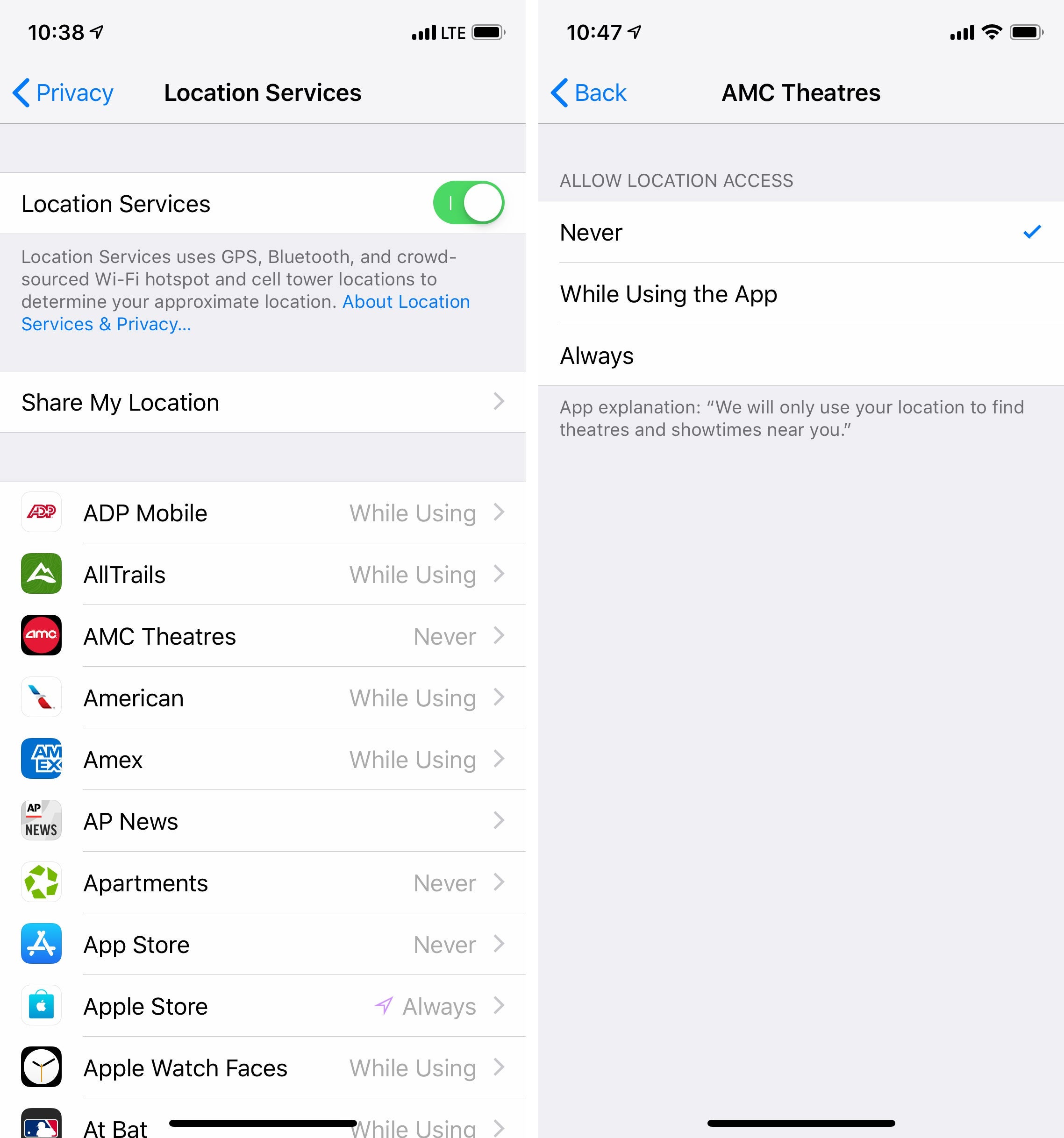
Unfortunately, most apps that you install on your smartphone or tablet will attempt to enable a sneaky setting by default. If you aren't careful, you can easily tap through a confirmation upon initial setup that gives the app permission to track your location at all times, even when you aren't actively using the app.
App developers love data. They love location data, usage data and personalization data. This data can be used for good — for example, Google Maps can use real-time traffic data to generate accurate forecasts of how bad future traffic will be — but it can also be used for ill. The trouble is that you, the end user, rarely have a bead on how a developer will use your data. Will they sell it to advertisers? Will they use it to target you with a product they're hawking? All of the above?

Granted, most travel related apps require that location services are enabled for them to be useful at all. While you should always consider how well you trust a certain company or developer, you can typically restrict apps from using your location data when you aren't actively using the app.
On Apple's iPhone and iPad products, you can check this by doing the following:
- Open Settings
- Pull down to find the search box, and input "Privacy"
- Within Privacy, tap into Location Services
- Comb through each app listed and select "While Using the App" for each app
- If the above option isn't available, toggle "Never" until you're using the app; you'll need to manually turn Location Services on and off for these apps each time you use the app.
If you have a phone or tablet running Google's Android operating system, Google has an entire guide devoted to managing location settings across the system as a whole as well as in individual apps.
Use the Web Instead of Apps
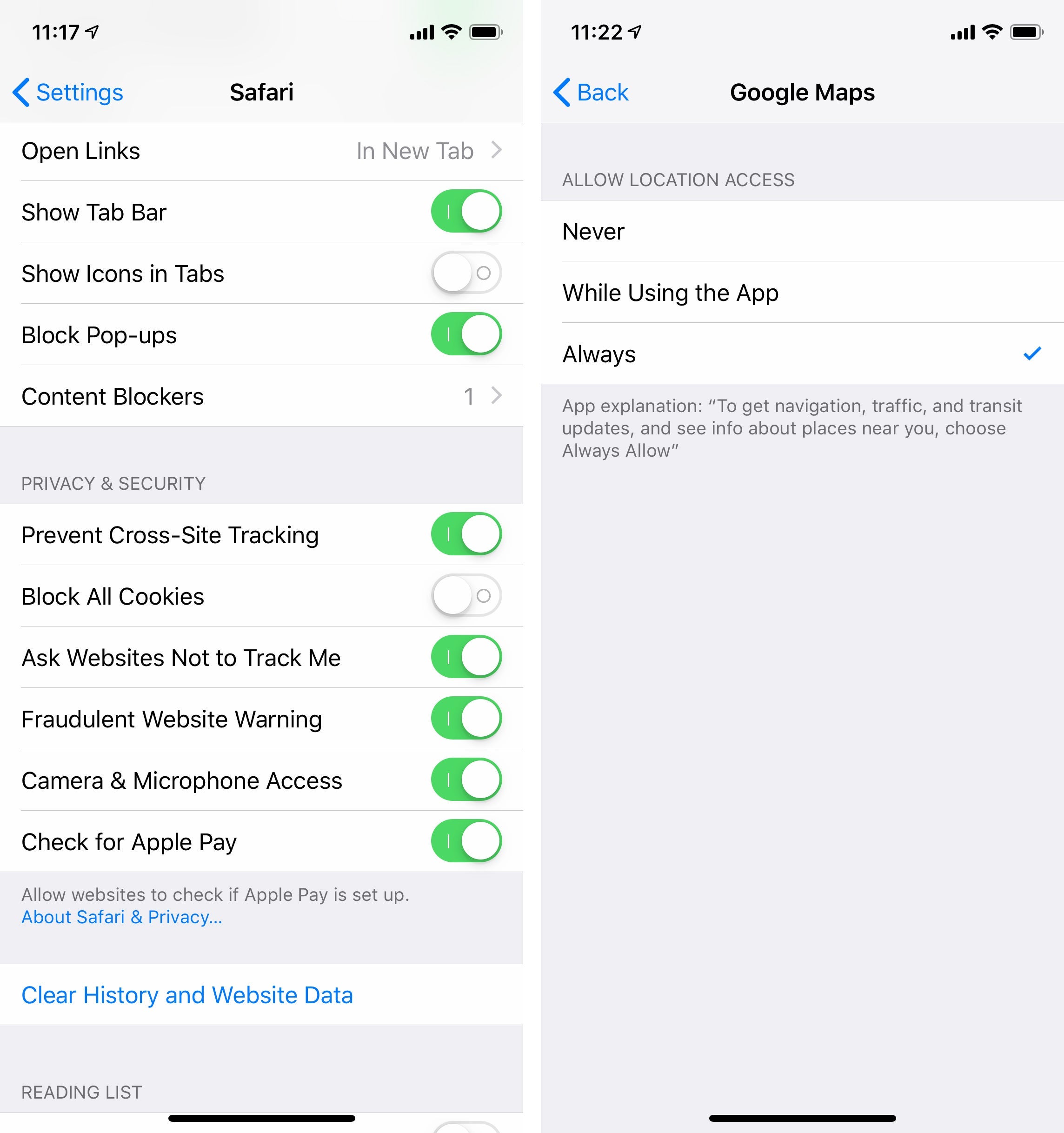
This is a more extreme option for those looking to truly purge their phone of avenues for tracking. Instead of downloading a dedicated app to check the weather, social media and even your credit cards, use a web browser like Apple Safari or Google Chrome.
This begins with deleting any app that has a suitable web-based replacement. Instead of downloading a weather app, for example, open a private browsing tab in your phone's browser and bookmark a weather website. You can then focus your efforts on ensuring that your browser disallows location tracking. Additionally, you can toggle your browser to block all cookies, request Do Not Track and prevent cross-site tracking within Settings.

For Apple users, you can take things a step further by downloading a content tracker compatible with the Safari web browser, such as Refine. In essence, the fewer apps you have on your phone, the fewer programs you'll need to be mindful of when it comes to tracking you.
Have any other tips for keeping tracking at bay on your smartphone and tablet? Let us know in comments below!
For more TPG news delivered each morning to your inbox, sign up for our daily newsletter here!
TPG featured card


Rewards
| 2X miles | 2 miles per dollar on every purchase |
| 5X miles | 5 miles per dollar on flights and vacation rentals booked through Capital One Business Travel |
| 10X miles | 10 miles per dollar on hotels and rental cars booked through Capital One Business Travel |
Intro offer
Annual Fee
Recommended Credit
Why We Chose It
The Capital One Venture X Business Card has all the Capital One Venture X Rewards Credit Card has to offer and more. It offers an incredible welcome bonus and requires an equally impressive spend to qualify. In addition, the card comes with premium travel perks like annual travel credit. (Partner offer)Pros
- The Capital One Venture X business card has a very lucrative welcome offer.
- In addition, the card comes with many premium travel perks such as an annual $300 credit for bookings through Capital One Business Travel.
- Business owners are also able to add employee cards for free.
Cons
- The card requires significant spending to earn the welcome offer.
- Another drawback is that the annual travel credit can only be used on bookings made through Capital One Business Travel.
- LIMITED-TIME OFFER: Earn up to 400K bonus miles: 200K miles when you spend $30K in the first 3 months, and an additional 200k miles when you spend $150k in the first 6 months
- Earn unlimited 2X miles on every purchase, everywhere—with no limits or category restrictions
- Earn 10X miles on hotels and rental cars and 5X miles on flights and vacation rentals booked through Capital One Business Travel
- With no preset spending limit, enjoy big purchasing power that adapts so you can spend more and earn more rewards
- Empower your teams to make business purchases while earning rewards on their transactions, with free employee and virtual cards. Plus, automatically sync your transaction data with your accounting software and pay your vendors with ease
- Redeem your miles on flights, hotels and more. Plus, transfer your miles to any of the 15+ travel loyalty programs
- Every year, you'll get 10,000 bonus miles after your account anniversary date. Plus, receive an annual $300 credit for bookings made through Capital One Business Travel
- Receive up to a $120 credit for Global Entry or TSA PreCheck®. Enjoy access to 1,300+ airport lounges worldwide, including Capital One Lounge locations and Priority Pass™ lounges, after enrollment
- Enjoy a $100 experience credit and other premium benefits with every hotel and vacation rental booked from the Premier Collection
- This is a pay-in-full card, so your balance is due in full every month
- Top rated mobile app
Rewards Rate
| 2X miles | 2 miles per dollar on every purchase |
| 5X miles | 5 miles per dollar on flights and vacation rentals booked through Capital One Business Travel |
| 10X miles | 10 miles per dollar on hotels and rental cars booked through Capital One Business Travel |
Intro Offer
Earn 200K miles when you spend $30K in the first 3 months, and an additional 200K miles when you spend $150K in the first 6 monthsLIMITED-TIME OFFER: Earn up to 400K bonus milesAnnual Fee
$395Recommended Credit
Credit ranges are a variation of FICO® Score 8, one of many types of credit scores lenders may use when considering your credit card application.740-850Excellent
Why We Chose It
The Capital One Venture X Business Card has all the Capital One Venture X Rewards Credit Card has to offer and more. It offers an incredible welcome bonus and requires an equally impressive spend to qualify. In addition, the card comes with premium travel perks like annual travel credit. (Partner offer)Pros
- The Capital One Venture X business card has a very lucrative welcome offer.
- In addition, the card comes with many premium travel perks such as an annual $300 credit for bookings through Capital One Business Travel.
- Business owners are also able to add employee cards for free.
Cons
- The card requires significant spending to earn the welcome offer.
- Another drawback is that the annual travel credit can only be used on bookings made through Capital One Business Travel.
- LIMITED-TIME OFFER: Earn up to 400K bonus miles: 200K miles when you spend $30K in the first 3 months, and an additional 200k miles when you spend $150k in the first 6 months
- Earn unlimited 2X miles on every purchase, everywhere—with no limits or category restrictions
- Earn 10X miles on hotels and rental cars and 5X miles on flights and vacation rentals booked through Capital One Business Travel
- With no preset spending limit, enjoy big purchasing power that adapts so you can spend more and earn more rewards
- Empower your teams to make business purchases while earning rewards on their transactions, with free employee and virtual cards. Plus, automatically sync your transaction data with your accounting software and pay your vendors with ease
- Redeem your miles on flights, hotels and more. Plus, transfer your miles to any of the 15+ travel loyalty programs
- Every year, you'll get 10,000 bonus miles after your account anniversary date. Plus, receive an annual $300 credit for bookings made through Capital One Business Travel
- Receive up to a $120 credit for Global Entry or TSA PreCheck®. Enjoy access to 1,300+ airport lounges worldwide, including Capital One Lounge locations and Priority Pass™ lounges, after enrollment
- Enjoy a $100 experience credit and other premium benefits with every hotel and vacation rental booked from the Premier Collection
- This is a pay-in-full card, so your balance is due in full every month
- Top rated mobile app