Here's Why It's Important to Set Aircraft Change Alerts


Not all aircraft interiors are created equally. There can be some vast differences between seats —even on the same airline's aircraft. And for those of us wanting to maximize our travel experience, information is power.
Yesterday, TPG reader Christoph Trappe tweeted this photo of his experience on American Airlines Flight 87 from London's Heathrow (LHR) to Chicago (ORD):
As it turns out, American Airlines swapped the aircraft at the last minute from a Boeing 787-8 to a Boeing 787-9. While that might seem like a small difference, those two aircraft are arranged quite differently. Both plane types have 3-3-3 seating in economy, but the 787-9 has a premium economy section and much better business class seats.
This was a huge upgrade both for those flying in business class and those who ended up in premium economy after paying for economy. For Christoph, who was next on the list for a business class upgrade, the aircraft swap meant going from an extra-legroom exit row seat to a standard legroom economy seat. He didn't find out until boarding that there was a change and by then, it was too late to do anything about it.
His question: How can you request compensation? And how can he avoid this in the future?
For compensation, my suggestion was to contact American Airlines customer relations via AA's web form pointing out the downgrade. Sure enough, this netted Christoph a voucher toward a future flight:

In terms of how to avoid this the next time around, the answer is simple: ExpertFlyer Aircraft Change Alerts. I have found it incredibly helpful to set aircraft change alerts for all of my flights, especially on American Airlines — which is known for its last-minute aircraft changes.
ExpertFlyer will let you know if there's a change to the aircraft type (i.e. 788 to 789 in Christoph's case), but it'll also let you know if the seating map changes for the flight — even if the aircraft type remains the same:
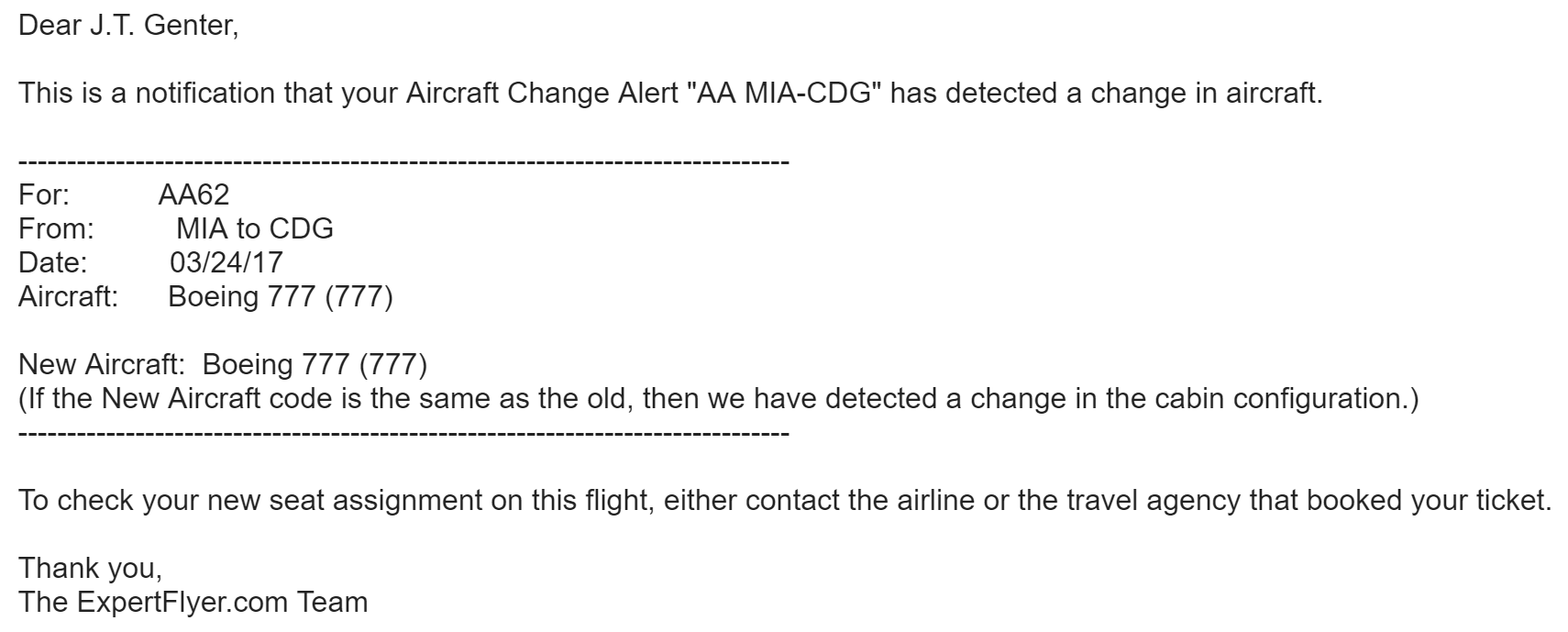
These type of alerts can be triggered when the airline swaps a retrofit aircraft for an older aircraft — or visa versa. Either way, you'll be one of the first to know about it and you can jump on the airline's website or app to reconsider seating options.
Last November, ExpertFlyer's Aircraft Change Alert discovered a newly-retrofitted Boeing 777-200 on a flight my wife and I were scheduled on from Dallas/Fort Worth (DFW) to Frankfurt (FRA) — changing from a spacious-but-old 2-5-2 arrangement to a modern-but-tight 3-4-3 arrangement. We were able to snag one of the few 2-seat pairs before the seats were filled by the airline's system.
You'll need to be a Premium ExpertFlyer member to set Aircraft Change Alerts and a Premium subscription costs $9.99/month or $99.99/year. For frequent travelers, the cost is well worth the price and for me, ExpertFlyer has become a necessary tool. However, even periodic travelers can get huge value out of a subscription. If your travel dates are locked in, setting an award availability alert can end up saving you a pile of miles or points — or a ton of time searching — by alerting you when saver space is available.
TPG featured card

at Capital One's secure site
Terms & restrictions apply. See rates & fees.
| 5X miles | Earn 5X miles on hotels, vacation rentals and rental cars booked through Capital One Travel |
| 2X miles | Earn unlimited 2X miles on every purchase, every day |
Pros
- Stellar welcome offer of 75,000 miles after spending $4,000 on purchases in the first three months from account opening. Plus, a $250 Capital One Travel credit to use in your first cardholder year upon account opening.
- You'll earn 2 miles per dollar on every purchase, which means you won't have to worry about memorizing bonus categories
- Rewards are versatile and can be redeemed for a statement credit or transferred to Capital One’s transfer partners
Cons
- Highest bonus-earning categories only on travel booked via Capital One Travel
- LIMITED-TIME OFFER: Enjoy $250 to use on Capital One Travel in your first cardholder year, plus earn 75,000 bonus miles once you spend $4,000 on purchases within the first 3 months from account opening - that’s equal to $1,000 in travel
- Earn unlimited 2X miles on every purchase, every day
- Earn 5X miles on hotels, vacation rentals and rental cars booked through Capital One Travel
- Miles won't expire for the life of the account and there's no limit to how many you can earn
- Receive up to a $120 credit for Global Entry or TSA PreCheck®
- Use your miles to get reimbursed for any travel purchase—or redeem by booking a trip through Capital One Travel
- Enjoy a $50 experience credit and other premium benefits with every hotel and vacation rental booked from the Lifestyle Collection
- Transfer your miles to your choice of 15+ travel loyalty programs
- Top rated mobile app