Navigating New York City with Apple Watch


While The Points Guy headed down south for a long weekend, he left his Apple Watch with me. I put it to work right away, identifying my preferred watch face, loading up on apps and, as you’ll see below, finding a new way to get to work.
Now, I've lived in New York City since 2008—give me an address and I'll probably be able to get myself there without pulling up an app. But that doesn't mean my route is the most efficient, and while that's mostly by design (the more direct routes tend to be those most heavily trafficked by tourists), if I'm running late I'll consider switching things up.
So, I decided to have Apple Watch help me get from my apartment in the Financial District to our office in SoHo. Opting to use Siri to get things going, I started my commute by awkwardly lifting my wrist to my face and saying "navigate to..."—but that loaded driving directions. I tapped again to clarify "show me walking directions to...," and that seemed to do the trick. My destination popped up, followed quickly by my first step, and I was on my way.
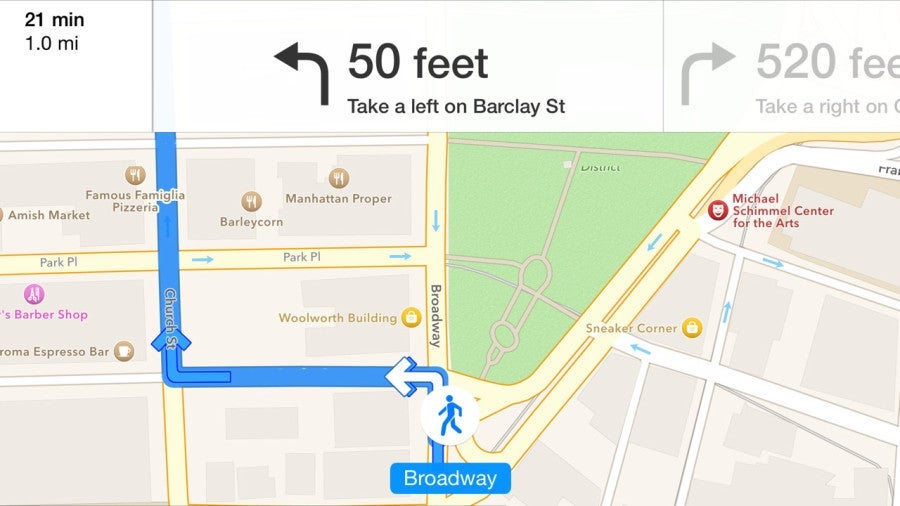
The walk usually takes me a hair over 25 minutes, but Apple Watch said it could be done in 24. Game on. My usual trek down Broadway (wider sidewalks and less construction), which Google Maps is a-okay with, wasn't an option with Apple's app equivalent. And, for now, you can't use Google Maps with an Apple Watch. Still, I really wanted to walk down Broadway, so I started walking my usually route.
The watch vibrated just before the first intersection, and again at the next and then at the one after that. Then I had a few minutes to walk in peace until the watch decided to nudge me again. Fine—we'll do it your way, stupid watch. It adjusted quickly and I walked in a straight line until I arrived at the office, more or less on time (the few times I paused to take pictures of the watch more than made up for any time savings).
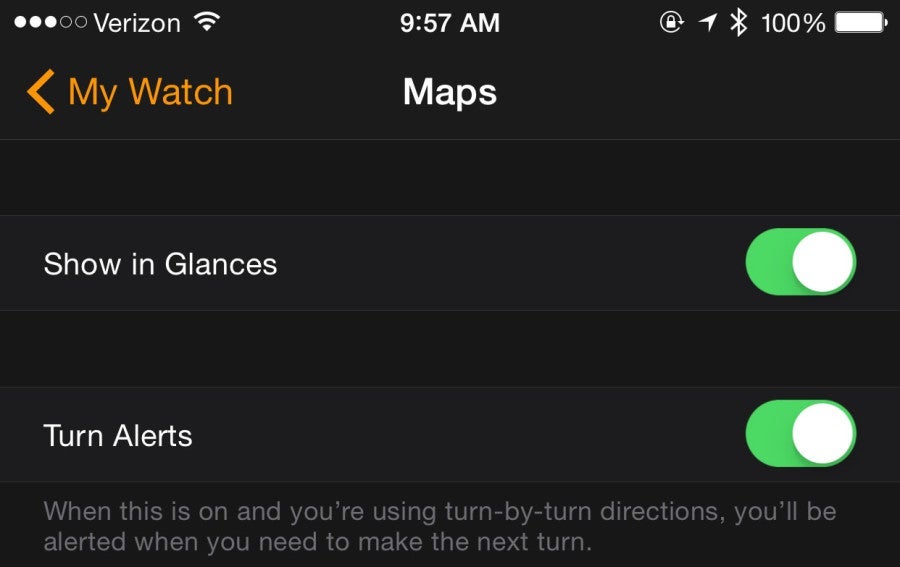
When I arrived, I noticed that my iPhone's battery had dropped by five percent. I did send a couple of emails during the walk, but the watch's navigation mode was mostly responsible for that hit to the battery. It's important to note that, like with many of Apple Watch's functions, your phone handles the processing here. That helps reduce the power draw with the watch itself, at your iPhone battery's expense.

I wasn't able to figure out how to view the watch's current battery life until many hours later (there's a bit of a learning curve when it comes to just about everything with Apple Watch), so I don't know how my morning walk factored in, but I did end the day with roughly 70% left, which isn't bad at all.
TPG featured card

Rewards
| 4X | Earn 4X Membership Rewards® points per dollar spent on purchases at restaurants worldwide, on up to $50,000 in purchases per calendar year, then 1X points for the rest of the year. |
| 4X | Earn 4X Membership Rewards® points per dollar spent at US supermarkets, on up to $25,000 in purchases per calendar year, then 1X points for the rest of the year. |
| 3X | Earn 3X Membership Rewards® points per dollar spent on flights booked directly with airlines or on AmexTravel.com. |
| 2X | Earn 2X Membership Rewards® points per dollar spent on prepaid hotels and other eligible purchases booked on AmexTravel.com. |
| 1X | Earn 1X Membership Rewards® point per dollar spent on all other eligible purchases. |
Intro offer
Annual Fee
Recommended Credit
Why We Chose It
There’s a lot to love about the Amex Gold. It’s a fan favorite thanks to its fantastic bonus-earning rates at restaurants worldwide and at U.S. supermarkets. If you’re hitting the skies soon, you’ll also earn bonus Membership Rewards points on travel. Paired with up to $120 in Uber Cash annually (for U.S. Uber rides or Uber Eats orders, card must be added to Uber app and you can redeem with any Amex card), up to $120 in annual dining statement credits to be used with eligible partners, an up to $84 Dunkin’ credit each year at U.S. Dunkin Donuts and an up to $100 Resy credit annually, there’s no reason that foodies shouldn’t add the Amex Gold to their wallet. These benefits alone are worth more than $400, which offsets the $325 annual fee on the Amex Gold card. Enrollment is required for select benefits. (Partner offer)Pros
- 4 points per dollar spent on dining at restaurants worldwide and U.S. supermarkets (on the first $50,000 in purchases per calendar year; then 1 point per dollar spent thereafter and $25,000 in purchases per calendar year; then 1 point per dollar spent thereafter, respectively)
- 3 points per dollar spent on flights booked directly with the airline or with amextravel.com
- Packed with credits foodies will enjoy
- Solid welcome bonus
Cons
- Not as useful for those living outside the U.S.
- Some may have trouble using Uber and other dining credits
- You may be eligible for as high as 100,000 Membership Rewards® Points after you spend $6,000 in eligible purchases on your new Card in your first 6 months of Card Membership. Welcome offers vary and you may not be eligible for an offer. Apply to know if you’re approved and find out your exact welcome offer amount – all with no credit score impact. If you’re approved and choose to accept the Card, your score may be impacted.
- Earn 4X Membership Rewards® points per dollar spent on purchases at restaurants worldwide, on up to $50,000 in purchases per calendar year, then 1X points for the rest of the year.
- Earn 4X Membership Rewards® points per dollar spent at US supermarkets, on up to $25,000 in purchases per calendar year, then 1X points for the rest of the year.
- Earn 3X Membership Rewards® points per dollar spent on flights booked directly with airlines or on AmexTravel.com.
- Earn 2X Membership Rewards® points per dollar spent on prepaid hotels and other eligible purchases booked on AmexTravel.com.
- Earn 1X Membership Rewards® point per dollar spent on all other eligible purchases.
- $120 Uber Cash on Gold: Add your Gold Card to your Uber account and get $10 in Uber Cash each month to use on orders and rides in the U.S. when you select an American Express Card for your transaction. That’s up to $120 Uber Cash annually. Plus, after using your Uber Cash, use your Card to earn 4X Membership Rewards® points for Uber Eats purchases made with restaurants or U.S. supermarkets. Point caps and terms apply.
- $84 Dunkin' Credit: With the $84 Dunkin' Credit, you can earn up to $7 in monthly statement credits after you enroll and pay with the American Express® Gold Card at U.S. Dunkin' locations. Enrollment is required to receive this benefit.
- $100 Resy Credit: Get up to $100 in statement credits each calendar year after you pay with the American Express® Gold Card to dine at U.S. Resy restaurants or make other eligible Resy purchases. That's up to $50 in statement credits semi-annually. Enrollment required.
- $120 Dining Credit: Satisfy your cravings, sweet or savory, with the $120 Dining Credit. Earn up to $10 in statement credits monthly when you pay with the American Express® Gold Card at Grubhub, The Cheesecake Factory, Goldbelly, Wine.com, and Five Guys. Enrollment required.
- Explore over 1,000 upscale hotels worldwide with The Hotel Collection and receive a $100 credit towards eligible charges* with every booking of two nights or more through AmexTravel.com. *Eligible charges vary by property.
- No Foreign Transaction Fees.
- Annual Fee is $325.
- Terms Apply.
Rewards Rate
| 4X | Earn 4X Membership Rewards® points per dollar spent on purchases at restaurants worldwide, on up to $50,000 in purchases per calendar year, then 1X points for the rest of the year. |
| 4X | Earn 4X Membership Rewards® points per dollar spent at US supermarkets, on up to $25,000 in purchases per calendar year, then 1X points for the rest of the year. |
| 3X | Earn 3X Membership Rewards® points per dollar spent on flights booked directly with airlines or on AmexTravel.com. |
| 2X | Earn 2X Membership Rewards® points per dollar spent on prepaid hotels and other eligible purchases booked on AmexTravel.com. |
| 1X | Earn 1X Membership Rewards® point per dollar spent on all other eligible purchases. |
Intro Offer
You may be eligible for as high as 100,000 Membership Rewards® Points after spending $6,000 in eligible purchases on your new Card in your first 6 months of Membership. Welcome offers vary and you may not be eligible for an offer.As High As 100,000 points. Find Out Your Offer.Annual Fee
$325Recommended Credit
Credit ranges are a variation of FICO® Score 8, one of many types of credit scores lenders may use when considering your credit card application.Excellent to Good
Why We Chose It
There’s a lot to love about the Amex Gold. It’s a fan favorite thanks to its fantastic bonus-earning rates at restaurants worldwide and at U.S. supermarkets. If you’re hitting the skies soon, you’ll also earn bonus Membership Rewards points on travel. Paired with up to $120 in Uber Cash annually (for U.S. Uber rides or Uber Eats orders, card must be added to Uber app and you can redeem with any Amex card), up to $120 in annual dining statement credits to be used with eligible partners, an up to $84 Dunkin’ credit each year at U.S. Dunkin Donuts and an up to $100 Resy credit annually, there’s no reason that foodies shouldn’t add the Amex Gold to their wallet. These benefits alone are worth more than $400, which offsets the $325 annual fee on the Amex Gold card. Enrollment is required for select benefits. (Partner offer)Pros
- 4 points per dollar spent on dining at restaurants worldwide and U.S. supermarkets (on the first $50,000 in purchases per calendar year; then 1 point per dollar spent thereafter and $25,000 in purchases per calendar year; then 1 point per dollar spent thereafter, respectively)
- 3 points per dollar spent on flights booked directly with the airline or with amextravel.com
- Packed with credits foodies will enjoy
- Solid welcome bonus
Cons
- Not as useful for those living outside the U.S.
- Some may have trouble using Uber and other dining credits
- You may be eligible for as high as 100,000 Membership Rewards® Points after you spend $6,000 in eligible purchases on your new Card in your first 6 months of Card Membership. Welcome offers vary and you may not be eligible for an offer. Apply to know if you’re approved and find out your exact welcome offer amount – all with no credit score impact. If you’re approved and choose to accept the Card, your score may be impacted.
- Earn 4X Membership Rewards® points per dollar spent on purchases at restaurants worldwide, on up to $50,000 in purchases per calendar year, then 1X points for the rest of the year.
- Earn 4X Membership Rewards® points per dollar spent at US supermarkets, on up to $25,000 in purchases per calendar year, then 1X points for the rest of the year.
- Earn 3X Membership Rewards® points per dollar spent on flights booked directly with airlines or on AmexTravel.com.
- Earn 2X Membership Rewards® points per dollar spent on prepaid hotels and other eligible purchases booked on AmexTravel.com.
- Earn 1X Membership Rewards® point per dollar spent on all other eligible purchases.
- $120 Uber Cash on Gold: Add your Gold Card to your Uber account and get $10 in Uber Cash each month to use on orders and rides in the U.S. when you select an American Express Card for your transaction. That’s up to $120 Uber Cash annually. Plus, after using your Uber Cash, use your Card to earn 4X Membership Rewards® points for Uber Eats purchases made with restaurants or U.S. supermarkets. Point caps and terms apply.
- $84 Dunkin' Credit: With the $84 Dunkin' Credit, you can earn up to $7 in monthly statement credits after you enroll and pay with the American Express® Gold Card at U.S. Dunkin' locations. Enrollment is required to receive this benefit.
- $100 Resy Credit: Get up to $100 in statement credits each calendar year after you pay with the American Express® Gold Card to dine at U.S. Resy restaurants or make other eligible Resy purchases. That's up to $50 in statement credits semi-annually. Enrollment required.
- $120 Dining Credit: Satisfy your cravings, sweet or savory, with the $120 Dining Credit. Earn up to $10 in statement credits monthly when you pay with the American Express® Gold Card at Grubhub, The Cheesecake Factory, Goldbelly, Wine.com, and Five Guys. Enrollment required.
- Explore over 1,000 upscale hotels worldwide with The Hotel Collection and receive a $100 credit towards eligible charges* with every booking of two nights or more through AmexTravel.com. *Eligible charges vary by property.
- No Foreign Transaction Fees.
- Annual Fee is $325.
- Terms Apply.