Why kids who fly need their own email addresses


In an increasingly connected world, it's important that your kids have their own email addresses. This is especially the case if they fly. More often than not, in order to establish a frequent flyer account for your child, you need to use an email address that is distinct from your own. Each account needs an identifying email address and sharing one just won't cut it in these instances.
Even if you just travel once or twice a year as a family, there's no reason to let those frequent flyer miles go to waste. But, if your child doesn't have a frequent flyer account, it's a no-go. If you don't have an account, there's no way to earn miles. Kids may also need their own email addresses for establishing a relationship with Homeland Security's Trusted Traveler Programs (Global Entry, TSA PreCheck, Nexus or Sentri).
While you may not actually give your kids access to their own email address until they hit a certain age, you'll likely still need to create and manage one on their behalf -- even when they are just infants, toddlers or tweens. Here's some advice on how to do just that.

Use this Gmail tip to quickly setup email addresses for your kids
TPG editor-at-large Zach Honig shared some fantastic advice about using this simple Gmail trick to create a new email address. The beautiful part here is that the emails directed to this new address will actually be delivered to your Gmail inbox. And, this method is free. This is the perfect scenario for a parent that's setting up and managing email accounts for the sole purpose of managing their children's loyalty accounts.
Anyone with an existing Gmail address can use this technique. Say your email address is jake2656@gmail.com and your kids are Amy, Todd and Sara. You would use the following Gmail addresses when setting up their loyalty accounts:
- jake2656+amy@gmail.com
- jake2656+todd@gmail.com
- jake2656+sara@gmail.com
Whenever someone sends an email to any of the above addresses, it will appear in the jake2656@gmail.com inbox. This is awesome because you don't have to even bother setting up or registering any new email accounts. You're just sharing your inbox with your kids. This trick allows you a super easy way to get young ones signed up for loyalty programs with the added benefit of easy management on your part.
Or create a "real" Gmail email account
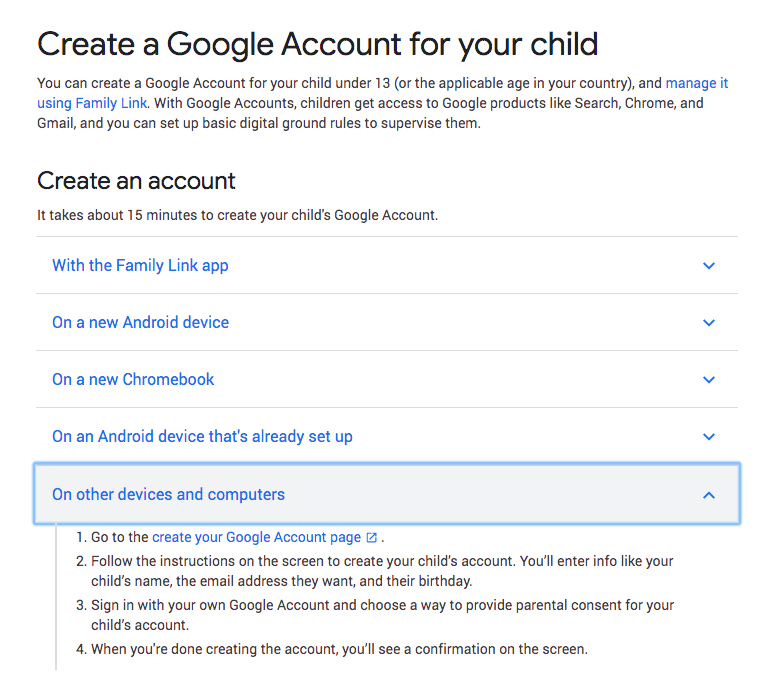
If you'd prefer, you can also create a real individual Gmail account for any of your kids who are under 13. Parents can manage these accounts with Google's Family Link parental control software. You can choose to keep these accounts to yourself or give your kids access. If you do, you can set up access to the specific Google products you'll allow them to access (like search, Chrome, Gmail, etc.).
Yahoo used to offer a similar service through Yahoo Family Account but it is not currently supporting the creation of new accounts.

Other email options for kids
If you want to create individual email addresses for your kids but don't want to use Gmail, there are other free and paid services that specifically cater to families. Take a look at offerings from:
- ZillaMail -- offers both a basic free service and a paid option ($1.95/month or $14.95 annually)
- KidsEmail -- free 30-day trial and then $4.95/month or $38.95 annually
- ZooBuh -- free 30-day trial and then $1/month
- Tocomail -- one-week free trial and then $2.99/month or $29.99 annually
Bottom line
Don't let an email address be the barrier to starting your kids' loyalty accounts. Setup an email address and then register your kids for their own frequent flyer accounts. You'll be glad you did when they earn enough miles for a free flight!
What solution do you use for managing email accounts for your family's loyalty accounts?
Looking for more family travel advice? Here are some resources:
TPG featured card

at Capital One's secure site
Terms & restrictions apply. See rates & fees.
| 5X miles | Earn 5X miles on hotels, vacation rentals and rental cars booked through Capital One Travel |
| 2X miles | Earn unlimited 2X miles on every purchase, every day |
Pros
- Stellar welcome offer of 75,000 miles after spending $4,000 on purchases in the first three months from account opening. Plus, a $250 Capital One Travel credit to use in your first cardholder year upon account opening.
- You'll earn 2 miles per dollar on every purchase, which means you won't have to worry about memorizing bonus categories
- Rewards are versatile and can be redeemed for a statement credit or transferred to Capital One’s transfer partners
Cons
- Highest bonus-earning categories only on travel booked via Capital One Travel
- LIMITED-TIME OFFER: Enjoy $250 to use on Capital One Travel in your first cardholder year, plus earn 75,000 bonus miles once you spend $4,000 on purchases within the first 3 months from account opening - that’s equal to $1,000 in travel
- Earn unlimited 2X miles on every purchase, every day
- Earn 5X miles on hotels, vacation rentals and rental cars booked through Capital One Travel
- Miles won't expire for the life of the account and there's no limit to how many you can earn
- Receive up to a $120 credit for Global Entry or TSA PreCheck®
- Use your miles to get reimbursed for any travel purchase—or redeem by booking a trip through Capital One Travel
- Enjoy a $50 experience credit and other premium benefits with every hotel and vacation rental booked from the Lifestyle Collection
- Transfer your miles to your choice of 15+ travel loyalty programs
- Top rated mobile app