Save Money By Changing This Paypal Currency Setting


When you travel to another country it is common to be asked when paying with a credit card if you want to be charged in the local currency or in US dollars. While it may seem counter-intuitive at first, the correct answer is virtually always to be charged in local currency as otherwise you are very, very likely to lose out on a less than favorable exchange rate. Of course you also want to be sure to pay with a credit card that does not charge a foreign transaction fee so you aren't hit with a roughly 3% fee by your bank every time you use your card abroad to pay in local currency.
I knew that #traveltruth, but I had never dealt with this issue from my home when using Paypal online to pay for services from another country. I'm sure some of you have already experienced this phenomenon, but if you haven't yet, be aware that you have to be on guard when using Paypal to pay for services billed in a different currency or you may end up wasting money on unfavorable exchange rates because of a Paypal default setting.
To give an example, I recently had a £600 bill to pay via PayPal and when I went to pay it I was surprised that it was displaying the price in USD.
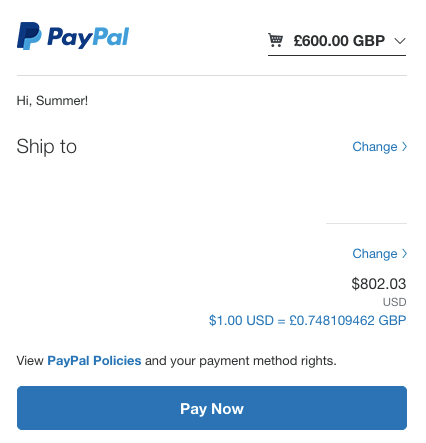
Not only that, but I was surprised that the converted total was as high as it was, as I figured that it would convert to less than $800 USD. Turns out that the default setting in PayPal seems to be convert the transaction to the currency of the credit card you have on file, at least for Visa and MasterCard cards.
You can change the setting to bill you in the currency listed in the seller's invoice by following several steps, but it isn't an intuitive process so I'll outline how I got it done.
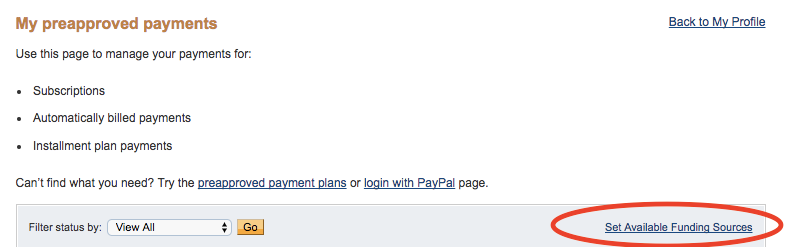
To change the conversion settings, log into your PayPal account and then click on "Payments" on the top bar. Next, select "Manage Pre-approved Payments". From that screen you can select a tiny "Set Available Funding Sources" link as shown below.
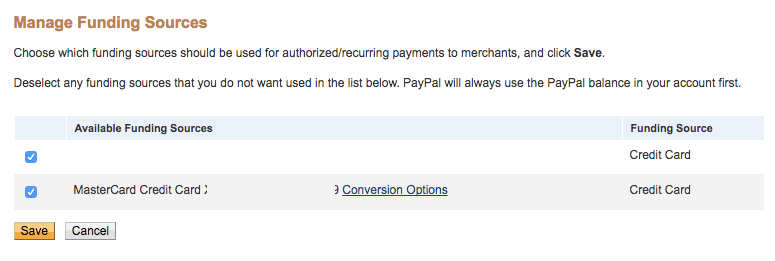
On the Manage Funding Sources screen you can click the hyperlink "Conversion Options" by the Visa and MasterCard cards to change their conversion settings.
You can then click off of the default setting on top and instead have Paypal bill your card in the currency listed on the seller's invoice as indicated by the second option.
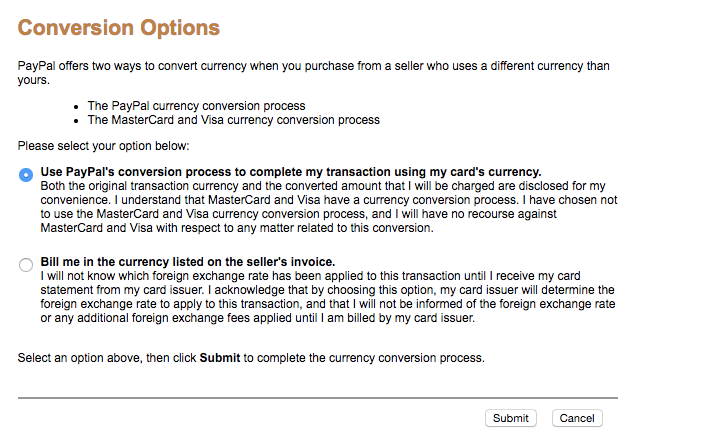
Once I changed this setting I then was able to view and pay the bill in pounds with that specific credit card.

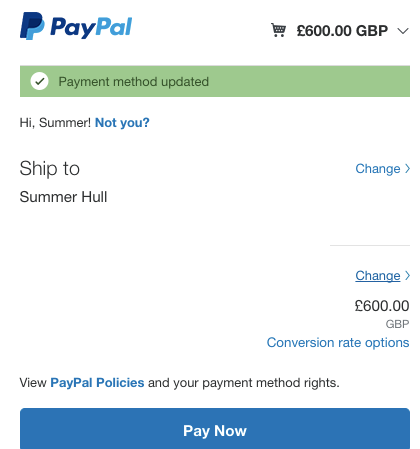
Now let's talk again about why I wanted to do that in the first place. Paypal was converting £600 into $802.03, but when I instead paid in pounds and let my bank do the conversion for me I instead paid just $775.32.

That is roughly $27 saved by paying in 'local currency' and trusting my bank's conversion rate over the payment system at hand. Have you ever dealt with this issue? Do you have any other money saving tips when dealing with different currencies?
TPG featured card

at Capital One's secure site
Terms & restrictions apply. See rates & fees.
| 5X miles | Earn 5X miles on hotels, vacation rentals and rental cars booked through Capital One Travel |
| 2X miles | Earn unlimited 2X miles on every purchase, every day |
Pros
- Stellar welcome offer of 75,000 miles after spending $4,000 on purchases in the first three months from account opening. Plus, a $250 Capital One Travel credit to use in your first cardholder year upon account opening.
- You'll earn 2 miles per dollar on every purchase, which means you won't have to worry about memorizing bonus categories
- Rewards are versatile and can be redeemed for a statement credit or transferred to Capital One’s transfer partners
Cons
- Highest bonus-earning categories only on travel booked via Capital One Travel
- LIMITED-TIME OFFER: Enjoy $250 to use on Capital One Travel in your first cardholder year, plus earn 75,000 bonus miles once you spend $4,000 on purchases within the first 3 months from account opening - that’s equal to $1,000 in travel
- Earn unlimited 2X miles on every purchase, every day
- Earn 5X miles on hotels, vacation rentals and rental cars booked through Capital One Travel
- Miles won't expire for the life of the account and there's no limit to how many you can earn
- Receive up to a $120 credit for Global Entry or TSA PreCheck®
- Use your miles to get reimbursed for any travel purchase—or redeem by booking a trip through Capital One Travel
- Enjoy a $50 experience credit and other premium benefits with every hotel and vacation rental booked from the Lifestyle Collection
- Transfer your miles to your choice of 15+ travel loyalty programs
- Top rated mobile app