How to set up autopay for all your credit cards



Update: Some offers mentioned below are no longer available. View the current offers here.
It's probably happened at least once to everyone here: You log into your bank account to make a payment and realize that you've just missed your payment deadline. The result is the same whether you were off by one day or one week — late fees and penalties await those who fail to make timely payments.
You can avoid any potential late payment worries by setting up automatic payments. This service, offered by essentially every bank out there, allows you to set a recurring monthly payment on your credit cards, so you'll never have to worry about missing one again.
The process for setting up autopay is fairly simple to navigate. Here's how.
Log in to your bank account
To get started, you'll need to log in to your bank account. Since I have a Chase Sapphire Preferred® Card (see rates and fees), I'll use this account to illustrate how it's done.
You can also call in to set this up if you don't have an online account. However, creating a username and password makes accessing your information much easier.
Navigate to your account
Once you log into your account, you'll be at your account dashboard. On Chase's website, you'll see a list of your credit cards in the "Accounts" tab. Click on the individual card, and a pop-up will appear, giving you additional information, including the ability to set up automatic payments.

The process is similar across most banks' sites. From your home page, navigate to a single credit card or click to the payments page to find the autopay option.
Set up your payment
From here, you can begin to set up your payments. If you don't already have a bank account linked for payments, you'll need to do that now. To do so, you'll need your bank account and routing numbers.

Once your accounts are linked, you can set up automatic payments. You'll have several options for how much you'd like to pay:
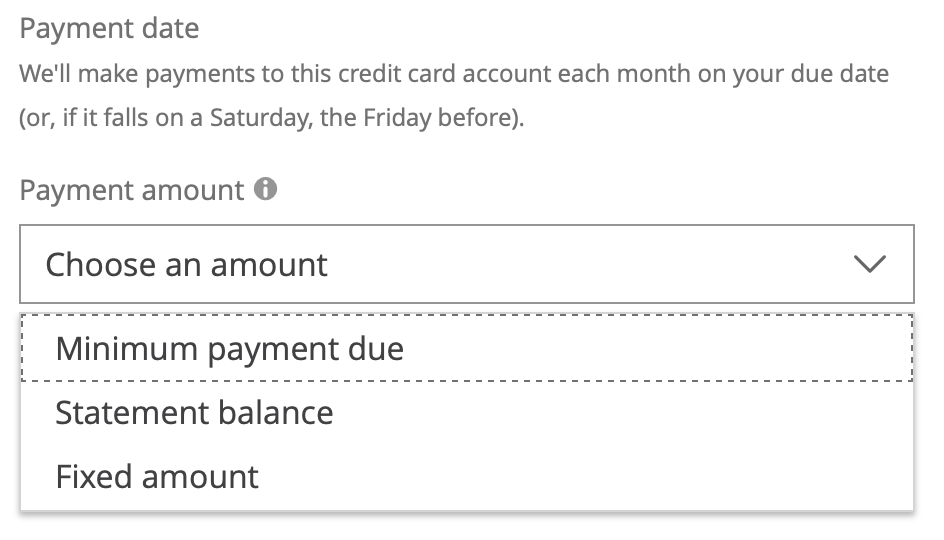
While we always advocate paying your balance in full, there may be some times when you're unable to do so. If that's the case for you, you can always pay less than your balance. The bank calculates your minimum payment monthly, which will vary according to how much you owe, while a fixed amount is a set dollar amount you pick yourself. Remember that penalties will still apply if your fixed amount is below your minimum payment.
While these two options aren't as good as paying your balance in full, if you're at least making the amount of your minimum payments, you won't suffer things like late fees or even lost reward points. Considering that many banks charge upward of $30 every time you make a late payment, these fees can rack up quickly.
Related story: 6 reasons the Chase Sapphire Preferred should be your next credit card
Review and double check
Once you've set up your automatic payments, you should be good to go. Many banks take at least one billing cycle to implement your choices, so if you've got a payment already due, you'll likely need to make one more manual payment. Check with your bank to be certain.

Another thing to remember is that these payments will continue indefinitely; as long as you're charging transactions to your card and have autopay on, your bank account will be billed each month automatically. If the amount charged to your bank account is more than the money you've got available, you could face overdraft fees. This is especially true in times of hardship, such as an unexpected layoff.
Bottom line
Autopay is a fantastic feature banks offer that helps you avoid missing payments. Aside from incurring late fees, missed payments can negatively affect your credit score and even increase your APR. Avoid all these issues by setting up your account to make automatic payments — just don't forget you have it on!
Learn more: Best credit cards of August 2024