Apple Pay Overview: How to Set Up and Shop


When Apple launched the iPhone 6, iPhone 6 Plus, Apple Watch and latest iPad back in September, the company also announced that it would launch a mobile payment system called Apple Pay in October. Well, it's October, and Apple Pay has launched, so I asked TPG Special Contributor Eric Rosen to look into the benefits and drawbacks of this new payment option, and help readers learn how to use it.
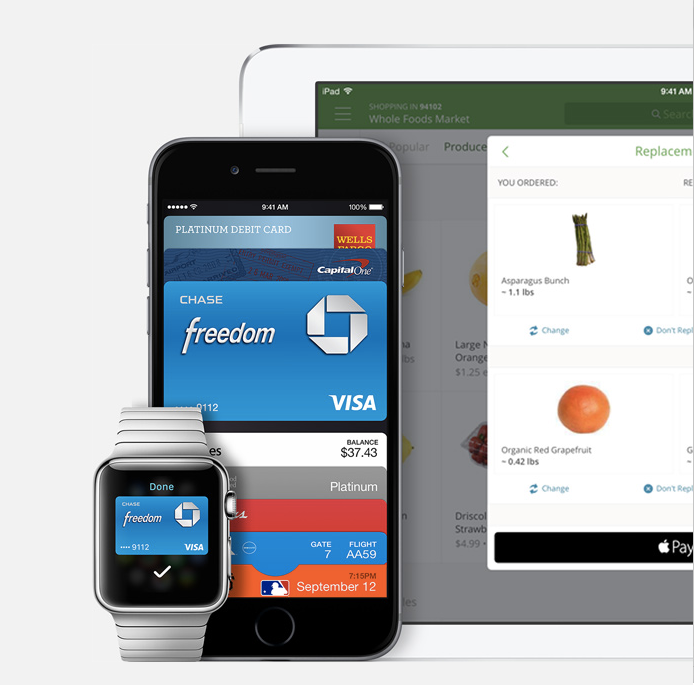
An easy-to-use digital wallet is a dream come true for points collectors. Imagine being able to carry all your credit cards with you in one device that lets you choose which card to use for each specific transaction. Bringing that dream a little closer to reality is the recent launch of Apple Pay, a mobile payment system that has just become available to iPhone 6 and 6 Plus users with the iOS 8.1 release.
Google Wallet has been available for a few years with many of the same capabilities. The main difference seems to be which merchants accept each form of payment (there seems to be a lot of overlap), and that Android phones must be unlocked (i.e., out of secure mode) in order to process a transaction.
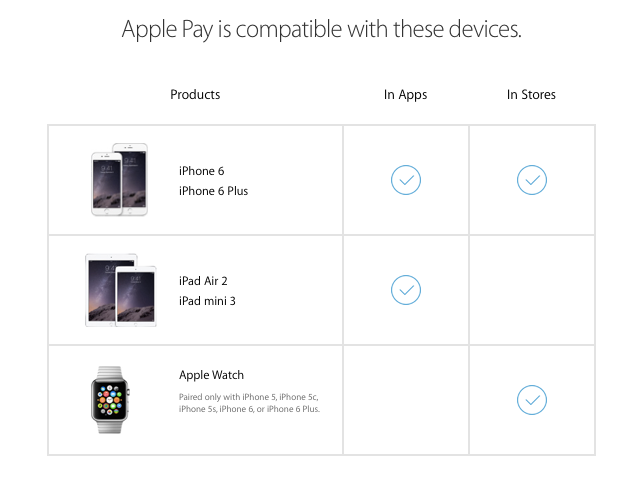
Which Devices Can You Use It On?
So far, Apple Pay is available on:
- iPhone 6
- iPhone 6 Plus
- iPad Air 2
- iPad mini 3
But early in 2015, it will be available on the Apple Watch, as well as on the iPhone 5, 5c and 5s. If you have one of the 5's, you will have to pair it with the Apple Watch in order to use Apple Pay on it.
Setup
This is actually pretty easy. There's no specific Apple Pay app for the iPhone that comes with the iOS 8.1 update. It's already integrated into Passbook, the same system iPhone carriers can use for Starbucks and certain movie transactions. To initialize your account, launch Passbook and you'll be presented with the option to add a debit or credit card to your account. Apple makes things easier (and slightly creepier) by automatically including the credit card to which your iTunes account is linked.
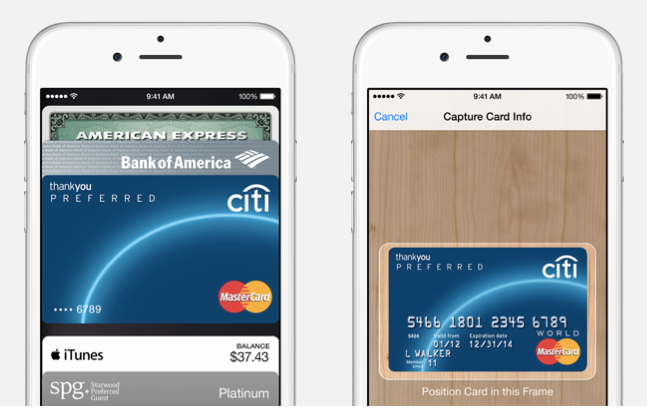
There are two ways to enter your card information: either enter the number, expiration date and security code manually, or simply take a picture of your credit card and Passbook should automatically fill in the fields (depending on where this information is on your credit card, you might still have to manually enter one or more of the numbers).
The fields you must enter include the name on the card, card number, expiration date and security code.

If you enter a debit card, you might be prompted for more information, including special authorization steps involving PINs and even app installations.
In your Settings, the "Use Touch ID for" option should automatically have iPhone Unlock, Apple Pay, and iTunes & App Store set to "on."
Once you have successfully added a card, it should list your most recent transactions, which is also quite useful for keeping track of your spending and potentially noting any fraudulent charges. Also interesting is that Apple Pay won't require any authorization or approval from your card issuer, so once you enter the info, you're good to go.
Which Cards Can You Use?
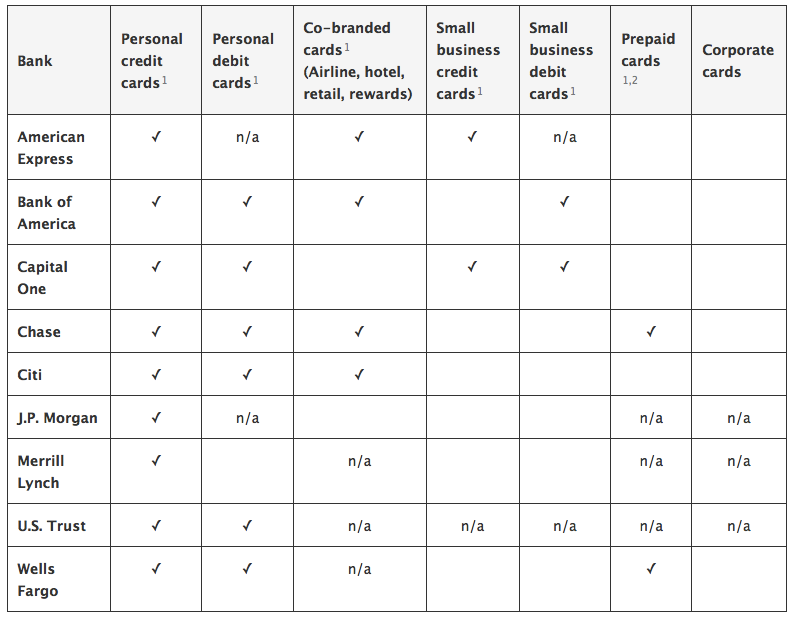
Apple said that it would accept American Express, MasterCard and Visa cards to begin with, so it covers a broad spectrum of the credit cards out there. But before you go whipping out all your cards, keep in mind that only the following issuers are currently supported:
- American Express (not corporate cards)
- Bank of America
- Capital One
- Chase (Visa only and not small business cards)
- Citibank
- Merrill Lynch (credit only)
- US Trust
- Wells Fargo
Visa has also said that its cards from the following issuers will be compatible in the near future: Barclaycard, First National Bank of Omaha, M&T Bank, PNC, Navy Federal Credit Union, Regions Bank, USAA and US Bank.
MasterCard will add cards from the following issuers in the coming months: Barclaycard, USAA, PNC, Navy Federal Credit Union, US Bank, Fifth Third, First Hawaiian, First National Bank of Omaha, First Niagara, Key Bank, Silicon Valley Bank, SSFCU, SunTrust and Synchrony Financial. MasterCard has also developed the MasterCard Nearby App to let customers know about nearby merchants where they can use Apple Pay.
You can find the full list of supported credit card products here, along with further details on which types of cards from which issuers are compatible.
Gift cards from specific merchants and other non-network gift cards are not supported. However, general purpose reloadable cards from Chase and Wells Fargo that use the Visa, MasterCard, and Amex payment networks should be compatible.
Where You Can Use It
Apple has touted the fact that you can use the new payment method at 220,000 locations within the US, with the hopes of expanding that number both here and abroad. The Apple Pay website provides a general list of compatible retailers, including Bloomingdale's, Chevron, Duane Reade, Foot Locker, Nike, Macy's, Office Depot, Subway, Walgreens and Whole Foods.
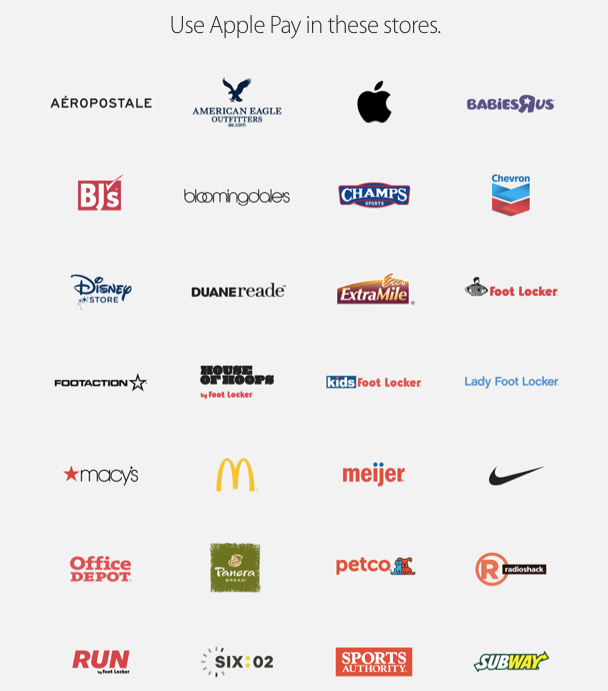
While many large retailers like McDonald's already support it, others – most notably Starbucks and Walmart – have not yet invested in the near field technology necessary to operate it, so expect more changes ahead.
Some apps and websites are also supported. There's a handy list compiled by the iDownloadBlog that includes big names like Open Table, Hotel Tonight, Indiegogo, Lyft, Staples, Target, and Uber, as well as (unexpectedly) the Starbuck's app.
How You Pay
When you're rung up at a participating merchant, you tap your device on the payment terminal (though this should also function if you simply wave your device close enough to it). If you haven't already activated your Touch ID for the transaction by placing your fingerprint on the ID button, you'll be prompted to do so. You might also be prompted to enter the last several digits of your account number, but this refers to your Apple Pay device account number (a security feature) and not your specific credit card number.
The phone should indicate that the transaction has been processed successfully, and your receipt should print out at the register as normal. As soon as the transaction goes through, you should get a Push Notification that displays the amount and location of your charge.
Overall Positives
Ease of use: No need to carry several credit cards with you or hand over your card for swiping, You simply tap your phone and voila, the transaction is done, with no signature required.
Pick your card: If you're a serious points collector, chances are you're carrying multiple cards at any given time in order to maximize category spending bonuses and calendar year spending benefits. Now you don't have to take all your cards with you at all times. Instead, you can just select the card you want through Apple Pay depending on the transaction.
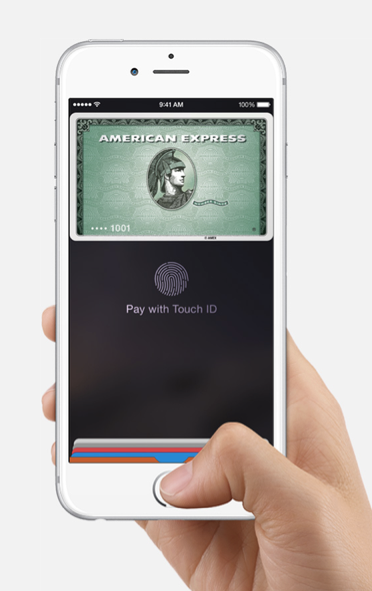
Security: Since you don't have to hand over a physical card, there's no chance of someone copying your credit card information while it's in their hands. Furthermore, your actual credit card number isn't even used. The transaction is processed with a virtual card number that doesn't give the vendor direct access to your credit card or bank account. And unlike a stolen credit card that pretty much anyone could take into a store and swipe or use online, these transactions require your PIN or fingerprint to go through.
This BusinessWire post explains it well:
"When paying with Visa through Apple Pay, the account holder's personal account information, including the 16-digit credit or debit card number, is never stored on the phone or by the merchant. Instead, Visa's new technology generates a unique digital account number that is a proxy for the primary card number, and is used to facilitate the payment. Digital account numbers are device-specific, meaning they are designed to only be used to make purchases with a specific mobile device or phone. In the event that the device is lost or stolen, the digital account number can be disabled without the need to reissue the primary payment card. Thanks to the use of digital account numbers, payments with Apple Pay are private. Only the consumer's bank has access to the transaction details for billing, risk analysis and rewards management purposes."
If you have Find My iPhone, you should be able to disable Apple Pay on a lost or stolen device as well.
Notifications: Whether you use Apple Pay or just your regular credit card, if it's in your Passbook, you'll be notified of any transactions that go through, adding another layer of security and accountability.
Overall Negatives
Security: On the flip side of this issue, if you lose your phone, all your information is on it. Granted, you have to access it with your fingerprint, but enterprising thieves will probably find a way around that (or have already). Still, at least you'll probably notice faster if your phone is missing than if a credit card is gone from your wallet.
Limited availability: Though several large retailers are accepting Apple Pay payments, there's still a long way to go, with just 220,000 locations nationwide offering it and none abroad. Bottom line, it's not replacing your credit cards anytime soon.
Limited issuers: Yes, Apple Pay launched with many of the major credit cards issuers already supported, including Amex, Capital One, Chase and Citi, but it's still missing quite a few, including Barclaycard and US Bank. Hopefully the remaining issuers will be online soon. Apple Pay's usefulness is also limited by the exclusion of corporate cards and small business cards (from Amex and Chase, respectively).
Limited devices: Apple Pay is only available on the company's latest products for the moment, so if you don't have one, you're out of luck. However, once this expands to the iPhone 5, a lot more users will have access to the service - though it is too bad you have to shell out for the Apple Watch in order to do so.
Conclusion
The launch of Apple Pay represents the next great evolution in payment methods. Though the launch was fairly limited due to the number of supported merchants and apps, it's actually pretty well rounded for a new product with many of the major credit card issuers and card products supported.
The new security features also sound impressive, with several layers that include the separation of card numbers from accounts, and the biometric fingerprint requirement. These features should all make Apple Pay transactions safer.
Hopefully the network will expand quickly to include more devices, issuers and merchants (including those in other countries) so that consumers can better take advantage of this technology.
While I won't be leaving my credit cards home anytime soon, you can bet that I'll be uploading my credit cards to Apple Pay as soon as I get my hands on the new iPhone 6, so that I can leave at least some of them home.
Last week, we announced that we would be launching the TPG To Go app this month. It is going to include a ton of features that will allow you to maximize all your purchases, track minimum spending requirements and anniversary bonuses, and more. While Apple Pay is not yet supported on the app, we hope to include this functionality eventually, so stay tuned!
[card card-name='The Amex EveryDay® Preferred Credit Card from American Express' card-id='220310489' type='javascript' bullet-id='1']
TPG featured card

at Capital One's secure site
Terms & restrictions apply. See rates & fees.
| 5X miles | Earn 5X miles on hotels, vacation rentals and rental cars booked through Capital One Travel |
| 2X miles | Earn unlimited 2X miles on every purchase, every day |
Pros
- Stellar welcome offer of 75,000 miles after spending $4,000 on purchases in the first three months from account opening. Plus, a $250 Capital One Travel credit to use in your first cardholder year upon account opening.
- You'll earn 2 miles per dollar on every purchase, which means you won't have to worry about memorizing bonus categories
- Rewards are versatile and can be redeemed for a statement credit or transferred to Capital One’s transfer partners
Cons
- Highest bonus-earning categories only on travel booked via Capital One Travel
- LIMITED-TIME OFFER: Enjoy $250 to use on Capital One Travel in your first cardholder year, plus earn 75,000 bonus miles once you spend $4,000 on purchases within the first 3 months from account opening - that’s equal to $1,000 in travel
- Earn unlimited 2X miles on every purchase, every day
- Earn 5X miles on hotels, vacation rentals and rental cars booked through Capital One Travel
- Miles won't expire for the life of the account and there's no limit to how many you can earn
- Receive up to a $120 credit for Global Entry or TSA PreCheck®
- Use your miles to get reimbursed for any travel purchase—or redeem by booking a trip through Capital One Travel
- Enjoy a $50 experience credit and other premium benefits with every hotel and vacation rental booked from the Lifestyle Collection
- Transfer your miles to your choice of 15+ travel loyalty programs
- Top rated mobile app