Skip to content

How to protect your iPhone from 'cyberflashing' while on airplanes

Sept. 02, 2022
5 min read
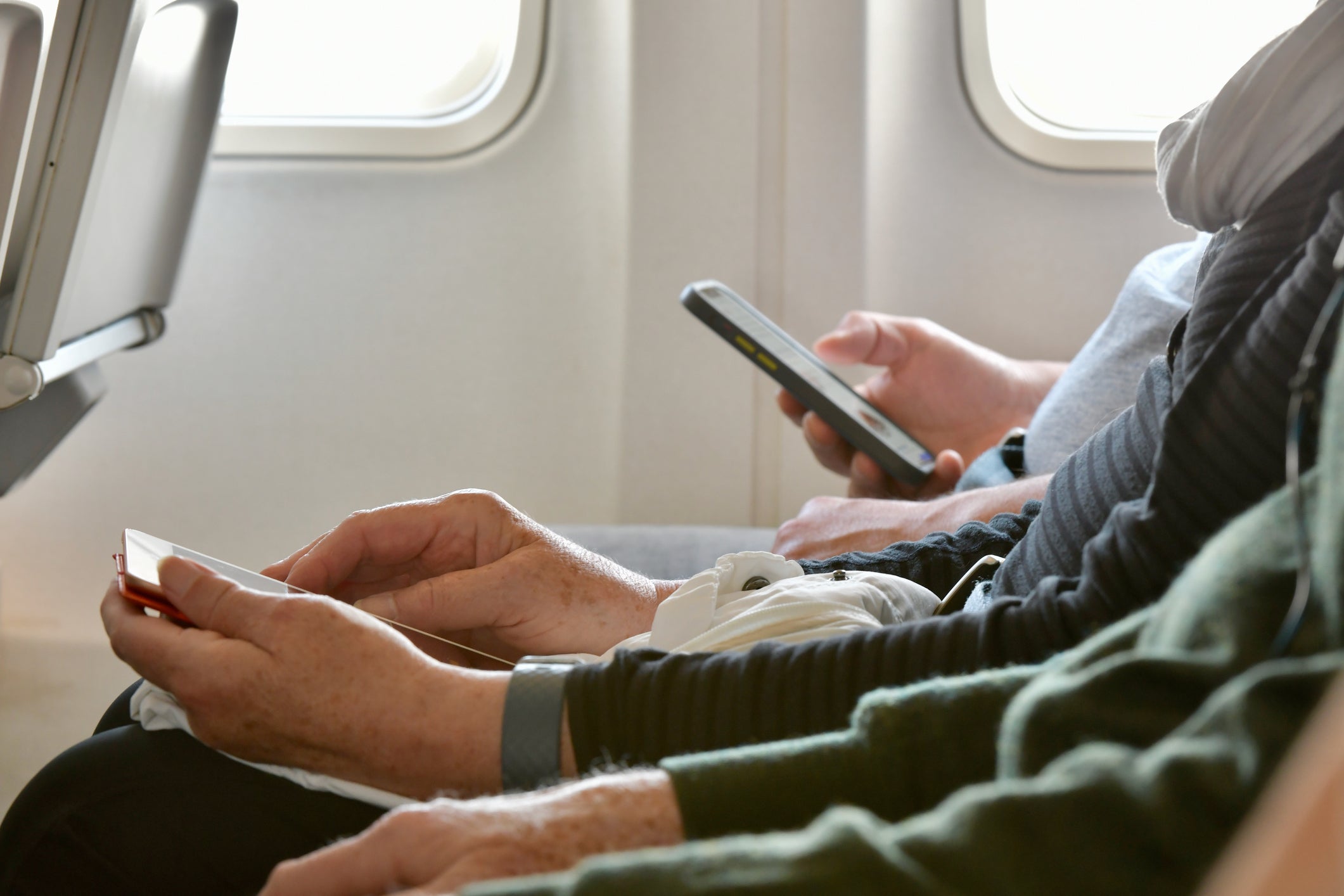
Older person using smartphone on plane
The cards we feature here are from partners who compensate us when you are approved through our site, and this may impact how or where these products appear. We don’t cover all available credit cards, but our analysis, reviews, and opinions are entirely from our editorial team. Terms apply to the offers listed on this page. Please view our advertising policy and product review methodology for more information.

This week, Southwest Airlines made news as a pilot threatened to turn around a plane on the runway after someone aboard sent nude photos to passengers via the iPhone AirDrop feature.

"If this continues while we’re on the ground, I’m going to have to pull back to the gate, everybody’s going to have to get off, we’re going to have to get security involved and ... vacation is going to be ruined," the pilot is heard saying in a now-viral TikTok video.

“So you folks, whatever that AirDrop thing is, quit sending naked pictures, and let’s get yourself to Cabo,” the pilot ordered.

A similar incident occurred in June on a Southwest flight, according to a New York Post report. The airline staff summoned airport police to detain a passenger who admitted to sending unwanted photos to everyone during the flight.

In light of both events and others like it, many have become increasingly concerned about "cyberflashing," the risk of being sent unwanted, explicit pictures. Given the higher number of cyberflashing cases in recent months, some officials, including those in New York's state legislature, are even introducing legislation that would expressly prohibit the act.

So what can you do to protect yourself and your family? Here's all you need to know about the AirDrop feature used in cyberflashing — plus steps you can take to avoid receiving inappropriate photos from strangers while on flights.

For more TPG news delivered each morning to your inbox, sign up for our daily newsletter.

A look at Apple's iPhone AirDrop feature

A tourist takes a photo of the Eiffel Tower with a smartphone. ALEXANDER SPATARI/GETTY IMAGES

All iPhones come installed with a service called AirDrop. This feature allows iPhone users to send photos to other iPhone users via a Bluetooth wireless connection that operates separately from Wi-Fi and cellular communication networks, so it can be used even when your phone is in airplane mode while you're traveling.

The Bluetooth communications technology used for the AirDrop feature is the same technology that allows iPhones to find your luggage with AirTags and enables laptops to connect to a wireless mouse or keyboard.

Daily Newsletter
Reward your inbox with the TPG Daily newsletter
Join over 700,000 readers for breaking news, in-depth guides and exclusive deals from TPG’s experts

To use this feature, you must be no more than a couple of hundred feet from a device (though the range may be less, depending on the devices used and the environment you're in). Since passengers on a flight are usually within this Bluetooth range of one another, they can often AirDrop images to each other.

By using the AirDrop feature, you can easily share large photo files and sets of photos with others without the time and space requirements needed for emailing or messaging. AirDrop also lets you send photos to groups of people — including those not on your contact list — making it a fun and useful feature to use for sharing trip photos.

However, despite being convenient and effective to use, the AirDrop feature also lends itself to potential abuse given its ability to share photos with strangers. Fortunately, there are a few simple ways to protect yourself from receiving any unwanted communications through the feature.

Related: How Apple AirTags helped me get my delayed bags back (twice in one trip)

How to avoid cyberflashing
BILL FINK/THE POINTS GUY

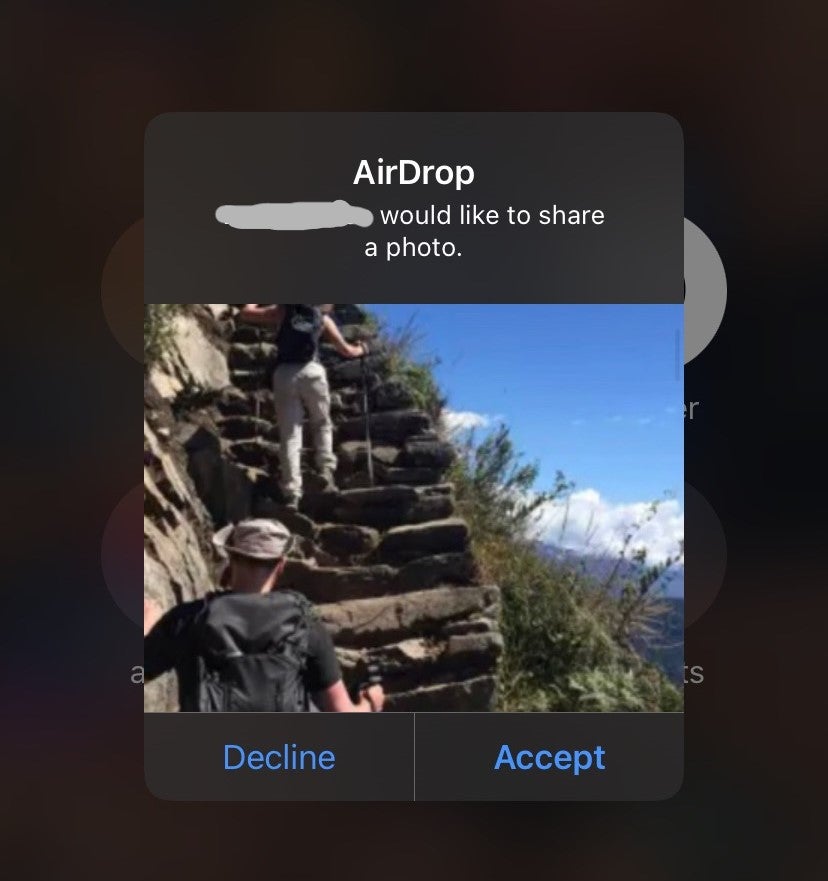
In the incidents that recently occurred on Southwest Airlines flights, passengers within the senders' Bluetooth range received explicit photos via AirDrop. The photos appeared as a preview similar to the screenshot above with a message asking to accept or decline the photos.

While AirDrop receivers can decline inappropriate images, the preview alone can be worrisome, especially for those traveling with kids who may be on iPhones, iPads or other Apple devices. Luckily, Apple provides several easy ways to prevent your devices from receiving such unsolicited photos.

To start, you can do the obvious: Simply turn off Bluetooth from the main screen settings (where you would put your device into airplane mode). This prevents you from sending or receiving any Bluetooth communications, meaning you won't be able to connect to any Bluetooth devices, such as headphones and gaming controls.
BILL FINK/THE POINTS GUY

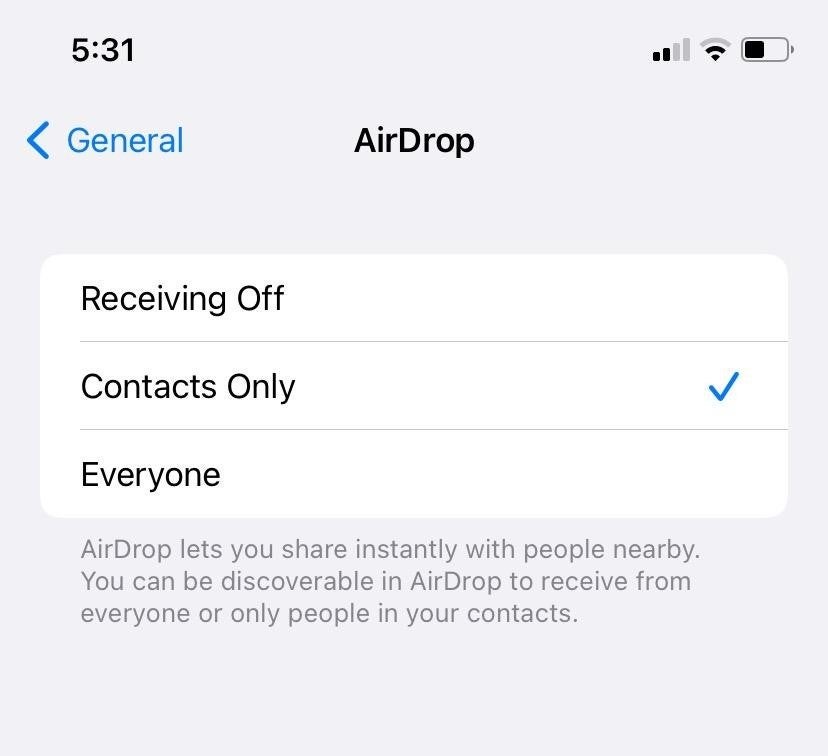
Should you want to connect to Bluetooth devices as you travel, there's another way you can protect your iPhone against unwanted photos. Begin by going to your iPhone's settings page, clicking on "General" and tapping the button for AirDrop. Once in your device's AirDrop menu, choose the "Contacts Only" or "Receiving Off" setting to limit what photos you're able to receive.

With "Contacts Only," only those on your device's contact list will be able to share photos with you via AirDrop. Meanwhile, "Receiving Off" prevents any photo from reaching your device, regardless of who it's coming from. By selecting either of these options instead of the "Everyone" choice also available, you'll make it so unsolicited photos from strangers are unable to reach your device.

Related: 10 travel-friendly features coming to Apple's newest iPhone

Bottom line

Recent incidents of explicit photos being shared via AirDrop on flights have highlighted the need for travelers to be aware of their Apple devices' settings.

By following the steps above, you can easily protect yourself from cyberflashing. If you want to temporarily change your settings, simply toggle to a different option before going back to your preferred choice.

Taking these precautions will help protect you and your loved ones as you travel.

Related: How and why you should use a VPN while traveling

Featured image by JOEL GUAY/GETTY IMAGES
Editorial disclaimer: Opinions expressed here are the author’s alone, not those of any bank, credit card issuer, airline or hotel chain, and have not been reviewed, approved or otherwise endorsed by any of these entities.

TPG featured card

Best for dining at restaurants
TPG Editor‘s Rating
4 / 5
Go to review
Apply for American Express® Gold Card
at American Express's secure site

Rewards

1 - 4X points

Intro offer

As High As 100,000 points. Find Out Your Offer.

Annual Fee

$325

Recommended Credit

Excellent to Good

Why We Chose It

There’s a lot to love about the Amex Gold. It’s a fan favorite thanks to its fantastic bonus-earning rates at restaurants worldwide and at U.S. supermarkets. If you’re hitting the skies soon, you’ll also earn bonus Membership Rewards points on travel. Paired with up to $120 in Uber Cash annually (for U.S. Uber rides or Uber Eats orders, card must be added to Uber app and you can redeem with any Amex card), up to $120 in annual dining statement credits to be used with eligible partners, an up to $84 Dunkin’ credit each year at U.S. Dunkin Donuts and an up to $100 Resy credit annually, there’s no reason that foodies shouldn’t add the Amex Gold to their wallet. These benefits alone are worth more than $400, which offsets the $325 annual fee on the Amex Gold card. Enrollment is required for select benefits. (Partner offer)

Pros

  • 4 points per dollar spent on dining at restaurants worldwide and U.S. supermarkets (on the first $50,000 in purchases per calendar year; then 1 point per dollar spent thereafter and $25,000 in purchases per calendar year; then 1 point per dollar spent thereafter, respectively)
  • 3 points per dollar spent on flights booked directly with the airline or with amextravel.com
  • Packed with credits foodies will enjoy
  • Solid welcome bonus

Cons

  • Not as useful for those living outside the U.S.
  • Some may have trouble using Uber and other dining credits
  • You may be eligible for as high as 100,000 Membership Rewards® Points after you spend $6,000 in eligible purchases on your new Card in your first 6 months of Card Membership. Welcome offers vary and you may not be eligible for an offer. Apply to know if you’re approved and find out your exact welcome offer amount – all with no credit score impact. If you’re approved and choose to accept the Card, your score may be impacted.
  • Earn 4X Membership Rewards® points per dollar spent on purchases at restaurants worldwide, on up to $50,000 in purchases per calendar year, then 1X points for the rest of the year.
  • Earn 4X Membership Rewards® points per dollar spent at US supermarkets, on up to $25,000 in purchases per calendar year, then 1X points for the rest of the year.
  • Earn 3X Membership Rewards® points per dollar spent on flights booked directly with airlines or on AmexTravel.com.
  • Earn 2X Membership Rewards® points per dollar spent on prepaid hotels and other eligible purchases booked on AmexTravel.com.
  • Earn 1X Membership Rewards® point per dollar spent on all other eligible purchases.
  • $120 Uber Cash on Gold: Add your Gold Card to your Uber account and get $10 in Uber Cash each month to use on orders and rides in the U.S. when you select an American Express Card for your transaction. That’s up to $120 Uber Cash annually. Plus, after using your Uber Cash, use your Card to earn 4X Membership Rewards® points for Uber Eats purchases made with restaurants or U.S. supermarkets. Point caps and terms apply.
  • $84 Dunkin' Credit: With the $84 Dunkin' Credit, you can earn up to $7 in monthly statement credits after you enroll and pay with the American Express® Gold Card at U.S. Dunkin' locations. Enrollment is required to receive this benefit.
  • $100 Resy Credit: Get up to $100 in statement credits each calendar year after you pay with the American Express® Gold Card to dine at U.S. Resy restaurants or make other eligible Resy purchases. That's up to $50 in statement credits semi-annually. Enrollment required.
  • $120 Dining Credit: Satisfy your cravings, sweet or savory, with the $120 Dining Credit. Earn up to $10 in statement credits monthly when you pay with the American Express® Gold Card at Grubhub, The Cheesecake Factory, Goldbelly, Wine.com, and Five Guys. Enrollment required.
  • Explore over 1,000 upscale hotels worldwide with The Hotel Collection and receive a $100 credit towards eligible charges* with every booking of two nights or more through AmexTravel.com. *Eligible charges vary by property.
  • No Foreign Transaction Fees.
  • Annual Fee is $325.
  • Terms Apply.
Apply for American Express® Gold Card
at American Express's secure site
Terms & restrictions apply. See rates & fees
Best for dining at restaurants
TPG Editor‘s Rating
4 / 5
Go to review

Rewards Rate

4XEarn 4X Membership Rewards® points per dollar spent on purchases at restaurants worldwide, on up to $50,000 in purchases per calendar year, then 1X points for the rest of the year.
4XEarn 4X Membership Rewards® points per dollar spent at US supermarkets, on up to $25,000 in purchases per calendar year, then 1X points for the rest of the year.
3XEarn 3X Membership Rewards® points per dollar spent on flights booked directly with airlines or on AmexTravel.com.
2XEarn 2X Membership Rewards® points per dollar spent on prepaid hotels and other eligible purchases booked on AmexTravel.com.
1XEarn 1X Membership Rewards® point per dollar spent on all other eligible purchases.
  • Intro Offer

    As High As 100,000 points. Find Out Your Offer.
  • Annual Fee

    $325
  • Recommended Credit

    Excellent to Good

Why We Chose It

There’s a lot to love about the Amex Gold. It’s a fan favorite thanks to its fantastic bonus-earning rates at restaurants worldwide and at U.S. supermarkets. If you’re hitting the skies soon, you’ll also earn bonus Membership Rewards points on travel. Paired with up to $120 in Uber Cash annually (for U.S. Uber rides or Uber Eats orders, card must be added to Uber app and you can redeem with any Amex card), up to $120 in annual dining statement credits to be used with eligible partners, an up to $84 Dunkin’ credit each year at U.S. Dunkin Donuts and an up to $100 Resy credit annually, there’s no reason that foodies shouldn’t add the Amex Gold to their wallet. These benefits alone are worth more than $400, which offsets the $325 annual fee on the Amex Gold card. Enrollment is required for select benefits. (Partner offer)

Pros

  • 4 points per dollar spent on dining at restaurants worldwide and U.S. supermarkets (on the first $50,000 in purchases per calendar year; then 1 point per dollar spent thereafter and $25,000 in purchases per calendar year; then 1 point per dollar spent thereafter, respectively)
  • 3 points per dollar spent on flights booked directly with the airline or with amextravel.com
  • Packed with credits foodies will enjoy
  • Solid welcome bonus

Cons

  • Not as useful for those living outside the U.S.
  • Some may have trouble using Uber and other dining credits
  • You may be eligible for as high as 100,000 Membership Rewards® Points after you spend $6,000 in eligible purchases on your new Card in your first 6 months of Card Membership. Welcome offers vary and you may not be eligible for an offer. Apply to know if you’re approved and find out your exact welcome offer amount – all with no credit score impact. If you’re approved and choose to accept the Card, your score may be impacted.
  • Earn 4X Membership Rewards® points per dollar spent on purchases at restaurants worldwide, on up to $50,000 in purchases per calendar year, then 1X points for the rest of the year.
  • Earn 4X Membership Rewards® points per dollar spent at US supermarkets, on up to $25,000 in purchases per calendar year, then 1X points for the rest of the year.
  • Earn 3X Membership Rewards® points per dollar spent on flights booked directly with airlines or on AmexTravel.com.
  • Earn 2X Membership Rewards® points per dollar spent on prepaid hotels and other eligible purchases booked on AmexTravel.com.
  • Earn 1X Membership Rewards® point per dollar spent on all other eligible purchases.
  • $120 Uber Cash on Gold: Add your Gold Card to your Uber account and get $10 in Uber Cash each month to use on orders and rides in the U.S. when you select an American Express Card for your transaction. That’s up to $120 Uber Cash annually. Plus, after using your Uber Cash, use your Card to earn 4X Membership Rewards® points for Uber Eats purchases made with restaurants or U.S. supermarkets. Point caps and terms apply.
  • $84 Dunkin' Credit: With the $84 Dunkin' Credit, you can earn up to $7 in monthly statement credits after you enroll and pay with the American Express® Gold Card at U.S. Dunkin' locations. Enrollment is required to receive this benefit.
  • $100 Resy Credit: Get up to $100 in statement credits each calendar year after you pay with the American Express® Gold Card to dine at U.S. Resy restaurants or make other eligible Resy purchases. That's up to $50 in statement credits semi-annually. Enrollment required.
  • $120 Dining Credit: Satisfy your cravings, sweet or savory, with the $120 Dining Credit. Earn up to $10 in statement credits monthly when you pay with the American Express® Gold Card at Grubhub, The Cheesecake Factory, Goldbelly, Wine.com, and Five Guys. Enrollment required.
  • Explore over 1,000 upscale hotels worldwide with The Hotel Collection and receive a $100 credit towards eligible charges* with every booking of two nights or more through AmexTravel.com. *Eligible charges vary by property.
  • No Foreign Transaction Fees.
  • Annual Fee is $325.
  • Terms Apply.
