American Updates How It Sells Tickets on AA.com


It's been a while since American Airlines last redesigned its website. However, after big changes to its mileage program and Basic Economy fares reportedly launching this year, the carrier needed to refresh how it sells flights online — and you'll see the difference the next time you head to AA.com.
Overall, the changes look cleaner: The search process and viewing the results pages should be easier for the casual traveler — while also including additional features for advanced users and Executive Platinum elites.
Let's go through the new flight-searching process:
Searching for Fights
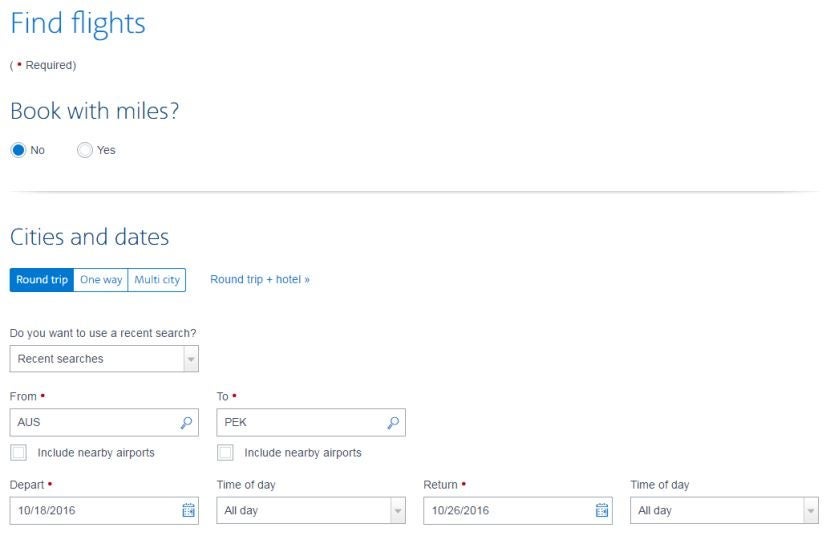
For those who are used to searching flights from the AA.com homepage, you may be relieved that this search option remains unchanged. However, if you click Advanced Search, you're going to get an updated — but straightforward — flight search tool.
If you're looking for an award flight, American Airlines starts with just this question. Once you enter your origin, destination, dates and number of passengers, you can further limit your search at the bottom of the page. The default is that AA will search the lowest fare for all cabins on flights with American Airlines flight numbers. You have the option to limit your search to refundable fares, search only business/first options or search "All airlines."
For domestic flights, leaving the "American Airlines" default option makes no difference. However, if you're flying internationally, you're going to get more flight options by selecting "All airlines." Leaving it as the default, search results are limited to just AA codeshare flights. While you won't earn as many elite-qualifying miles (EQMs) on partner segments, opening up the search to include other Oneworld partners could mean a cheaper price or a more convenient schedule.
Choosing a Flight Option
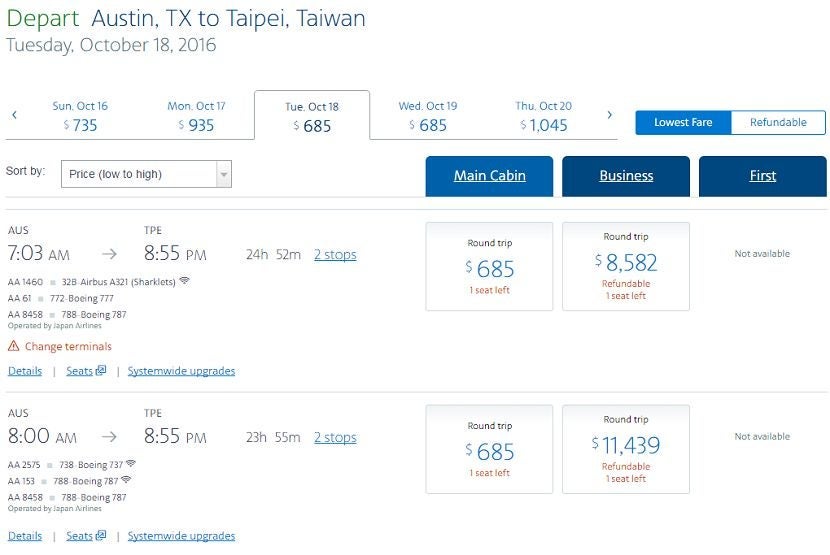
The new search result page is an improvement over the previous website. First of all, it's a cleaner interface — simultaneously including more information while keeping the page clear of clutter. At the top of the result page, you can easily compare fares on the date you selected with options on dates +/- 2 days.

One thing that's a definite improvement for AVGeeks — and others familiar with AA's fleet — is that the site will show the particular aircraft type in the search results, without you having to expand the flight option data or open a new tab to find this information. For example, many of American's 777-200s are sub-par — even in business class. So, if you see a "772" option listed, you'll know that you need to bring your own entertainment. Looking to fly on the new American Airlines 787-9 Dreamliner? Look for "789" in the flight results. Need to stay connected? You can see right in the search results which flight options have Wi-Fi.
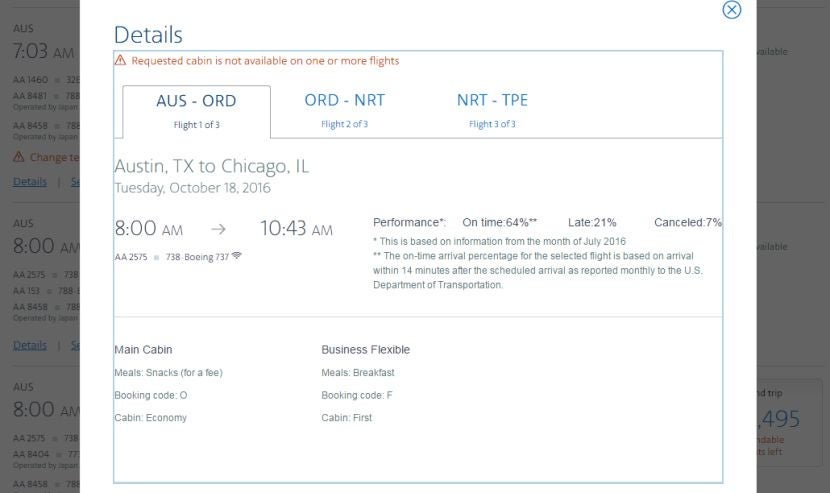
For further information about a particular flight option, clicking on the "Details" link lists the on-time performance (or lack thereof), meal options and the booking fare code. If you're flying domestic first class, this detail is useful to see if you'll be served a meal or just "refreshments" on a particular flight. If you picked a flight option with a partner flight number, the booking fare code is useful information to be able to calculate how many miles you'll earn from the flight.
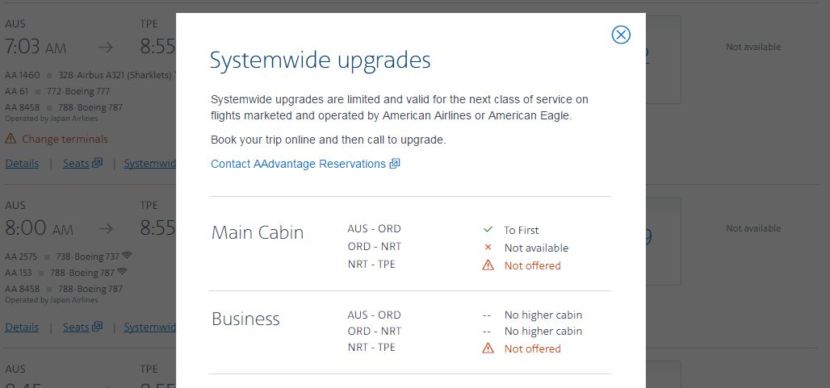
American Airlines Executive Platinum members will be able to find out in one click if a flight option currently has availability for applying a systemwide upgrade. Just click the "Systemwide upgrades" link for the flight option to get an in-screen pop-up with the details. In case you've lost track of how many systemwide upgrades you have available, this window also displays your current balance.
Choosing Seats
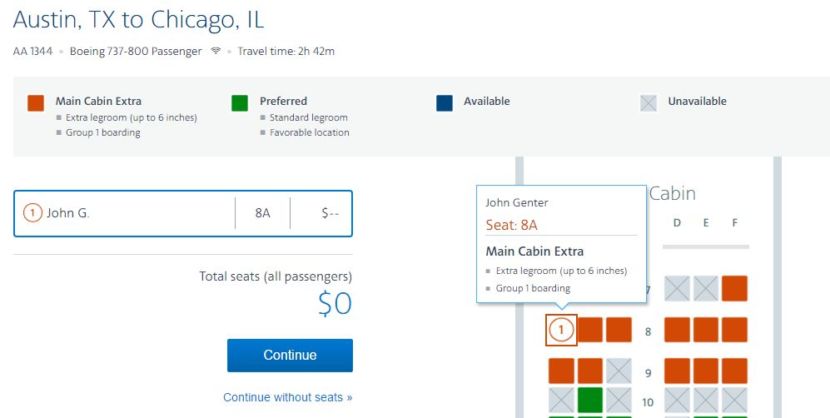
American Airlines also revamped the seat-selection tool. Rather than having a cluttered map of zero- to four-star seats and numbering every seat, AA has cleaned up the seat map. Now seats are just orange (Main Cabin Extra), green (Preferred Seats), blue (available standard seats) or gray (not available). You can view more information for each seat by hovering your mouse over it.
One interesting aspect of the new seat map: AA seems to have dropped "elite and full-fare" seating. Previously, we called AA out for hiding dozens of available seats from non-elite flyers. Now, AA has dropped the triangle symbol from the seat map and — for all of the flights I checked — the seat maps are identical for Executive Platinum members and general members.
New Concerns for Elite Members
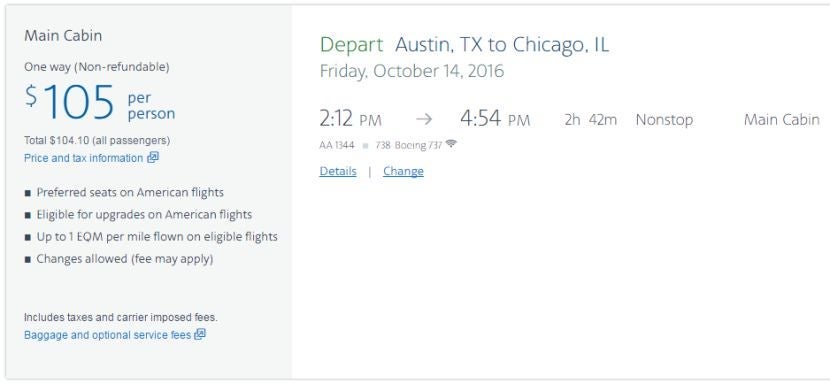
American Airlines Basic Economy is coming. AA hasn't released official details on what Basic Economy fares will entail, but this weekend's changes to its website indicate some updates that could be coming soon.
After selecting main cabin flight options, the trip summary page includes the following unsettling phrases:
- Preferred seats on American flights
- Eligible for upgrades on American flights
- Up to 1 EQM per mile flown on eligible flights
- Changes allowed (fee may apply)
These are "perks" that haven't been listed before, as they're simply taken for granted. Flyers have always been able to select Preferred Seats — for a cost for non-elites — and all flights are currently upgradeable. The only obvious reason these items are listed now is that Basic Economy will strip these benefits away.
This would be mostly in line with what Delta has already done: remove seat selections, deny the ability to upgrade and make fares completely non-refundable/changeable. However, Delta still allows Medallion members to earn elite and award miles on these Basic Economy fares. Since it now mentions that main cabin fares earn EQMs, American seems to be opening the door to Basic Economy fares that wouldn't earn elite miles.
Bottom Line
We generally like the new AA.com redesign and applaud American Airlines for making it easier to see equipment details, on-time performance and systemwide upgrade availability. However, the new design does make the website a lot less compact — meaning it's harder to compare flights at a glance for routes that have many options. Also, our joy is somewhat soured that this change is likely paving the way for Basic Economy fares to be introduced.
H/T: View From The Wing
[card card-name='Citi® / AAdvantage® Platinum Select® MasterCard®' card-id='22144516' type='javascript' bullet-id='1']
TPG featured card

at American Express's secure site
Terms & restrictions apply. See rates & fees.
| 4X | Earn 4X Membership Rewards® points per dollar spent on purchases at restaurants worldwide, on up to $50,000 in purchases per calendar year, then 1X points for the rest of the year. |
| 4X | Earn 4X Membership Rewards® points per dollar spent at US supermarkets, on up to $25,000 in purchases per calendar year, then 1X points for the rest of the year. |
| 5X | Earn 5X Membership Rewards® points on prepaid hotel stays booked through AmexTravel.com or the Amex Travel App™. |
| 3X | Earn 3X Membership Rewards® points on flights booked through AmexTravel.com, the Amex Travel App™, or purchased directly from airlines. |
| 2X | Earn 2X Membership Rewards® points on prepaid car rentals booked through AmexTravel.com or the Amex Travel App™ and cruises booked and paid through AmexTravel.com. |
| 1X | Earn 1X Membership Rewards® point per dollar spent on all other eligible purchases. |
Pros
- Valuable dining and food-related credits
- Flexible rewards with airline and hotel transfer partners
- Multiple travel and purchase protections
- No foreign transaction fees
- Access to Amex Offers for additional savings (enrollment required)
Cons
- Not as useful for those living outside the U.S.
- Some may have trouble using Uber and other dining credits
- You may be eligible for as high as 100,000 Membership Rewards® Points after you spend $8,000 in eligible purchases on your new Card in your first 6 months of Card Membership. Welcome offers vary and you may not be eligible for an offer. Apply to know if you’re approved and find out your exact welcome offer amount – all with no credit score impact. If you’re approved and choose to accept the Card, your score may be impacted.
- Earn 4X Membership Rewards® points per dollar spent on purchases at restaurants worldwide, on up to $50,000 in purchases per calendar year, then 1X points for the rest of the year.
- Earn 4X Membership Rewards® points per dollar spent at US supermarkets, on up to $25,000 in purchases per calendar year, then 1X points for the rest of the year.
- Earn 5X Membership Rewards® points on prepaid hotel stays booked through AmexTravel.com or the Amex Travel App™.
- Earn 3X Membership Rewards® points on flights booked through AmexTravel.com, the Amex Travel App™, or purchased directly from airlines.
- Earn 2X Membership Rewards® points on prepaid car rentals booked through AmexTravel.com or the Amex Travel App™ and cruises booked and paid through AmexTravel.com.
- Earn 1X Membership Rewards® point per dollar spent on all other eligible purchases.
- Pay It® lets you tap in the American Express® App to quickly pay for small purchase amounts throughout the month and still earn rewards the way you usually do. Plan It® gives you the option to split up big purchases into equal monthly payments with a fixed fee. You’ll know upfront exactly how much you’ll pay.
- $120 Dining Credit: Earn up to a total of $10 in statement credits monthly when you pay with the Gold Card at Grubhub (including Seamless), Buffalo Wild Wings, Five Guys, The Cheesecake Factory, and Wonder. This can be an annual savings of up to $120. Enrollment required.
- $100 Resy Credit: Get up to $100 in statement credits each calendar year at over 10,000 qualifying U.S. Resy restaurants after you pay for eligible purchases with the American Express® Gold Card. That’s up to $50 in statement credits semi-annually. Enrollment required.
- $84 Dunkin' Credit: Earn up to $7 in monthly statement credits after you pay with the American Express® Gold Card at U.S. Dunkin’ locations. Enrollment required.
- $120 Uber Cash on Gold: Enjoy up to $120 in Uber Cash annually with your Gold Card. Just add your Card to your Uber account and you'll get $10 in Uber Cash each month to use on orders and rides in the U.S. when you select an Amex Card for your transaction.
- Enjoy complimentary Hertz Five Star® Status benefits like skipping the counter at select locations, adding an additional driver at no additional cost*, and vehicle upgrades**. Benefit enrollment and Hertz Gold+ registration are required. *Additional drivers must meet standard rental qualifications and must be a spouse or domestic partner to qualify as complimentary. Other additional drivers subject to fees. **Benefits are subject to availability and vary by location. Additional Hertz program Terms and Conditions including age restrictions apply.
- Book two nights or more with The Hotel Collection through AmexTravel.com or the Amex Travel App™ and receive a $100* credit towards eligible charges at over 1,400 upscale hotels worldwide. *Eligible charges vary by property.
- Book your travel through the Amex Travel App™ with added peace of mind – backed by American Express® service and support. Only for American Express® Card Members.
- Whenever you need us, we're here. Our Member Services team will ensure you are taken care of. From lost Card replacement to statement questions, we are available to help 24/7.
- No Foreign Transaction Fees.
- Annual Fee is $325.
- Terms Apply.