Skip to content

Tip: Using OpenFlights to Track Your Flights

Oct. 06, 2017
4 min read
OpenFlights FlyerJT
Tip: Using OpenFlights to Track Your Flights
The cards we feature here are from partners who compensate us when you are approved through our site, and this may impact how or where these products appear. We don’t cover all available credit cards, but our analysis, reviews, and opinions are entirely from our editorial team. Terms apply to the offers listed on this page. Please view our advertising policy and product review methodology for more information.

While it's easy to track your miles if you fly primarily on one airline, those of us AvGeeks who want to track our flight stats across all airlines need to turn to a specialized tool to do so. The Points Guy's Zach Honig has discussed using Jet Lovers to track his flights. Let's take a look at my preferred method: OpenFlights.

While not the most advanced-looking website, I find that it tracks everything I want it to, and produces compiled statistics I love. Once you've built up a history, you can see your flight history by year:
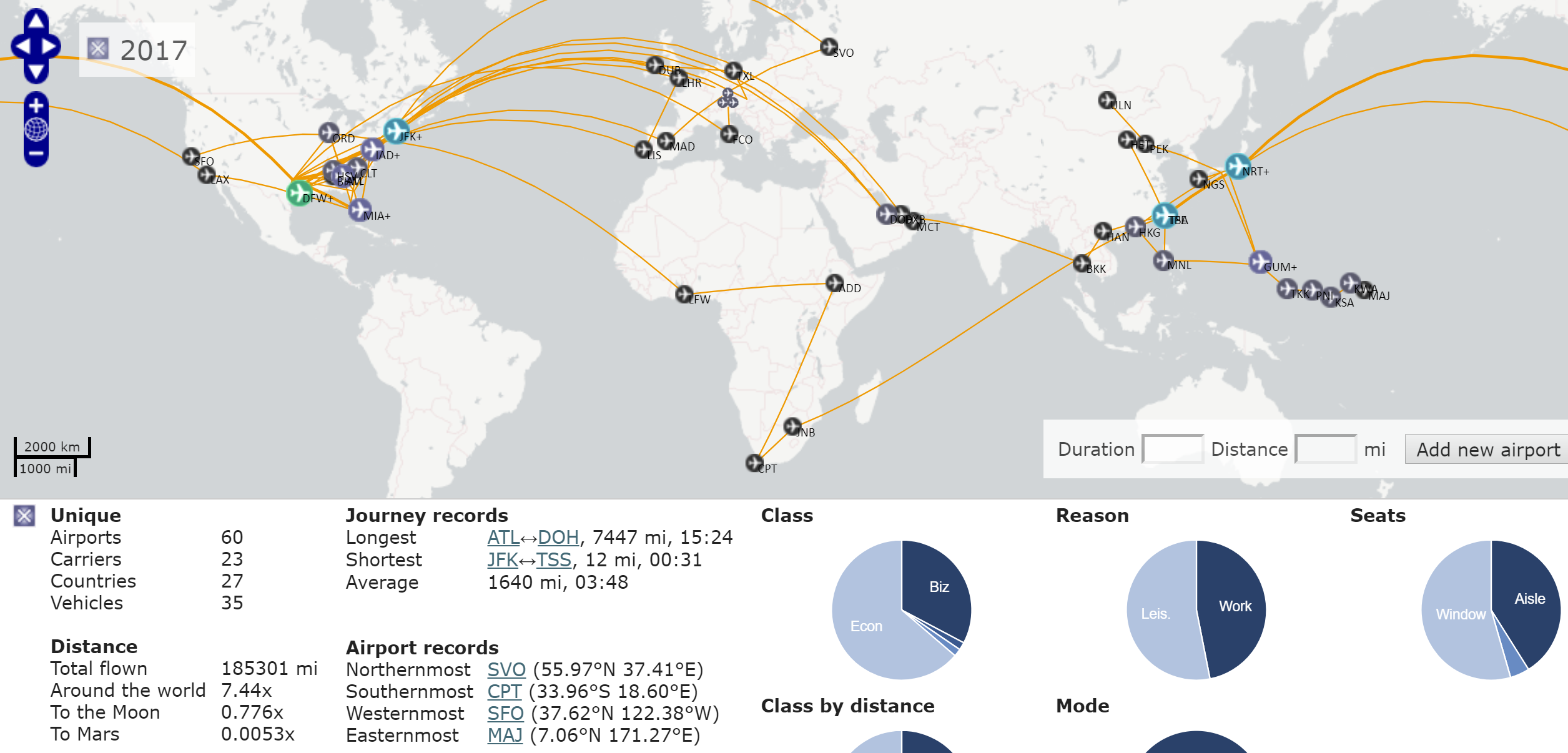
Image generated by OpenFlights with Year filter set to 2017 and Analyze tool.

Or where and how you've flown on a particular airline:
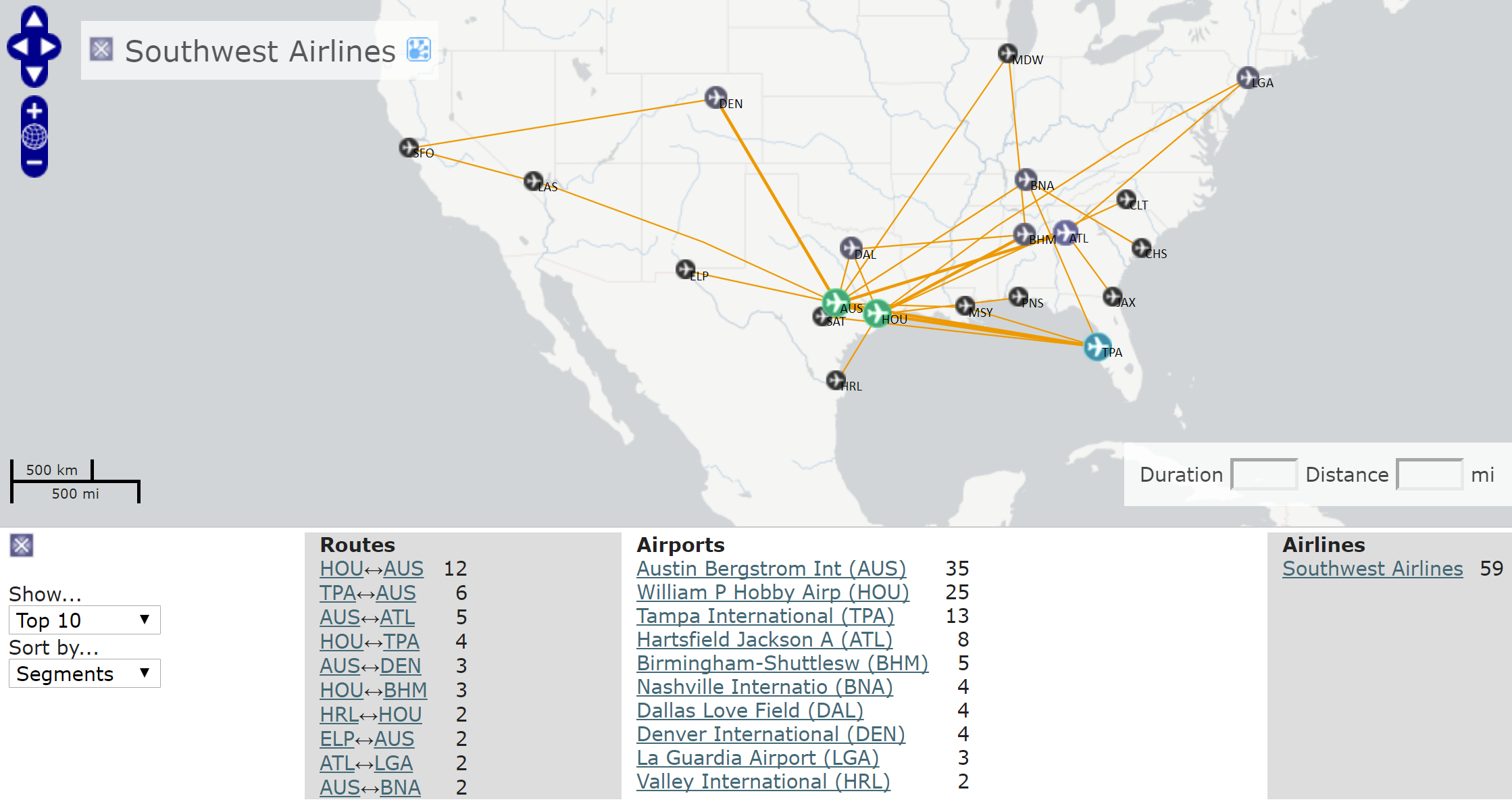
Image generated by OpenFlights with Carrier filter set to Southwest and Top 10 tool.

Or, both by year and by airline:

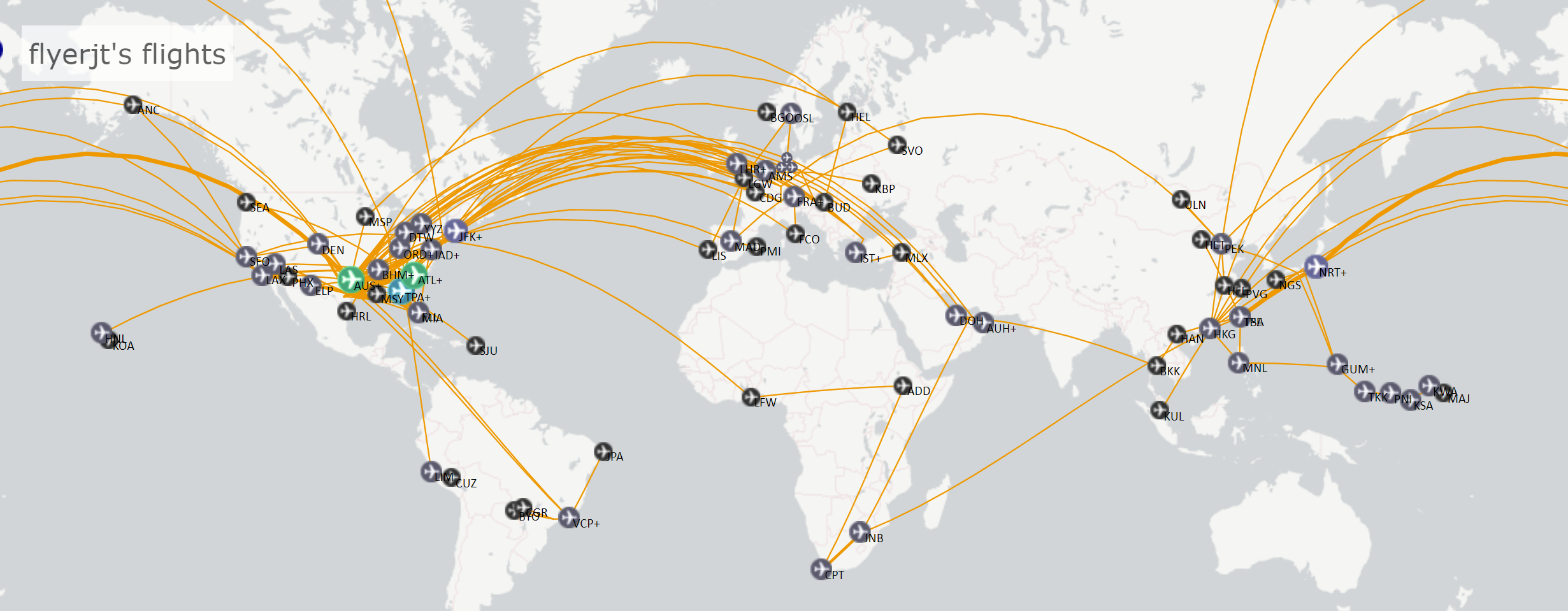
You can even generate a banner with your flight details wherever html code can be added:

The only limitation is finding old flight details. Those of us who'd love to have a perfect record of all our flight history might be bummed that we can't find flight history going back too far using our frequent flyer account histories. But, at least you can use OpenFlights as a tool for flight tracking going forward.

To get started, sign up for a free account. Then, on the homepage or your profile page, click New Flight to start logging flights. You can enter as little as just the date and departure/arrival airports. But, those of us who are nerdy about it have the opportunity to add: Departure Time, Arrival Time, Flight Number, Seat Number, Seat Type, Carrier, Plane (equipment type), Registration, Class and Reason for the trip.

If you want to track more than just flights, you can click the "Flight" drop down to select Road, Ship or Train.

Here are some tips from a few years of use:

Daily Newsletter
Reward your inbox with the TPG Daily newsletter
Join over 700,000 readers for breaking news, in-depth guides and exclusive deals from TPG’s experts
  • If you enter the Flight Number field with the airline code (i.e. AA204), the Carrier field will be automatically filled.
  • It's always going to default to being a work trip. So, if you want to keep this stat accurate, don't forget to change this field.
  • If you enter a departure time, the arrival time and flight duration is calculated off a simple formula (30 min plus 1 hour per every 500 miles). Make sure to change the Arrival Time if you want to have an exact record.
  • You can add whatever you want in the Plane field. However, after about a second of typing, it's going to suggest options based on what you've typed, and it's hard to edit these suggestions after selecting them. Frustrated with this option, I'll type the aircraft type as I want it in the Note field and then copy-paste into the Plane field.
  • Speaking of the Plane field, you'll probably want to decide when you first start tracking how detailed you want to be — whether to enter "Boeing 777" or "Boeing 777-300ER".

While accounts are free, you can support the developers if you find the tool useful by upgrading to a paid account. The functionality is the same either way, but paid accounts don't have advertisements and help keep the site running.

Do you have another flight tracking tool you prefer instead?

TPG featured card

Rewards rate
4XEarn 4X Membership Rewards® points per dollar spent on purchases at restaurants worldwide, on up to $50,000 in purchases per calendar year, then 1X points for the rest of the year.
4XEarn 4X Membership Rewards® points per dollar spent at US supermarkets, on up to $25,000 in purchases per calendar year, then 1X points for the rest of the year.
5XNew! Earn 5X Membership Rewards® points on prepaid hotel stays booked through AmexTravel.com or the Amex Travel App.
3XEarn 3X Membership Rewards® points on flights booked through AmexTravel.com, the Amex Travel App, or purchased directly from airlines.
2XEarn 2X Membership Rewards® points on prepaid car rentals booked through AmexTravel.com or the Amex Travel App and cruises booked and paid through AmexTravel.com.
1XEarn 1X Membership Rewards® point per dollar spent on all other eligible purchases.
Intro offer
Open Intro bonus
As High As 100,000 points. Find Out Your Offer.
Annual fee
$325
Regular APR
See Pay Over Time APR
Recommended credit
Open Credit score description
Excellent to Good

Pros

  • Valuable dining and food-related credits
  • Flexible rewards with airline and hotel transfer partners
  • Multiple travel and purchase protections
  • No foreign transaction fees
  • Access to Amex Offers for additional savings (enrollment required)

Cons

  • Not as useful for those living outside the U.S.
  • Some may have trouble using Uber and other dining credits
  • You may be eligible for as high as 100,000 Membership Rewards® Points after you spend $8,000 in eligible purchases on your new Card in your first 6 months of Card Membership. Welcome offers vary and you may not be eligible for an offer. Apply to know if you’re approved and find out your exact welcome offer amount – all with no credit score impact. If you’re approved and choose to accept the Card, your score may be impacted.
  • Earn 4X Membership Rewards® points per dollar spent on purchases at restaurants worldwide, on up to $50,000 in purchases per calendar year, then 1X points for the rest of the year.
  • Earn 4X Membership Rewards® points per dollar spent at US supermarkets, on up to $25,000 in purchases per calendar year, then 1X points for the rest of the year.
  • New! Earn 5X Membership Rewards® points on prepaid hotel stays booked through AmexTravel.com or the Amex Travel App.
  • Earn 3X Membership Rewards® points on flights booked through AmexTravel.com, the Amex Travel App, or purchased directly from airlines.
  • Earn 2X Membership Rewards® points on prepaid car rentals booked through AmexTravel.com or the Amex Travel App and cruises booked and paid through AmexTravel.com.
  • Earn 1X Membership Rewards® point per dollar spent on all other eligible purchases.
  • Pay It® lets you tap in the American Express® App to quickly pay for small purchase amounts throughout the month and still earn rewards the way you usually do. Plan It® gives you the option to split up big purchases into equal monthly payments with a fixed fee. You’ll know upfront exactly how much you’ll pay.
  • Updated! $120 Dining Credit: Earn up to a total of $10 in statement credits monthly when you pay with the Gold Card at Grubhub (including Seamless), Buffalo Wild Wings, Five Guys, The Cheesecake Factory, and Wonder. This can be an annual savings of up to $120. Enrollment required.
  • $100 Resy Credit: Get up to $100 in statement credits each calendar year at over 10,000 qualifying U.S. Resy restaurants after you pay for eligible purchases with the American Express® Gold Card. That’s up to $50 in statement credits semi-annually. Enrollment required.
  • $84 Dunkin' Credit: Earn up to $7 in monthly statement credits after you pay with the American Express® Gold Card at U.S. Dunkin’ locations. Enrollment required.
  • $120 Uber Cash on Gold: Enjoy up to $120 in Uber Cash annually with your Gold Card. Just add your Card to your Uber account and you'll get $10 in Uber Cash each month to use on orders and rides in the U.S. when you select an Amex Card for your transaction.
  • New! As an American Express® Gold Card Member, you can enjoy complimentary Hertz Five Star® Status. Enjoy benefits like skipping the counter at select locations, adding an additional driver at no additional cost*, and vehicle upgrades**. Benefit enrollment and Hertz Gold+ registration are required. *Additional drivers must meet standard rental qualifications and must be a spouse or domestic partner to qualify as complimentary. Other additional drivers subject to fees. **Benefits are subject to availability and vary by location. Additional Hertz program Terms and Conditions including age restrictions apply.
  • Take advantage of a $100 credit towards eligible charges* at over 1,300 upscale hotels worldwide when you book The Hotel Collection through AmexTravel.com or the Amex Travel App **. *Eligible charges vary by property. **The Hotel Collection requires a two-night minimum stay.
  • Book your travel through the Amex Travel App with added peace of mind – backed by American Express® service and support. Only for American Express® Card Members.
  • Whenever you need us, we're here. Our Member Services team will ensure you are taken care of. From lost Card replacement to statement questions, we are available to help 24/7.
  • No Foreign Transaction Fees.
  • Annual Fee is $325.
  • Terms Apply.