The Points Guy believes that credit cards can transform lives, helping you leverage everyday spending for cash back or travel experiences that might otherwise be out of reach. That's why we publish a variety of editorial content and card comparisons: to help you find a great card to turn your goals into reality.
Our site may earn compensation when a customer clicks on a link, when an application is approved, or when an account is opened with our partners, and this may impact how or where these products appear. While we don't cover all available credit cards, our editorial team creates and maintains all of the analysis of these cards, and our content is not influenced nor subject to review by any credit card company, bank or partner prior to (or after) publication. Please view our advertising policy and product review methodology for more information.
Advertiser disclosure
The Points Guy believes that credit cards can transform lives, helping you leverage everyday spending for cash back or travel experiences that might otherwise be out of reach. That's why we publish a variety of editorial content and card comparisons: to help you find a great card to turn your goals into reality.
Our site may earn compensation when a customer clicks on a link, when an application is approved, or when an account is opened with our partners, and this may impact how or where these products appear. While we don't cover all available credit cards, our editorial team creates and maintains all of the analysis of these cards, and our content is not influenced nor subject to review by any credit card company, bank or partner prior to (or after) publication. Please view our advertising policy and product review methodology for more information.
Katie Genter is a digital nomad who has traveled full time since June 2017. She writes and edits stories about points and miles, and loyalty programs, often letting her personal experiences color these stories.
December 22, 2024 • 11 min read
The cards we feature here are from partners who compensate us when you are approved through our site, and this may impact how or where these products appear. We don't cover all available credit cards, but our analysis, reviews, and opinions are entirely from our editorial team. Terms apply to the offers listed on this page. Please view our advertising policy and product review methodology for more information.
Editorial note: This is a recurring post, regularly updated with new information.
Editorial disclaimer: Opinions expressed here are the author's alone, not those of any bank, credit card issuer, airline or hotel chain, and have not been reviewed, approved or otherwise endorsed by any of these entities.
Comments
By commenting, you agree to our Community Guidelines to help create a positive space for conversation. The responses below are not provided or commissioned by the bank advertiser, our partners, or The Points Guy (“TPG”). They have not been reviewed, approved, or otherwise endorsed by any of these parties. All responses are submitted by individual contributors, and neither the bank advertiser, our partners, nor TPG are responsible for ensuring that all posts and/or questions are answered.
Related stories
Quick summary
American Airlines systemwide upgrades allow eligible travelers to move to a higher class of service on select flights, including those operated by partner airlines.
These upgrades can be used on paid fares for up to three segments per one-way trip, but are not valid on award tickets, free tickets or certain special fares.
Systemwide upgrades are earned through Loyalty Point milestones or Million Miler status, with specific thresholds required for selection.
Upgrades can be applied immediately if space is available, or travelers may waitlist or set alerts for future availability.
What to consider
Systemwide upgrades are valid for one year after issuance, but from March 2025, they will align with the status membership year.
Upgrade space is limited and must be available in specific fare buckets; using tools like ExpertFlyer can help locate availability segment by segment.
Upgrades can be gifted to others, but cannot be sold or exchanged for compensation.
What you'll miss from the article
Step-by-step guidance on searching for upgrade space, setting alerts and maximizing the chances of clearing a systemwide upgrade.
Generated by AI with support from our editorial team.
You can use an American Airlines systemwide upgrade to change a paid fare to the next class of service one-way for up to three segments. As long as your trip has at least one American-marketed flight, you can use an American Airlines systemwide upgrade for the following:
American Airlines-marketed and -operated flights
British Airways-marketed and -operated transatlantic flights
British Airways-operated transatlantic flights marketed by American
ZACH GRIFF/THE POINTS GUY
On American Airlines flights, you can use a systemwide upgrade to go from:
Business to first class
Economy or premium economy to business on a three-cabin aircraft
Economy to first for domestic flights on a two-cabin aircraft
Economy to business for short-haul international flights on a two-cabin aircraft
Meanwhile, on transatlantic British Airways flights, you can use a systemwide upgrade to go from:
Business to first class
Premium economy to business
Economy to premium economy
You can only use a systemwide upgrade on individual published fare tickets. You can’t use systemwide upgrades to upgrade AAdvantage award tickets, free tickets, military or other government fares, opaque fares, infant tickets or extra seats you've purchased.
The Loyalty Point Rewards program is one way to earn American Airlines systemwide upgrades. Systemwide upgrades are a choice (in other words, you must select them instead of other rewards) at the following Loyalty Point milestones each qualification period:
175,000 Loyalty Points: You get one reward choice at this milestone; one option is two systemwide upgrades.
250,000 Loyalty Points: You get two reward choices at this milestone; one option is two systemwide upgrades.
400,000 Loyalty Points: You get two reward choices at this milestone; one option is one systemwide upgrade.
550,000 Loyalty Points: You get two reward choices at this milestone; one option is one systemwide upgrade.
750,000 Loyalty Points: You get two reward choices at this milestone; one option is one systemwide upgrade.
1 million Loyalty Points: You get one reward choice at this milestone; one option is four systemwide upgrades.
3 million Loyalty Points: You get one reward choice at this milestone; one option is six systemwide upgrades.
5 million Loyalty Points: You get one reward choice at this milestone; one option is 10 systemwide upgrades.
ZACH GRIFF/THE POINTS GUY
As a reminder, Platinum Pro status requires 125,000 Loyalty Points each qualification period, and Executive Platinum status requires 200,000 Loyalty Points. So you won’t be able to choose any systemwide upgrades if you earn Platinum Pro status with 125,000 Loyalty Points during this qualification period. You’ll only get the opportunity to select at most two systemwide upgrades if you earn Executive Platinum status with 200,000 Loyalty Points during this qualification period.
AAdvantage members with American Airlines Million Miler status can also earn systemwide upgrades when they reach specific milestones. You'll get four systemwide upgrades when you reach 2 million miles toward AAdvantage Million Miler status. Then, for each subsequent 1 million miles you earn toward Million Miler status, you’ll get four more systemwide upgrades.
When do American Airlines systemwide upgrades expire?
Systemwide upgrades currently expire one year after they’re deposited in your account. However, AAdvantage recently announced that starting March 1, 2025, they will be valid through the status membership year.
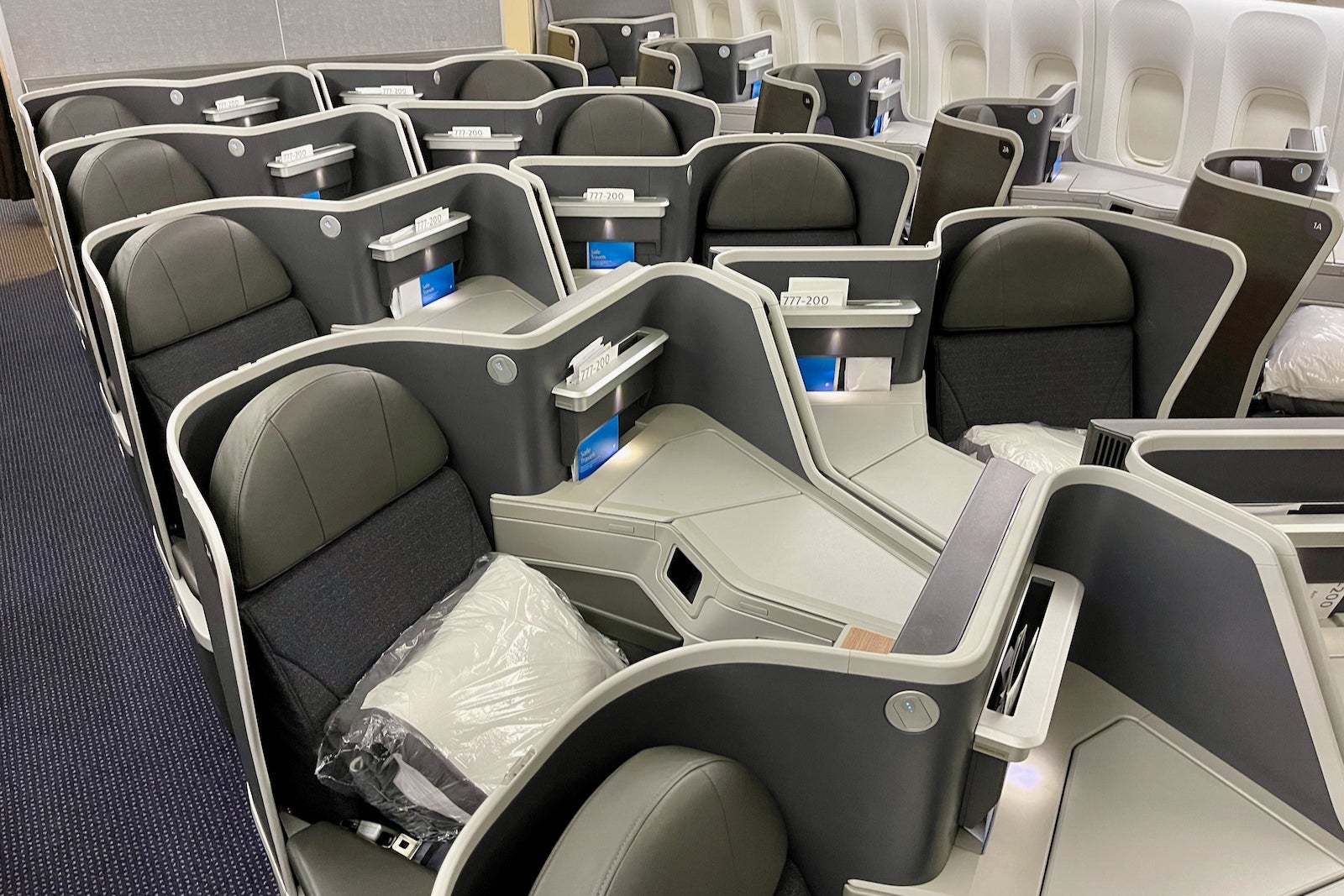
American Airlines 777-200 business class cabin. ZACH GRIFF/THE POINTS GUY
So, if you earn 175,000 Loyalty Points during the qualification year that ends Feb. 28, 2025, and select two systemwide upgrades as your 175,000-point Loyalty Point Rewards choice, these systemwide upgrades will be valid through March 31, 2026. AAdvantage is also extending the expiration date of systemwide upgrades you earned between March 1, 2024, and Feb. 28, 2025, through March 31, 2026.
Although you must use the systemwide upgrade to confirm an upgrade before its expiration date, travel can occur after the expiration date.
Travelers tend to use American Airlines systemwide upgrades in one of three ways:
To book a flight with systemwide availability and immediately apply the upgrade
To set up award alerts for flights they've already booked that don't currently have systemwide availability and apply the upgrade as soon as availability appears
To waitlist for upgrades on long-haul flights they've already booked
MINISERIES/GETTY IMAGES
Since 2016, my husband and I have used 64 systemwide upgrades on long-haul flights of seven or more hours using the first two strategies. So, let's explore how to use American Airlines systemwide upgrades.
How to find systemwide availability
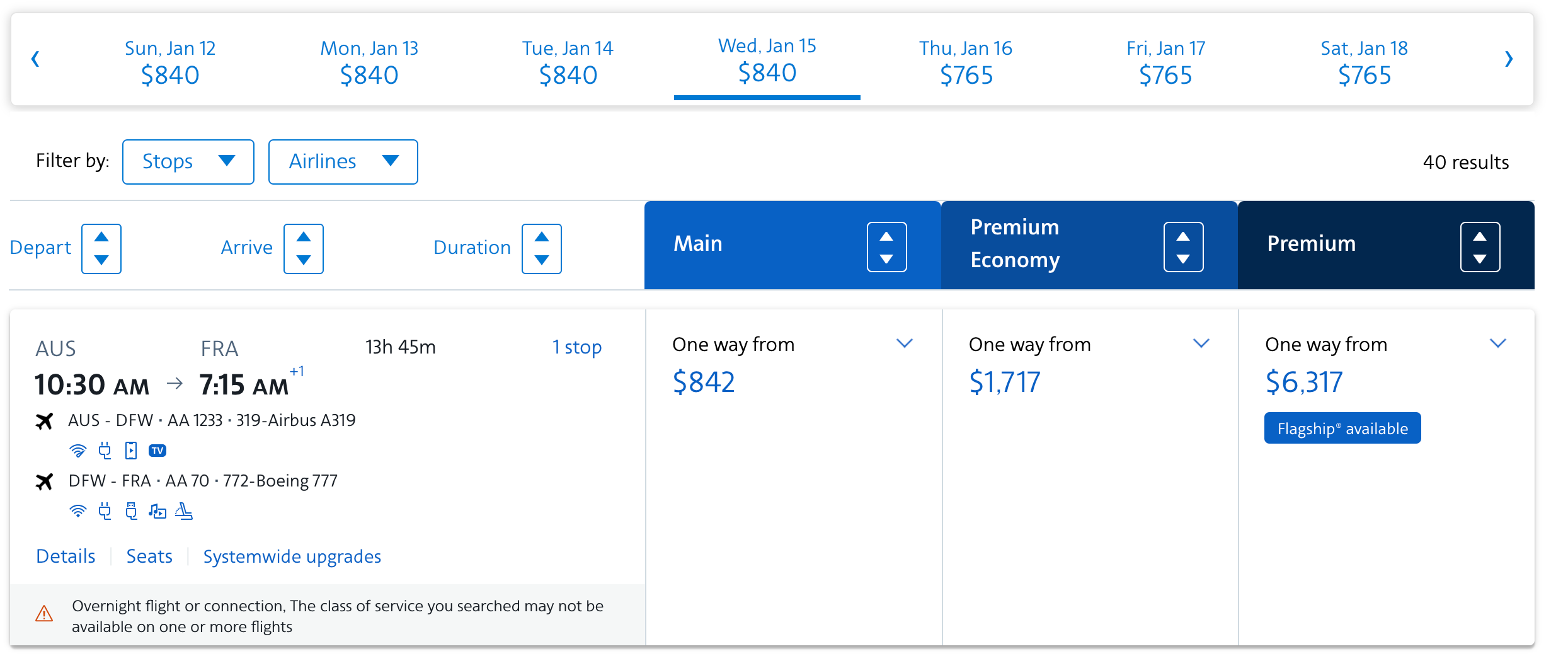
Finding systemwide availability is perhaps the most difficult part of using systemwide upgrades. American Airlines encourages its members with systemwide upgrades to log into their accounts on the American Airlines website and then look for flights with a “Systemwide upgrades” link on the results page.
AA.COM
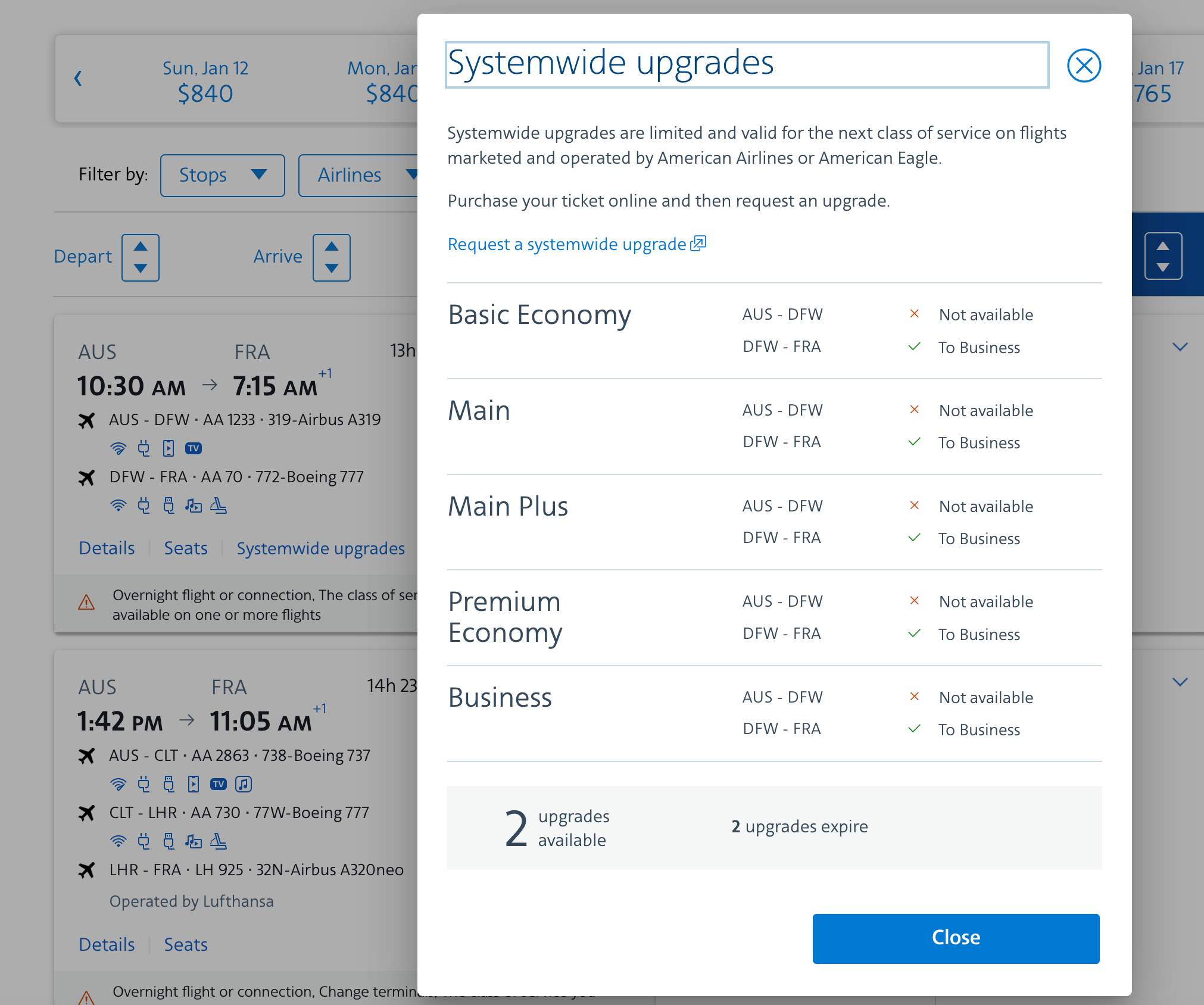
Once you find a flight option with this link, you can click the link to see what classes currently have systemwide upgrade availability. If you’re looking at a multisegment option, you can see which segments have systemwide upgrade availability.
AA.COM
Using the American Airlines website can help you find systemwide upgrade availability, especially if you tend to book last-minute paid flights.
But most travelers will find it easier to sign up for a paid membership with ExpertFlyer (owned by TPG’s parent company, Red Ventures). This allows you to search for upgrade availability and even set alerts for individual flights. You’ll need to find availability in the following fare buckets to use a systemwide upgrade:
Business to first on three-cabin American Airlines flights: A
Other upgrades on American Airlines flights: C
Business to first on British Airways flights: Z
Premium economy to business on British Airways flights: U
Economy to premium economy on British Airways flights: P
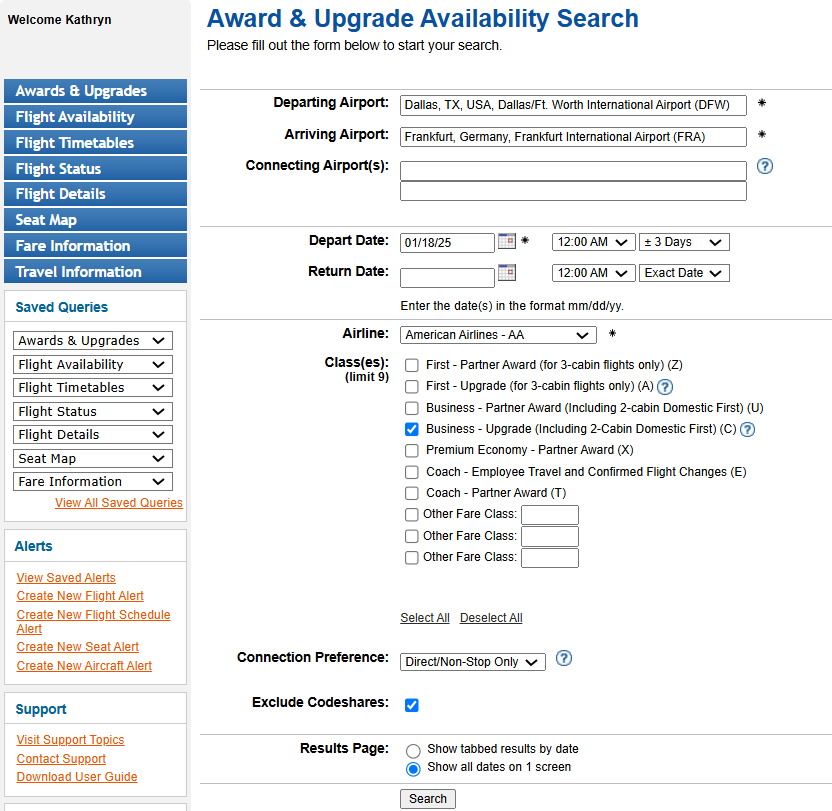
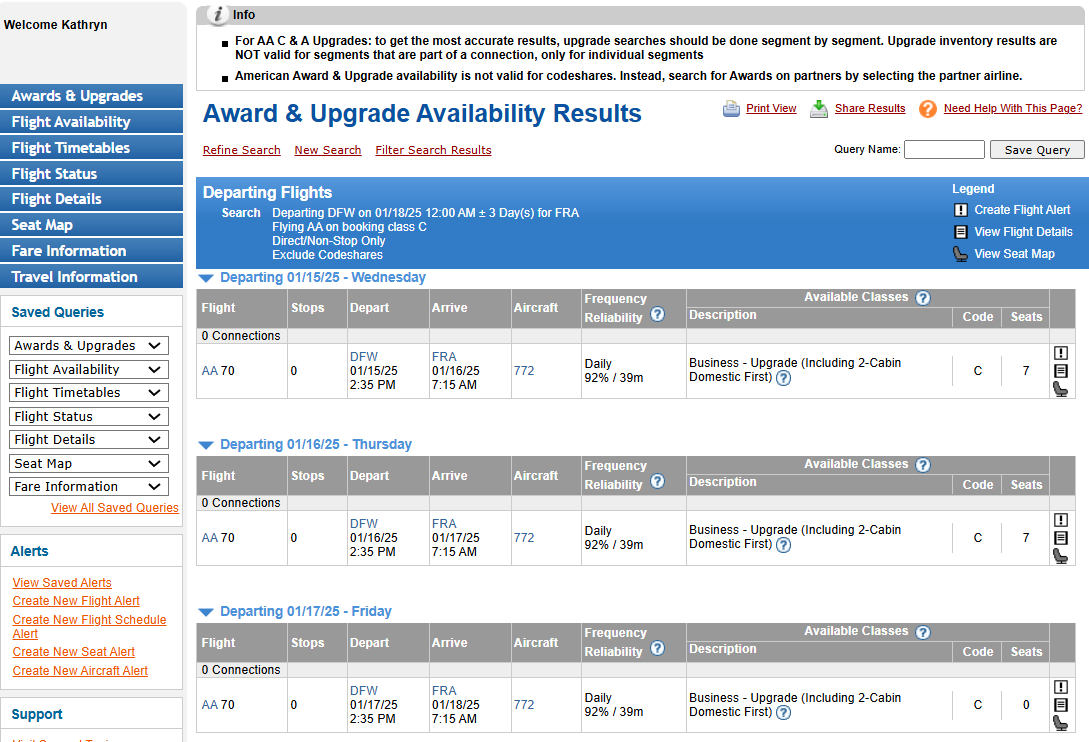
Using ExpertFlyer, you can search for A and C upgrade availability on American Airlines flights using the “Awards & Upgrades” section. You’ll get the most accurate results through ExpertFlyer when you search for systemwide upgrade availability segment by segment. So, I recommend using the "Connection Preference" drop-down to select only direct flights.
EXPERTFLYER.COM
On the results screen, the "Seats" column indicates how many seats are likely bookable with systemwide upgrades. To receive an upgrade alert for a specific flight that doesn’t currently have upgrade availability, click the exclamation mark next to the result.
EXPERTFLYER.COM
I highly recommend setting up upgrade alerts segment by segment for any flights to which you hope to apply systemwide upgrades. This is better than waitlisting for a systemwide upgrade on these flights since it may let you apply your upgrade before AAdvantage processes waitlisted upgrade requests.
How to request a systemwide upgrade
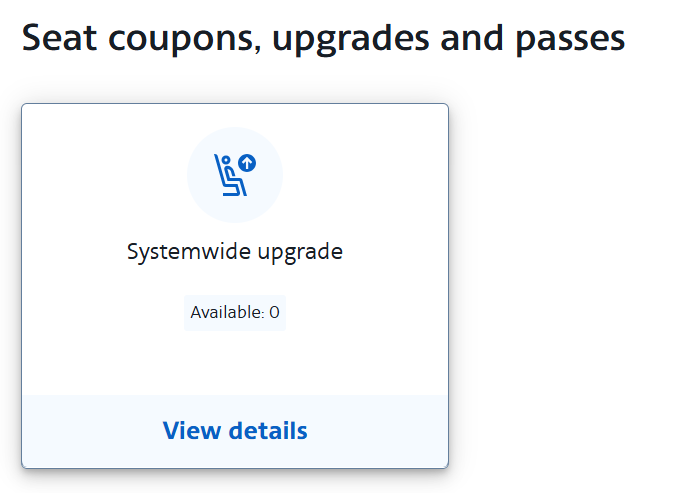
To see how many unused systemwide upgrades you have and the expiration dates on these upgrades, log into your American Airlines account and click “Rewards” under “Rewards Hub” on the left-hand side of the webpage. Under “Seat coupons, upgrades and passes,” you’ll see a tile labeled “Systemwide upgrade.”
AA.COM
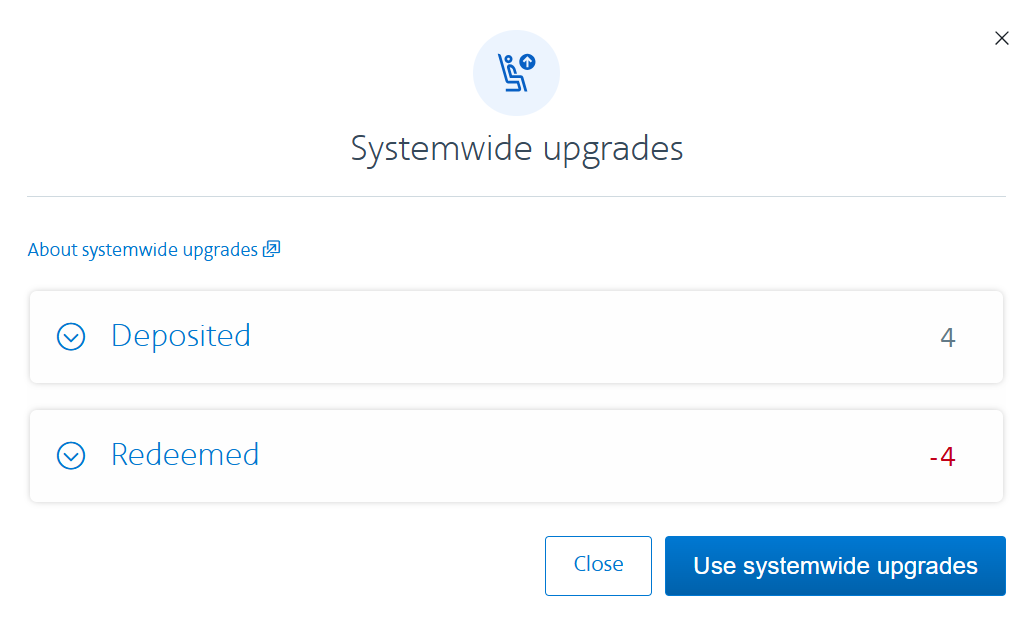
Click on this tile to see more information about your systemwide upgrades, including when systemwide upgrades were deposited in your account and which systemwide upgrades you’ve redeemed.
AA.COM
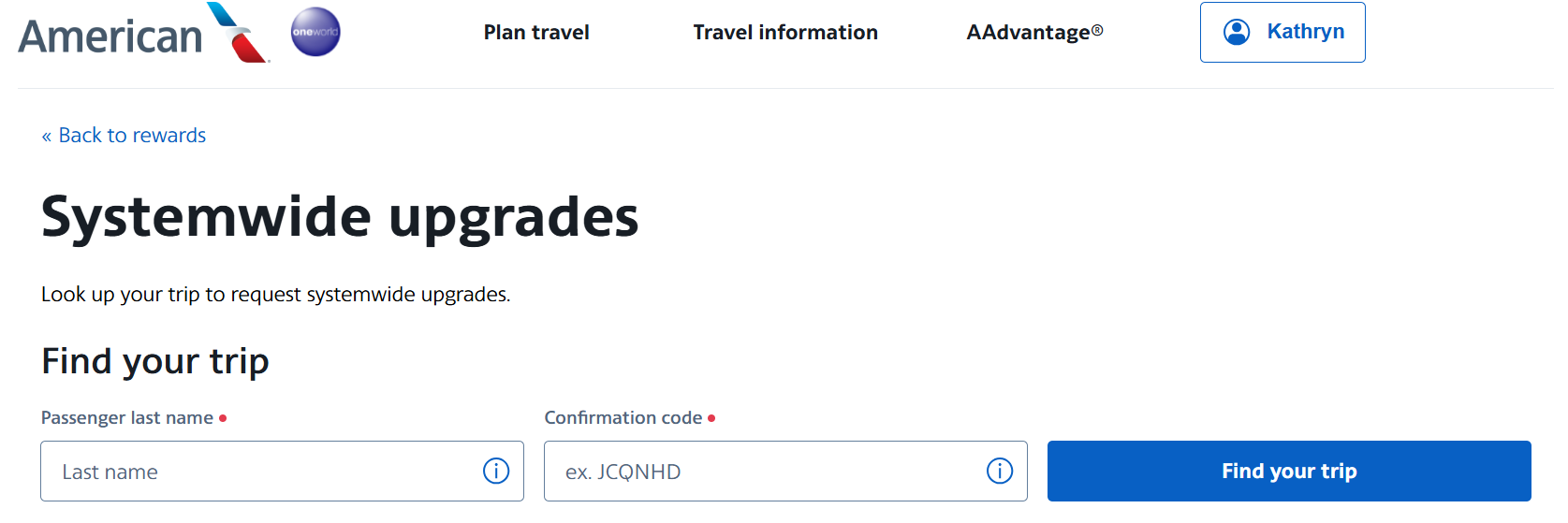
Now you can redeem systemwide upgrade certificates online. To request a systemwide upgrade online, click the "Use systemwide upgrades" button and then enter your last name and confirmation code on the page that loads.
AA.COM
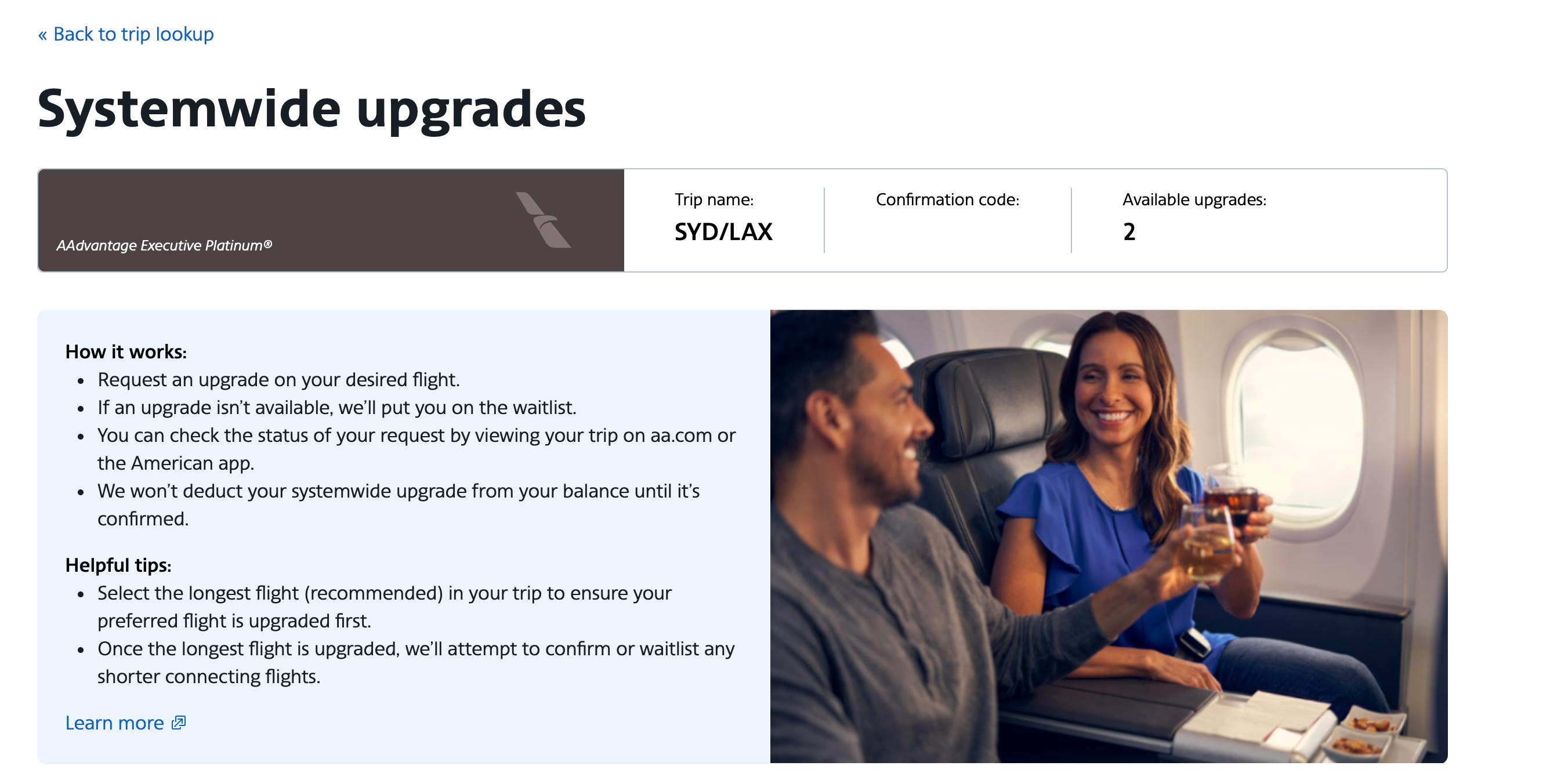
An informative page will load discussing how to apply systemwide upgrades online.
AA.COM
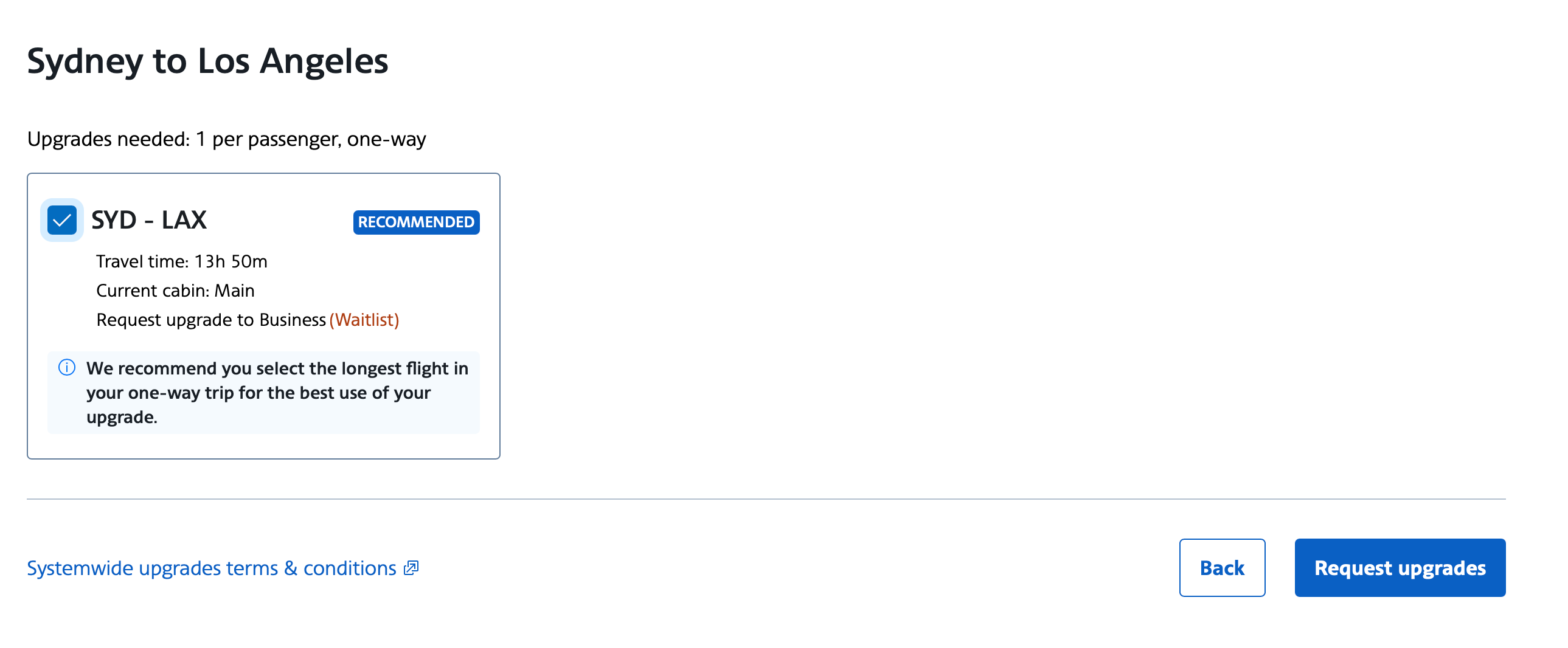
Then you can select a flight for which you'd like to request a systemwide upgrade. In this case, the request would be waitlisted instead of confirmed since there isn't currently any systemwide availability on that flight.
AA.COM
Previously, you had to call the reservations line to apply systemwide upgrades, which was often time-consuming. Unfortunately, you'll still need to call to apply a systemwide upgrade to some trips, including when you depart from an airport requiring payment of premium taxes, fly on a British Airways transatlantic flight or have three or more passengers on your reservation.
If there isn’t any upgrade space on your flight(s), you can waitlist your request for flights operated by American Airlines. Waitlisted requests will clear in order based on the following priority:
Status level
Upgrade type
12-month rolling Loyalty Points
Booking code
Date and time of the waitlist request
ZACH GRIFF/THE POINTS GUY
If you’ve waitlisted your request but haven’t cleared the waitlist by the time you check in, AAdvantage will add you to the airport upgrade standby list. If your upgrade clears from the airport upgrade standby list, AAdvantage will deduct a systemwide upgrade from your account.
Finally, if you’ve cleared a systemwide upgrade but need to cancel your trip before you depart, call AAdvantage and ask to reinstate your systemwide upgrade(s).
How do you earn miles when you use a systemwide upgrade?
Unfortunately, you’ll still earn American Airlines miles and Loyalty Points based on the fare class and cabin you originally booked.
Can someone else use my systemwide upgrade?
You can use your systemwide upgrades for anyone you choose, even if you're not traveling with them. However, the terms and conditions for systemwide upgrades state: “Upgrades are void if sold or advertised for sale for cash or other considerations.” So, although you can gift your systemwide upgrades to friends, family members or lucky strangers, you shouldn’t receive anything in return.
Bottom line
When you can clear American Airlines systemwide upgrades on long-haul international flights, they’re extremely valuable, and it feels like a big win. It’s certainly possible to clear systemwide upgrades just days before your flight (or even at the airport), but it’s also possible to do so months in advance.
You’ll often have the best chances at clearing systemwide upgrades on high-frequency routes offering multiple flights operated by American Airlines daily. Traveling off-peak days and seasons can also help.
If you want to use your systemwide upgrades on long-haul international itineraries, I recommend first looking at upgrade availability on your longest segment. Ideally, you’ll find and book an itinerary with upgrade availability on the longest segment, as then you can use a systemwide upgrade to clear into a higher class of service shortly after booking. Otherwise, set up upgrade alerts or add yourself to the waitlist to hopefully use your systemwide upgrade as your flight nears.
Comments
By commenting, you agree to our Community Guidelines to help create a positive space for conversation. The responses below are not provided or commissioned by the bank advertiser, our partners, or The Points Guy (“TPG”). They have not been reviewed, approved, or otherwise endorsed by any of these parties. All responses are submitted by individual contributors, and neither the bank advertiser, our partners, nor TPG are responsible for ensuring that all posts and/or questions are answered.