Using Google Flights' Maps Feature to Find Last-Minute Deals for Labor Day


TPG Contributor JT Genter shows you how to use Google Flights to find affordable last-minute flights for the upcoming holiday weekend (or any other time).
Are you planning to take to the skies over the Labor Day weekend? If you don't have your tickets yet, there's still time to book your flights. With an estimated 2.23 million passengers expected to travel each day of the holiday weekend, you might think that there are no seats left. But, Airlines for America estimates that US-based airlines will be operating 2.54 million seats each day.
So, there's going to be space. But what about the cost? If you know the right way to search, you might not have to pay an arm and a leg. Let's look into how Google Flights Explore Map can help you find a great flight option — for Labor Day or any day.
Narrowing Down by Price and/or Type of Destination
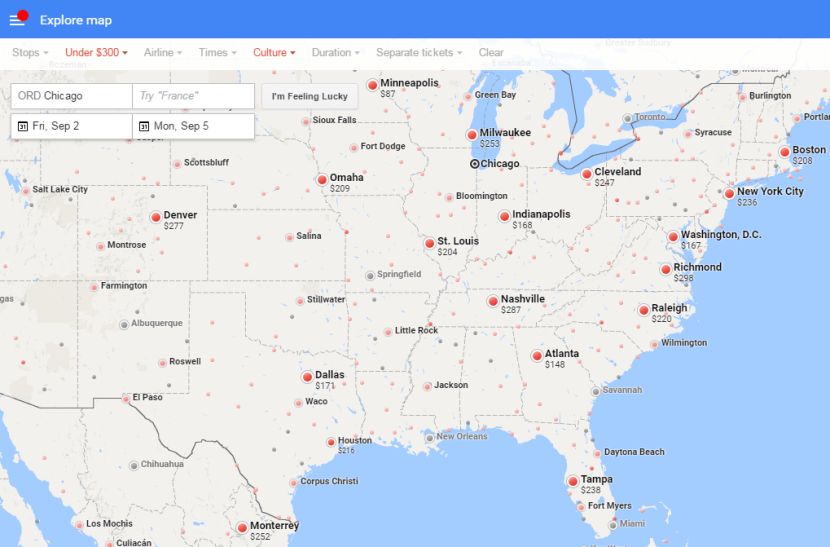
One of the great things about Google Flights' Explore Map is that you can make your search as specific or general as you'd like. Do you have a hard limit for price? Use the Google Flights Explore Map "Price" option to quickly get a shortlist of possibilities.
You can further narrow down the options by selecting a destination "Interest". Whether it's beaches or shopping you're looking for, Google Flights has a long list of destination categories to choose from:
- Adventure Travel
- Beaches
- Culture
- Ecotourism
- Food
- Honeymoon
- Islands
- Nature
- Outdoor Recreation
- Shopping
- Wildlife
- Winter Sports
General Destination and/or Specific Airline
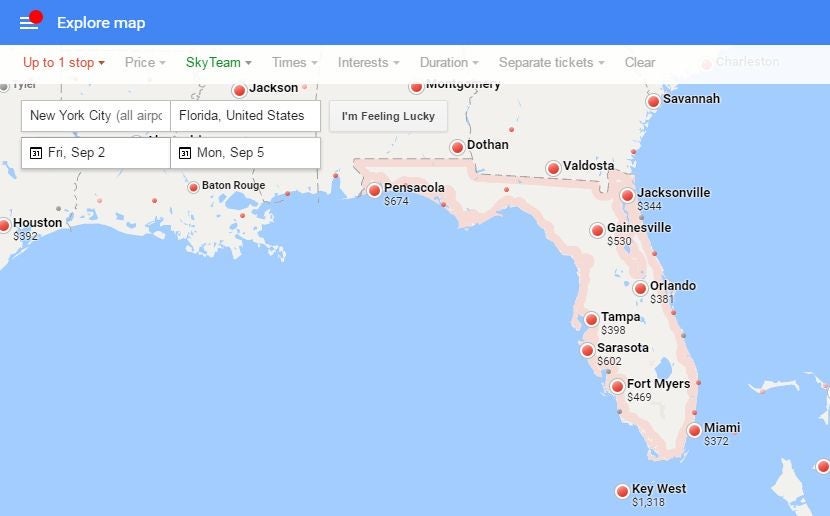
If you want to narrow down destinations to a state or region of the world, enter this preference in the destination box. Then, use the map results to pick the best value. If you're biased toward a specific destination (i.e., Key West), this can help you easily figure out that flying into a nearby airport (i.e., Miami) might save you a bundle.

Airline elites can also narrow down the map options to their preferred airline. For map searches, Google Flights doesn't list all possible airlines under the "Airline" dropdown box. Instead, just the alliances are listed. For domestic flights, this is generally all that's needed to get your preferred airline. However, if you're looking to book through a specific airline, you can override the this in the URL. Just replace the alliance code (;a=SKYTEAM;) with your airline's two-digit airline code (;a=DL;)
Maximizing Your Vacation and/or Limiting Flight Duration
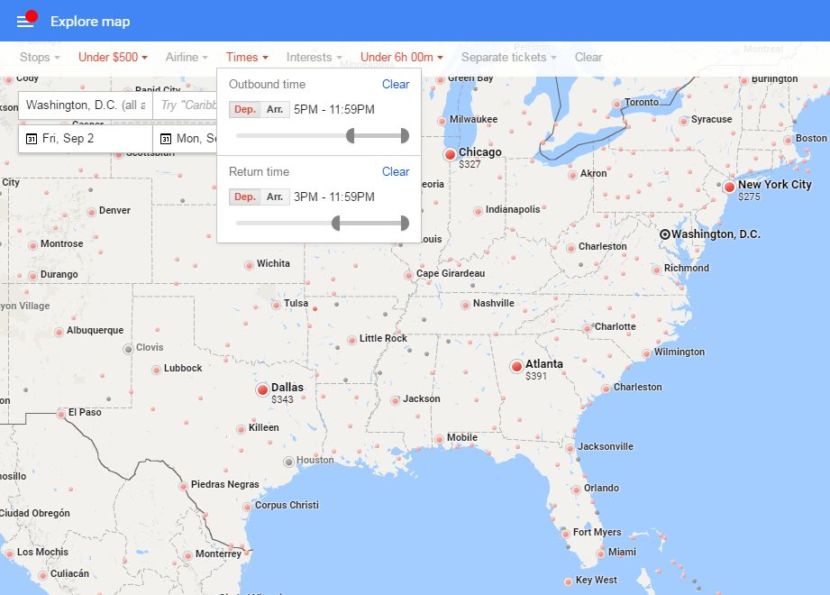
Need to fly out after work Friday evening? Do you want to fly back Monday afternoon to maximize your time off? Under the "Times" drop-down, you can narrow the flight options by departure and/or arrival time for both the outbound and/or return flights.
If you don't mind connecting — but want to avoid long-layover options — use the "Duration" option. This will limit the flight results to those that take less than a certain amount of time. Note: Both the outbound and return will be limited to this duration.
Business/First Class
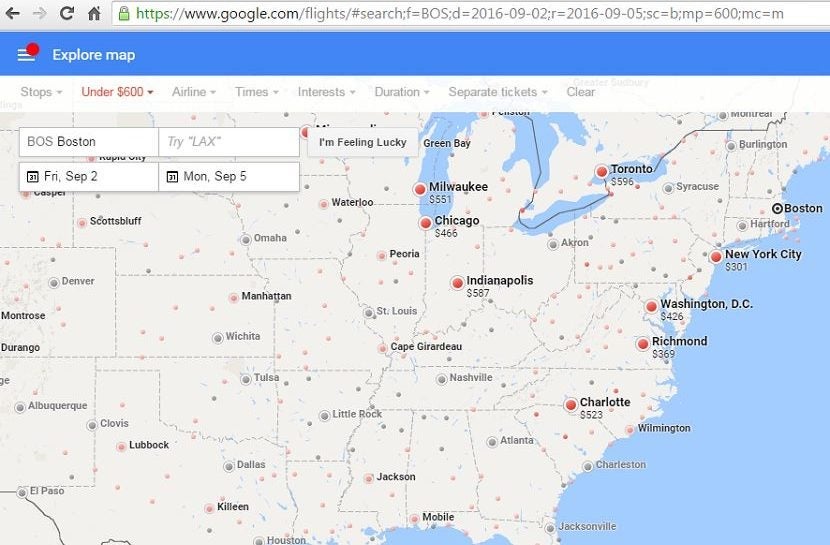
If you're generally a business/first-class traveler, you might be wondering how to use the Google Flights Explore Map to find an option you'd like. After all, the basic setting is economy flights, and there's no clear way of limiting options to business/first class. Here's how you can do it:
First, set up the rest of your preferred settings (number of stops, alliance, interests). Then, in the website's URL, add ";sc=b" for business class or ";sc=f" for first class. This can be added pretty much anywhere after "search" in the URL, but it's easiest to just add it to the end of the URL. For domestic flights, you can generally use either code to get a seat in the front, but you'll need to select the right code for transcontinental and long-haul international flights.
Putting It All Together
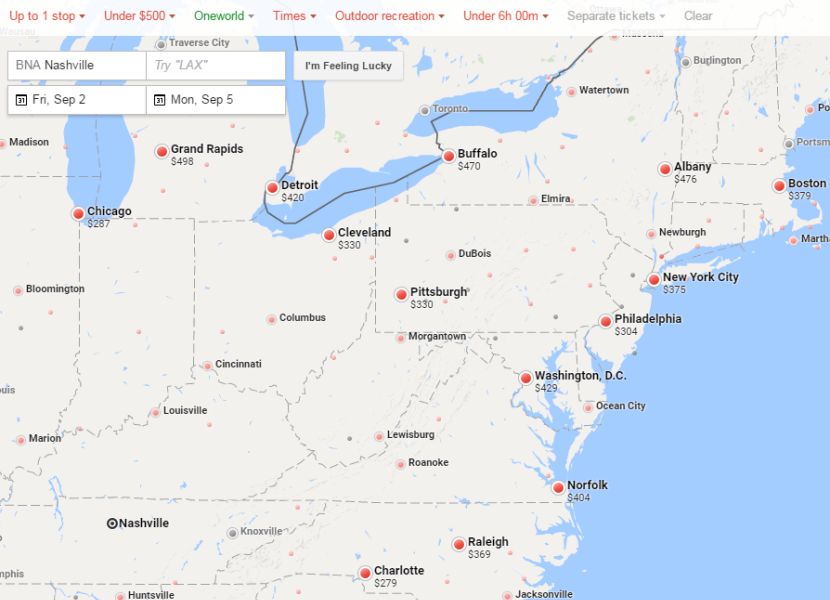
Google Flights Explore Map is an excellent tool for finding the perfect Labor Day — or any day — getaway. Many online flight search tools offer some of this search functionality, but Google Flights combines all of them into one robust flight search tool. So, when you're looking for flights, narrow the search as much as you want. You can always eliminate some limitations if you don't end up with any results.
Even for the busy Labor Day weekend, there are still deals to be found. In the example above, we limited flights out of Nashville (BNA) to Outdoor Recreation destinations, nonstop or one-stop, under $500, departing before noon Friday and returning Monday afternoon on itineraries less than six hours.
Where will you be heading this Labor Day weekend?
TPG featured card

at American Express's secure site
Terms & restrictions apply. See rates & fees.
| 4X | Earn 4X Membership Rewards® points per dollar spent on purchases at restaurants worldwide, on up to $50,000 in purchases per calendar year, then 1X points for the rest of the year. |
| 4X | Earn 4X Membership Rewards® points per dollar spent at US supermarkets, on up to $25,000 in purchases per calendar year, then 1X points for the rest of the year. |
| 5X | Earn 5X Membership Rewards® points on prepaid hotel stays booked through AmexTravel.com or the Amex Travel App™. |
| 3X | Earn 3X Membership Rewards® points on flights booked through AmexTravel.com, the Amex Travel App™, or purchased directly from airlines. |
| 2X | Earn 2X Membership Rewards® points on prepaid car rentals booked through AmexTravel.com or the Amex Travel App™ and cruises booked and paid through AmexTravel.com. |
| 1X | Earn 1X Membership Rewards® point per dollar spent on all other eligible purchases. |
Pros
- Valuable dining and food-related credits
- Flexible rewards with airline and hotel transfer partners
- Multiple travel and purchase protections
- No foreign transaction fees
- Access to Amex Offers for additional savings (enrollment required)
Cons
- Not as useful for those living outside the U.S.
- Some may have trouble using Uber and other dining credits
- You may be eligible for as high as 100,000 Membership Rewards® Points after you spend $8,000 in eligible purchases on your new Card in your first 6 months of Card Membership. Welcome offers vary and you may not be eligible for an offer. Apply to know if you’re approved and find out your exact welcome offer amount – all with no credit score impact. If you’re approved and choose to accept the Card, your score may be impacted.
- Earn 4X Membership Rewards® points per dollar spent on purchases at restaurants worldwide, on up to $50,000 in purchases per calendar year, then 1X points for the rest of the year.
- Earn 4X Membership Rewards® points per dollar spent at US supermarkets, on up to $25,000 in purchases per calendar year, then 1X points for the rest of the year.
- Earn 5X Membership Rewards® points on prepaid hotel stays booked through AmexTravel.com or the Amex Travel App™.
- Earn 3X Membership Rewards® points on flights booked through AmexTravel.com, the Amex Travel App™, or purchased directly from airlines.
- Earn 2X Membership Rewards® points on prepaid car rentals booked through AmexTravel.com or the Amex Travel App™ and cruises booked and paid through AmexTravel.com.
- Earn 1X Membership Rewards® point per dollar spent on all other eligible purchases.
- Pay It® lets you tap in the American Express® App to quickly pay for small purchase amounts throughout the month and still earn rewards the way you usually do. Plan It® gives you the option to split up big purchases into equal monthly payments with a fixed fee. You’ll know upfront exactly how much you’ll pay.
- $120 Dining Credit: Earn up to a total of $10 in statement credits monthly when you pay with the Gold Card at Grubhub (including Seamless), Buffalo Wild Wings, Five Guys, The Cheesecake Factory, and Wonder. This can be an annual savings of up to $120. Enrollment required.
- $100 Resy Credit: Get up to $100 in statement credits each calendar year at over 10,000 qualifying U.S. Resy restaurants after you pay for eligible purchases with the American Express® Gold Card. That’s up to $50 in statement credits semi-annually. Enrollment required.
- $84 Dunkin' Credit: Earn up to $7 in monthly statement credits after you pay with the American Express® Gold Card at U.S. Dunkin’ locations. Enrollment required.
- $120 Uber Cash on Gold: Enjoy up to $120 in Uber Cash annually with your Gold Card. Just add your Card to your Uber account and you'll get $10 in Uber Cash each month to use on orders and rides in the U.S. when you select an Amex Card for your transaction.
- Enjoy complimentary Hertz Five Star® Status benefits like skipping the counter at select locations, adding an additional driver at no additional cost*, and vehicle upgrades**. Benefit enrollment and Hertz Gold+ registration are required. *Additional drivers must meet standard rental qualifications and must be a spouse or domestic partner to qualify as complimentary. Other additional drivers subject to fees. **Benefits are subject to availability and vary by location. Additional Hertz program Terms and Conditions including age restrictions apply.
- Book two nights or more with The Hotel Collection through AmexTravel.com or the Amex Travel App™ and receive a $100* credit towards eligible charges at over 1,400 upscale hotels worldwide. *Eligible charges vary by property.
- Book your travel through the Amex Travel App™ with added peace of mind – backed by American Express® service and support. Only for American Express® Card Members.
- Whenever you need us, we're here. Our Member Services team will ensure you are taken care of. From lost Card replacement to statement questions, we are available to help 24/7.
- No Foreign Transaction Fees.
- Annual Fee is $325.
- Terms Apply.