The Points Guy believes that credit cards can transform lives, helping you leverage everyday spending for cash back or travel experiences that might otherwise be out of reach. That's why we publish a variety of editorial content and card comparisons: to help you find a great card to turn your goals into reality.
Our site may earn compensation when a customer clicks on a link, when an application is approved, or when an account is opened with our partners, and this may impact how or where these products appear. While we don't cover all available credit cards, our editorial team creates and maintains all of the analysis of these cards, and our content is not influenced nor subject to review by any credit card company, bank or partner prior to (or after) publication. Please view our advertising policy and product review methodology for more information.
Advertiser disclosure
The Points Guy believes that credit cards can transform lives, helping you leverage everyday spending for cash back or travel experiences that might otherwise be out of reach. That's why we publish a variety of editorial content and card comparisons: to help you find a great card to turn your goals into reality.
Our site may earn compensation when a customer clicks on a link, when an application is approved, or when an account is opened with our partners, and this may impact how or where these products appear. While we don't cover all available credit cards, our editorial team creates and maintains all of the analysis of these cards, and our content is not influenced nor subject to review by any credit card company, bank or partner prior to (or after) publication. Please view our advertising policy and product review methodology for more information.
Guides
Amex Travel App: How to plan and book trips — and when to use it
Augusta Stone is a credit cards writer for TPG. She joined the TPG team in 2023 and is excited to take points and miles beginners with her on a journey toward maximizing rewards.
June 13, 2026 • 11 min read
The cards we feature here are from partners who compensate us when you are approved through our site, and this may impact how or where these products appear. We don't cover all available credit cards, but our analysis, reviews, and opinions are entirely from our editorial team. Terms apply to the offers listed on this page. Please view our advertising policy and product review methodology for more information.Editorial disclaimer: Opinions expressed here are the author's alone, not those of any bank, credit card issuer, airline or hotel chain, and have not been reviewed, approved or otherwise endorsed by any of these entities.
Comments
By commenting, you agree to our Community Guidelines to help create a positive space for conversation. The responses below are not provided or commissioned by the bank advertiser, our partners, or The Points Guy (“TPG”). They have not been reviewed, approved, or otherwise endorsed by any of these parties. All responses are submitted by individual contributors, and neither the bank advertiser, our partners, nor TPG are responsible for ensuring that all posts and/or questions are answered.
Related stories
Quick summary
The new travel app merges booking and trip management features from the website into a mobile platform, offering hotel, flight and car rental reservations.
Users can access curated destination inspiration, create hotel wishlists, manage upcoming trips and locate airport lounges within the app.
The app allows payment or redemption of points for bookings, but cruise and vacation rental reservations remain exclusive to the website.
Some features, such as tracking statement credit progress and map-based hotel searches, are not available in the app.
What to consider
Cruise and vacation home bookings, as well as map views for hotels, are only accessible on the website, not the app.
Booking flights through the app may be slower and less reliable than on the website, especially without a strong internet connection.
Redeeming points through the app yields a fixed value of 1 cent per point, while TPG's June 2026 valuations place these points at 2 cents each when transferred to loyalty partners.
What you'll miss from the article
A detailed comparison of when to use the app versus the website for specific travel planning needs and a closer look at the app's unique features and limitations.
Generated by AI with support from our editorial team.
If you're an American Express cardmember, it's likely you're already familiar with the Amex mobile app, where you can view transactions, pay your statement, activate Amex Offers and manage your account.
You may also know about the Amex Travel website at amextravel.com, where you can book flights, hotels, rental cars, vacation rentals and cruises, paying with your eligible American Express card or redeeming Membership Rewards points.
In 2025, Amex merged these concepts into a new Amex Travel App™, bringing parts of the travel-planning and booking experience to your smartphone.
Unfortunately, not every feature made the transition, and there are some key distinctions to consider. What is the Amex Travel App best for, and where does it fall short? Here's what to know.
Amex Travel App basics
The Amex Travel App is the mobile app version of amextravel.com. It operates as a separate app from the Amex app, where you manage your card accounts, so you'll have to download it to explore its functionality. However, the two apps are integrated with one another.
Once you've downloaded the Amex Travel App (either through the iOS App Store or Google Play), you can easily navigate to it from the Amex card management app by going to the "Membership" tab and selecting "Book Travel."
Once you're logged in, you can access four tabs:
Inspiration: A tailored section of articles, guides and trends with destination guides and hotel lists to inspire your next trip.
Wishlists: A space to create tailored lists of hotel properties you'd like to save. You can pick any title and description for a wishlist, and add hotels as you navigate the app.
Book: The most practical section where you can book flights, hotels or car rentals through the app.
Trips: An area to view and manage upcoming, past and canceled trips made on the app or amextravel.com website.
One thing worth noting upfront is that you cannot book cruises or vacation rentals through the Amex Travel App. This feature is only available on the amextravel.com website.
AMEX TRAVEL
There's also a profile section where you can view your Membership Rewards points balance, access travel benefits specific to your card and find nearby airport lounges. You can also update your loyalty program numbers, flight preferences and companion details, as well as chat with an Amex representative in-app.
If you hold a card with access to Fine Hotels + Resorts and/or The Hotel Collection (THC requires a two-night minimum stay), you'll be able to see these properties in the app. You can pay for reservations with your Amex card or redeem Membership Rewards points.
*Consumer Amex Platinum: On up to $500,000 of airfare purchases per calendar year (then 1 point per dollar spent).
It is worth pointing out that you'll also receive 5 points per dollar spent on airfare booked directly with airlines on the Amex Platinum and 3 points per dollar spent on airfare booked directly with airlines on the Amex Gold. This is important because, on average, Amex Travel flights cost over 10% more than booking directly, based on TPG's research.
Beyond earning Membership Rewards points, you can also redeem them in the app, though this is unlikely to be the best use of your points.
You'll always receive a 1-cent-per-point value when redeeming Membership Rewards points through the Amex Travel App or website. Because TPG's June 2026 valuations place Membership Rewards points at 2 cents apiece (when transferred to one of Amex's valuable loyalty program partners), we won't generally recommend you redeem this way.
Still, using your Membership Rewards points on Amex Travel bookings is a simple option.
With this in mind, I found a handful of features on the Amex Travel App to be useful and interesting.
Identifying airport lounges near me or a specific airport
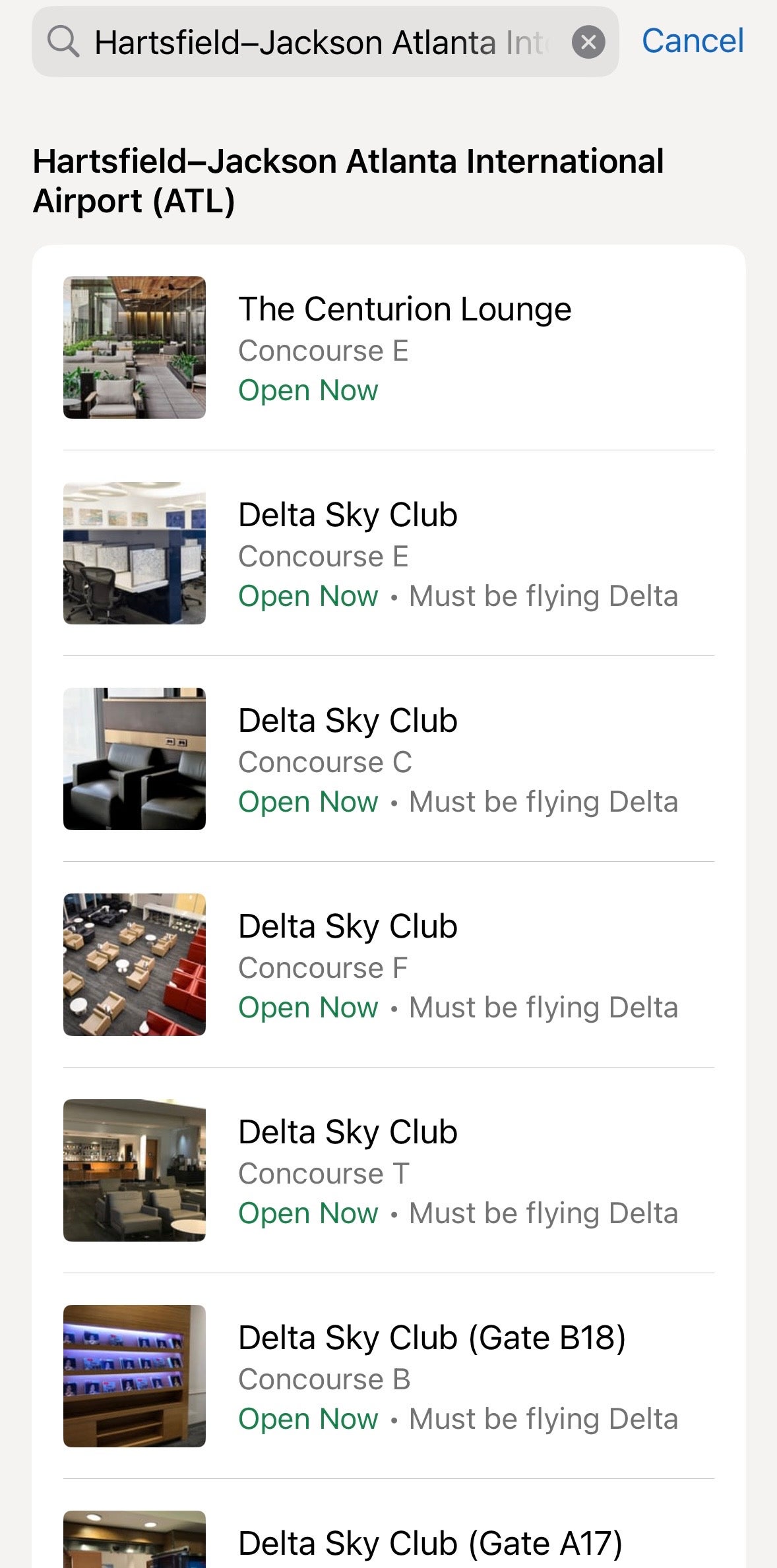
One of my favorite Amex Travel App features is the "Find Airport Lounges" area. Since I'm an Amex Platinum cardmember, it pulls up my nearest airport and shows me what is available, along with operating hours and where I can find lounges within the airport.
If I'm not near the airport I'd like to visit, I can simply tap the magnifying glass icon to search for lounge locations at another airport. Here, I found available lounges at Hartsfield-Jackson Atlanta International Airport (ATL).
AMEX TRAVEL
You can also start your Centurion Lounge check-in early by receiving an eligibility code in the app, which can save time in a long entry line by getting you into the queue as soon as possible. I haven't been able to use this feature yet, but I'm sure it will come in handy when I'm visiting crowded terminals on busy travel days.
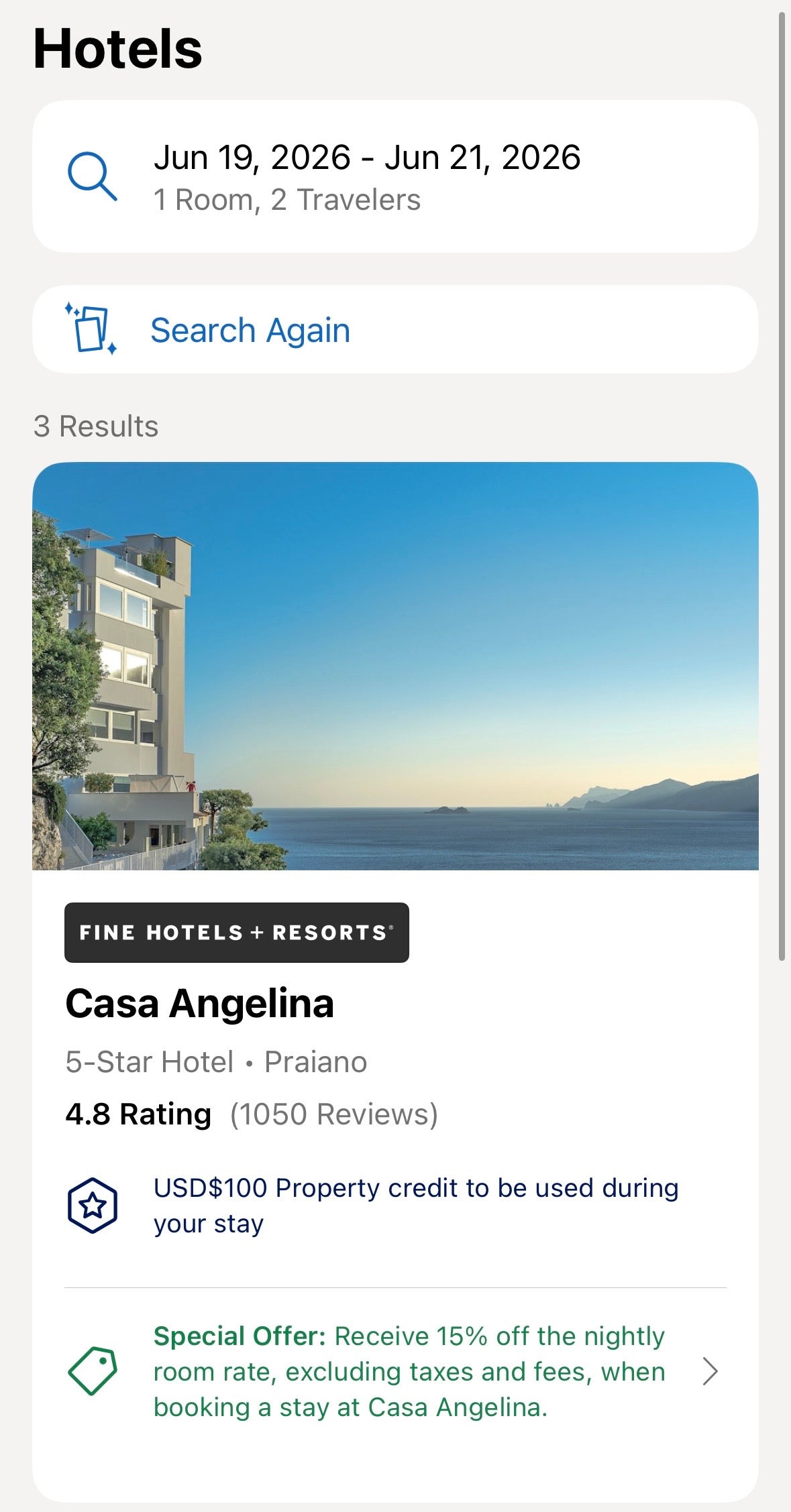
Researching and saving potential hotels, including FHR and THC
The Amex Travel App shines when it comes to identifying, researching and brainstorming hotel stays, including those in FHR and THC.
For one, the ability to find inspiration through curated articles was exciting. I also enjoyed the feature that let me select from multiple vacation types, such as "beachfront," "boutique," or "amazing restaurant," to curate a destination that matched my travel preferences.
AMEX TRAVEL
Once you find a hotel you're interested in, it's easy to see its policies, whether they apply to any card benefits or special offers, and other details about the property.
Viewing and using (but not tracking) statement credits
The app lets you see the full value of statement credits offered by eligible cards you hold. And, if you have an applicable statement credit available, you can apply it to your booking through the app.
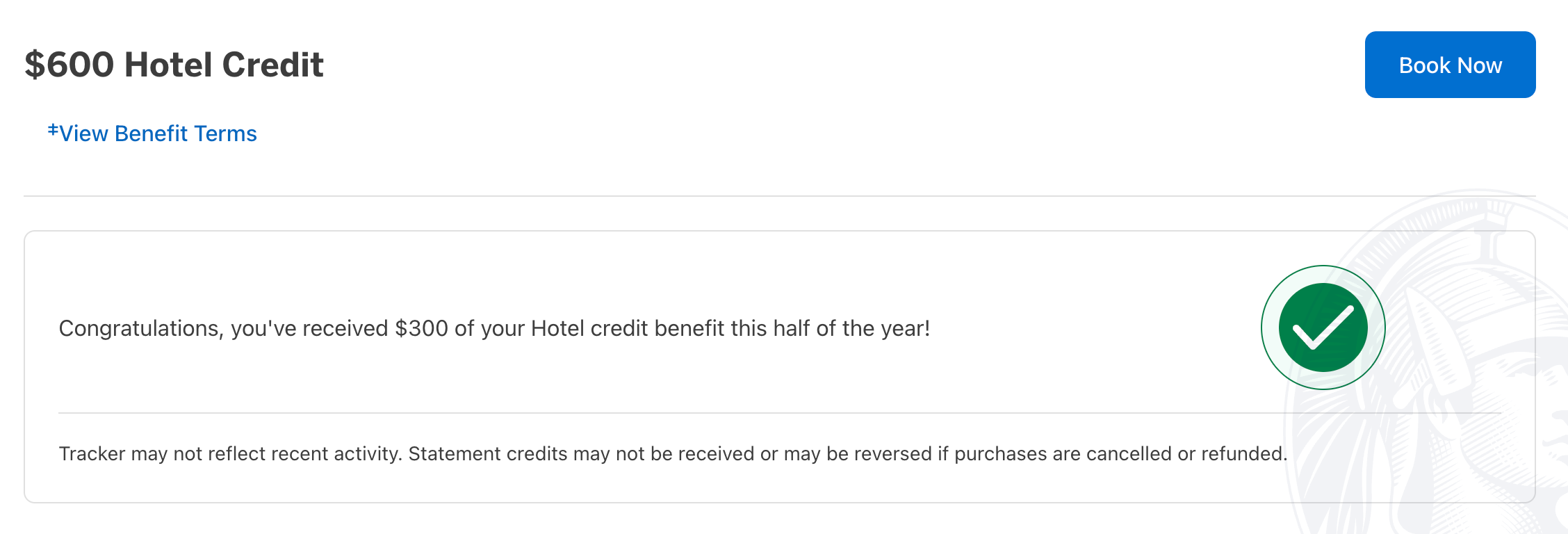
For instance, I receive up to a $600 annual hotel credit per calendar year in the form of a statement credit (up to $300 semiannually) on prepaid FHR or THC bookings made through American Express Travel when I pay with my Amex Platinum (enrollment required; THC stays require a two-night minimum). I can view this benefit in the app.
However, I can't view my exact progress on the Amex Travel App. I can do this in my Amex account by navigating to the "Rewards & Benefits" section, as seen below. (I've used my credit for the first half of this year.)
AMERICAN EXPRESS
The main drawback is that you can't see how much of a credit you've already used in the app. However, if you do have some of your credit left to redeem, it is nice that you can apply it to bookings made in the app.
Live chat
One of my favorite American Express features is the ability to chat with a dedicated "travel specialist" about everything from bookings to statement credits, and the Amex Travel App makes this especially convenient. I especially enjoy this because I won't have to bring out my laptop just to chat live with someone about an important detail.
These are the key areas in which the Amex Travel App didn't meet my expectations:
Inability to book or research cruises or vacation homes
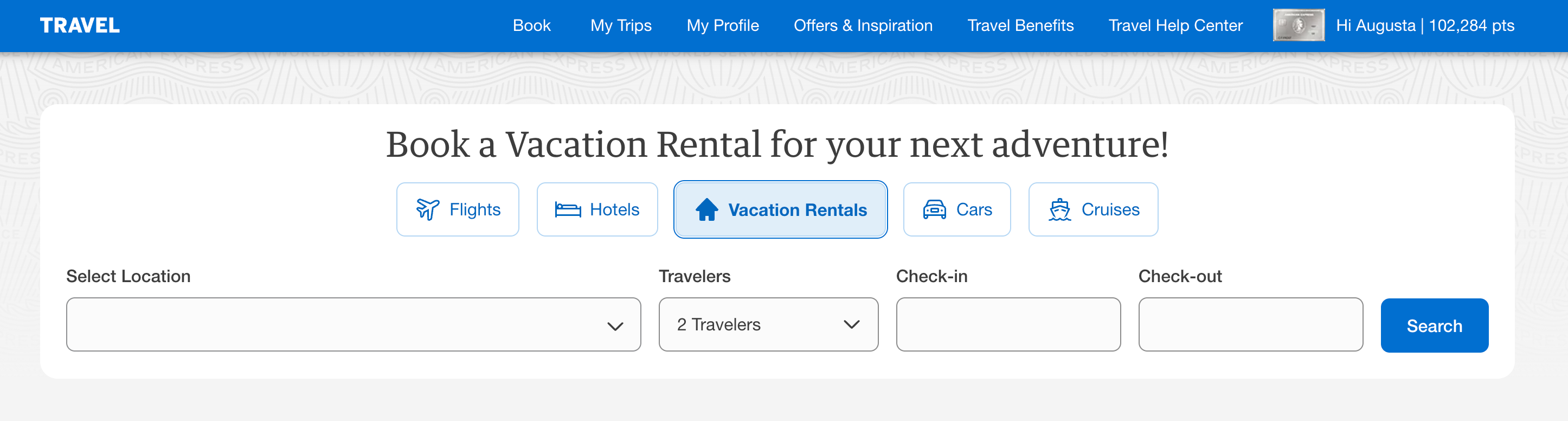
The Amex Travel App has no functionality to book or view cruises or vacation homes, even though you can do so on the amextravel.com website, as shown below.
AMERICAN EXPRESS
Slow experience when booking flights
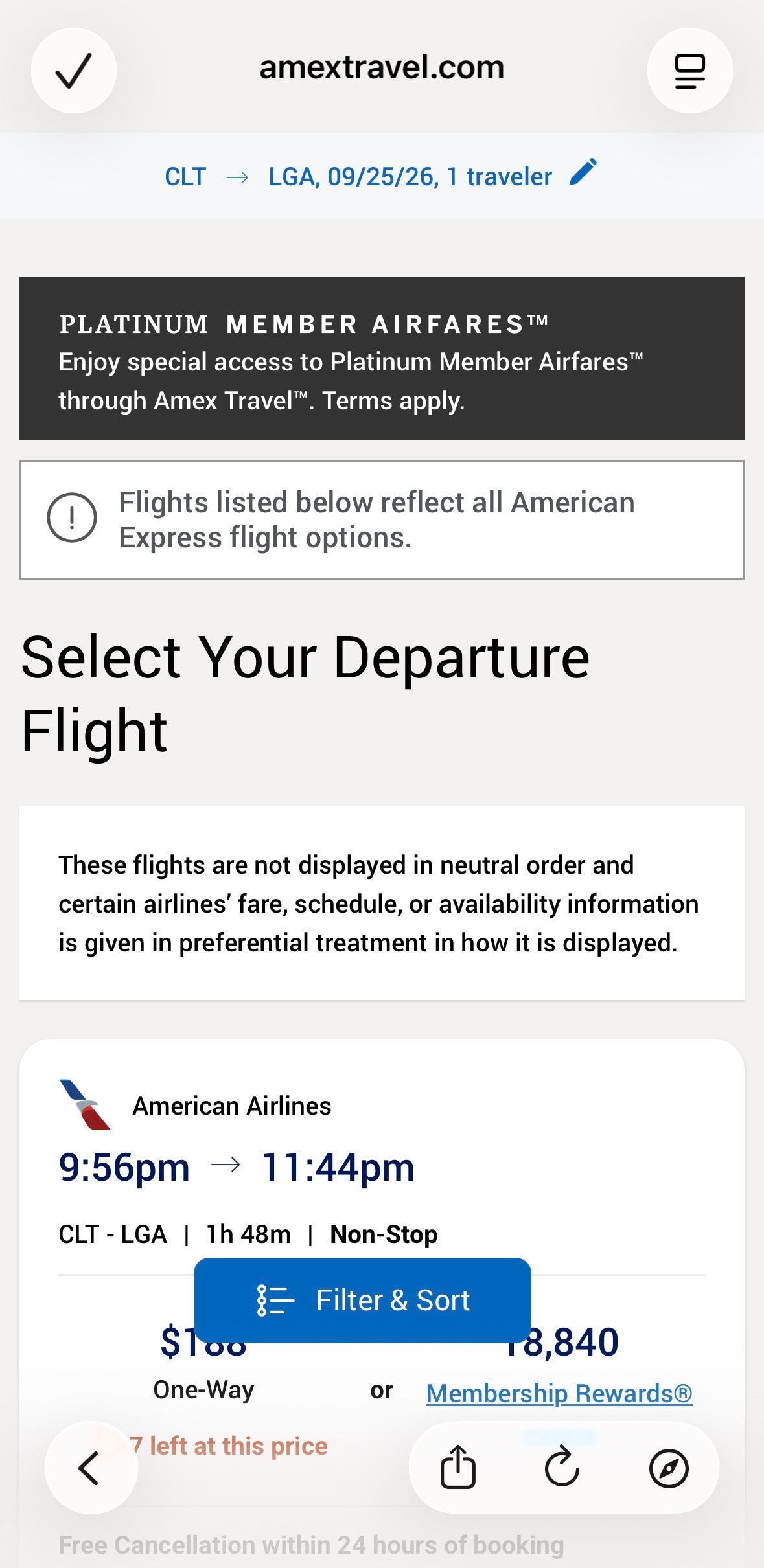
When I tested booking flights on the app, I noticed it redirected me to a mobile version of the amextravel.com website rather than a fully integrated app-first experience. I also had trouble loading flights when I searched on my cell service, so I had to be connected to Wi-Fi to see results.
AMEX TRAVEL
This wasn't the case when I looked up hotels or rental cars. Unlike flight searches, hotel and rental car searches performed consistently regardless of connection strength.
Personally, I found the app's flight booking experience slower and less reliable. I wouldn't feel comfortable booking a flight this way, but the functionality is technically there — as long as you have a speedy connection.
Missing map views for hotels
I couldn't find a way to view hotels on the map in the Amex Travel App. This is a website feature that I value, so this was disappointing for me.
You won't be able to replicate every functionality of the amextravel.com website on the Amex Travel App. However, if you're seeking convenience or inspiration, the app is a good option.
Here is what I would recommend for each platform:
Use the Amex Travel App
Use the amextravel.com website
Brainstorming hotel stays, viewing property details and perks
Discovering inspiration for future destinations
Locating airport lounges near you or a specific airport
Quickly managing upcoming, past and canceled trips
Booking or researching cruises or vacation home rentals
Making flight reservations
Tracking statement credit progress
Viewing hotels on a map
I'd note that some aspects are identical on the app and the website. Live chat functions the same, and you can book hotels and car rentals with similar ease. In my experience, booking flights on the app is slower and less reliable, so I would still recommend booking on the website.
In my searches, prices were the same whether I booked through the website or the app. Just keep in mind that prices through Amex Travel may differ from those if you book directly with an airline, hotel or car rental company.
The Amex Travel App works best as a research and inspiration tool. Browsing hotel details, saving wishlists and discovering future destinations feel natural on mobile, and hotel and car rental bookings work well enough that you won't need to reach for your laptop.
However, it isn't a full replacement for the website. Flight booking felt slower and less reliable on the app, and features like cruise reservations, vacation rentals, statement credit tracking and map-based hotel search remain website-only.
Use the app for research and on-the-go trip management — but don't abandon the website yet.
By commenting, you agree to our Community Guidelines to help create a positive space for conversation. The responses below are not provided or commissioned by the bank advertiser, our partners, or The Points Guy (“TPG”). They have not been reviewed, approved, or otherwise endorsed by any of these parties. All responses are submitted by individual contributors, and neither the bank advertiser, our partners, nor TPG are responsible for ensuring that all posts and/or questions are answered.