Current Issues with United Expert Mode

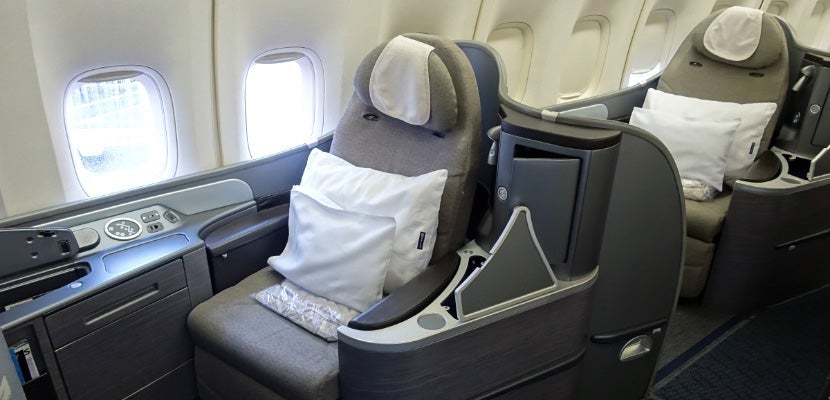
If you're a United elite member, there's a fairly good chance you're familiar with the airline's "Expert Mode," which lets you access fare class availability when searching on United.com. Expert Mode will return a flight's full availability broken out by fare class, so you can easily see if the flight you want has award or upgrade availability (whereas Expert Flyer can only display award availability for United and partner flights).
This takes the guess work out of whether or not an upgrade will clear — if you see any number other than 0 following "R" when searching with Expert Mode, you'll know it's possible to instantly upgrade your flight to business class (or two-cabin first class within the US). You can also see how many seats are available within a given revenue fare class (helpful if you're trying to find a flight with enough "cheap" seats for you and several companions).
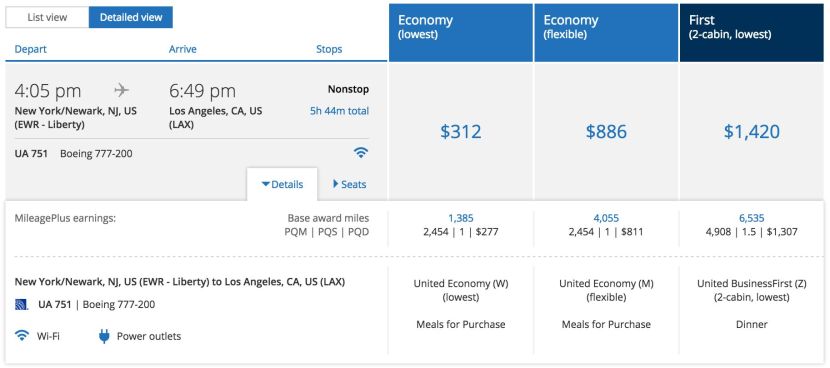
While Expert Mode usually has some minor bugs that may impact results, such as inaccurate per-segment availability when you're searching for connecting flights, it typically functions quite well if you know how to work around its limitations. Unfortunately, for the past few weeks, Expert Mode has been much buggier than normal, making it very difficult to access fare-class information. Fortunately, there's a workaround, and United's PR team has confirmed that full operation will return soon.
The Expert Mode Workaround
As United works to fix this bug, it is still possible to pull up the regular fare class breakdown, albeit with another step. Rather than searching segment-by-segment, as you've probably done in the past, you'll need to add in a segment before the flight you're trying to find results for. So if you're looking for upgrade availability on EWR-LAX, as in the example above, you'll need to search [Airport 1]-EWR-LAX, instead.
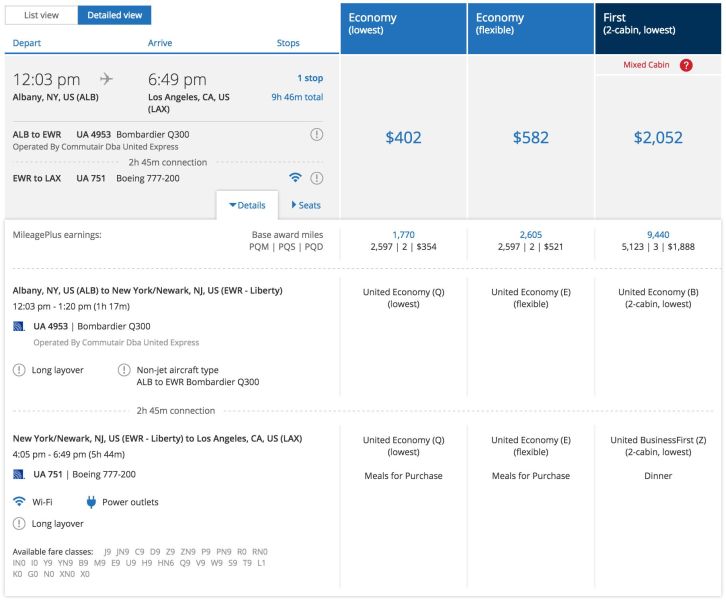
So in the example above, I've added in an Albany to Newark segment at the beginning of the itinerary. I don't plan to book this flight as outlined above — I'm only interested in the Newark to Los Angeles segment (which happens to be operated by United's 777 for a limited time). Once I add Albany to the equation, Expert Mode springs into action for the EWR-LAX leg (results are notably absent for ALB-EWR). As you can see above, the flight is displaying R0, which means standard upgrades are not available. It does show PN9, however, so if you're a Global Services member, your upgrade will clear right away.

Until United fixes this bug, you'll need to add an additional segment to the beginning of your itinerary. Of course, once you confirm the fare class availability you're hoping to find, you can then complete your search as you actually intend to fly.
Have you found a better workaround for United's Expert Mode?
TPG featured card

at American Express's secure site
Terms & restrictions apply. See rates & fees.
| 3X | Earn 3X Miles on Delta purchases. |
| 1X | Earn 1X Miles on all other eligible purchases. |
Pros
- Delta SkyClub access when flying Delta
- Annual companion ticket for travel on Delta (upon renewal)
- Ability to earn MQDs through spending
- Various statement credits for eligible purchases
Cons
- Steep annual fee of $650
- Other Delta cobranded cards offer superior earning categories
- Earn 100,000 Bonus Miles after you spend $6,000 or more in purchases with your new Card within the first 6 months of Card Membership and an additional 25,000 bonus miles after you make an additional $3,000 in purchases on the Card within your first 6 months, starting from the date that your account is opened. Offer Ends 04/01/2026.
- Delta SkyMiles® Reserve American Express Card Members receive 15 Visits per Medallion® Year to the Delta Sky Club® when flying Delta and can unlock an unlimited number of Visits after spending $75,000 in purchases on your Card in a calendar year. Plus, you’ll receive four One-Time Guest Passes each Medallion Year so you can share the experience with family and friends when traveling Delta together.
- Enjoy complimentary access to The Centurion® Lounge in the U.S. and select international locations (as set forth on the Centurion Lounge Website), Sidecar by The Centurion® Lounge in the U.S. (see the Centurion Lounge Website for more information on Sidecar by The Centurion® Lounge availability), and Escape Lounges when flying on a Delta flight booked with the Delta SkyMiles® Reserve American Express Card. § To access Sidecar by The Centurion® Lounge, Card Members must arrive within 90 minutes of their departing flight (including layovers). To access The Centurion® Lounge, Card Members must arrive within 3 hours of their departing flight. Effective July 8, 2026, during a layover, Card Members must arrive within 5 hours of the connecting flight.
- Receive $2,500 Medallion® Qualification Dollars with MQD Headstart each Medallion Qualification Year and earn $1 MQD for each $10 in purchases on your Delta SkyMiles® Reserve American Express Card with MQD Boost to get closer to Status next Medallion Year.
- Enjoy a Companion Certificate on a Delta First, Delta Comfort, or Delta Main round-trip flight to select destinations each year after renewal of your Card. The Companion Certificate requires payment of government-imposed taxes and fees of between $22 and $250 (for itineraries with up to four flight segments). Baggage charges and other restrictions apply. Delta Basic experiences are not eligible for this benefit.
- $240 Resy Credit: When you use your Delta SkyMiles® Reserve American Express Card for eligible purchases with U.S. Resy restaurants, you can earn up to $20 each month in statement credits. Enrollment required.
- $120 Rideshare Credit: Earn up to $10 back in statement credits each month after you use your Delta SkyMiles® Reserve American Express Card to pay for U.S. rideshare purchases with select providers. Enrollment required.
- Delta SkyMiles® Reserve American Express Card Members get 15% off when using miles to book Award Travel on Delta flights through delta.com and the Fly Delta app. Discount not applicable to partner-operated flights or to taxes and fees.
- With your Delta SkyMiles® Reserve American Express Card, receive upgrade priority over others with the same Medallion tier, product and fare experience purchased, and Million Miler milestone when you fly with Delta.
- Earn 3X Miles on Delta purchases and earn 1X Miles on all other eligible purchases.
- No Foreign Transaction Fees. Enjoy international travel without additional fees on purchases made abroad.
- $650 Annual Fee.
- Apply with confidence. Know if you're approved for a Card with no impact to your credit score. If you're approved and you choose to accept this Card, your credit score may be impacted.
- Terms Apply.
- See Rates & Fees